Key Takeaways:
- Clockify’s free plan is generous but narrow: You get unlimited users and basic time tracking, but it lacks the controls, automation, and governance required to operate effectively at enterprise scale.
- Enterprise-critical features require paid plans: Capabilities such as single sign-on, audit logs, approvals, and advanced admin controls are only available in Clockify’s higher priced tiers, with full coverage starting at the Enterprise plan.
- Free often shifts costs instead of removing them: For teams with 50 or more employees, savings on licenses are frequently offset by manual data cleanup, CSV exports, fragmented access control, and increased administrative effort.
- Clockify Enterprise improves governance, not automation: The Enterprise tier strengthens security and compliance but still relies heavily on manual start and stop timers, with limited built-in productivity intelligence.
- Operational gaps remain at the Enterprise level: Limitations around SCIM provisioning, API rate limits, coarse API permissions, and payroll or ERP integrations mean IT and operations teams continue to carry ongoing maintenance work.
- Flowace is built around automation from the start: Time tracking runs passively in the background, reducing reliance on user behavior and improving data consistency across large teams.
- Flowace delivers value earlier in the pricing curve: Automated tracking, productivity analytics, and monitoring features are included in mid-tier plans rather than being restricted to the highest enterprise tier.
- Per-user pricing differences compound at scale: Small differences in per-seat pricing translate into substantial annual savings as headcount increases, especially for teams with 100 or more users.
- The real trade-off is governance versus automation: Clockify Enterprise suits organizations focused on compliance and formal controls, while Flowace is better aligned with teams prioritizing efficiency, utilization, and reduced admin overhead.
- ROI favors reduced manual effort: Tools that minimize human input, improve visibility, and produce cleaner data tend to deliver stronger returns than tools that rely primarily on manual processes.
- Clockify works best as an entry-level solution: It is effective for small teams starting with basic tracking, but it becomes more restrictive as organizational complexity grows.
- Flowace is designed for scale: Its automation-first approach makes it a better fit for organizations that want to operate efficiently as they add more users and teams.
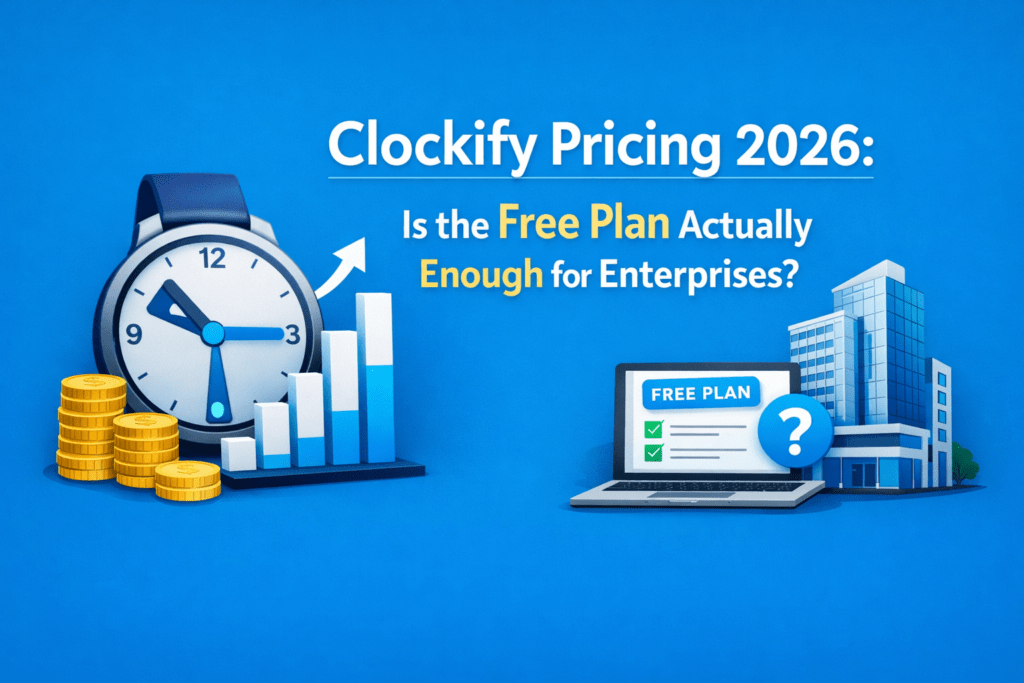
Clockify pricing plan offers an attractive free plan (unlimited users) alongside tiered paid subscriptions. But when you take a closer look, you can see that the capabilities larger organizations rely on (SSO, time theft detection, audit trails, advanced automations, stronger admin controls) are usually reserved for paid tiers.
So when you evaluate Clockify, don’t treat the sticker “free” as the full story. Ask what you’ll need to operate securely and at scale, then map those needs to the specific plan that unlocks them.
In this blog, we’ll benchmark Clockify vs Flowace from the perspective that matters to you. That means focusing on how each product moves the needle on utilization, billing accuracy, and managerial visibility.
Clockify’s 2026 Pricing Breakdown for Enterprise-Scale Teams
The most compelling aspect of Clockify is its ability to support unlimited users on a free plan. The free tier includes core time-tracking fundamentals like start/stop timers, manual entries, timesheets, idle detection and basic reporting. You can also add unlimited projects and clients, mobile and desktop apps, and browser extensions. These elements make the free plan one of the most permissive in the category.
However, the free tier lacks many features that large enterprise teams will certainly require.
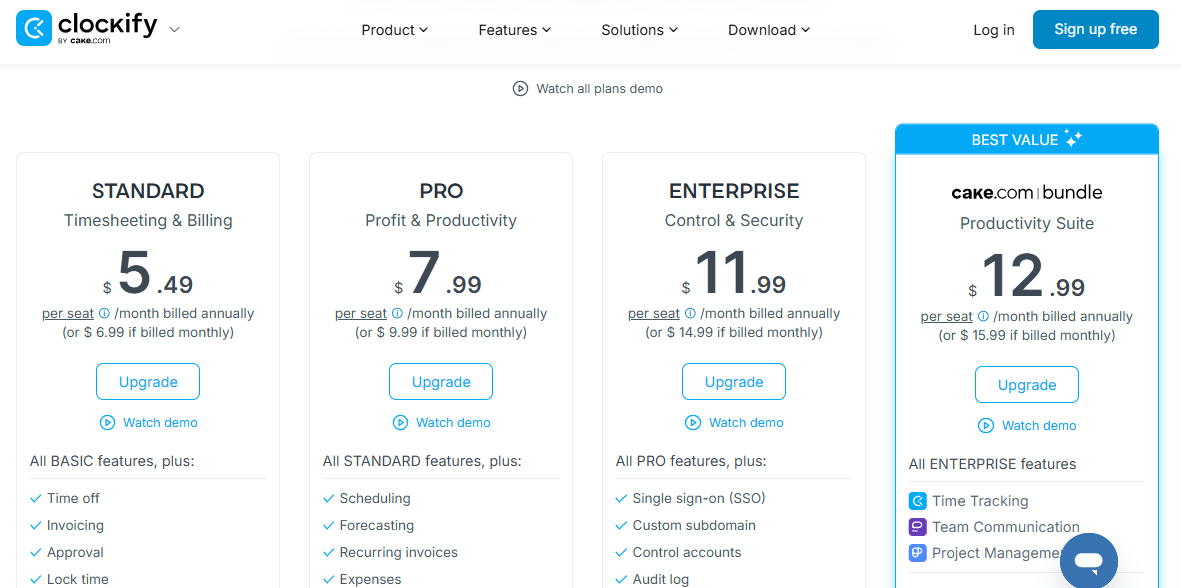
Its core paid tiers (annual billing) include:
- Basic $3.99 per seat,
- Standard $5.49,
- Pro $7.99 per seat,
- Enterprise $11.99 per seat, and
- “Cake” bundle at $12.99 per seat
The basic tier is built on the free plan with essential administrative tools: bulk edits, adding time for others, required field enforcement, project templates, historical rates, time audits, import tools, and privacy options.
Standard adds essential workforce management and billing capabilities to the bundle. It includes time-off tracking, timesheet approvals, attendance/overtime tracking, task rates, invoicing, and QuickBooks integration.
Pro tier is built to help you manage profitability and project performance, bringing scheduling, forecasting, expense and labor cost tracking, budgets/estimates, custom fields, and productivity-focused reporting into your workflows.
Enterprise layers on advanced security and governance, offering single sign-on (SSO), a custom subdomain, detailed audit logs, and enhanced account control to support compliance and centralized admin oversight at scale.
The Cake bundle is a comprehensive productivity package that includes Enterprise-level Clockify plus Pumble (team communication) and Plaky (project management) under one subscription at about $12.99 per seat per month when billed annually, offering significant savings versus buying each tool separately.
Clockify Free vs Paid: Why Free Time Tracking Often Costs More Than You Expect?
You can really have an unlimited number of users on Clockify’s free plan. But that “free forever” baseline is intentionally narrow.
The free tier gives you core timers, manual entries, timesheets, basic reports, mobile/desktop apps, and browser extensions. That’s just enough to capture your employee work hours, but not to govern them at scale. When you need enterprise controls, Clockify moves those capabilities into paid tiers.
For a 50+ employee organization, Clockify’s free tier removes license costs upfront, which makes adoption easy. But those savings often reappear elsewhere:
- Manual data cleanup, CSV exports for payroll or billing, and ad-hoc user management increase administrative overhead.
- As the team scales, other limitations surface. Without SSO, access control becomes fragmented and harder to secure.
- The lack of audit logs makes it difficult to trace changes or satisfy compliance requirements.
- Reporting remains basic, which limits your ability to answer questions around utilization, cost allocation, and project profitability without exporting data into spreadsheets or BI tools.
- Integrations with payroll, ERP, or accounting systems also rely heavily on manual processes, slowing down monthly close and billing cycles.
- Without approvals, workflows, or enforced controls, managers spend more time reviewing and correcting timesheets, while inconsistencies creep into the data.
Over time, the absence of automation compounds the problem. Support and onboarding are minimal on the free tier, leaving internal teams to manage rollouts and training on their own.
For many midsize and enterprise teams, these hidden costs outweigh the license savings, which is why they eventually move to paid plans to regain control and clarity.
Clockify Enterprise: Constraints You Should Know Before Buying
Clockify’s Enterprise plan addresses many of the limitations found in the free tier. But it still has practical gaps that matter if you are running a 50+ headcount organization.
We have listed some of the key findings here:
- What Enterprise does include: SSO (SAML/OAuth/Ldap), audit logs, custom subdomain, and centralized account controls. i.e., the core governance items you expect for enterprise use.
- API rate limits: The REST API is rate-limited (e.g., ~50 requests/sec per add-on). So, large automated workflows may need to be rate-aware.
- API key permissions are coarse: Clockify currently does not support creating API keys with limited read-only scopes per workspace. API access is governed by the user account’s role, not a scoped machine token.
- No SCIM provisioning (reported): Third-party evaluations and recent vendor audits note a lack of SCIM user provisioning even on higher plans, which forces manual or custom provisioning flows.
- SSO + audit logs solve access & traceability but don’t eliminate lifecycle work. You get secure sign-on and event history, yet without SCIM you still need a user-onboarding/offboarding process (manual or script-driven). That keeps HR/IT in the loop for longer.
- Integrations/payroll connectors gaps: Several independent reviews flag limited native payroll/shift scheduling integrations. You may need to rely on exports or middleware for payroll/ERP synchronization.
- Higher operational overhead than a fully-provisioned enterprise product: Even with Enterprise licensing, you may still spend FTE hours on onboarding/offboarding, API integration maintenance, CSV reconciliations, and custom scripts.
- API limitations make deep automation costlier: Rate limits and lack of scoped tokens mean integrations must be engineered carefully: backoff logic, token rotation tied to a human account, and conservative polling strategies become part of your SOW. That increases DevOps effort and potential failure modes.
Clockify Enterprise vs Flowace: Which Works Best at Scale?
Clockify is widely adopted because it is easy to start and has a generous free tier. But when you move beyond a team of 10–15 users, that simplicity starts to work against you.
But Flowace changes the story.
Flowace is built around automation and time tracking that runs in the background and captures work without clicks. It doesn’t just offer enterprise features at a better price point. It eliminates the manual overhead that drives hidden costs in the first place.
Flowace presents lower per-seat pricing with built-in automated tracking and heavier employee monitoring and productivity tracking in its mid/premium tiers.
When you put Clockify Enterprise and Flowace side by side for teams of 50+ users, the first noticeable difference is how pricing and value scale.
Clockify Enterprise sits at $11.99 per user per month when billed annually (or $14.99 monthly) and includes essentials for governance.
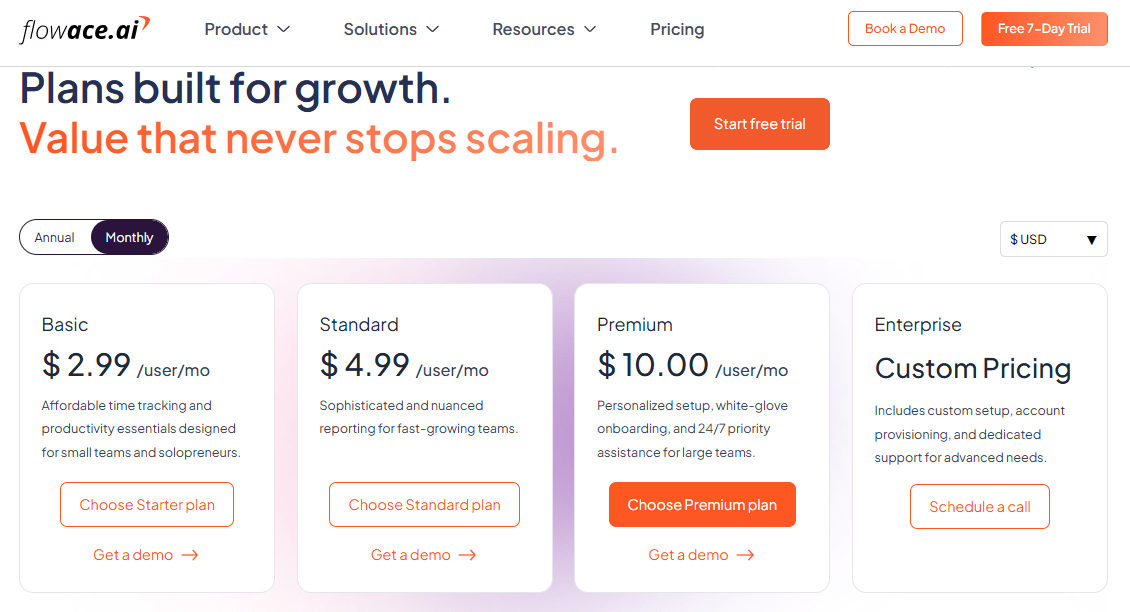
Flowace, on the other hand, structures pricing in tiers that generally start lower on a per‑user basis. Flowace’s pricing is organized into:
- Basic at ~$2.99/user/month,
- Standard at ~$4.99, and
- Premium at about $10/user/month.
It also offers a custom Enterprise option for larger or regulated deployments with tailored features and support.
Flowace differentiates itself by automating time tracking and activity capture, giving dashboards and productivity analytics by default rather than as add‑ons, and integrating app/website usage, break detection and engagement metrics into standard plans. That means teams often get operational value earlier in the stack without paying for governance features they may not yet need.
At scale, this leads to a practical trade‑off:
- If your priority is enterprise governance, security compliance, and tightly controlled access, Clockify’s Enterprise tier delivers those capabilities in a structured way, albeit at a higher per‑seat cost.
- If your priority is automated tracking, real‑time productivity insights, and a lower total cost of ownership, Flowace tends to provide more of those capabilities at lower price points earlier in the pricing curve.
Clockify Enterprise vs Flowace: A Quick Comparison
| Aspect | Clockify Enteprise | Flowace | Quick Takeaway |
| List price (annual, USD) | $11.99 / user / month (annual) — $14.99 monthly option. | Common public ranges: Basic ≈ $2.99, Standard ≈ $4.99, Premium ≈ $10 / user / month (annual); enterprise pricing negotiable. | Flowace is typically lower per-seat at published tiers; Clockify’s enterprise seat price is higher but predictable. |
| Time capture model | Manual start/stop timers (timesheets, approvals); auto features are add-ons or in paid tiers. | Passive / automated activity capture (apps, websites, idle detection) built into core plans. | Flowace reduces user effort and reconciliation; Clockify emphasizes traditional timesheet workflows. |
| Enterprise security & provisioning | SSO (SAML/OIDC), audit logs, custom subdomain; SCIM provisioning not universally available / may be limited today. | SSO available; SCIM and advanced provisioning usually handled via custom/enterprise deals — confirm in RFP. | Both support SSO; ask each vendor for SCIM and provisioning SLAs. |
| Reporting & analytics | Strong timesheet, billing and profit reports; focused on compliance and billing accuracy. | Built-in productivity dashboards, activity classification and engagement metrics in mid/high tiers. | Clockify → billing/profitability; Flowace → operational productivity insights. |
| Integrations (payroll / ERP) | QuickBooks native sync; complex ERP often needs CSV/middleware. | Integrations available; deeper connectors usually part of premium/enterprise agreements. | Expect work for complex payroll/ERP in both cases — ask vendors for exact connector lists. |
| API & automation | Robust API but documented rate limits and coarse API key scopes (dev work needed for scale). | APIs + automation emphasized; verify rate limits and scoped token options with sales. | Both are integrable — Flowace often positions automation as core, Clockify requires careful engineering at scale. |
| Onboarding & support | Enterprise onboarding and SLA options available (paid). | Enterprise onboarding / SLAs negotiable; standard plans include self-help & trial. | Negotiate credits/CSM and explicit SLAs in contract for either vendor. |
| Hidden TCO risks | Seat-based costs scale linearly; potential provisioning, CSV reconciliation, and integration overhead. | Lower list price may still incur integration and change-management costs, but automation often reduces reconciliation overhead. | Run TCO, including admin hours saved, onboarding engineering and integration maintenance. |
| Best fit | Organizations prioritizing governance, auditability and formal compliance. | Organizations prioritizing automation, realtime productivity insights and lower per-seat TCO. |
Clockify Enterprise vs Flowace: ROI Comparison
Let’s assume that your organization has 100 active users on each platform.
If you go with Clockify Enterprise, the math is straightforward.
Clockify Enterprise
$11.99 × 100 users = $1,199 / month → $14,388 / year
At $11.99 per user per month, you’re looking at $1,199 per month, or $14,388 annually for 100 users.
Flowace — two representative scenarios (public listings)
- Flowace Standard at $3.99 × 100 = $399 / month → $4,788 / year.
- Flowace Premium at $6.99 × 100 = $699 / month → $8,388 / year.
With Flowace, the economics look very different at the mid and premium tiers. On the Standard plan at $3.99 per user, your cost drops to $399 per month, or $4,788 per year for the same 100 users. Even at the Premium tier at $6.99 per user, you’re still at $699 per month, or $8,388 annually.
Flowace’s Standard and Premium tiers are materially cheaper per seat than Clockify’s Enterprise plan for a 100-user deployment. As your user count grows that small per-user difference translates into substantial financial savings.
Final Verdict
When you’re evaluating Clockify vs Flowace for an enterprise-sized team, it helps to look beyond feature checklists and focus on how each platform actually performs at scale.
Clockify’s free plan is a great entry point for simple time tracking. It works well for small teams that can get by with manual timers and basic reports. But once your team grows past 50 people, the cracks start to show. Enterprise features like SSO, audit logs, and advanced admin controls are locked behind the $11.99/user/month plan
Flowace, on the other hand, builds automation into the foundation. You don’t have to depend on people to click start and stop. It runs quietly in the background, capturing work automatically across apps, files, and websites. And despite offering more advanced features out of the box (like SSO, auto-capture, and productivity analytics) Flowace comes in at a lower per-user cost, especially at scale.
If you want to dig deeper, our blog includes detailed, side-by-side comparisons of Flowace’s features and pricing against competitors, such as TimeCamp vs Clockify, Time Doctor vs Clockify, Clockify vs Hubstaff, Toggl Track vs Clockify, the best Clockify alternatives, and a full Clockify pricing comparison.
These breakdowns show why so many teams are moving to Flowace time tracking.
Ready to see it firsthand? Start a free Flowace demo or start your free trial with Flowace today and see how much time and budget you could be saving without the manual overhead.
FAQs:
Can I use Clockify’s free plan for a 50+ employee company?
Technically, yes. Clockify’s free plan has unlimited users. But it lacks key enterprise features (custom roles, advanced reports, SSO). Most large teams find they eventually need a paid plan to get the functionality and support they require.
What are the hidden costs of free time tracking tools?
Free tools may save license fees but impose hidden costs: extra admin time, errors and compliance risks. Examples include manual report corrections and labor law audits. Over time, these costs often outweigh the zero subscription fee.
What are Clockify’s enterprise plan limitations?
Aside from per-user cost, Clockify’s Enterprise plan is feature-complete but not automated. It relies on manual timers and has limited analytics. If you need built-in automation or AI insights, you must either supplement with other tools or consider alternatives like Flowace.
Can I get secure, enterprise-grade time tracking for under $5/user?
Flowace’s Standard plan is $4.99/user and includes many enterprise features (integrations, analytics, security logs). Clockify’s comparable tier ($5.49) still lacks automation and has fewer features. For $5/user you may need to cobble together multiple tools or go with a solution like Flowace that bundles more.
How does Flowace compare to Clockify in terms of outcomes?
Flowace delivers built-in automation and analytics, whereas Clockify is primarily a timesheet. Companies switching to Flowace report higher productivity and lower costs. In contrast, Clockify’s value is its free entry point and ease of use. For enterprise decision-makers, Flowace often provides a stronger ROI by reducing admin overhead.
Which is better for large teams: Clockify or Flowace?
Clockify is robust and free for basic tracking, but it lacks automation and requires paid seats for enterprise features. Flowace costs about the same or less (USD) but includes AI-driven time capture, productivity insights, and SSO in every paid tier. For large teams focused on efficiency, Flowace is often the smarter choice.