Enterprise-grade security backed by GDPR, HIPAA, ISO 27001 & SOC 2 compliance. Know more

ActivTrak vs Flowace: The ActivTrak Alternative With More Included
ActivTrak bills annually and sells screenshots as an add-on. Flowace includes them, monthly or annual, at $6.98 per user against ActivTrak's $10.
- 7-day free trial, no credit card
- Monthly or annual billing, no lock-in
TRUSTED BY GROWING TEAMS WORLDWIDE














The short version
ActivTrak is strong on analytics. Flowace gives you the same visibility in one plan, billed monthly or annually.
Screenshots in the plan.
Scheduled screenshots start at Basic, $1.99 per user. ActivTrak sells them as an add-on.
Billing that fits your budget.
Pay monthly or annually. Renewal happens only with your consent.
Time and attendance in one tool.
Project time, shifts and leave sit next to activity data. No second system.
Side by side
ActivTrak vs Flowace: Features and pricing compared
| What you're really buying | Flowace | ActivTrak |
|---|---|---|
| Billing | Monthly or annual | Annual only |
| Pricing model | Screenshots and SSO in Premium | Base plus add-ons |
| Screenshots | Included from Basic | Screen Details add-on |
| AI assistant | Flowace AI, for admins | AI Insights, +$4 per worker |
| Project and task time | Included | Not on plan list |
| Attendance, shifts, leave | Built in | Schedule adherence only |
| Linux agent | Yes | Windows, macOS, ChromeOS |
| Keystroke logging | No, on any plan | No |
| Live screen viewing | No | Available as an add-on |
| Compliance audit | SOC 2 Type 2 | SOC 2 Type 2 |
| Feature | Flowace | ActivTrak |
|---|---|---|
| TRACKING & MONITORING | ||
| Automatic time capture | Yes | Yes |
| Activity logs | 1-second raw, from Standard | Activity summaries by user and team |
| Screenshots | Included | Screen Details add-on |
| Live screen view | No | Screen Details add-on |
| Keystroke logging | No, on any plan | No |
| ACCESS & DETAIL | ||
| SSO | Included from Premium | All paid plans |
| Platforms | Windows, Mac, Linux | Windows, macOS, ChromeOS |
| Mobile app | No | Not listed |
| AI assistant | Flowace AI, for admins | AI Insights, +$4 per worker; included in Workflow ($21) |
| PROJECT & WORK MANAGEMENT | ||
| Project time tracking | Included | Not listed |
| Profit (cost/hr, rate/hr) | Included | Not listed |
| Bubble task classifier | Yes | Not listed |
| Attendance, shifts, leave | Built in | Schedule adherence; leave not listed |
| Integrations | 70+ | Entra ID, SCIM, calendar; HRIS and API as add-ons |
| RELIABILITY & SUPPORT | ||
| Support | Live chat every plan; success manager on Premium and above | Digital support; paid support plan required above 50 licenses |
| Certifications | SOC 2, ISO 27001, GDPR, HIPAA-aligned | SOC 2 Type 2, HIPAA, GDPR, CCPA |
| COMMERCIAL | ||
| Price with SSO | Premium $6.98 | Work Activity Tracking $10 |
| Billing | Monthly or annual | Annual only |
| Free option | 7-day trial, no card | Free plan up to 3 workers; 14-day trial |
Strengths mapped
Where each platform is stronger
Our read across the dimensions buyers weigh most. We show where ActivTrak leads too.

Billing flexibility

Cost predictability (included vs add-on)

Time, projects and attendance

Support included

Compliance audit

Analytics depth
Value per seat
The add-ons are where ActivTrak's price really lands
ActivTrak's entry plan is $10 per worker, billed annually. Screenshots, AI and HRIS sync cost extra on top.
- Automatic time capture, no manual entries
- 1-second activity logs, audit-ready
- Scheduled screenshots, included
- SSO, included in Premium
- Keyboard and mouse activity %, included
- Project & task tracking with auto-timesheets
- Attendance, shifts and leave, built in
- Live chat every plan; success manager on Premium+
- Monthly or annual billing
- Work Activity Tracking, $10/worker/mo, annual only
- Screenshots (Screen Details add-on)
- AI Insights, $4/worker/mo
- HRIS integration
- API access (ActivConnect)
- Paid support plan above 50 licenses
- Project and task time
- Leave management
- Linux agent
Flowace has add-ons as well, and we would rather say so. Ours are IT extras: single sign-on, user provisioning, API access, extra screenshots, and shared-desk tracking. All five are already in the Premium plan. The daily tools are never behind an add-on.
Why teams move
The four moments teams start evaluating ActivTrak alternatives
Drawn from ActivTrak's public G2 reviews and pricing page.
Reports take work to read
- The data is spread across many reports
- You click into each user for detail
- The answer takes longer than the question
With Flowace:
Admins ask Flowace AI in plain English.
The contract is annual only
- Every plan is an annual contract
- No monthly option for a pilot team
- Renewal arrives whether you are ready or not
With Flowace:
Pay monthly or annually. Renewal needs your consent.
Screenshots cost extra
- The entry plan starts at $10 per worker
- Screenshots need the Screen Details add-on
- AI Insights adds $4 more
With Flowace:
Screenshots are in every plan, from $1.99.
Time and attendance live elsewhere
- ActivTrak measures activity
- Project time isn't on its plan list
- Leave and shifts need another tool
With Flowace:
Activity, project time and leave in one product.
The platform
Five things a Flowace seat includes that an ActivTrak seat doesn't
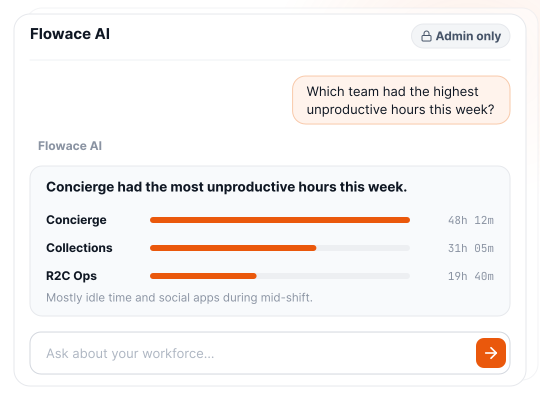
Answers questions in plain English
- Ask Flowace AI about your team's activity.
- Get the answer without building a report.
ActivTrak
AI Insights, a $4 add-on.
Flowace
Flowace AI, for admins.
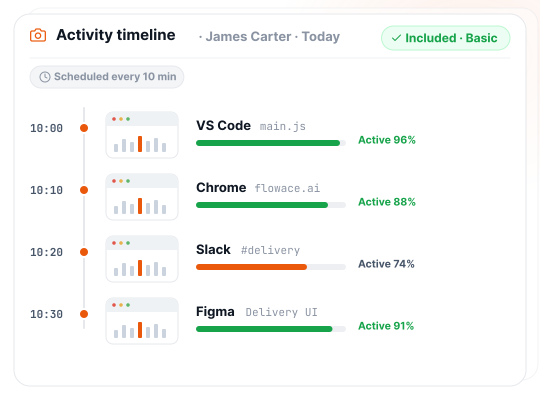
Includes screenshots in the plan
- Scheduled screenshots start on Basic.
- No add-on to approve before you see a screen.
ActivTrak
Screen Details add-on.
Flowace
Included from Basic.
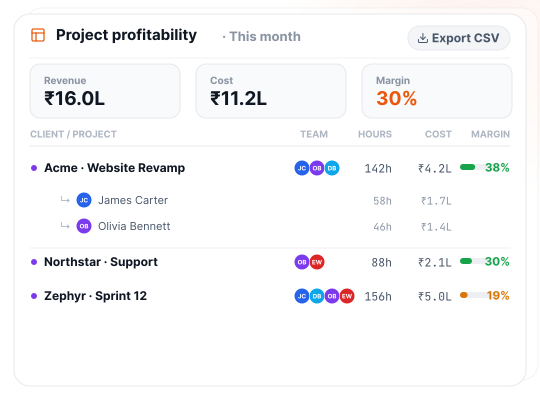
Tracks time by project and task
- Log time by client, project and task.
- See cost and margin per project and person.
ActivTrak
Not on its plan list.
Flowace
Cost and rate per project, per person.
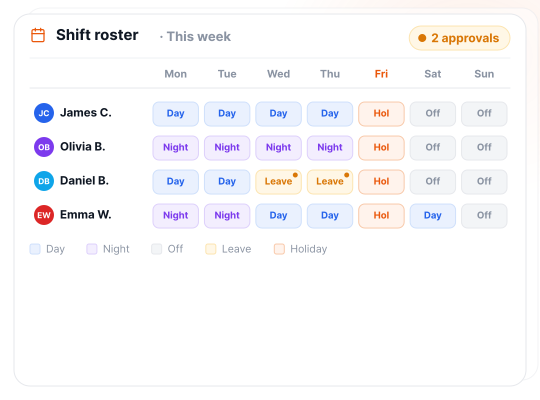
Runs attendance, shifts and leave
- Set schedules, shift rosters and holidays.
- Approve leave where you already track time.
ActivTrak
Schedule adherence only.
Flowace
Shifts, leave and holidays built in.
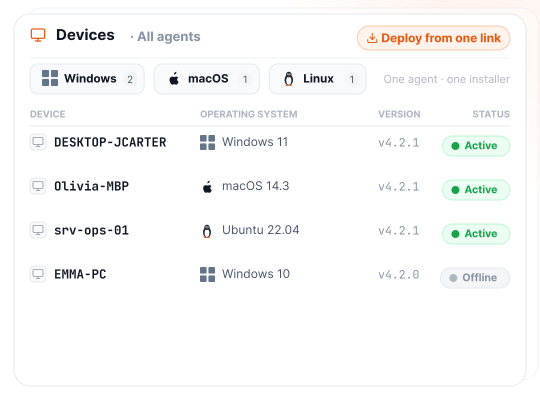
Runs on Linux
- One agent for Windows, Mac and Linux.
- Deploy mixed fleets from one link.
ActivTrak
Windows, macOS and ChromeOS.
Flowace
Windows, Mac and Linux.
Results
What Flowace customers found once the hours were visible

+12.7% billable growth, with zero new hires
- −24% Non-billable hours, Q2 to Q3
- 72× Return on idle visibility
Hours that had been untracked or broadly logged became visible and defensible. We didn't work more, we measured what we'd been doing.Billable hours grew from 71,591 to 80,714 in nine months

24.9% 15.1% idle time, quarter after quarter
- 14.6% Productive-hour growth over nine months
- 3× Faster output growth than headcount
Even while scaling, Flowace helped us uncover 6,000 idle hours and boost activity rates from 75.1% to 84.9%.Activity rate rose from 75.1% to 84.9% as the team grew from 66 to 96 agents

44% less unproductive time, 2024 to 2026
- 48 hrs To move off Time Doctor, start to finish
- 87.7% Activity rate in 2026, up from 85.8%
We started on the standard plan, but once we saw how much more Flowace could do for us, upgrading to Premium was an easy decision.Live on Flowace within 48 hours of leaving Time Doctor
Deployment
Switching from ActivTrak to Flowace takes a day, not a project.
We import your data.
Teams, settings, and history migrated free.
Deploy in 60 seconds.
One link installs the agent on Windows, macOS, and Linux.
First insight in 72 hours.
Dashboards go live in minutes. Most teams find their first inefficiency within three days.
Our candid take
Which should you pick?
ActivTrak may fit if:
- You need a SOC 2 Type 2 report today.
- You manage Chromebooks, or want a free plan for up to 3 people.
- You want to benchmark how employees use AI tools.
Flowace is the stronger choice if:
- You want monthly billing, not an annual contract.
- You want screenshots and SSO in the plan, not on top of it.
- You want project time, attendance and leave in the same tool.
- You run Linux, or want live chat support on every plan.
Frequently Asked Questions
FAQs About ActivTrak vs Flowace
ActivTrak is an established workforce analytics tool sold on annual contracts, with screenshots, AI Insights and HRIS sync as paid add-ons. Flowace includes screenshots in every plan, adds project time, attendance and leave, supports Linux, and bills monthly or annually. Neither records keystrokes. The difference is the billing model, the add-ons and the scope.
Flowace costs less per seat than ActivTrak. Flowace Premium, which includes SSO and screenshots, is $6.98 per user per month billed annually. ActivTrak’s entry plan with SSO is $10 per worker per month on an annual contract, before add-ons. The ActivTrak pricing breakdown covers every tier.
ActivTrak does not offer monthly billing. Its pricing page states that all plans are billed on an annual contract. Flowace offers monthly and annual billing, and a Flowace subscription renews only with the customer’s consent.
Flowace includes live chat support on every plan and a customer success manager on Premium and above. ActivTrak includes digital support on paid plans, sells Premier and Signature support as add-ons, and requires a paid support plan for purchases above 50 licenses.
Flowace has a few IT add-ons: single sign-on, user provisioning, API access, extra screenshots and shared-desk tracking. All five are included in the Premium plan. Tracking, screenshots, reports and project time are never behind an add-on. See Flowace pricing.
Flowace does not record keystrokes, video, or live screens. Flowace captures scheduled screenshots and measures keyboard and mouse input frequency, never what is typed. ActivTrak also does not log keystrokes, but offers live screen view through its Screen Details add-on.
Flowace does not have a mobile app and does not monitor mobile devices. Flowace runs on Windows, Mac and Linux desktops and laptops. ActivTrak’s agents run on Windows, macOS and ChromeOS.
Flowace supports Linux, along with Windows and Mac, from one agent. ActivTrak’s help center lists Windows, macOS and ChromeOS agents, with no Linux agent.
Migrating from ActivTrak to Flowace takes about a day. Flowace migrates teams, settings and history free, the agent installs in 60 seconds per device, and first insights arrive within 72 hours. Book a demo to time the switch before your ActivTrak renewal.
Flowace is SOC 2 compliant, ISO 27001 certified, GDPR compliant and HIPAA-aligned, on every plan. Sales can share the SOC 2 report the same day under NDA. ActivTrak holds SOC 2 Type 2.
ActivTrak does not log keystrokes or access device cameras, according to its help center. Screenshots and live screen view are off by default and available through its paid Screen Details add-on. Flowace takes scheduled screenshots on every plan and never offers live screen viewing.
Flowace is an ActivTrak alternative for teams that want activity, project time and attendance in one tool, with monthly or annual billing. Other ActivTrak alternatives include Insightful, Teramind, DeskTime, Hubstaff and Time Doctor. Compare Flowace with Hubstaff and Time Doctor.
Flowace AI is available to full-access admins, who ask questions about team activity in plain English. Usage limits apply.
Run both ActivTrak and Flowace for a week.
Install Flowace next to ActivTrak. Compare the price, the billing terms, and what each one includes.
- No credit card
- Free migration
- Cancel anytime





Maximize Your Potential with Flowace!
Experience seamless time tracking and productivity enhancement like never before. Join the Flowace revolution and unlock your full potential. Start your journey to success today!”
