


Custom Work Categories
Define categories like communication, dev tools, or file management.
Enterprise-grade security backed by GDPR, HIPAA, ISO 27001 & SOC 2 compliance. Know more

One platform for everything modern teams need to track. Hours auto-captured, patterns surfaced, decisions backed by data.

Trusted by teams at









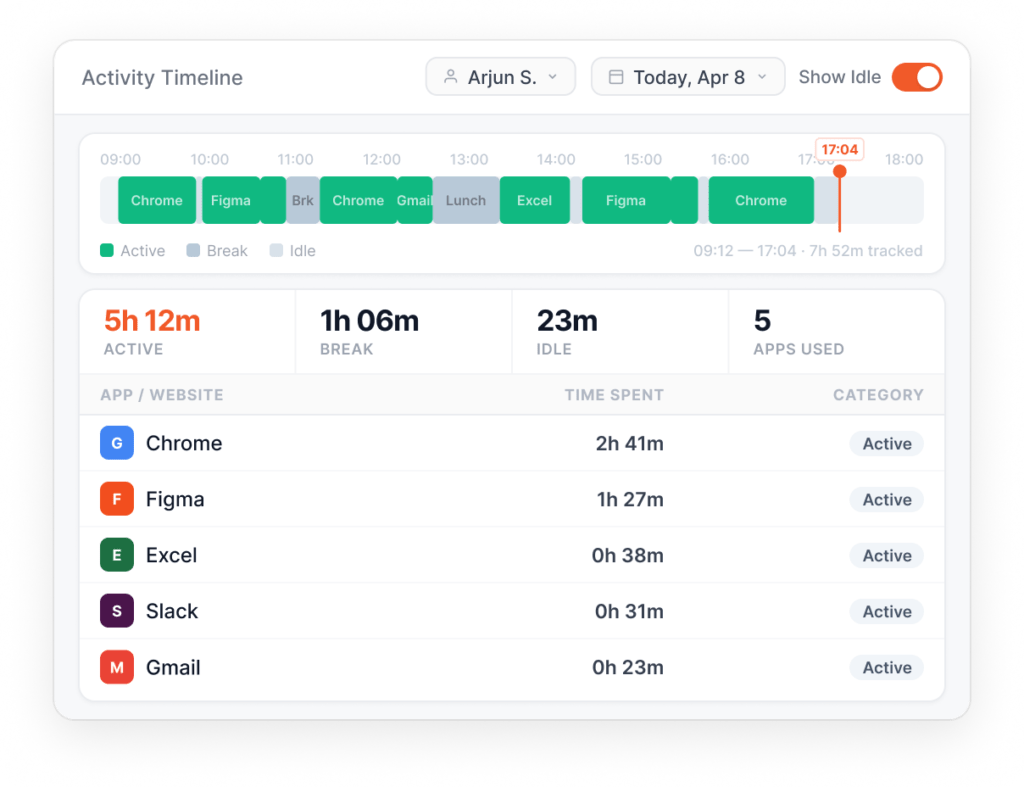
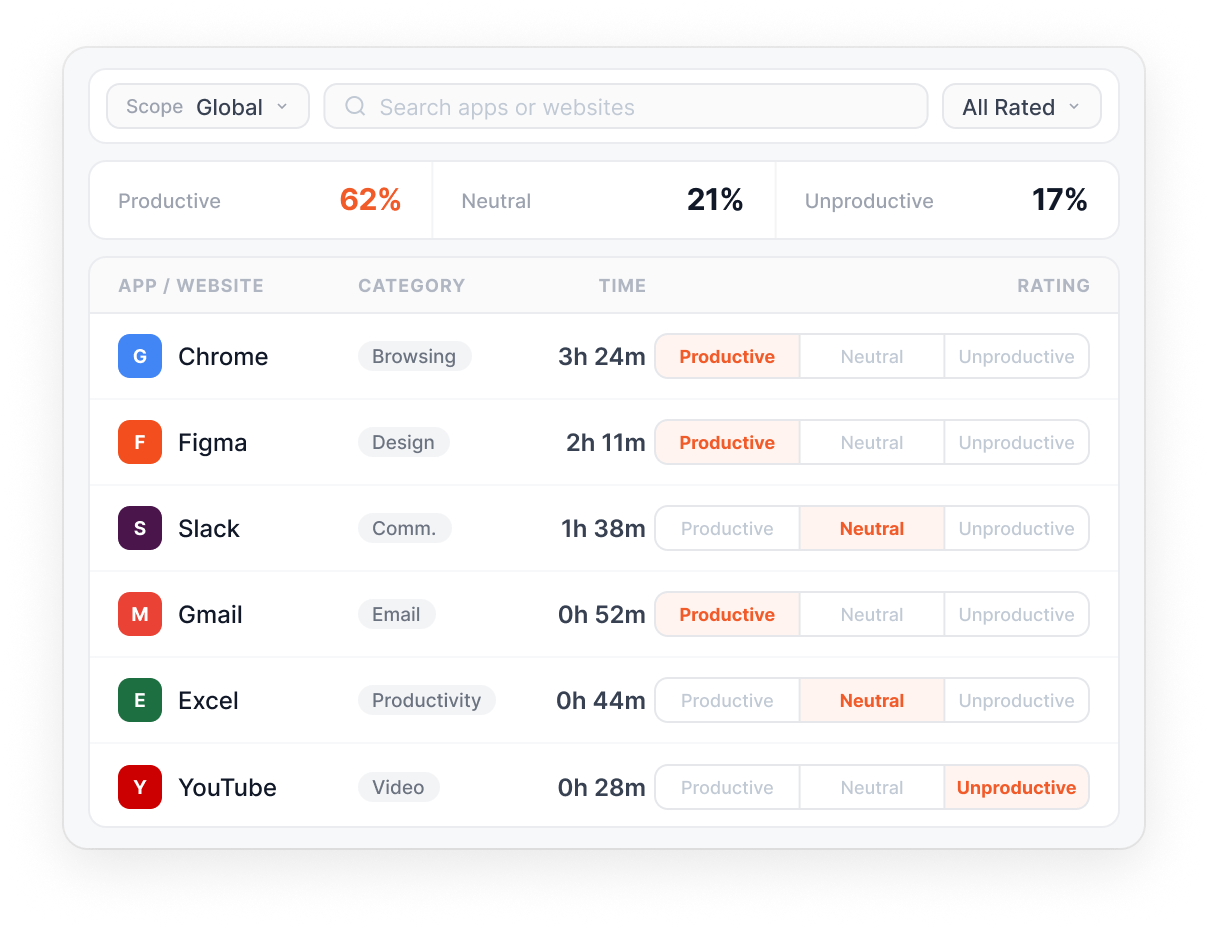
Visibility into how time is actually spent across apps, websites, and work categories.
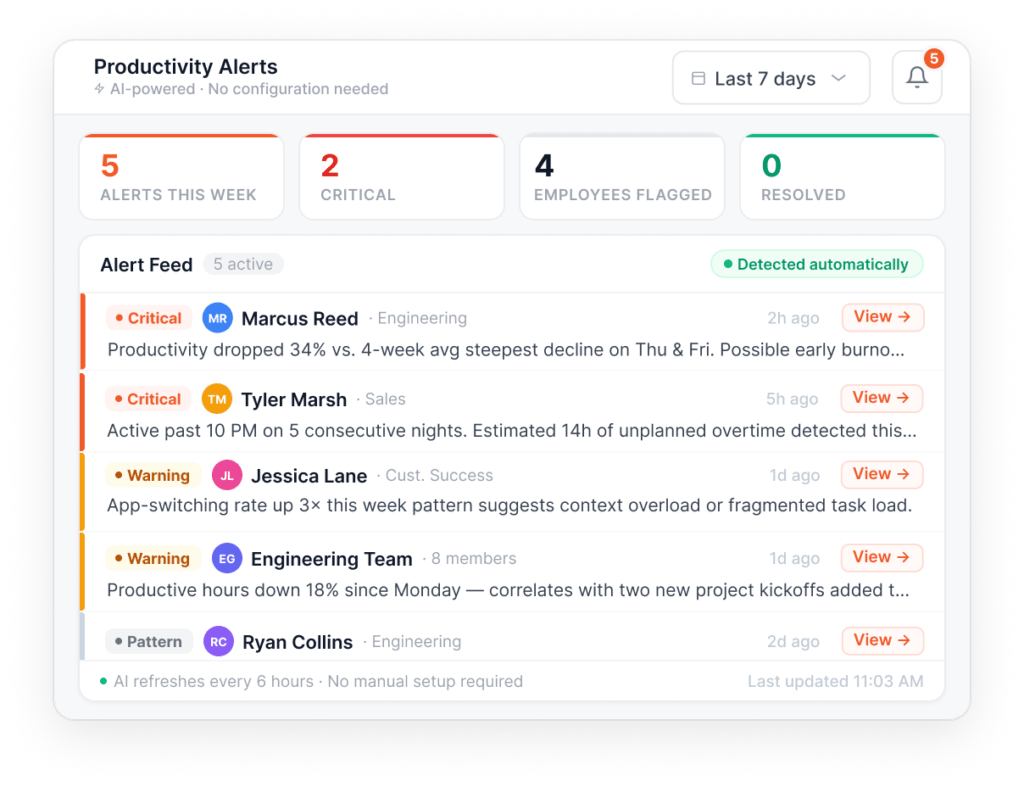
AI notifications for burnout, low productivity, and trending patterns.
Patterns surfaced automatically. No threshold-setting, no rule-writing.
Track time across all applications and websites automatically.
Rate apps and websites as productive, unproductive, or neutral at any level.
Other Features
Define categories like communication, dev tools, or file management.
Visual analytics for individuals, teams, and the organization.
Configurable idle thresholds per user; whitelist meeting apps.
Classify non-desk time (meetings, breaks, client visits) with productivity ratings.
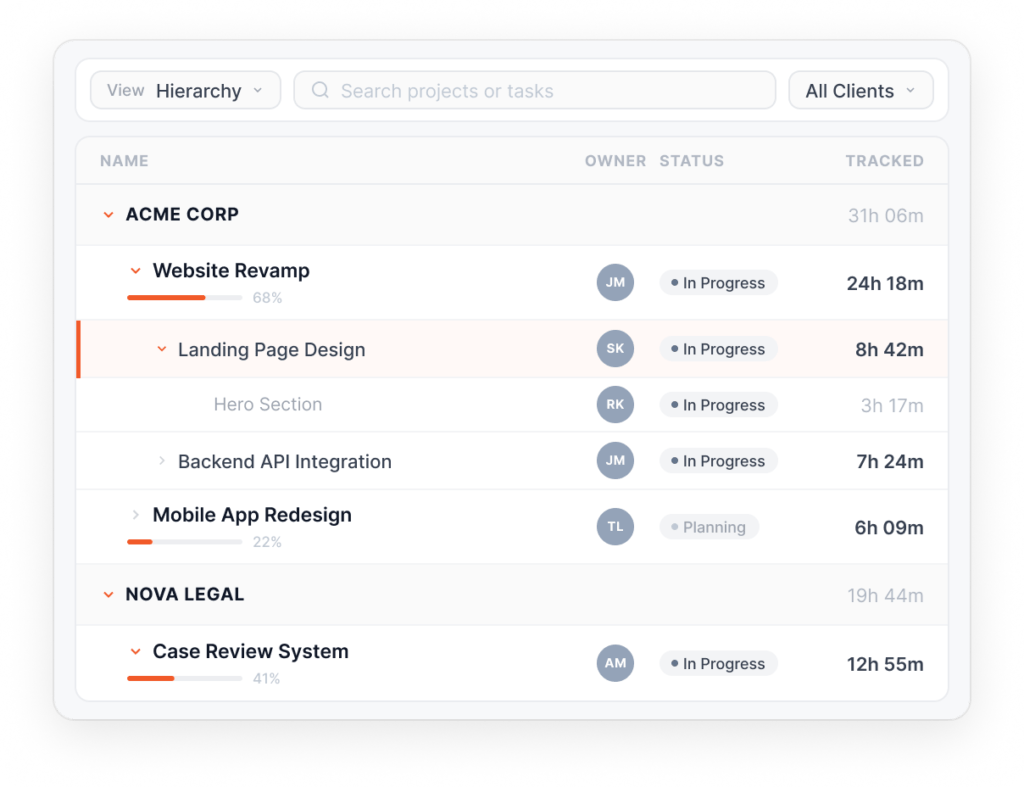
Keep projects on budget with automatic timesheets and 5-level task granularity.
5-level project hierarchy that maps to your industry's units of work.
Track the unit of work that matters to your industry, not a generic timesheet.
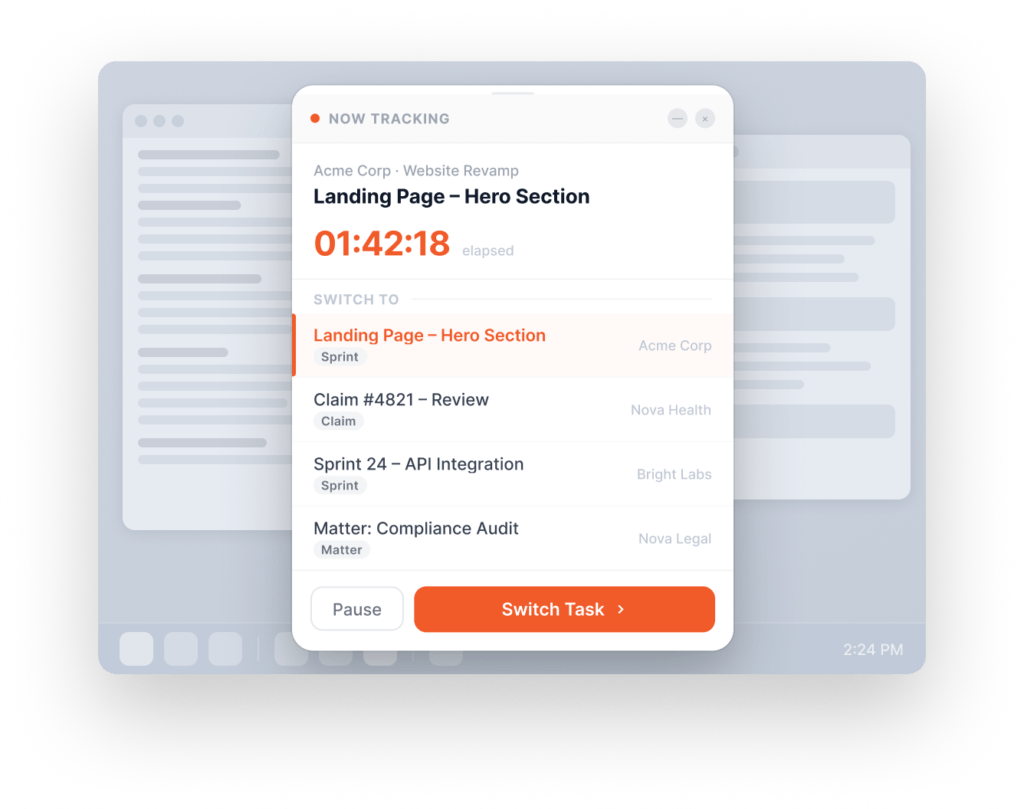
Desktop widget for one-tap project and task switching.
Industry-specific time-and-motion study, in real time.
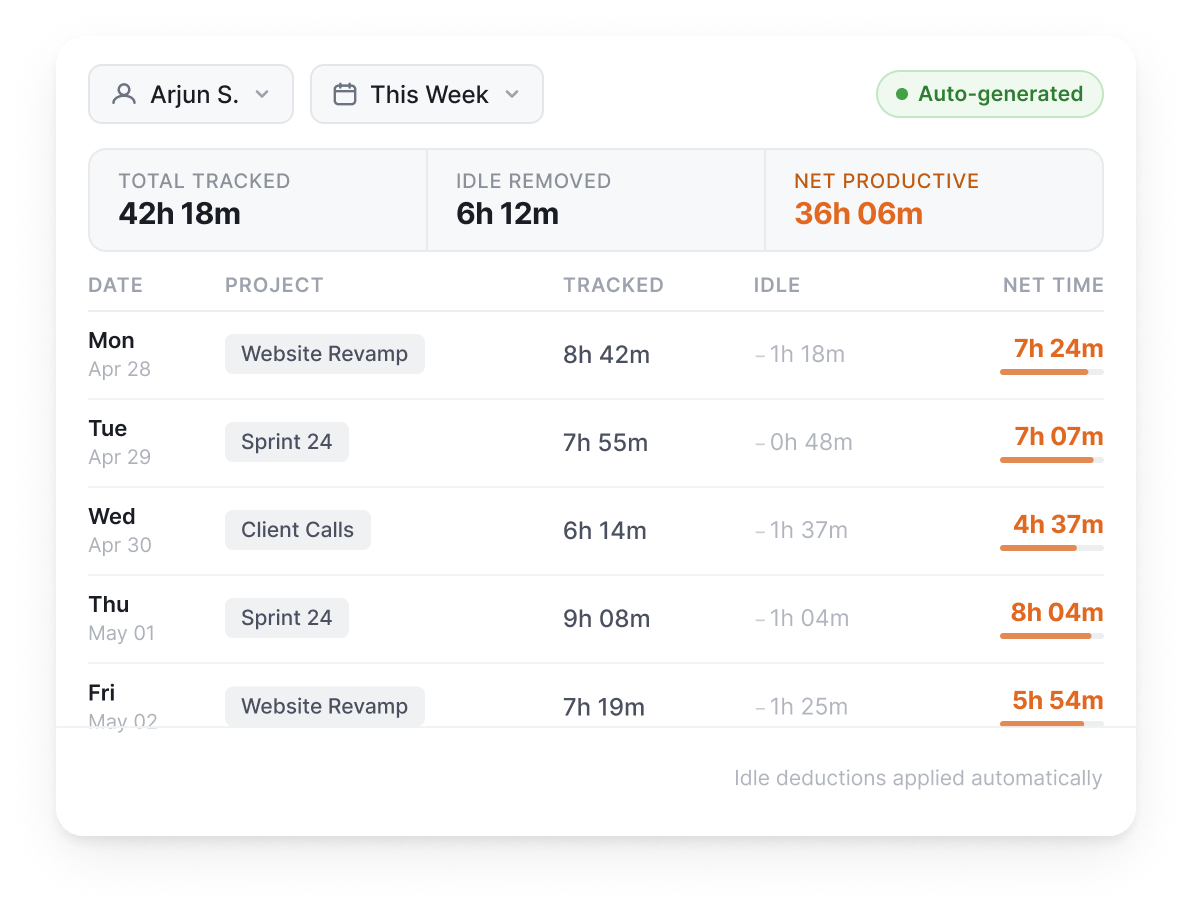
Auto-generated timesheets with idle time netted out.
Other Features
Calendar integration to attribute meeting hours to projects.
Set billable rates per user; calculate project cost vs. revenue
Generate invoices from tracked billable hours automatically.
Lock timesheets after N days to protect payroll and billing integrity.
Add, edit, or remove time entries with configurable approval workflows.
Track client calls via Android and categorize them by client project automatically.
Select a client site and classify time spent there under the corresponding project.
Organize documents in Client > Project > Task hierarchy to auto-attribute documentation time to projects.
Transparent workforce monitoring with privacy controls built in.
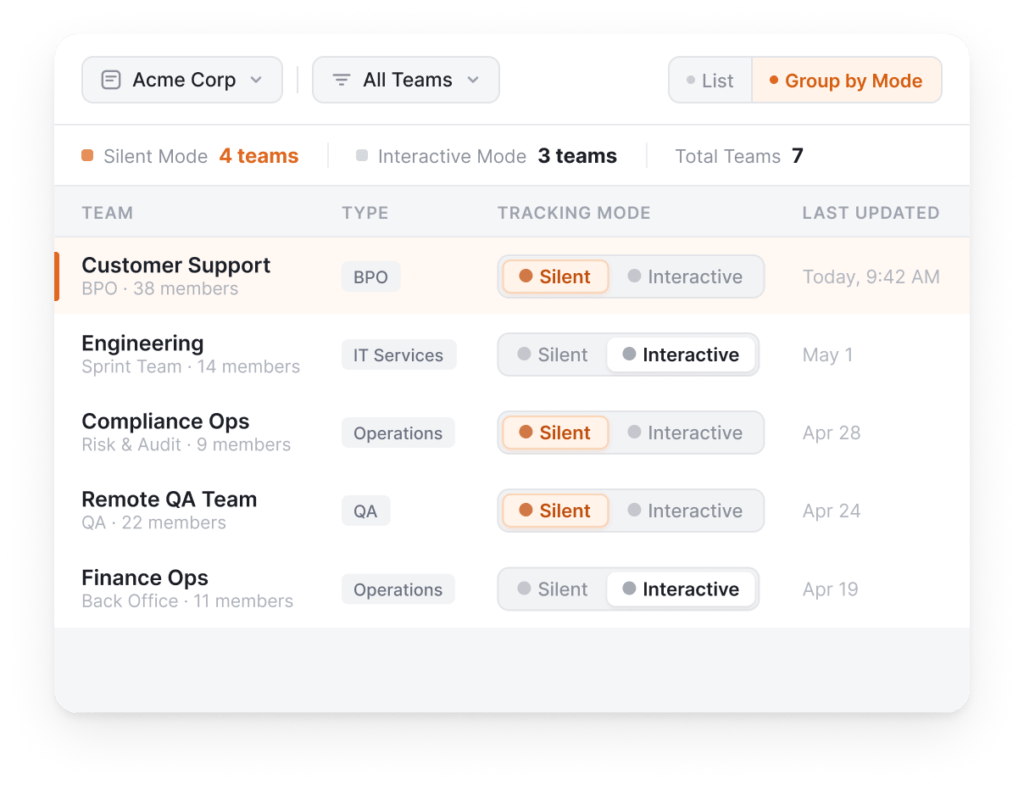
Background monitoring without employee-facing UI.
Choose monitoring mode per team, not per platform.
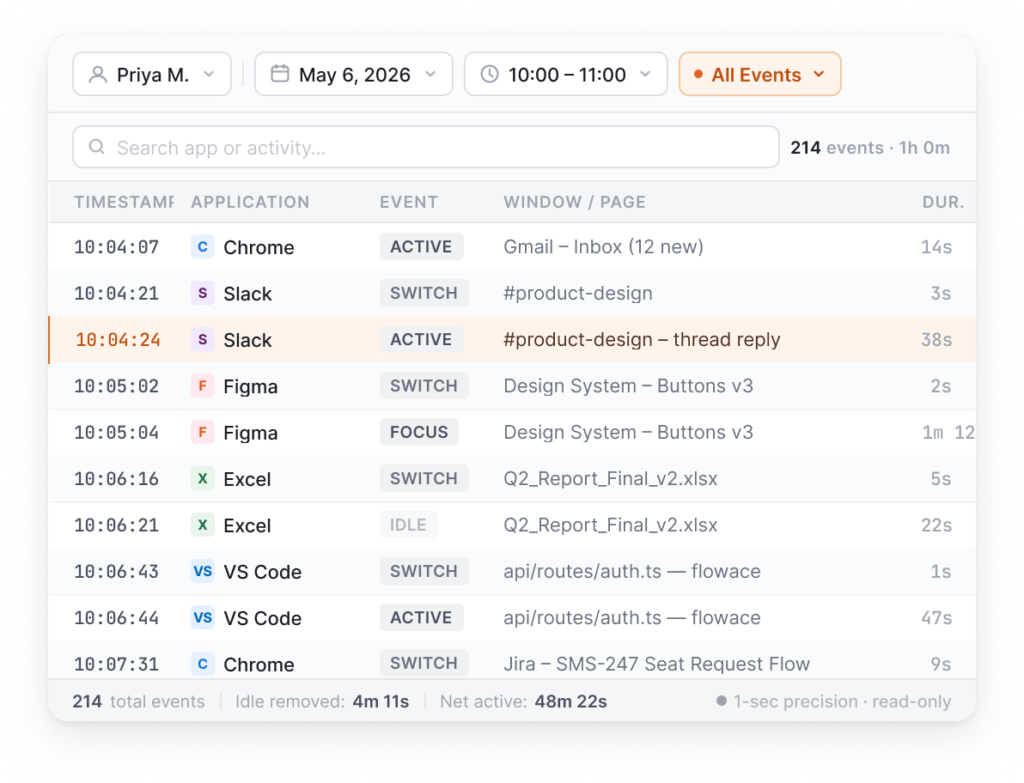
Event-by-event activity records at 1-second precision.
Forensic-grade detail for compliance reviews and dispute resolution.
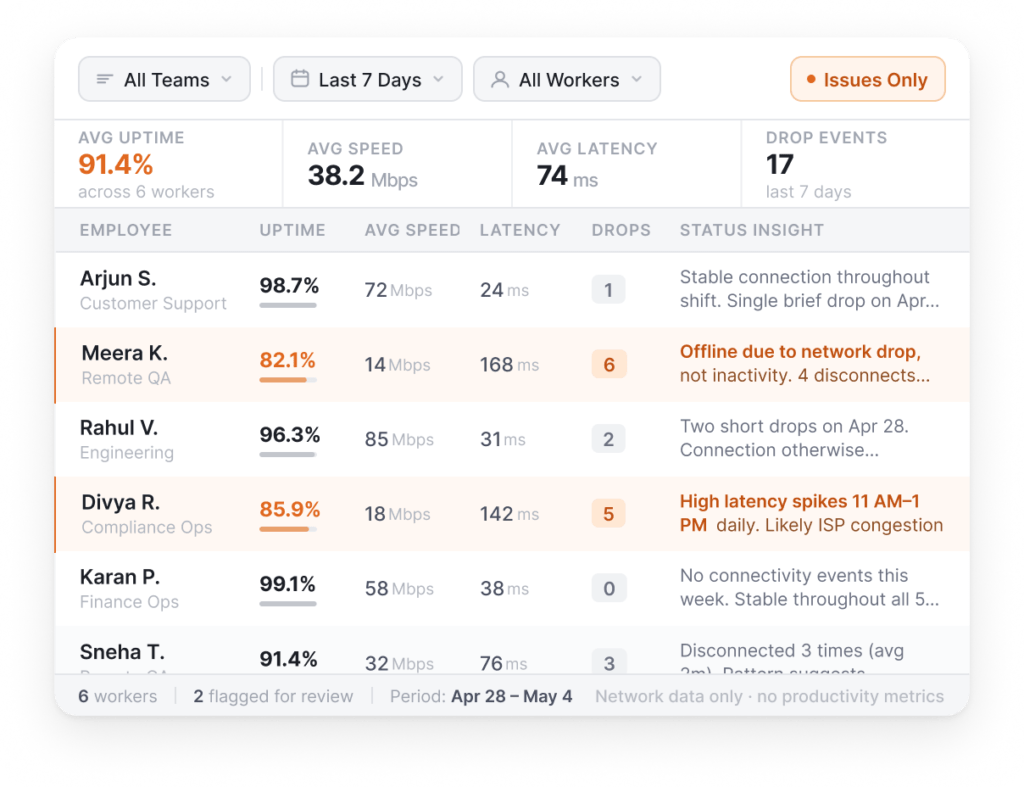
Tracks uptime, speed, and latency for remote worker infrastructure.
Distinguishes "employee offline" from "employee disconnected."
Other Features
Periodic screen capture at configurable intervals, with dual-monitor support.
Track input frequency (not keystrokes) to measure engagement.
Employee-visible app with bubble for project selection.
When enabled, nothing is tracked. No screenshots, no timesheets, no activity data. Equivalent to not having the desktop app installed.
Attendance, shifts, leaves, expenses, and approvals in one place.
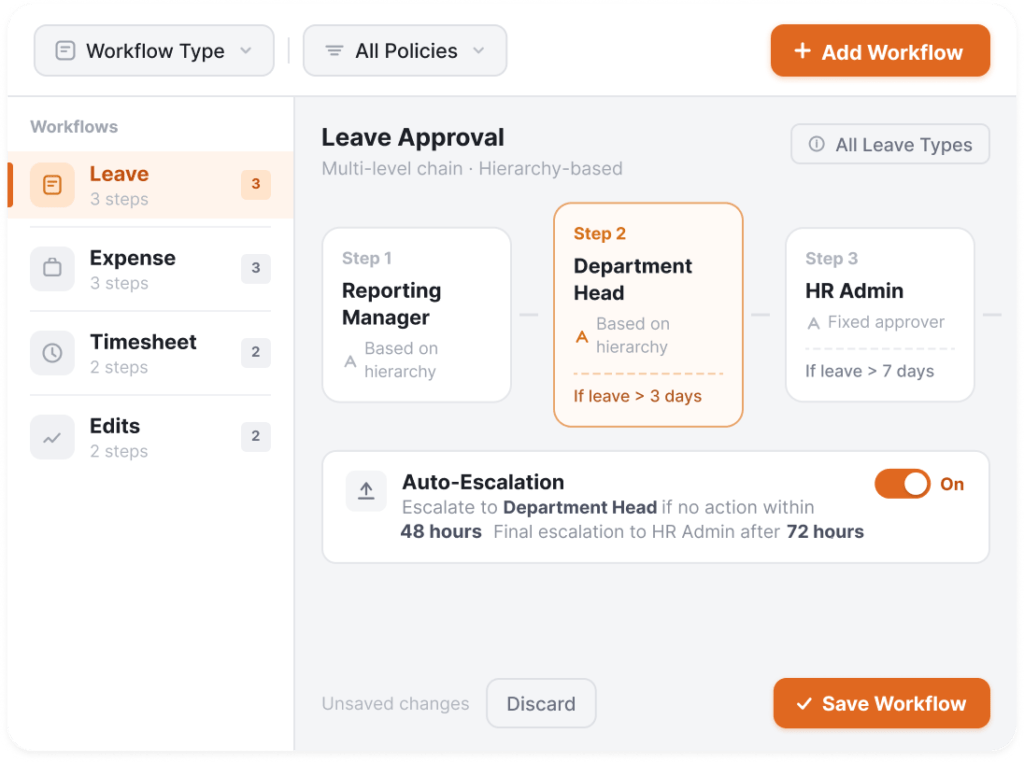
Multi-level configurable approval chains for leave, expense, and time entries.
One approval engine for everything you'd otherwise chase on spreadsheets.
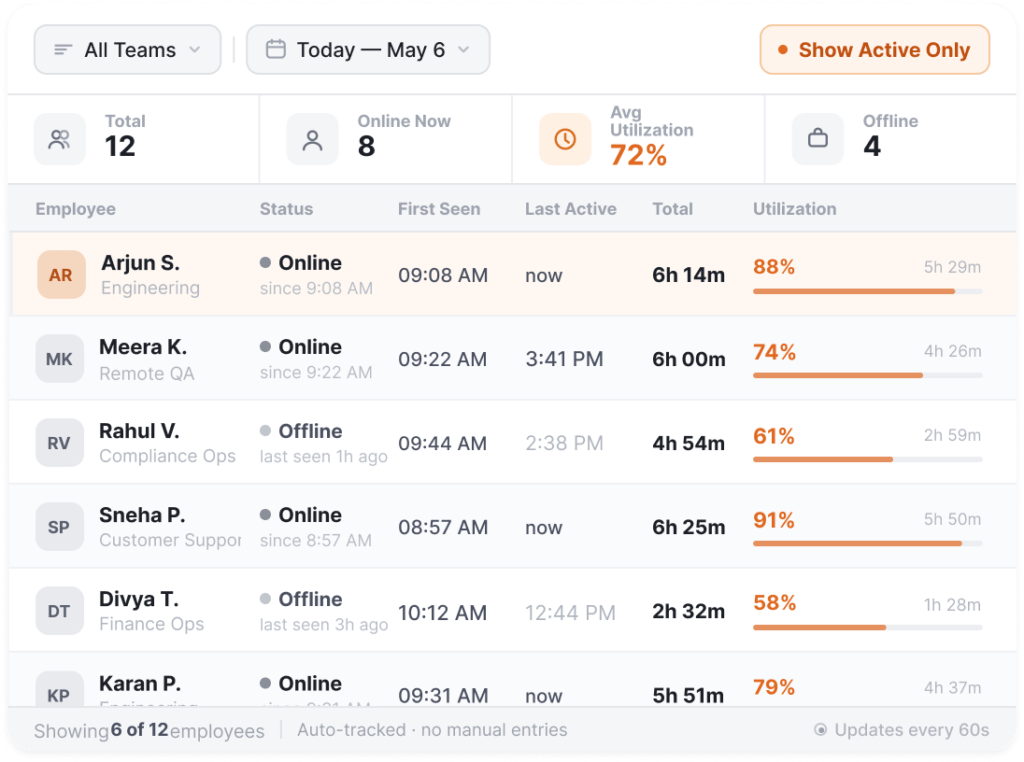
Automated attendance with online/offline status and utilization reporting.
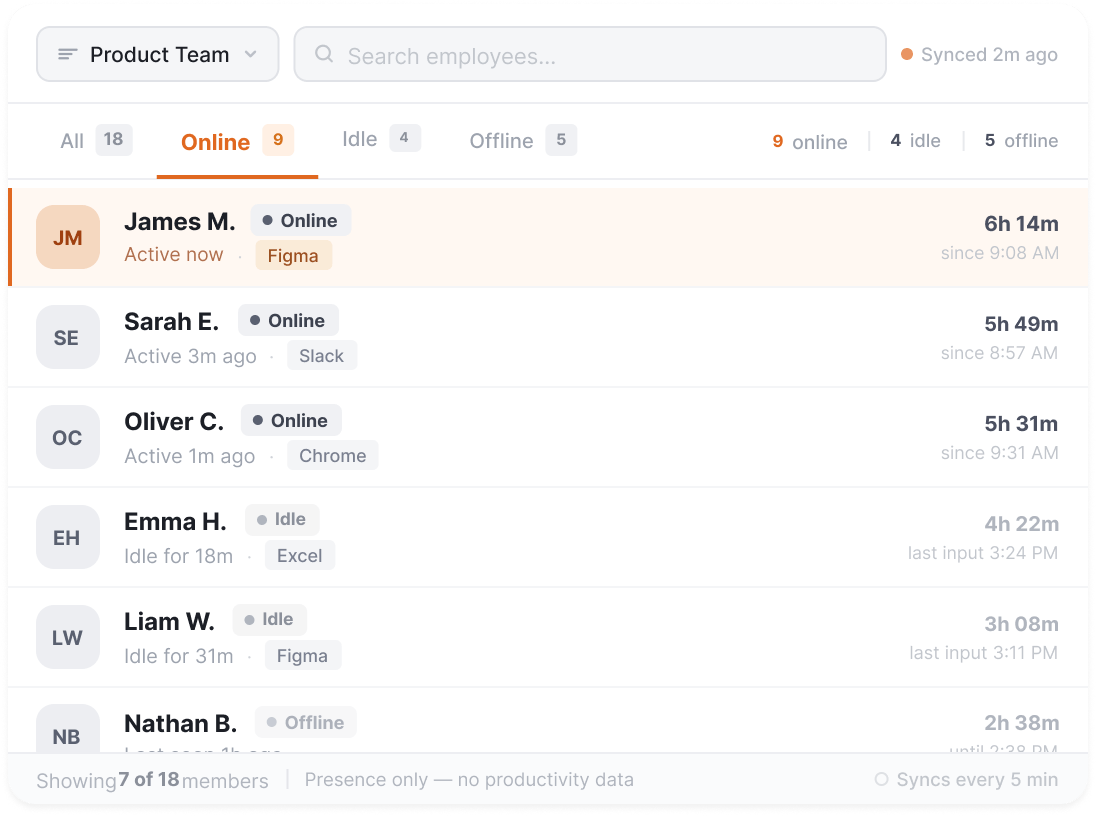
See who is online, offline, or idle across your team. Data syncs every 5 minutes on active internet connection.
Other Features
Create recurring shifts, assign via Excel, manage rosters.
Configure leave policies, holiday calendars, and track balances.
Submit expense details, amounts, and proof screenshots for multi-level approval.
Set holidays and weekly offs per company or team.
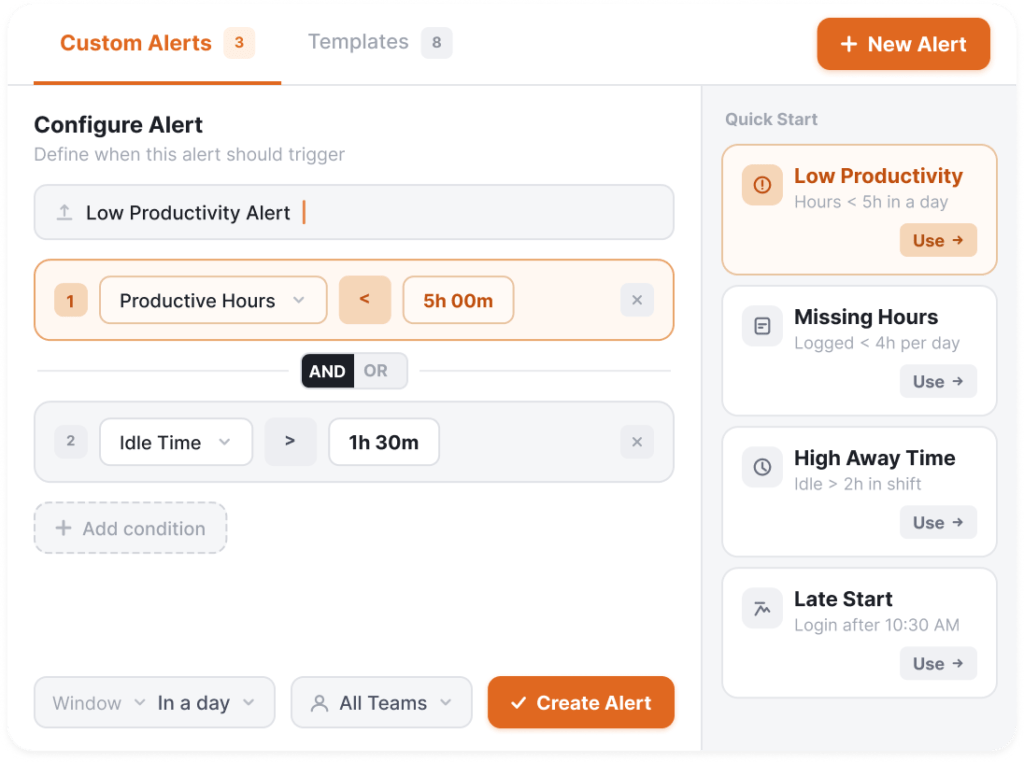
AI-powered notifications that surface problems before they escalate.
Build custom no-code alerts. Or use built-in:
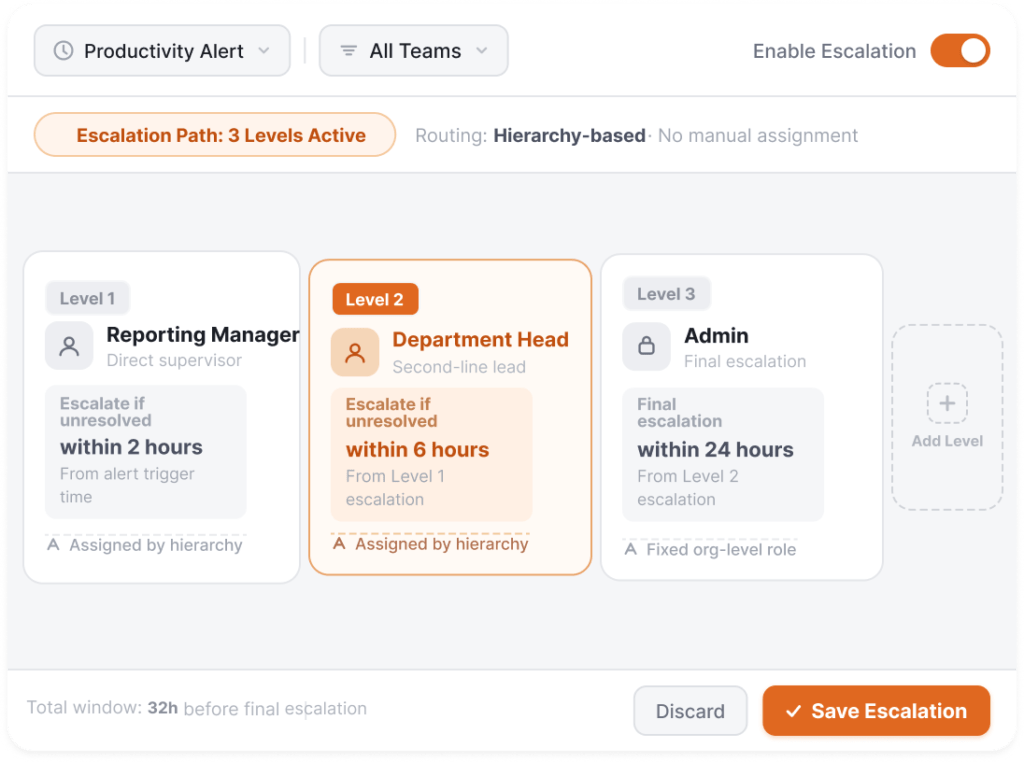
Route alerts through n-level org hierarchy automatically.
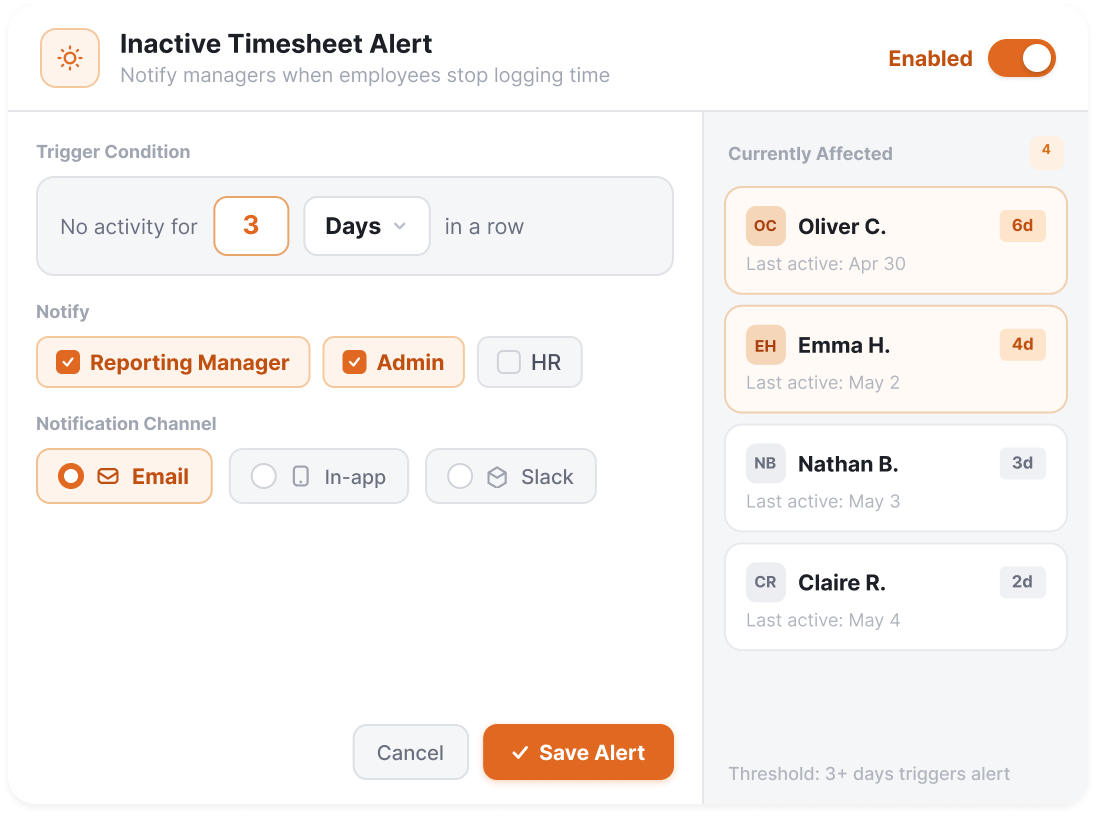
Email notifications when employees are inactive for N days.
Pre-built and customizable reports for every stakeholder.
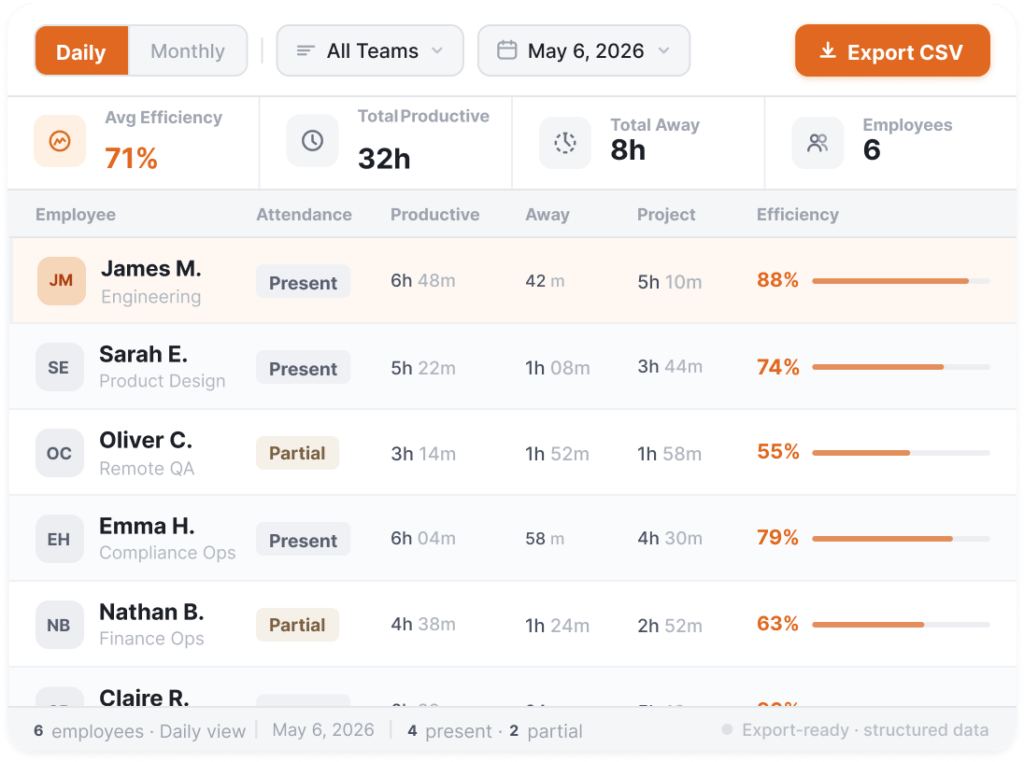
Daily and monthly view of attendance, productive hours, away time, and project time per member, with CSV export.
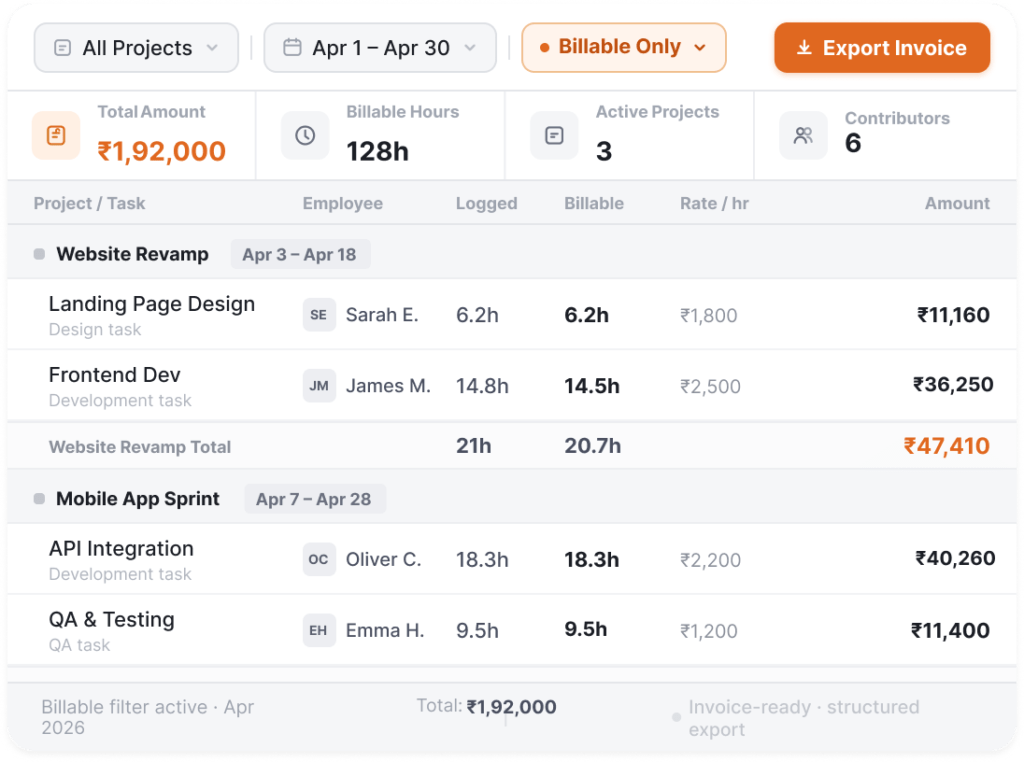
Project-level timesheet rollup for billing reconciliation.
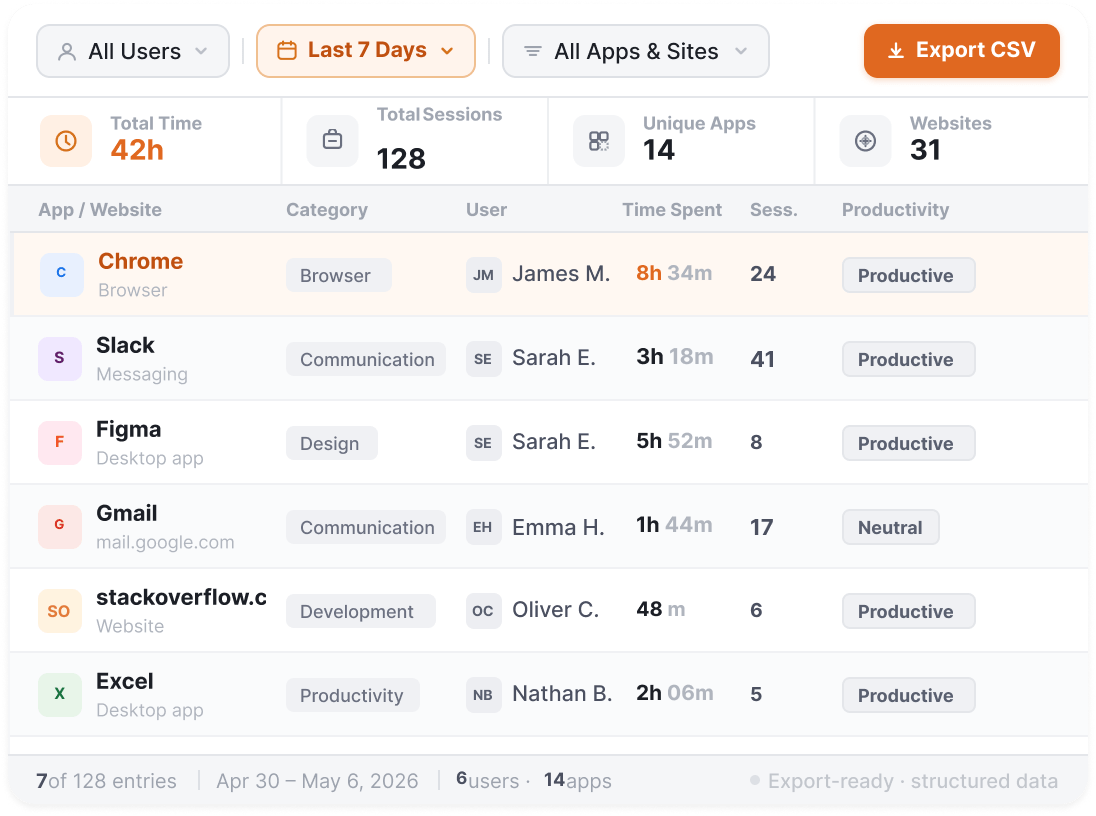
Detailed app and website usage export by user, team, and date range.
Other Features
Task-wise or member-wise project detail report.
Visual timeline of daily activity patterns.
Add, remove, and reposition dashboard widgets. Include or exclude widgets to customize your view.
All widgets reflect shift-specific data for per-shift comparisons.
Export any report as CSV or Excel.
Flowace runs across your team in minutes, with no IT dependency and no process changes.
Deploy via a simple shareable link.
No timesheets. No check-ins. No behavior change.
Your dashboard is live in minutes. Most teams identify their first inefficiency within 72 hours.
Integrations
No migrations. No disruption. Flowace connects to your existing stack and starts capturing insights instantly.
See All Integrations

“Flowace gave us real-time clarity we never had before.Managing remote and hybrid teams used to be a constant guessing game. Flowace changed that, with automatic time tracking, AI-powered productivity insights, and seamless Keka integration made everything click. Onboarding was painless, and their support team is genuinely the best we've worked with.”

“Finally, a tool that understands us! We always knew something was slowing us down but we just couldn't see it. Flowace changed that overnight. Real-time visibility into where time goes, what's creating bottlenecks, and what needs fixing right now. The reporting dashboard tells you what to do next. We've restructured entire processes without adding oversight or micromanagement. 10/10 recommend”
“The ROI reports alone made it worth it. Silent mode meant zero disruption, and then the ROI reports changed everything. For the first time, we could see exactly what we were getting back, clear, honest numbers that justified every decision. Most tools leave you guessing. Flowace showed us the proof.”
Workforce intelligence fails without trust and technology. Flowace is built to deliver both.
Every team member has access to the same insights as managers. Transparency builds trust and accountability.
When enabled, nothing is tracked. No screenshots, no timesheets, no activity data. Equivalent to not having the app installed.
No downtime. No performance drops. No operational surprises.
Clear benchmarks and visibility improve performance without creating anxiety.
Compliance and enterprise
Systems built for security, privacy, and control.




Optional Addons
Flowace keeps the everyday work product in the plan: automatic time tracking, screenshots, silent tracking, projects and tasks, productivity insights, dashboards, and 1-second activity logs. A short list of optional add-ons lets you tailor Flowace on top of any plan: single sign-on, automated user provisioning, public API access, extra and multi-monitor screenshots, and shared-desk tracking. Each is also built into the Premium plan, so you can add just one enterprise feature without upgrading.
Employee productivity monitoring tracks how employees spend their work time, complete tasks, and get work done. It helps businesses understand work patterns through data…
Read more
Both ProHance & Flowace help organizations enhance their efficiency by providing them with time insights and workforce management. Let’s dig further into the similarities…
Read more
Tracking employee performance doesn’t have to be complicated or stressful. When done right, it helps you spot strengths, address challenges, and keep your team…
Read moreFAQ's
Flowace is a workforce productivity platform that automatically captures work hours, surfaces productivity patterns, and turns activity into decisions teams can act on. It brings time tracking, productivity insights, employee monitoring, workforce management, alerts, and reporting into one platform, so teams do not stitch together separate tools.
Flowace includes six connected modules: Productivity Insights, Automatic Time Tracking, Employee Monitoring, Workforce Management, Intelligent Alerts, and Reports and Dashboards. They share one agent and one dataset, so attendance, project time, activity, and productivity all line up in the same reports.
Flowace runs on Windows, macOS, and Linux, with a lightweight agent under 120 MB. For managed device fleets, you can push deployment through Intune, Active Directory, or MSI.
Setup takes about 60 seconds. You deploy the agent through a shareable link, your team keeps working normally with no timesheets or check-ins, and your dashboard goes live in minutes. Most teams identify their first inefficiency within 72 hours.
Yes. Flowace connects to 70+ tools, including Darwinbox, Keka HR, Freshteam, HR One, Asana, Google Meet, Microsoft Teams, and Dropbox. It works inside your existing stack with no migration, so it starts capturing insights right away.
Flowace records raw activity at 1-second precision, rather than sampling every 30 to 60 seconds like many tools. That gives audit-ready, event-by-event records for billing, compliance reviews, and dispute resolution.
Flowace is built for transparency. Every employee sees the same insights their managers see, and a per-user Privacy Mode lets anyone fully opt out. When Privacy Mode is on, nothing is captured: no screenshots, no timesheets, no activity data, the same as not having the app installed.
Yes. Flowace is GDPR, HIPAA, ISO 27001, and SOC 2 aligned, with role-based access, custom data retention policies, AES-256 encryption, and TLS 1.2+ in transit. White labelling and modularization are available for enterprise deployments.
Yes. Flowace supports remote, hybrid, and in-office teams, with live online, offline, and idle status, and an internet connectivity report that separates ’employee offline’ from ’employee disconnected’ so remote infrastructure issues are not mistaken for low activity.
Flowace scales from 50 to 5,000+ users with no downtime or performance drops, so it fits growing teams and large enterprises on the same platform.
Yes. Flowace offers a free 7-day trial with no credit card required, plus dedicated onboarding. You can also book a 15-minute walkthrough run on your own data.
Yes, a short list of optional ones: single sign-on, automated user provisioning, public API access, extra and multi-monitor screenshots, and shared-desk tracking. These are enterprise IT and security extras, and each is also built into the Premium plan. The everyday work product, tracking, screenshots, silent mode, insights, tasks, and reports, stays in the plan on every tier.
15-minute walkthrough, your data, no canned demo.



Experience seamless time tracking and productivity enhancement like never before. Join the Flowace revolution and unlock your full potential. Start your journey to success today!”




