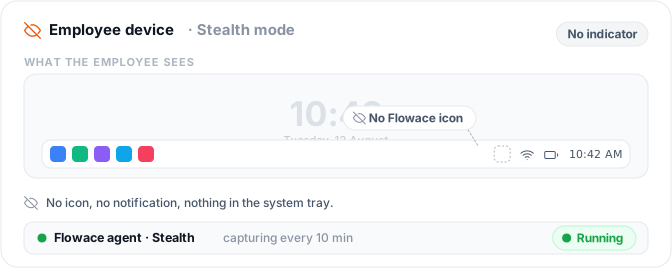
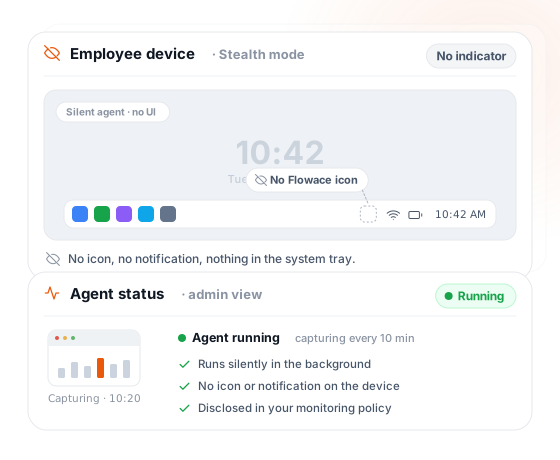
Stays out of the system tray, the notification center, Task Manager, and Activity Monitor, deployed once, running the whole time.
Enterprise-grade security backed by GDPR, HIPAA, ISO 27001 & SOC 2 compliance. Know more

Updated on
The same screenshots and activity logs as standard mode, installed without a visible icon or notification.
Free 7-day trial · No credit card required · 5-minute setup · Dedicated onboarding.

80,000 users, 674 customers, 20 countries










How it works
Stays out of the system tray, the notification center, Task Manager, and Activity Monitor, deployed once, running the whole time.
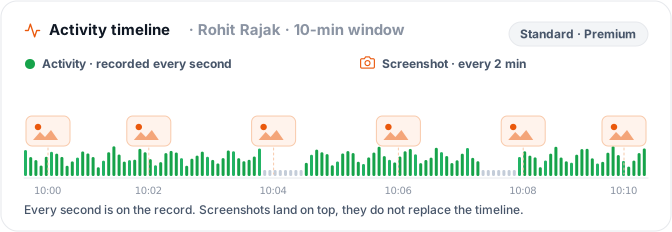
A record built for review, not hours of footage to sit through.
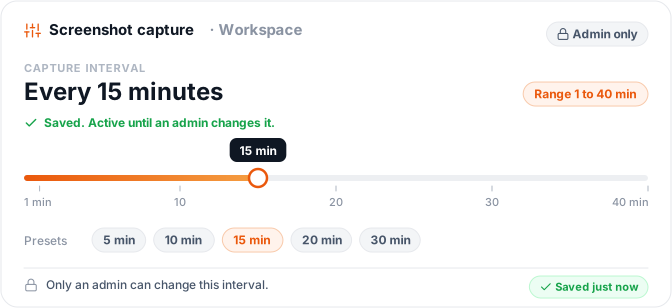
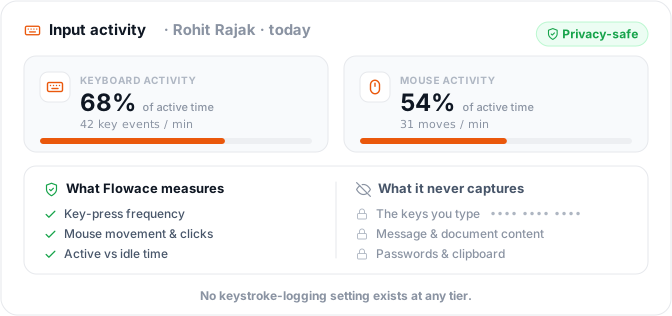
Keypad and Cursor Activity (Premium tier) measures effort and engagement, the signal your team actually needs to act on.
Categorization rules are configurable per team, so what counts as productive is your call.
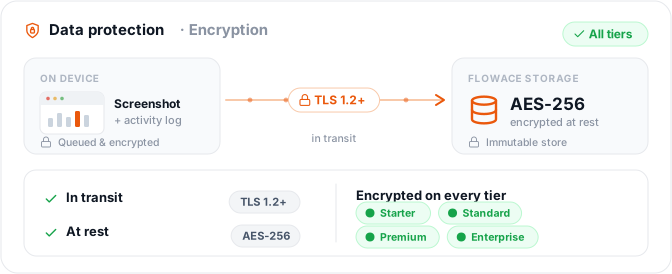
Activity is cached locally and synced automatically the moment the device reconnects.
Capabilities
Discreet by design
Runs invisibly at the OS level, hidden from view, and from Task Manager and Activity Monitor too.
One standard, every mode
Screenshots and activity logs hold to one consistent standard across your whole organization.
Built for review
Scheduled screenshots and second-by-second logs, not raw footage to sit through.
Measures engagement
Keypad and Cursor Activity tracks how active someone was — the signal that matters.
Sorts itself out
Rules your team sets, not a black box.
Runs offline, Catches up later
Cached locally, synced the moment a device reconnects.
One agent, Every desktop
Consistent deployment across your whole desktop fleet.
Comparison
| Feature | Flowace | Teramind | Other stealth monitoring software |
|---|---|---|---|
| Live screen viewing | Never offered, in any mode | Real-time viewing with DVR-style playback | Common — CurrentWare offers live desktop viewing too |
| Keystroke logging | Never, at any tier or mode | Full keystroke and text capture | Common among category leaders |
| What "stealth" actually changes | Visibility only, identical data and standard as every other mode | Unlocks additional invasive capture | Usually the same pattern as Teramind |
| Pricing | Published, every tier | Unpublished, quote-only | Varies |
| Screenshot capture | Periodic, scheduled | Not the primary method (live-view led) | Apploye adds a live feed on top of screenshots |
| Activity log precision | 1-second (Standard/Premium) | Not published | Not published |
| Data retention | 1 year, every tier | Not published | Varies |
| Deployment | Desktop app, Windows/Mac/Linux | Windows, Mac, Linux | Varies |
| Mobile monitoring | Not offered | Offered | Varies |
| Competitor | What their stealth/hidden monitoring page actually offers |
|---|---|
| Teramind | Markets itself as "undetectable," with real-time screen viewing, HD recording with DVR-style playback, and full keystroke/text logging |
| Apploye | Adds a live feed on top of scheduled screenshots; separately claims to avoid keylogging in favor of input signals, closer to Flowace's position on that one point |
| CurrentWare | Offers live desktop viewing under its stealth mode, but its own page recommends pairing stealth deployment with employee notice, i.e. the same caution this page gives |
8,239 hours of remote work auto-captured.
The onboarding felt smooth from the very first call. And once we got into AI time tracking, that is the one that really stood out for us.
86.9% Team productivity in 2026
We started on the standard plan, but once we saw how much more Flowace could do for us, upgrading to Premium was an easy decision.

+12.7% billable growth, with zero new hires
Hours that had been untracked or broadly logged became visible and defensible. We didn't work more, we measured what we'd been doing.
By industry
Monitor shared clinical workstations without adding friction to patient care.
Front-desk and back-office staff often share devices across shifts. Stealth mode installs without an icon or notification, so it doesn't add a visible step to already-tight clinical workflows.
Deploy across high-turnover seats without a per-agent rollout conversation.
Shift-based, high-turnover contact center floors are the clearest fit for stealth deployment — provisioning a new seat doesn't require walking a new agent through a visible monitoring tool.
Keep monitoring discreet where confidentiality is already the norm.
Legal teams already operate under strict confidentiality norms; a silent install fits that existing posture better than a visible on-screen indicator does.
Cover remote and offshore contractors on devices you don't physically manage.
Offshore and contract IT staff are harder to standardize device policy for. Stealth mode gives the same activity record without depending on the contractor acknowledging a visible agent.
Monitor close-season workloads without disrupting client-facing staff.
Accounting teams run heavy, deadline-driven cycles where staff are often client-facing. A silent install avoids adding a visible tool to a desktop that's already under pressure.
Outcomes
Simple per-user pricing. Every plan includes attendance, projects & tasks, silent tracking, and support.
billed annually
Included features
billed annually
All features in Basic, plus:
billed annually
All features in Standard, plus:
All features in Premium, plus:
Pricing as of September 2026, billed annually, roughly 30% below monthly · 7-day free trial, no card, no seat minimum · Full plan comparison
Windows — full desktop agent, screenshots and activity logging.
No mobile app exists and no mobile monitoring is offered.
macOS — full desktop agent, same capability set.
No mobile app exists and no mobile monitoring is offered.
Linux — full desktop agent, same capability set.
No mobile app exists and no mobile monitoring is offered.
The top 10 employee monitoring software are:
1. Flowace: stealth and standard monitoring with transparent pricing
2. Hubstaff: time tracking with GPS field monitoring
3. We360.ai: productivity analytics for hybrid teams
4. ProHance: enterprise workforce analytics
5. Teramind: insider threat and DLP-focused monitoring
6. Time Doctor: time tracking with usage reports
7. Insightful: remote-team productivity monitoring
8. Apploye: time tracking with live screen viewing
9. CurrentWare: web filtering and endpoint monitoring
10. Kickidler: desktop monitoring with live-view emphasis.
You can learn more about the best employee monitoring software here.
Stealth monitoring runs the exact same screenshot capture and activity tracking as standard employee monitoring, without a visible icon or notification on the employee’s device. It doesn’t add extra data collection, it only changes whether the software is visible. See how this compares to standard screen monitoring for the full capability set.
Stealth mode doesn’t capture anything that standard mode doesn’t. It only changes whether the software is visible on the device, screenshots, activity logs, and every other data point stays identical to Interactive Mode.
Employees won’t know from the software itself that stealth mode is active, since it runs without a visible icon or notification. Whether you’re required to tell them anyway is a separate, jurisdiction-specific question, see “Is stealth monitoring legal?” below.
Flowace doesn’t log keystrokes in stealth mode, or in any mode, at any tier. What’s tracked instead is input frequency, how often the keyboard and mouse are used, a Premium-tier feature called Keypad and Cursor Activity. It shows how active someone was, never what they typed.
Stealth mode doesn’t include live screen viewing. Flowace doesn’t offer real-time screen viewing in any mode, screenshots are captured periodically, on a schedule you set, whether the software is visible or not.
The difference between Privacy Mode and Interactive Mode is visibility only. Privacy Mode installs silently, Interactive Mode is visible to the employee using the device, and the data captured is identical either way.
Stealth mode is supported on Windows, Mac, and Linux, with the same silent installation and the same capabilities across all three desktop platforms.
The activity log in stealth mode is precise to the second, on Standard and Premium tiers. It’s not included on Basic.
Stealth-captured data is retained for one year, on every pricing tier, the same retention period as standard mode.
Yes, Flowace is GDPR compliant.
Yes, Flowace is SOC 2 compliant.
Flowace is HIPAA-aligned rather than HIPAA certified, since HIPAA doesn’t have an official certifying body.
Yes, Flowace is ISO 27001 certified.
Flowace is priced across four tiers: Basic at $1.99 per user per month, Standard at $3.99, Premium at $6.98, and Enterprise on custom pricing. Annual billing saves roughly 30% against paying monthly.
Yes, Flowace offers a free 7-day trial, with no credit card required and no minimum number of seats.
Flowace’s stealth monitoring differs from most competitors by adding nothing beyond what standard mode already captures. Teramind’s hidden monitoring, for comparison, includes real-time screen viewing and full keystroke logging. Flowace’s stealth mode changes visibility only, not what’s collected.
Stealth-mode data can be pulled into your own systems through Flowace’s public API access, included on Premium and Enterprise plans, so activity and screenshot data can integrate with your own reporting or compliance tools.
Yes, stealth monitoring works for remote and hybrid teams. It tracks activity the same way regardless of location, which is part of why distributed and offshore teams are a common use case. Leadzen.ai’s remote team moved from 76.5% to 86.9% productivity after switching.
The same screenshots and activity logs as standard mode, installed without a visible icon or notification.



Experience seamless time tracking and productivity enhancement like never before. Join the Flowace revolution and unlock your full potential. Start your journey to success today!”



