Employee Internet Usage Monitoring: Productive Rules



Key Takeaways:
- Employee internet usage monitoring is not about tracking activity. Its real value comes from how you classify and interpret that activity.
- More activity does not equal more productivity. Screen time and app usage can be misleading without context.
- One-size-fits-all rules don’t work. Productivity depends on role, intent, and workflow.
- Binary labels create noise. A simple productive vs unproductive approach leads to false conclusions.
- A three-category system works better. Productive, neutral, and unproductive classifications create more accurate insights.
- Neutral categories are essential. Many tools enable work but shouldn’t inflate or reduce productivity scores.
- Policy labels are not performance judgments. Labels should guide investigation, not define employee performance.
- Monitoring without classification logic is just activity logging. Data becomes useful only when contextualized.
- Focus on patterns, not individuals. Monitoring should support coaching and decision-making, not micromanagement.
- Better rules lead to better data. And better data leads to fairer decisions and more reliable productivity insights.
Work is now hybrid, and most roles depend heavily on the internet to function. But access to the internet does not guarantee productive use. You still do not know whether time online is being spent on meaningful work or drifting into distractions.
Employee internet usage monitoring helps you see how time is really spent across apps and websites, giving you a clearer picture of daily work patterns.
But simply knowing which apps or websites are used does not tell you whether that time was productive, necessary, or wasted. Without clear classification rules, the same data can be interpreted in completely different ways by different managers, leading to inconsistent decisions and unreliable insights. This is where most monitoring efforts fall short.
The real value of employee internet usage monitoring comes from how you define and interpret that activity, not just how you track it.
In this article, you will learn how to build productive and unproductive rules based on role, context, and policy so your monitoring data becomes more accurate, more actionable, and less intrusive.
How Employee Internet Usage Monitoring Improves Visibility and Productivity
Employee internet usage monitoring is not just about tracking activity. When implemented correctly, it gives you real visibility into how work actually happens across your teams. That visibility is what helps you move from assumptions to data-driven decisions.

1. It shows where time is really going
Without employee monitoring, most teams rely on timesheets, estimates, or gut feeling. These are often incomplete or inaccurate.
With employee internet usage monitoring, you can:
- See which apps and websites are used throughout the day
- Understand how much time is spent on productive vs unproductive activities
- Identify patterns like frequent context switching or long idle gaps
This helps you answer a critical question:
Is time being spent on meaningful work or just recorded as work?
2. It reduces blind spots in remote and hybrid teams
In hybrid and remote setups, visibility is the biggest challenge. Managers are not physically present, and traditional supervision does not apply.For teams spread across locations, a reliable business mobile plan ensures employees have consistent, managed connectivity — a foundational layer for applying internet usage policies beyond the office network.
Monitoring helps you:
- Track work patterns without constant check-ins
- Understand when teams are most active or distracted
- Identify gaps in availability or engagement
3. It helps you separate activity from actual productivity
One of the biggest misconceptions is that more screen time equals more productivity. That is rarely true.
Monitoring helps you distinguish:
- Active vs idle time
- Focus work vs coordination work
- Productive tasks vs passive browsing
For example, a browser tab open for hours does not mean work is happening. Tools like Flowace solve this by tracking active vs idle time, app usage patterns, and task-level activity, giving you a clearer signal instead of raw logs.
What Employee Internet Usage Monitoring Data Actually Shows You
Employee internet usage monitoring can show you which apps and websites people use, how long they stay there, and how their day is distributed across tools. But that still does not tell you enough to make a fair judgment. A long session on LinkedIn could mean wasted time, or it could mean sourcing candidates, researching prospects, or checking a client update. A lot of browser activity can mean strong execution, or it can mean fragmented work with very little real output. Microsoft’s 2025 Work Trend Index found that employees now deal with 275 interruptions a day, which makes it even harder to judge productivity from surface-level activity alone.
So the real value of monitoring data is not in the tracking itself. It is in the classification and interpretation that come after it. If you do not define what counts as productive, neutral, or unproductive for each team, the same data can lead different managers to completely different conclusions. That creates inconsistency, weakens trust, and reduces the usefulness of the reports.
Why Most Productive vs Unproductive Rules Fail
Most website productivity classification rules fail because:
The same website can mean different things in different roles
A one-size-fits-all rulebook does not work because the value of a website or app depends on who is using it and why. You might see LinkedIn as unproductive for an accountant, but it can be essential for a recruiter or salesperson. You might treat YouTube as a distraction, but it becomes genuinely useful when your design team is following a tutorial. Slack or Teams can help you keep work moving when your team needs to stay aligned, but they can also become a time sink when conversations drift into off-topic chats.
The same applies to AI tools like ChatGPT. You might use them as a research aid in marketing or engineering, while HR teams may need to approach them more cautiously because of legal and policy concerns. Once you start looking at tools through the lens of role and intent, you avoid unfair judgments and make your monitoring rules far more accurate.
Binary labels create false positives
Labeling every site “productive” or “unproductive” oversimplifies real work. It can lead to unfair reporting, bad coaching decisions, and misinterpretation of idle time.
If your system counts all time in a browser or app as “productive,” you’ll overestimate productivity. Conversely, labeling entire categories as unproductive can misread legitimate research and training. Blanket labels create false positives and can mislead managers into micromanaging instead of coaching.
Monitoring without classification logic is just activity logging
Collecting logs of every web session without a classification framework produces data, not insight. Without context‑aware classification, you can’t distinguish between a developer researching on YouTube and someone watching a music video.
What Rules That Actually Work Have in Common
If you want employee internet usage monitoring to give you reliable insights, your rules need to reflect how work actually happens.
They classify by role, not by company‑wide assumptions
Different teams have different workflows. Sales teams need access to LinkedIn, email outreach tools, and competitor sites. Developers live in GitHub, Stack Overflow, and documentation portals. Marketing uses social networks and analytics dashboards. HR teams browse job boards and regulatory sites. A classification library that treats all social media as unproductive punishes recruiters and marketers. Build your classifications around job function and project context, not company‑wide generalizations.
They use a neutral bucket, not just productive and unproductive
Most modern monitoring tools include neutral or unrated categories. Flowace’s productivity ratings support categories like Productive, Unproductive, and Neutral. A neutral bucket captures tools that are neither clearly productive nor clearly distracting — such as search engines, calendars, internal chat, and documentation browsing — without skewing productivity scores. Neutral classifications reduce false positives and create cleaner data.
They separate policy labels from performance conclusions
Labeling a site unproductive doesn’t automatically mean an employee is performing poorly. A policy violation may simply indicate a break, research in an approved tool, or a classification gap. Use labels as signals, not verdicts.
Managers should investigate patterns before drawing conclusions, and combine internet usage data with outcomes like tasks completed, customer satisfaction, and timeliness.
They are reviewed regularly
Rules that worked last year may be obsolete today. New tools and workflows emerge, and employees adopt AI assistants or industry‑specific platforms. Without periodic reviews, your classification library drifts away from reality. A quarterly or monthly cadence helps catch new apps, update neutral tools, and correct misclassifications.
A Practical Framework for Classifying Websites and Apps: Productive, Unproductive, Neutral
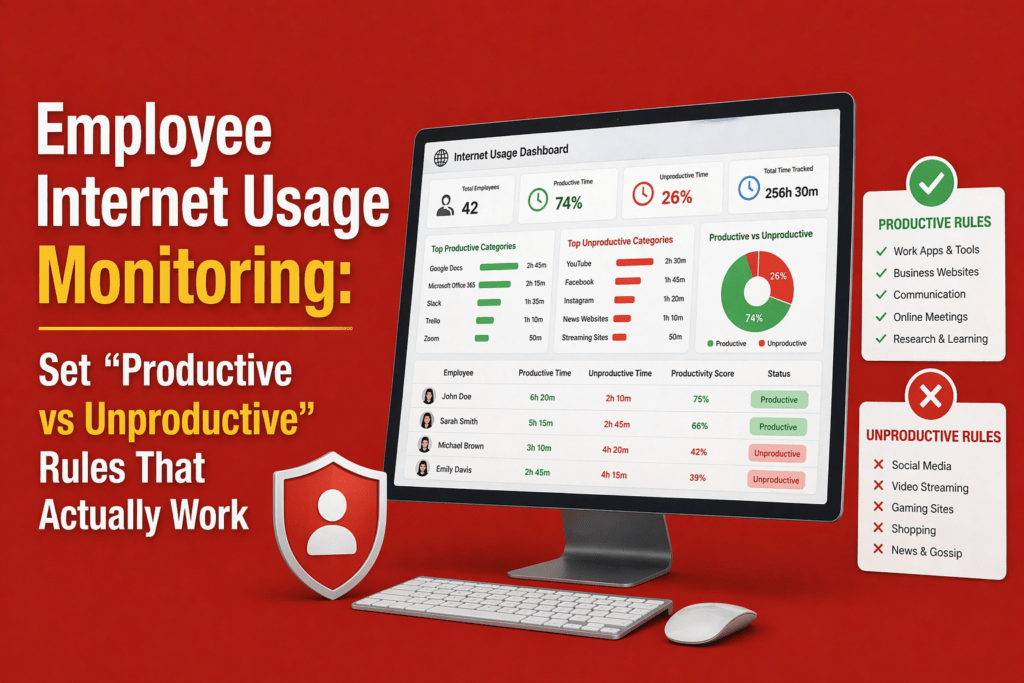
Creating a fair classification system requires clear definitions. Here is a three‑category framework you can adapt and expand by role:
Category 1: Productive
These are websites and apps directly tied to execution, delivery, analysis or approved workflows. Examples include:
- Project management tools (e.g., Jira, Asana)
- CRM platforms (e.g., Salesforce, Zoho)
- Internal systems and dashboards
- Documentation platforms (e.g., Confluence, Notion)
- Ticketing systems (e.g., Zendesk)
- Work‑related research sites and vendor portals
Category 2: Neutral but necessary
Neutral tools aren’t strictly productive, but they enable work. They should not count against employees, nor should they inflate productivity scores. Examples:
- Search engines (Google, Bing)
- Email and internal chat (Slack, Teams)
- Calendars and meeting tools (Google Calendar, Zoom)
- Documentation browsing and industry forums
- Approved AI tools under policy (e.g., ChatGPT for brainstorming)
- Temporary research paths and personal scheduling during breaks
Category 3: Unproductive
These sites and apps distract from work, especially when used during core work hours. Examples:
- Entertainment streaming (Netflix, Spotify)
- Social scrolling without role justification (Instagram, TikTok)
- Gaming platforms and gambling sites
- Online shopping and personal finance portals
- Personal messaging or texting on company devices
How to Set Productive vs Unproductive Rules by Team
Sales and business development
Sales teams live in CRMs, email outreach tools, and networking platforms. LinkedIn may be productive for prospecting, as are prospect research databases and competitor analysis sites. Long stretches on internal chat might be neutral — they enable coordination — but constant entertainment streaming is unproductive.
To achieve productive engagement, provide clear guidelines that support prospecting while discouraging personal social media use.
Recruiting and HR
Recruiters rely on job boards, LinkedIn, applicant tracking systems and talent‑sourcing tools. Employer review sites like Glassdoor may be neutral or productive depending on the workflow. HR also needs access to compliance and benefits portals. Keep general social media unproductive, but classify candidate outreach channels as productive. Provide guidance on acceptable use of generative AI and data privacy when handling resumes.
Marketing
Marketing teams use social media, advertising platforms, analytics dashboards and creative tools. YouTube might be unproductive for some roles but productive for campaign research. Competitor research and trend‑spotting sites should be neutral or productive. Marketing should treat entertainment sites as unproductive. Because marketing collaboration is high, encourage the use of neutral buckets for ideation tools and protect focus time with deep‑work policies.
Engineering and product
Developers and product managers rely on source repositories (GitHub), documentation, bug tracking, design systems and industry forums. Stack Overflow and developer blogs are productive. Long collaboration time in chat or video can be neutral, but leaving a browser open on idle should not count as productive. Focus on the classification that distinguishes between active coding sessions and passive reading.
Support and operations
Support teams and operations staff need ticketing systems, knowledge‑base platforms, CRM records and chat tools. Chat may be productive when resolving issues and neutral when waiting for responses. Repeated context switching can cause burnout; define a neutral category for downtime. Combine internet usage data with metrics like ticket resolution times and customer satisfaction rather than relying on raw app usage.
Common Mistakes That Make Internet Usage Monitoring Backfire
Even with the right intent, employee internet usage monitoring can quickly become ineffective if the approach is too rigid or poorly designed. Before you refine your system, it helps to recognize the common mistakes that cause monitoring to backfire:
- Using one classification library for everyone: When every department shares the same rulebook, you mislabel legitimate work as distractions and create noise.
- Treating all social media as unproductive: Platforms like LinkedIn, Twitter and YouTube can be essential for recruiting, marketing, and support. Blanket bans hinder productivity.
- Ignoring passive vs active time: Time spent with a browser open doesn’t always mean work is happening. Flowace differentiates between active and idle time, an essential feature when you’re evaluating productivity.
- Confusing visible activity with meaningful work: Seeing someone in a CRM all day doesn’t guarantee results; they might be stuck or doing low‑value tasks. Combine usage data with outcomes.
- Failing to review unrated or newly adopted tools: New AI tools, industry platforms, and productivity apps emerge constantly. Ignoring unrated entries leads to classification drift.
- Using labels to punish instead of investigate: Monitoring should be about improving workflows, not catching people. If you weaponize data, employees will hide usage or disengage.
How to Use Internet Usage Data Without Creating a Surveillance Culture
Focus on patterns, not policing
Monitoring should uncover patterns that inform coaching and resource allocation, not track every keystroke. Instead of looking for individual offenders, analyze aggregate trends: which teams are overloaded, which tools cause delays, and where can workflows be optimized? Use the data to support wellbeing, not to micromanage.
Use monitoring to improve data quality, not catch people
High‑quality data helps you identify systemic bottlenecks, spot burnout early and allocate resources effectively. Data‑driven decisions reduce time theft and improve billing accuracy, boosting profitability.
Be transparent about what is tracked and why
Transparency is a trust multiplier. A 2026 HR Stacks survey found that 42 % of U.S. employees say they’re monitored, while 17 % aren’t sure, and 61 % of heavily monitored employees want more influence over technology decisions.
Explain what’s being tracked (apps and websites, not keystrokes or private messages), why you’re doing it (to improve productivity and well‑being), and how you protect privacy. Give employees a voice in the process.
Use multiple signals, not web usage alone
Productivity is multifaceted. Combine internet usage with task completion, working hours, outcome metrics, customer feedback, and time‑on‑task information. This gives you a more complete and accurate view of how work is getting done, instead of relying on a single data point.
When you depend only on web activity, you risk misreading behavior. Someone may spend less time in a browser but deliver high-impact results, while another may appear constantly active without producing meaningful outcomes. By layering multiple signals, you reduce blind spots and avoid drawing the wrong conclusions.
What to Look for in Employee Internet Usage Monitoring Software
Selecting the right tool can make or break your monitoring strategy. Key capabilities include:
- Flexible productivity categories: Look for software that supports productive, unproductive, and neutral classifications so you can tailor rules by role. Flowace allows multiple categories rather than a rigid binary.
- Role‑based or group‑based classification: Choose tools that let you assign categories by team or individual role.
- Clear app and website usage reports: You need digestible dashboards that show time spent by app, website, project, and team. Reports should distinguish active vs passive time, highlight anomalies, and allow drill‑downs.
- Visibility into active vs passive time: Tools should detect when a user is actively interacting with a site (typing, clicking) versus when a window is just open in the background. This helps avoid counting idle time as productive.
- Privacy‑aware monitoring controls: Look for features like privacy mode, blurred screenshots, or opt‑in tracking. Flowace emphasises non‑invasive monitoring as heavy surveillance disrupts engagement.
- Easy reclassification and ongoing review: Administrators should be able to recategorize sites quickly and apply changes across teams without rewriting rules from scratch.
- Reporting that supports coaching, not just control: Data should be presented in ways that encourage manager‑employee conversations and highlight coaching opportunities.
How Flowace Helps You Set Productivity Rules That Reflect Real Work
Flowace is an automated, AI‑powered time tracking and productivity platform designed for modern teams. It combines hands‑free automatic time capture, silent monitoring, attendance management, project and task tracking, website and app usage classification, and productivity scoring into an affordable package. Here’s how Flowace helps you build rules that actually work:
- Monitor apps and websites used during work hours: Flowace automatically logs which applications and websites employees use and classifies them into productive, neutral, and unproductive categories. Administrators can customize classifications by role or team.
- Classify usage into meaningful productivity buckets: Through AI‑assisted tagging and customizable rules, Flowace maps activity to projects and tasks. Neutral buckets ensure you don’t mislabel research or communication tools.
- Support role‑based productivity visibility: Dashboards show time spent by team, role, and individual, highlighting workload imbalances and helping managers allocate tasks fairly.
- Reduce noise in reporting: Flowace distinguishes active vs idle time, filtering out open but unused tabs. This eliminates overcounted “productive” time and gives you cleaner data.
- Help managers review trends and exceptions: Weekly and monthly reports surface outliers, unrated tools and productivity dips, prompting timely classification reviews and coaching sessions.
- Balance visibility with privacy‑first implementation: Flowace offers privacy modes, optional screenshots, and compliance controls so employees know they’re being tracked responsibly. Transparent settings help build trust and meet regional labour law requirements.
Flowace offers tiered pricing to fit different business sizes. Plans start around $2.99 per user per month for basic features, with Standard and Premium tiers adding productivity ratings, integrations, executive dashboards and dedicated account management. A free trial is available, and annual plans reduce per‑user costs. Because Flowace’s pricing is straightforward and affordable, small teams can start small and scale up as they grow.
Final Takeaway
Turning on employee internet usage monitoring is easy. The hard part is building fair, role-based classification rules that actually reflect how work gets done. That is the part that matters most.
When your productive and unproductive rules are shaped by real team workflows, your reports become more reliable and your decisions become more fair. Simple binary labels usually create noise and mistrust. Context-aware rules do the opposite. They give you cleaner data, better coaching opportunities, and a healthier view of how your team works.
Start by classifying websites based on role. Use neutral or unrated categories where they make sense. Keep policy violations separate from performance judgments. Review your rules regularly so they stay relevant. And be transparent with your team so monitoring feels like support, not surveillance.
With a platform like Flowace, you can automate time tracking, apply context-based rules, and build a productivity culture that balances visibility with respect. Better rules create better data, and better data helps you make smarter decisions.
See how Flowace makes role-based monitoring simple. Book your free demo now.
FAQs:
Q: Is employee internet usage monitoring legal?
A: Laws vary by country and state. In many jurisdictions, employers can monitor internet usage on company devices if they inform employees and limit data collection to legitimate business purposes. Always consult local labour and data‑protection laws before implementing monitoring.
Q: How can we monitor internet usage without hurting morale?
A: Transparency and fairness are key. Explain what is tracked and why, involve employees in setting rules, classify sites by role and context, and review policies regularly. Research shows that 61 % of heavily monitored employees want a stronger voice in technology decisions.
Q: What’s the difference between productive, neutral and unproductive websites?
A: Productive sites directly support work tasks (e.g., project management, CRM). Neutral sites enable work or coordination without directly creating output (e.g., search engines, email). Unproductive sites distract from work (e.g., streaming, gaming). An unrated category captures new or ambiguous sites until they are reviewed.
Q: How often should we update our classification rules?
A: Review unrated entries weekly, adjust team‑specific rules monthly, and update your classification library quarterly. This cadence prevents classification drift and ensures new tools and workflows are properly categorized.