Employee Monitoring Laws by State 2026



Published: August 2026 · Last Updated: August 2026 · Last Verified: August 2026
Employee monitoring laws are legal in the United States, but the rules change by state and by what you are monitoring. Connecticut, Delaware, and New York have employee monitoring notice requirements, while other states have rules that can apply to things like call recording and biometric data.
This article breaks down federal law state by state, including consent, notice, and recording rules.
Is employee monitoring legal in the US?

Yes, employee monitoring is legal in the US. Employers can generally monitor activity on company systems for legitimate business purposes, but the rules vary by state and by the type of monitoring involved.
Connecticut, Delaware, and New York require employers to notify employees about certain types of electronic monitoring. Starting January 1, 2027, Colorado will require notice when employers use AI or automated decision-making tools in employment decisions.
Other states have rules that apply to specific technologies or types of data. Illinois, Texas, and Washington, for example, have laws that cover biometric data.
Ten states clearly require everyone’s consent before you record a call or meeting. Two more, Delaware and Nevada, have laws that conflict with themselves or with court rulings. That split is covered in the recording section below.
Quick Comparison State-By-State Table
The table below covers the state rules that differ from the federal baseline, including consent, notice, and recording requirements.
|
State |
Notice before monitoring? | Consent before monitoring? | Recording a call/meeting |
Statute |
| Connecticut | Yes, written notice plus a posted notice. From Oct 1, 2026, the notice must name specific monitored locations, and new hires get a plain-language statement of what can be monitored without notice. | No separate consent requirement for general monitoring. | All-party consent for phone calls; one-party for in-person conversations. | Conn. Gen. Stat. § 31-48d, as amended by Public Act 26-73 |
| Delaware | Yes, a one-time signed notice, or a daily electronic notice (e.g., a login banner), before monitoring phone, email, or internet use. | Acknowledging the notice functions as consent. | Disputed. Delaware’s wiretapping statute (11 Del. C. § 2402) allows one-party consent, but a separate 1990s privacy statute (11 Del. C. § 1335) requires all-party consent for private conversations, and no Delaware court has resolved which one controls. Treat it as all-party until that’s settled. | 19 Del. C. § 705 (notice); 11 Del. C. §§ 2402, 1335 (recording, conflicting) |
| New York | Yes — written notice at hire with signed acknowledgment, plus a continuously posted notice. | No separate consent needed beyond the acknowledgment. | One-party consent for recording | N.Y. Civil Rights Law § 52-c |
| Colorado | Notice is required from Jan. 1, 2027, before using AI or automated decision-making in hiring, promotion, or termination decisions. It does not cover routine employee monitoring. | No general consent requirement. | One-party consent. | SB 26-189 (effective Jan 1, 2027) |
| California | No dedicated monitoring-notice law. The CCPA/CPRA requires notice when personal data is collected, which covers most monitoring data. | All-party consent to record a confidential call or conversation. | All-party consent. | Cal. Penal Code § 632 |
| Illinois | Written notice and policy required before collecting biometric data (e.g., fingerprint clocks). | Written consent required for biometric data specifically. | All-party consent for recording. | 740 ILCS 14 (BIPA), amended by SB 2979 |
| Texas | No general monitoring-notice law. Written consent required for biometric data. | One-party consent for calls; written consent for biometric data. | One-party consent. | Tex. Bus. & Com. Code § 503.001 (CUBI) |
| Washington | No general monitoring-notice law. | All-party consent to record any conversation. | All-party consent. | RCW 9.73.030 |
| Florida | No general monitoring-notice law. | All-party consent for recording (third-degree felony if violated). | All-party consent. | Fla. Stat. ch. 934 |
| Pennsylvania | No general monitoring-notice law. | All-party consent for recording (felony if violated). | All-party consent. | 18 Pa. Cons. Stat. § 5704 |
| Maryland, Massachusetts, Montana, New Hampshire | No general monitoring-notice law in any of these four. | All four require all-party consent to record, with no statutory ambiguity. | All-party consent in all four. | Md. Cts. & Jud. Proc. § 10-402 · Mass. Gen. Laws ch. 272 § 99 · Mont. Code Ann. § 45-8-213 · N.H. Rev. Stat. Ann. § 570-A:2 |
Every other state follows the federal baseline i.e. one-party consent to record, no dedicated notice statute for company-device monitoring. That’s not a free pass. General privacy law, NLRA protections, and industry rules still apply, which is what the sections below cover.
Disclaimer: This table is a general guide, not a complete statement of the law. Rules can vary based on what you monitor, the device involved, and the specific situation. Laws can change, so check the current statute before relying on any rule here. This is not legal advice. Use this table as a starting point and have a qualified employment attorney review your monitoring policy before putting it into practice.
Several states get miscategorized often enough to flag directly, and it’s worth separating genuine legal ambiguity from tracker sloppiness.
Oregon requires consent for phone calls but not in-person conversations. A flat “all-party” or “one-party” label misses that split.
Michigan‘s statute reads as all-party, but courts have carved out a participant exception, so trackers disagree on how to classify it.
Vermont has no wiretapping statute at all. Its rule comes entirely from case law.
Nevada‘s statute (NRS 200.620) reads one-party on its face. A 1999 Nevada Supreme Court decision led some older trackers to argue it functions as all-party in practice, but current legal sources are split, and more recent trackers increasingly classify it as one-party. Treat it as genuinely unsettled rather than picking a side with confidence.
Delaware‘s conflict is in the table above.
Disclaimer: If your workforce touches any of these states, confirm with counsel rather than relying on a one-line label.
Is employee monitoring legal in the US? The Federal Baseline
The ECPA Monitor For a Business Reason, or With Consent
The Electronic Communications Privacy Act bans intercepting electronic communications, including email, calls, and instant messages unless an exception applies. Two exceptions cover most workplace monitoring.
- Business purpose: Employers can monitor company systems for a real business reason as part of normal operations. Reviewing support calls for training or scanning email for malware both qualify.
- Consent: Monitoring is legal if one person in the conversation agrees. Under federal law, that can be the employee. A signed policy or an acknowledged login banner usually counts.
Violations carry statutory damages of at least $10,000 or $100 per day, whichever is greater, plus possible criminal penalties.
The Stored Communications Act And Saved System Data
This law makes accessing stored communications without authorization illegal. The employer exception allows you to access communications stored on your own systems if your policy says so and employees know.
Reviewing a company email account is fine when employees have been told it is monitored. Reaching into a personal account, even one logged into on a work laptop, is not.
The NLRA Protects Employee Discussing Work Conditions
The NLRA is not a privacy law, but it limits monitoring in one specific way. You can’t use monitoring to interfere with employees discussing wages, working conditions, or unionizing, whether they are in a union or not.
The NLRB’s 2023 Stericycle decision treats broad recording bans and heavy surveillance policies as presumptively unlawful if they would make a reasonable employee hesitate to exercise those rights.
Some 2022 guidance on algorithmic monitoring was walked back in 2024-2025, but this underlying protection was not.
Include a line in your policy stating that nothing in it restricts legally protected activity.
CFAA, ADA, and FMLA Narrower Boundaries
The Computer Fraud and Abuse Act makes accessing a device or account without authorization illegal. This is why installing monitoring software on a personal phone without clear written consent is a real legal risk.
The ADA requires employers to keep any health or disability data collected by a monitoring tool confidential and share it only with people who need it for accommodation.
The FMLA carries the same confidentiality bar for anything tied to a leave request.
None of these laws block monitoring work activity. They block monitoring from becoming a backdoor into data you were never supposed to collect.
See how Flowace helps you monitor work activity while keeping privacy in mind.
Explore Privacy ModeHow Do Employee Monitoring Laws Differ by State in 2026?

Employee monitoring laws differ by state mainly in notice, consent, technology-specific rules, and AI-disclosure rules. Federal law sets the baseline, while some states add their own requirements.
The Three Notice States And What Changes October 1, 2026
Connecticut requires prior written notice, usually satisfied with a posted policy or signed acknowledgment. There is an exception if you have reasonable grounds to believe an employee is breaking the law.
Penalties are $500 for a first violation, $1,000 for a second, and $3,000 after that.
Public Act 26-73, effective October 1, 2026, adds two requirements. The notice must name the specific locations being monitored, and new hires must get a written plain-language statement covering what can be monitored without notice.
That’s a separate law from Connecticut’s SB 5, the AI Responsibility and Transparency Act. SB 5 phases in on a staggered schedule: the AEDT framework, developer-deployer rules, and the WARN Act AI-layoff disclosure take effect October 1, 2026, the same date as Public Act 26-73, which is why the two get confused.
But the part of SB 5 that requires notifying an individual employee or job candidate before an AI-assisted employment decision doesn’t take effect until October 1, 2027. Guides that treat these as one law, or SB 5 as fully effective on October 1, 2026, get it wrong.
Delaware allows a one-time signed notice or a daily electronic notice before monitoring phone, email, or internet use.
New York requires written notice at hire with a signed acknowledgment, plus a continuously posted notice. There is no additional consent requirement beyond that acknowledgment.
One-Party vs. All-Party Consent For Recording
This is a separate legal question from monitoring a screen. It only applies to recording audio.
In one-party states, which covers most of the country, you can record a conversation you’re part of without telling anyone. In all-party states, everyone has to agree first. Massachusetts and Pennsylvania both make unauthorized recording a felony.
Ten states are unambiguously all-party: California, Connecticut (phone calls only), Florida, Illinois, Maryland, Massachusetts, Montana, New Hampshire, Pennsylvania, and Washington.
Delaware and Nevada get added to some trackers’ lists and left off others. Delaware because two of its own statutes contradict each other, Nevada because a 1999 state supreme court ruling is interpreted differently depending on who you ask.
Treat both as all-party until your own counsel tells you otherwise.
Cross-state calls follow the stricter state’s rule. A New York employer, which is one-party, calling a California customer, which is all-party, needs everyone’s consent.
Playing a recorded-line disclosure on every call, everywhere, sidesteps the question entirely.
Biometric Monitoring in Illinois, Texas, and Washington
Illinois’ BIPA is the strictest. It requires written notice, a public policy, and written consent before collecting biometric data, including fingerprint time clocks.
Damages used to be calculated per scan. One employee badging in daily for a year could theoretically claim hundreds of violations.
SB 2979, signed August 2, 2024, capped that at one recovery per person regardless of scan count. It overturned the Illinois Supreme Court’s Cothron v. White Castle decision.
A 2026 Seventh Circuit ruling confirmed the cap applies retroactively to pending cases.
If a source still cites “$1,000–$5,000 per scan,” it’s describing the pre-2024 rule.
Texas’ CUBI law requires consent before collecting biometric identifiers. It also treats unauthorized GPS tracking of a personal vehicle as a misdemeanor.
Washington has no employer-specific biometric law, but its general biometric privacy statute requires notice and consent for commercial use of biometric identifiers.
AI-Specific Disclosure And Why AB 1221 Isn’t Part Of It
Colorado’s SB 26-189 covers AI and automated decision-making. Signed May 14, 2026, it requires notice before using these tools for hiring, promotion, or termination, along with an explanation if they lead to an adverse decision.
It replaces a broader 2024 version of Colorado’s AI law and takes effect January 1, 2027. It did not take effect in mid-2026, as some sources still state.
Connecticut’s SB 5 covers similar ground but on a staggered timeline. Its AEDT framework and the WARN Act AI-layoff disclosure requirement start October 1, 2026. The provision that actually requires notifying an individual employee or candidate before an AI-assisted employment decision is most comparable to what Colorado’s law does. It doesn’t take effect until October 1, 2027.
The correction that matters most is California’s AB 1221. The “workplace surveillance tools” bill would have required 30 days’ notice before deploying new monitoring technology.
AB 1221 died in an Assembly committee on February 2, 2026, after clearing two earlier votes. It never became law.
If a 2026 guide describes California as requiring 30-day surveillance notice “effective January 2026,” it’s describing a bill that failed.
California employers are still governed by the CCPA/CPRA’s general notice-at-collection rule and the all-party consent rule for recordings. There is nothing surveillance-specific.
What About the Other States?
If your state isn’t named above, you’re on the federal floor: one-party consent to record, no dedicated notice statute for company-device monitoring.
General privacy law and the NLRA protections above still apply regardless.
What Are the Time Tracking and Recordkeeping Requirements?
Monitoring law governs what you can watch. Recordkeeping law governs what you have to keep and prove. They are related but separate questions, and a lot of the practical risk sits here.
The FLSA requires accurate time records for at least two years and payroll records for at least three. Time clocks, spreadsheets, or software all work, as long as records are complete.
The Department of Labor’s Wage and Hour Division recovered more than $259 million in back wages for nearly 177,000 workers in fiscal year 2025. That was the highest total since 2019, much of it tied to unrecorded overtime and off-the-clock work.
Rounding clock-ins down, letting employees estimate hours, or missing required breaks are the specific fact patterns behind wage-and-hour lawsuits.
California’s meal-period rules are a clear example. The burden of proof that a break actually happened falls on the employer, which means you effectively have to track it.
If you employ anyone outside the U.S., the rules change entirely. The EU’s GDPR and Working Time Directive, the UK’s Working Time Regulations, and opt-in consent requirements in countries like Germany and South Korea all apply on top of, not instead of, whatever you’re doing for U.S. staff.
This guide is written for U.S. employers. Treat every other country as its own jurisdiction.
What Can Employers Legally Monitor at Work?
Employers can legally monitor work activity on company devices and accounts, but the rules depend on what they monitor and whether the device belongs to the company or the employee.
Employer Devices vs. Personal Devices (BYOD)
You have the strongest legal footing on devices and accounts you own. That footing weakens fast on a personal phone or laptop. If BYOD is unavoidable, use a separate work profile or container rather than full-device monitoring, with clear written consent describing exactly what’s collected.
Screenshots and Keystroke Logging
These are the two highest-risk monitoring types because they capture rich, often unrelated content. Ask first whether a summary, such as app usage or time on task, meets the actual need. If screenshots are genuinely necessary, limit frequency, exclude sensitive windows like banking or health portals, and set a short retention window before automatic deletion.
Email, Chat, and AI-Tool Usage
Monitoring work email and chat for security reasons is broadly legal on company systems. Check metadata first, such as sender, recipient, and timestamps, and pull full content only when a specific trigger, like a data-loss-prevention rule, fires.
The same logic extends to AI writing tools. Track whether sensitive data is leaving through them, without treating every query as something a human needs to review.
Public Perspectives on Employee Monitoring Laws
A look at public perspectives on workplace monitoring, employee privacy, and how these laws are viewed in practice.
This r/WFH thread is a good snapshot of what actually worries U.S. employees about remote monitoring. Personal devices, off-hours tracking, and how much an employer can see once work leaves the office.
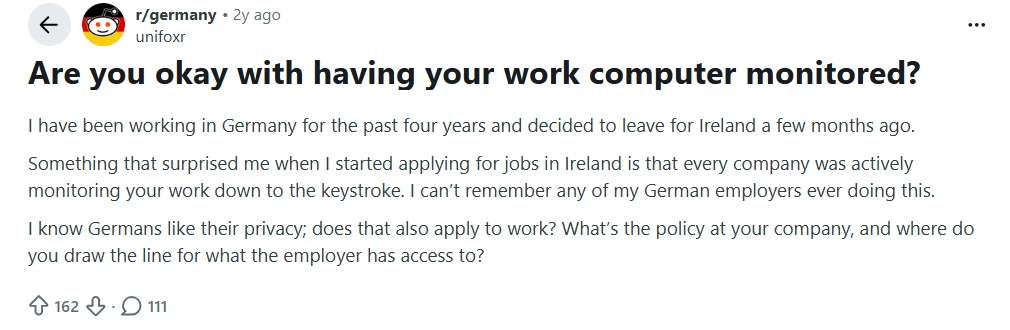
Image Alt text: The point of argument in this thread is US laws related to employee privacy, workplace tracking, personal devices, and remote employee monitoring.
How Flowace Handles Employee Monitoring
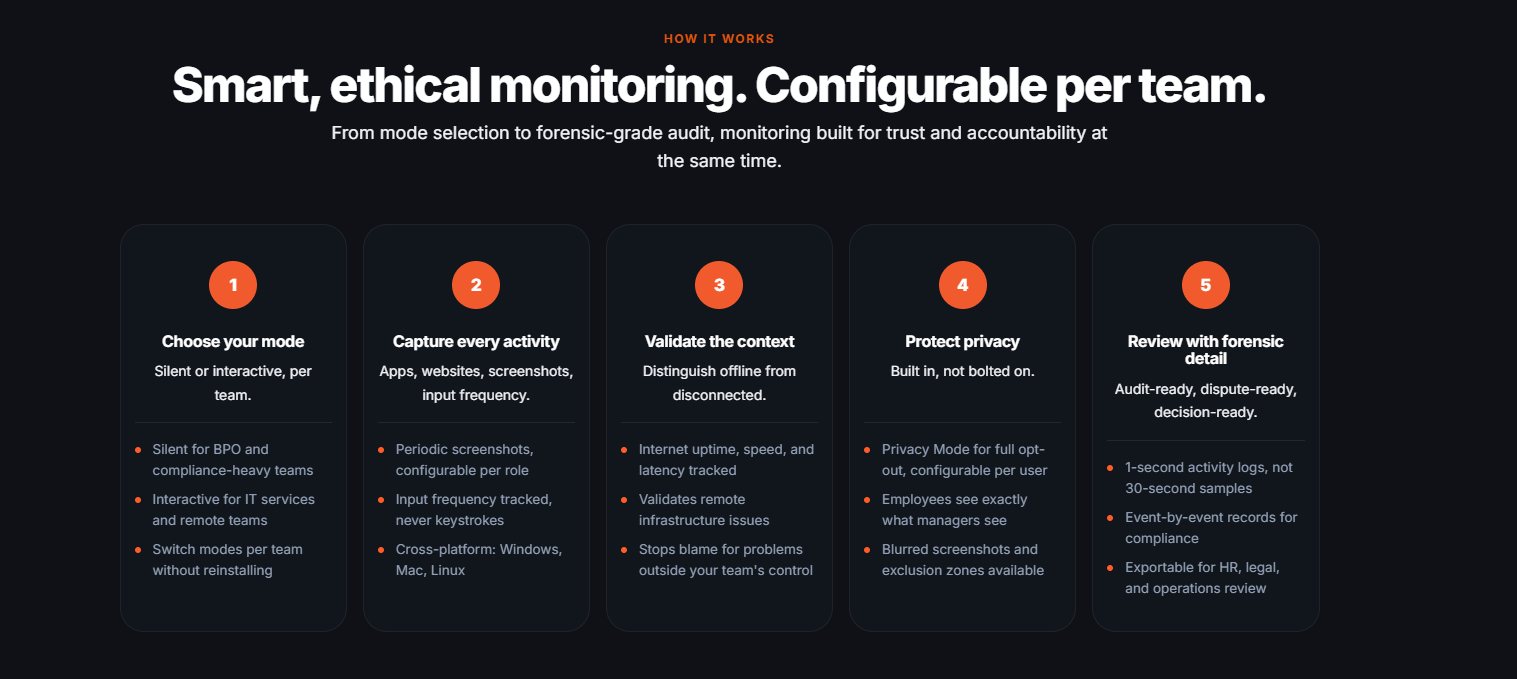
Image alt text: Flowace employee monitoring workflow showing activity tracking, context validation, privacy controls, and detailed audit logs.
Flowace gives teams a better understanding of where work time is spent by tracking time, app usage, and productivity trends. It helps protect user privacy by avoiding keystroke monitoring or recording individual keystrokes. However, it can automatically take screenshots at certain intervals.
Instead of taking screenshots all day, teams can specify when they are needed, such as for confirming billable client work. Employers have more flexibility over what they monitor and how much information they collect.
What Should an Employee Monitoring Policy Include?
Two of the highest-traffic searches that land on this page are “employee monitoring policy” and “employee monitoring policies.” Many readers want to know what to put in writing and what the law requires.
At minimum, a policy states what you monitor, why, who can see the data, and how long you keep it. Match the format to your state: a signed acknowledgment for New York, a posted-plus-written notice for Connecticut, a daily banner or signed notice for Delaware.
Where no state law applies, write it down anyway. A documented policy gives you useful evidence if a monitoring decision is ever challenged.
A full policy needs more structure than fits here, including scope, employee rights, and an appeals process for disputed data.
Also Read: Flowace’s Employee Monitoring Policy Template: 8 Must-Have Sections
What Are the Latest Employee Monitoring Law Changes in 2026?
- Feb 2, 2026: California’s AB 1221 died in committee. Never became law, despite still appearing in some guides as “effective January 2026.”
- Aug 2, 2024: Illinois capped BIPA damages at one recovery per person, overturning Cothron v. White Castle. A 2026 Seventh Circuit ruling confirmed the cap applies retroactively.
- May 14, 2026: Colorado signed SB 26-189, an AI/automated-decision notice law replacing its 2024 AI Act, effective January 1, 2027
- Oct 1, 2026: Public Act 26-73 brings Connecticut’s tighter monitoring-notice rules into effect. Connecticut’s separate SB 5 also begins phasing in the same day, but only its AEDT framework and WARN Act AI-layoff disclosure. The employee/candidate notice requirement under SB 5 doesn’t take effect until October 1, 2027.
- FY2025: DOL’s Wage and Hour Division recovered its highest back-wage total since 2019. Recordkeeping enforcement hasn’t slowed down while attention shifted to AI.
What Next Should Employers Should Do?
Employee monitoring is legal in the U.S., but the rules can change by state and by what you monitor. Start with a clear policy, tell employees what you collect, limit access to the data, and check the rules in every state where you have employees.
Laws can also change, so review your policy regularly and have counsel check it before you put it into practice.
See how Flowace puts employee monitoring into practice.
Check Employee Monitoring softwareFrequently Asked Questions About Employee Monitoring Laws
1. Is employee monitoring legal in the US?
Yes, it is legal to monitor employees in the United States. For a valid business use, monitoring company-owned devices and networks is allowed by federal law.
2. What states require employers to notify employees of electronic monitoring?
Connecticut, Delaware, and New York have dedicated notice laws. Starting January 1, 2027, Colorado will require notice for AI-driven employment decisions.
3. What’s the difference between one-party and all-party consent for recording?
The difference is who must agree. One-party consent requires one person on the call to agree, and that can be you. All-party consent requires everyone to agree. Ten states clearly require all-party consent. Delaware and Nevada are disputed, so different sources count them differently.
4. Is California’s AB 1221 workplace surveillance law in effect?
No. It died in an Assembly committee on February 2, 2026. California employers are still governed by the CCPA/CPRA’s general notice rule and the state’s all-party consent rule for recordings.
5. Do employers have to tell employees about monitoring software?
Employers must tell employees about monitoring software in Connecticut, Delaware, and New York. In other states, monitoring-specific laws generally do not require notice, but a disclosed and documented policy can help if monitoring is challenged.
6. How long must employers keep time-tracking records?
Employers must keep time records for at least two years and payroll records for three years under the FLSA. Some states require longer.
7. Can monitoring data be used for discipline or termination?
Yes, but it shouldn’t be the sole basis. Using work output, manager notes, and a fair review process alongside monitoring data can reduce wrongful-termination and discrimination risk.
8. Is it legal to monitor a personal device used for work (BYOD)?
Monitoring a personal work device is legally riskier than monitoring a company-owned device. Courts generally expect monitoring to be limited to a work-specific container, clearly disclosed, and based on real consent rather than full-device access.
____________________________________________________________________________________
Citations
- California Legislative Information — official AB 1221 bill record, status as of Feb 2, 2026
- Connecticut General Assembly — Public Act 26-73 (SB 472), full text, 2026
- New York State Senate — Civil Rights Law § 52-c, official codified text
- Illinois General Assembly — SB 2979 official bill status / Public Act 103-0769
- Colorado General Assembly — SB 26-189 official bill page, signed May 14, 2026. Official title: “Concerning the Use of Automated Decision-Making Technology in Consequential Decisions” confirms the AI/ADMT scope directly, not via secondary summary.
- Florida Senate — Florida Statutes Chapter 934, official text
- Pennsylvania General Assembly — Title 18, Chapter 57, official text
- Washington State Legislature — RCW 9.73.030, official text
- U.S. Department of Labor, Wage and Hour Division — FY2025 back-wage recovery announcement, January 2026
Law firm and legal-press commentary, all dated 2025-2026, used to explain and confirm the primary sources above:
- Carmody Law, New Connecticut Employment Laws from the 2026 Legislative Session, 2026
- Fisher Phillips LLP, Connecticut Employers Need to Prepare for New Workplace AI Law, May 2026
- Ogletree Deakins, Colorado’s New AI Act Targets Automated Decision-Making for Consequential Decisions, May 2026
- WilmerHale, Year in Review: 2024 BIPA Litigation Takeaways, February 2025
- National Law Review, coverage of the Seventh Circuit’s BIPA retroactivity ruling, April 2026
- Shipman & Goodwin LLP, Connecticut’s AI Responsibility and Transparency Act: Key Impacts on the Workplace, May 2026 source for SB 5’s staggered effective dates
- WilmerHale, What Companies Should Know About Connecticut’s New Omnibus AI Law, June 2026 confirms the October 1, 2027 date for SB 5’s individual notice/pre-decision disclosure obligation
More Statute citations:
- Delaware 11 Del. C. § 2402 and § 1335, 19 Del. C. § 705
- California Penal Code § 632
- Texas Bus. & Com. Code § 503.001
- Maryland Cts. & Jud. Proc. § 10-402
- Massachusetts Gen. Laws ch. 272 § 99
- Montana Code Ann. § 45-8-213
- Nevada Rev. Stat. § 200.620
- New Hampshire Rev. Stat. Ann. § 570-A:2.
Case law and additional sources for the Delaware/Nevada disputes:
- Lane v. Allstate Ins. Co., 969 P.2d 938 (Nev. 1998) — the case behind Nevada’s disputed all-party-vs-one-party classification
- Reporters Committee for Freedom of the Press, Delaware recording-law guide — source for the conflict between Delaware’s two statutes (11 Del. C. § 2402 vs. § 1335)