Key takeaways:
- A significant portion of billable legal work goes unrecorded due to manual time tracking, memory-based timesheets, and frequent context switching.
- Manual timers and after-the-fact time entry interrupt focus, create friction, and result in inaccurate, defensive billing records.
- Passive, automated time tracking software is better suited to legal workflows because it captures work as it occurs without disrupting lawyers.
- Effective tools must integrate seamlessly with legal billing and practice management systems like Clio and PracticePanther.
- Trust and privacy are critical: the best solutions separate productivity insights from surveillance and protect client confidentiality.
- Flowace stands out by functioning as a revenue recovery layer, automatically identifying billable work without manual input.
- Other tools (Clio, TimeSolv, Toggl, Clockify, RescueTime, Harvest) offer varying trade-offs between automation, billing integration, cost, and legal specificity.
- Fully manual tools are more affordable but carry a higher risk of missed billable time unless user discipline is extremely high.
- Firms that want accurate billing without micromanagement need tools that adapt to lawyer behavior, not the other way around.
If you run or manage a law firm, you know that a large share of billable legal work goes unrecorded. The best time tracking software for law firms addresses this gap by capturing the work that happens between emails, short calls, quick research checks, and routine follow-ups that feel too small to log.
These moments rarely make it into timesheets because they feel too small to stop and log. But taken together, they represent a serious revenue gap.
Industry studies consistently show that lawyers lose 20–30% of billable time to forgotten emails, short phone calls, quick research checks, and constant context switching. That loss compounds quietly, month after month, without showing up as a clear red flag.
When lawyers are forced to choose between billing accuracy and staying focused on client work, billing accuracy usually loses. By the end of the week, timesheets become educated guesses instead of reliable records. As a result, many firms adopt time tracking over block billing.
If your goal is to grow billable hours without micromanaging your lawyers, your tool stack matters. The best time tracking software for lawyers works quietly in the background and records every meaningful work without interrupting how lawyers actually work.
In this guide, we break down the tools that genuinely support passive time tracking software, seamless legal billing software integration, and reduced time leakage across client work.
The Real Reason Law Firms Struggle to Capture Billable Time

You hear the same complaints across firms:
- Lawyers forget to log time
- Timesheets are inaccurate
- Billing disputes keep increasing
It’s tempting to treat these as discipline or compliance issues. But that assumption ignores how fragmented and interruption-driven legal work really is.
As a managing partner or practice manager, you know this reality well. Your lawyers don’t work in neat, uninterrupted blocks. They constantly switch between client calls, drafting, research, emails, internal discussions, and quick clarifications. This can happen dozens of times an hour. If you rely on manual timesheets, such context switching, every task can not be documented accurately.
If you use a manual timer, again, you’re interrupting your lawyers. Starting and stopping a timer pulls attention away from actual legal work. It forces lawyers to think about tracking while they’re trying to think like lawyers. Over time, this creates friction.
By the end of the day, recall becomes the fallback. But memory is unreliable, especially after a long day of complex work. So timesheets get filled in defensively rather than precisely.
The core issue isn’t that lawyers don’t care about billing. It’s that most systems expect behavior that doesn’t match how legal work actually happens.
Fixing this requires a different approach. One that removes manual intervention instead of adding it. A passive time tracking software works best in this setting. These automated time tracking software works in the background, capturing meaningful activity without forcing lawyers to change how they work or think.
When tracking adapts to user behavior, you get more accurate data without burning out your team.
Our Evaluation Criteria for the Best Time Tracking Software for Law Firms in 2026
When we evaluated the Best Time Tracking Software for Law Firms, we focused on criteria that matter to managing partners, senior associates, and legal practice managers who are responsible for both revenue and trust.
First, we looked at how much effort the tool demands from your lawyers. You shouldn’t completely rely on memory or manual timers to capture billable work. We prioritized solutions that record work without disrupting focus.
Next, we assessed how well each tool fits into your existing systems. You need reliable legal billing software integration. So, we favored tools with native or proven compatibility with platforms like Clio, PracticePanther, and core accounting systems to ensure smooth billing workflows.
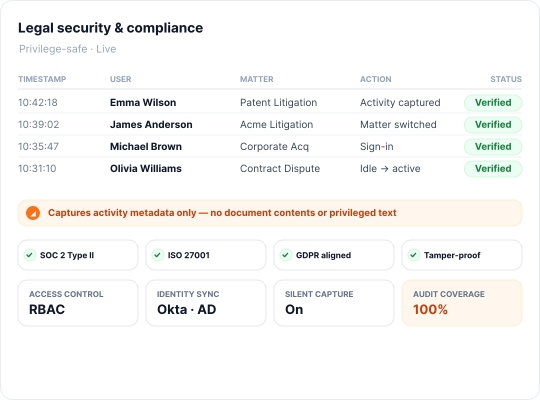
Trust is non-negotiable in legal practice. Therefore, we evaluated whether these tools clearly separate productivity data from surveillance, protect lawyer-client confidentiality, and provide audit trails without exposing sensitive content.
Finally, we examined how precisely time is captured. You lose revenue when short tasks are not documented accurately. The best time tracking software can log a two-minute email, a quick call, or research spread across multiple tabs. That level of granularity is essential to recovering unbilled time without adding friction to your team’s daily work.
The 7 Best Time Tracking Software for Law Firms in 2026
1. Flowace — The Revenue Recovery Choice

Flowace takes a very different approach from traditional time trackers, making it one of the best time tracking software for law firms focused on revenue recovery rather than manual logging.
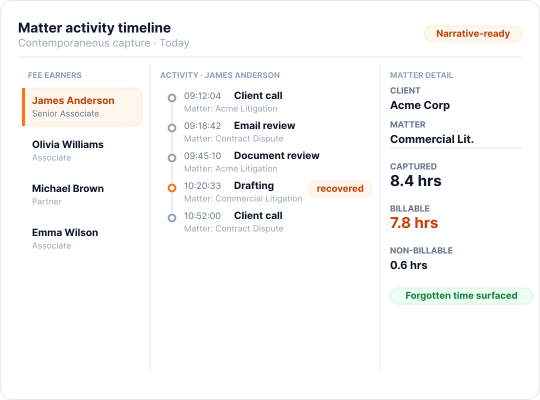
Flowace works entirely in the background as it starts recording work as soon as you log into your laptop. You don’t need to start or stop timers. The system automatically captures work activity: apps used, websites visited, and active work patterns, and builds an automated timesheet for you.
Flowace functions more like a revenue recovery layer. Rather than relying on lawyers to log their own time, it identifies billable work as it actually happens and can even categorize it into productive and non-productive work.
The platform uses automated tracking and AI-driven analysis to remove manual timesheets altogether, so billing accuracy improves without adding friction or creating the feeling of oversight.
Key Features:
- Automatic timesheet creation based on real work signals such as app usage, website activity, and document interaction.
- Fully passive, silent background tracking with no timers or manual input.
- Idle-detection with alerts to adjust entries when you step away.
- AI-driven alerts that flag productivity dips and unusual patterns.
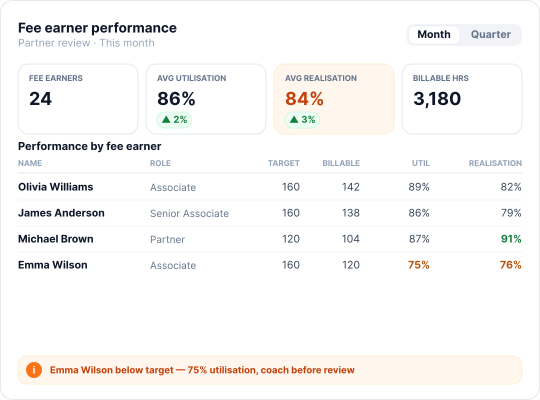
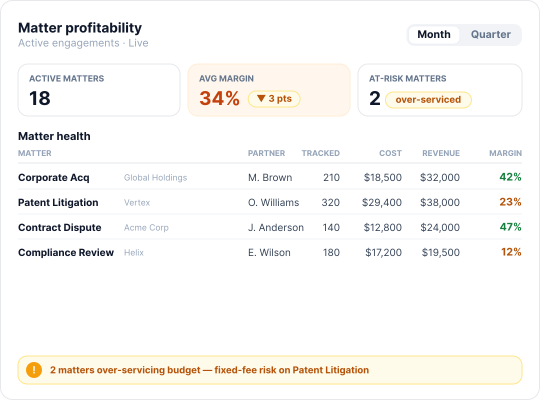
- Productivity dashboards for visibility across individuals and teams.
- Optional periodic screenshots that act as visual proof of work (Provides evidence without requiring lawyers to over-explain or recreate timelines).
Pros:
- Truly passive tracking with no timers, manual entries, or reminders.
- Prevents billable time loss caused by context switching and micro-tasks.
- Configurable privacy controls that let firms decide how much detail is recorded.
- Designed to support compliance and lawyer–client confidentiality.
- Provides objective proof of work to support invoices during hourly billing or retainer disputes.
Cons:
- Some lawyers may resist due to perceived surveillance.
- Captures all activity, requiring firms to trust that data is used for billing accuracy and not for micromanagement.
Pricing:
- Flowace pricing offers tiered plans. Its Basic plan starts around $2.99 per user per month (billed annually). The Standard plan is about $4.99/user/month, and Premium is $10.99/user/month. (Free trial available).
- Customized packages are available for enterprise customers.
2. Clio Manage — The All-in-One Practice Platform

You’re looking at a platform that really centralizes everything a law firm needs. Clio Manage is a full-featured, cloud-based practice management suite designed specifically for legal professionals. You can handle case management, client and matter intake, calendars, documents, trust accounting, billing, invoicing, basically, everything under one roof.
Clio also emphasizes workflow automation, so you can streamline the entire billing process, reduce errors, and free up your team to focus on legal work rather than administrative tasks. Many firms consider Clio among the best time tracking software for law firms when their priority is an integrated legal operations stack rather than automation.
Key Features:
- Case and document management.
- Trust accounting.
- Calendaring with Outlook and Google sync.
- Built-in timers and time entry for each task.
- Billing engine that auto-generates invoices from logged time.
- Deep billing integration that populates client bills with matter-specific time descriptions once time is entered.
Pros:
- End-to-end platform designed specifically for legal workflows.
- Unified system providing a single view of clients, matters, documents, and billing.
- Integrates with legal payments, case tools, and other law-specific software.
- Offers robust customer support and training resources for firms.
Cons:
- It is not completely automated. Lawyers must still run timers or enter time after work.
- Relies heavily on individual discipline and consistent user behavior.
- Does not automatically capture quick emails or frequent context switches.
- Makes time logging easier than paper-based methods but does not eliminate missed time.
Pricing:
- Clio Manage’s entry-level plan (EasyStart) is about $59/user/month. Higher tiers (Essentials, Advanced, Complete) range up to around $169/user/month.
3. TimeSolv — The Billing-First Tool

TimeSolv positions itself as the best time tracking software for law firms that care more about billing precision than automated capture. It’s a cloud-based time and billing solution built with lawyers and other professional services firms in mind.
You’ll find the usual time-entry tools, but TimeSolv is fundamentally built around billing efficiency, with deep capabilities for expenses, customization, and complex invoice scenarios.
Key Features:
- Comprehensive billing and invoicing.
- Multiple invoice templates per client.
- Dashboard with budgeting graphs (target vs. actual billing).
- Mobile apps for manual time entry from anywhere, including offline.
Pros:
- Excellent customer service and support, including 24/7 support at no additional charge.
- Clean, intuitive user interface.
- Supports multiple billing rates and trust accounting.
- Enables prompt and efficient invoice generation.
- Low total cost of ownership with no hidden fees for updates.
Cons:
- Time tracking is entirely manual.
- No background activity capture or AI-assisted time recording.
- Users must start and stop timers or enter time manually.
- Platform makes time entry easier but does not automate it.
- Limited analytics and reporting beyond basic billing reports.
Pricing:
- TimeSolv offers a flexible subscription with a free trial. The price is set per active user, with legal billing plans typically around $40–$55 per user per month.
4. Toggl Track — The Solo & Freelancer Favorite

Toggl Track can qualify as the best time tracking software for law firms operating as solo practices or very small teams. It’s built around a simple one-click timer that you start and stop as you work, making it popular with freelancers, consultants, and very small teams.
You and your team can quickly log time against clients or projects without much setup, which keeps adoption friction low. That said, Toggl is intentionally focused on basic time management rather than legal-specific workflows. We’d view it as a clean, easy way to capture hours, but not a system designed to support the broader needs of a law firm.
Key Features:
- Manual start/stop timers for tracking work.
- Simple project and task organization.
- Flexible and customizable reporting.
- Calendar integrations that can auto-start timers for meetings.
- Integrations with productivity tools like Google Calendar.
Pros:
- Clean, intuitive interface with minimal learning curve.
- Free plan supports up to 5 users, making it cost-effective for solo practitioners.
- Strong core functionality for basic time tracking needs.
- Detailed reports and visual summaries for quick insight into time usage.
Cons:
- Many advanced features are restricted to paid tiers.
- Does not scale well for growing firms.
- No native integrations with legal practice management or billing systems.
- Exporting time to legal billing software requires additional steps.
Pricing:
- Toggl Track offers a free plan (up to 5 users, with basic time tracking). The paid Starter plan is $10 per user per month.
5. Clockify — The Budget Option

Clockify is a free time tracking software designed for teams and individuals to monitor work hours, projects, and productivity across tasks. Clockify offers free, unlimited users, manual start/stop timers (with optional app/website auto-tracking), timesheets, reporting, basic invoicing, expense logging, scheduling, and even GPS. This makes Clockify attractive for firms searching for the best time tracking software for law firms with minimal upfront cost.
We’d recommend it when your priority is adoption and cost control rather than advanced automation or law-firm-specific workflows.
Key Features:
- Manual start/stop timers and timesheet entries.
- Ability to log time later into timesheets.
- Project and task hierarchies for organization.
- Dashboard showing active projects.
- Comprehensive reporting, including timesheets and project summaries.
- Timesheet approvals to manage team entries.
Pros:
- Generous free plan allowing unlimited users, ideal for growing firms on a budget.
- Simple, intuitive interface with easy one-click time logging.
- Detailed reporting and dashboards available on paid tiers.
- Advanced administrative controls included with paid plans.
Cons:
- Time tracking is fully manual; missed timers mean lost billable hours.
- Many features, including advanced reports, integrations, and widgets, are restricted to paid tiers.
- The interface is utilitarian and lacks polish.
- Some concerns over data privacy, as free plan data is stored on Clockify’s servers.
- Lacks automation, so consistent use is required to avoid missed billable time.
- Best suited for cost-conscious firms, but carries a higher risk of lost minutes without disciplined tracking.
Pricing:
Clockify has a robust free tier (unlimited users, projects, and reports). Paid plans start at $5.49 per user per month, and higher tier goes upto $12 usd per user per month.
6. RescueTime — The Individual Productivity Tool

While not designed for billing, RescueTime can still complement the best time tracking software for law firms by exposing productivity patterns. Once installed on your computer, it runs quietly in the background, tracking how much time you spend in different apps and websites.
The goal of the tool is to offer insight into where work hours are actually going. RescueTime automatically categorizes activities (like “Email,” “Research,” or “Social Media”), giving you a clear picture of productivity patterns. We’d use it to help identify time sinks and optimize workflows, rather than as a system for capturing billable hours for clients.
Key Features:
- Automatic tracking of apps and websites.
- Categorizes activities by type (e.g., communication, creative work, distractions).
- Detailed reporting on time spent across tasks and activities.
- “Focus Time” blocks to restrict access to distracting sites.
- Real-time alerts for excessive time on non-work applications.
Pros:
- Runs automatically once set up, requiring minimal user effort.
- Provides detailed, granular reports highlighting time leaks.
- Focus and distraction-blocking tools help improve concentration.
- Can track offline time if logged, maintaining continuity of time tracking.
- Useful for attorneys looking to understand and improve personal time management.
Cons:
- No client or project structure, and no legal billing integrations.
- Only provides raw productivity data, without distinguishing billable vs. non-billable time.
- Does not track which client or matter a task belongs to.
- Using it solely for billing would require manually interpreting reports to create client time entries.
Pricing:
- RescueTime offers a free (Lite) plan with basic automatic activity tracking and limited insights, and paid plans start at $9 per month.
7. Harvest — The Traditional Billing Tool

Harvest is often considered the best time tracking software for law firms that prefer traditional timers paired with invoicing.
Harvest is a tried-and-true time-tracking and invoicing tool, popular in agencies and mixed-service firms. You and your team can log time either by running timers or filling out timesheets, and then Harvest lets you generate invoices directly from that logged time.
It handles project cost tracking and invoicing efficiently, but it’s designed for general-purpose use rather than law-specific workflows. You get a reliable way to connect time capture with revenue, without the legal-specific bells and whistles of something like TimeSolv or Clio.
Key Features:
- Time and expense tracking integrated with invoicing.
- Assign time entries to specific projects or clients.
- Generate invoices directly from logged time.
- Project budgeting with alerts when projects approach budget limits.
- Timesheet approvals for managers to review and approve/reject entries.
Pros:
- Strong invoicing capabilities, allowing one-click generation of professional client bills from tracked time.
- Provides detailed reporting on project costs and profitability.
- Dashboard helps track budgets and team utilization.
Cons:
- Missed timers result in lost billable time if users forget to start/stop timers.
- Interface and features feel dated compared to more automated competitors.
- Requires an internet connection for full functionality.
- Timesheet approvals and editing can be cumbersome.
- Relies on individual discipline to keep timers accurate, similar to Toggl and Clockify.
Pricing:
- Harvest’s pricing starts with a free plan for a single user with very basic time tracking and limited projects, and then offers paid tiers from $13.75 per user/month and Premium plans at $14–$17.50 per user/month.
Conclusion
Time tracking isn’t just an administrative chore anymore. It’s a critical part of your firm’s revenue strategy. When your team relies on memory, manual timers, or incomplete timesheets, every missed email, call, or quick research session quietly erodes billable hours.
The best time tracking software for law firms in 2026 addresses this challenge head-on. Platforms like Flowace recover lost hours automatically, without interrupting lawyers, while other time and attendance tracking software offer varying balances of automation, billing integration, and cost.
To understand how much revenue is actually being missed, firms need automated tracking that captures work as it happens, something Flowace is built to do.
Book a free demo with Flowace today or start a free trial now to measure the gap between work performed and work billed with real activity data.
FAQs:
1. Why do law firms lose so much billable time?
Law firms lose billable time primarily because legal work is highly fragmented. Short emails, quick calls, brief research, and constant context switching rarely get logged
2. What makes time tracking especially difficult for lawyers?
Legal work doesn’t happen in long, uninterrupted blocks. Lawyers switch rapidly between matters, clients, and communication channels, making it impractical to start and stop timers for every task without disrupting focus.
3. What is passive time tracking software for law firms?
Passive time tracking software runs quietly in the background and automatically records work activity—such as apps used, websites visited, and documents worked on—without requiring lawyers to start timers or enter time manually.
4. Is automated time tracking better than manual timers for law firms?
Yes. Automated time tracking captures work as it happens, improving accuracy and recovering lost billable hours without interrupting lawyers. Manual timers depend on discipline and memory, which often leads to underbilling.
5. Is client confidentiality protected when using time tracking software?
Reputable platforms prioritize privacy by separating productivity data from surveillance, limiting access to sensitive information, and providing audit trails without exposing confidential client content.