
Time Doctor vs Flowace: Compare Features, Pricing & Total Cost (2026)
Time Doctor is a solid, established tracker. Flowace matches the tracking, includes the features Time Doctor charges extra for, and gives each team a real person to call.
- 7-day free trial, no credit card
- Each feature included, no add-on gating

TRUSTED BY GROWING TEAMS WORLDWIDE















The short version
Time Doctor is a strong tracker. Flowace gives you the same accuracy in one price, with support that answers.
One price, no gated add-ons.
SSO, idle detection, and full keyboard and mouse detail are included, not extra.
Support that answers fast.
A hands-on contact on each plan, not a 2-day email queue.
An agent that stays on.
Flowace restarts itself if someone force-quits it. Some Mac trackers do not.
Side by side
From Time Doctor's public pricing and our product testing.
| What you're really buying | Flowace | Time Doctor |
|---|---|---|
| Tracking accuracy | Accurate, 1-second logs | Accurate |
| Pricing model | All-inclusive | Base plus add-ons |
| SSO | Included | Paid add-on |
| Idle / jiggler detection | Included | Paid add-on |
| Keyboard & mouse activity | Included, shown as % | Paid add-on |
| Profit per project (cost/hr, rate/hr) | Yes | Limited |
| Dedicated support | Each tier | No assigned rep, 2-day email |
| Agent auto-restart if force-quit | Yes | Not on Mac |
| Feature | Flowace | Time Doctor |
|---|---|---|
| TRACKING & MONITORING | ||
| Automatic time capture | Yes | Yes |
| Activity logs | 1-second raw | Accurate tracking |
| Configurable screenshots | Included | Flexible (blur, interval) |
| Idle / jiggler detection | Included | Paid add-on |
| ACCESS & DETAIL | ||
| SSO | Included | Paid add-on |
| Keyboard & mouse activity | Included, shown as % | Paid add-on |
| PROJECT & WORK MANAGEMENT | ||
| Project time tracking | Included | Yes |
| Profit (cost/hr, rate/hr) | Included | Limited |
| Bubble task classifier | Yes | No |
| RELIABILITY & SUPPORT | ||
| Agent auto-restart on force-quit | Yes | Not on Mac |
| Dedicated support contact | Each tier | No assigned rep |
| Support response | Hands-on, fast | 2-day email, 3-4 days live |
| COMMERCIAL | ||
| Entry price | Premium tier ~$7 | Basic $6.67/user/mo |
| Free trial, no card | 7 days | Yes |
Strengths mapped
Where each platform is stronger
Our read across the dimensions buyers weigh most. We show where Time Doctor leads too.

Tracking accuracy

Cost predictability (included vs add-on)

Support responsiveness

Agent resilience (auto-restart)

Brand maturity & market presence

Ease of onboarding
Value per seat
The add-ons are where the price really lands
Time Doctor's Basic plan is an overview. The detail most teams want sits behind paid add-ons.
- Automatic time capture, no manual entries
- 1-second activity logs, audit-ready
- SSO included
- Idle and jiggler detection included
- Keyboard and mouse activity %, included
- Project & task tracking with auto-timesheets
- Profit reports by project and person
- Bubble: one-click project classifier
- Dedicated support at each size
- Agent that auto-restarts if force-quit
- Basic plan, $6.67/user/mo annual
- SSO
- Idle / jiggler detection
- Full keyboard & mouse detail
- Other detail add-ons
- Profit per project
- Bubble task classifier
- Dedicated support contact
- Auto-restart on Mac force-quit
Why teams move
The four moments teams start evaluating alternatives
Drawn from the migrations we've run. If one sounds familiar, you know how it ends.
The Basic plan turns out to be an overview
- You pick Basic for the price, then find SSO is an add-on.
- So are idle detection and full keyboard and mouse detail.
- The detail you wanted is behind extra line items.
With Flowace:
each of those is included in the plan. The price you see is the price you pay.
Support takes days when a deal is live
- Time Doctor support is self-serve and ticket-based.
- Email runs about 2 days, a live contact 3 to 4 days, with no assigned rep.
With Flowace:
a hands-on support contact on each plan, no matter your team size.
On a Mac, the agent can be quit with nothing flagged
- On Mac, the app can be force-quit from the menu bar.
- There is no admin alert and no auto-restart, so tracking can stop unnoticed.
With Flowace:
Flowace restarts automatically after a force-quit, including on Mac.
The quote climbs past where it started
- Basic looks affordable next to Flowace's premium tier.
- Add the features you actually need and the total moves higher.
With Flowace:
one all-inclusive price, so the budget and the invoice match.
The platform
Five things a Flowace seat does that a Time Doctor seat cannot
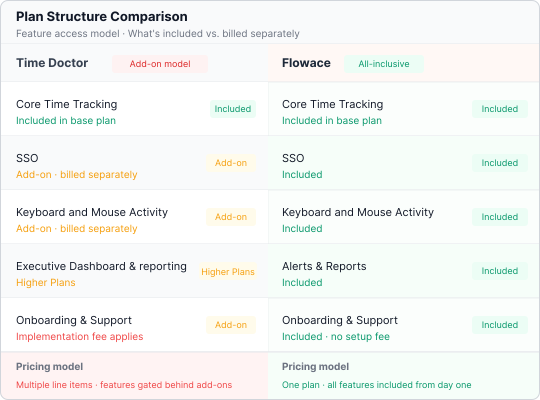
Includes the features Time Doctor gates
- SSO and idle detection come in the plan, plus keyboard and mouse activity shown as a percentage.
- No add-on math to reach the detail you need.
Time Doctor
Paid add-ons on top of Basic.
Flowace
Included in each plan.
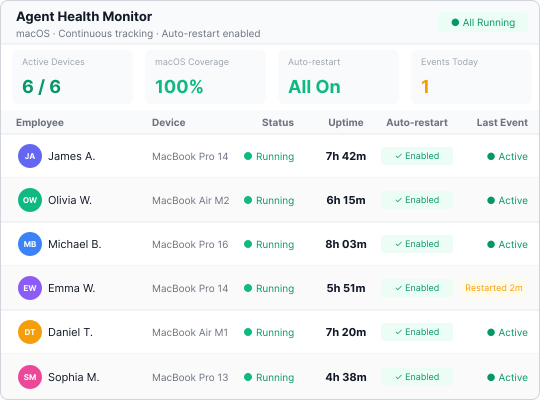
Stays running, even on Mac
- The agent restarts itself if someone force-quits it.
- Tracking does not stop silently without anyone noticing.
Time Doctor
Can be force-quit on Mac with no alert or restart.
Flowace
Restarts automatically.
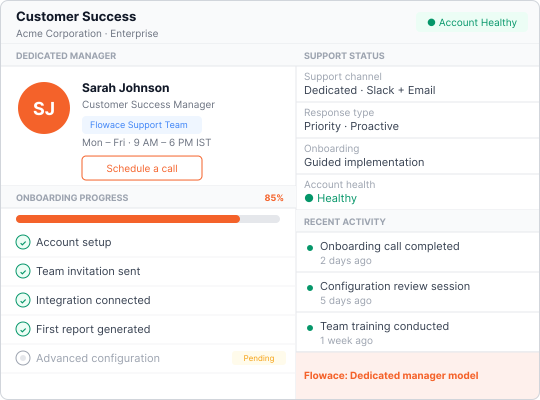
Answers support fast, at each size
- A hands-on contact on each plan, not a ticket queue.
- Help arrives in hours, not days, when a rollout is on the line.
Time Doctor
2-day email, no assigned rep.
Flowace
Dedicated support at each size.
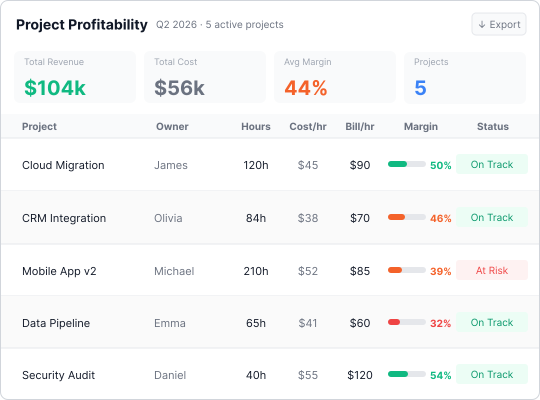
Reports project profit
- Each hour maps to cost and rate per project and person.
- See margin, not just tracked time.
Time Doctor
Limited project profit reporting.
Flowace
Cost and rate per project, per person.
Classifies project time with the Bubble
- Tag the project you are on in one click, in the moment.
- Project data stays complete without manual cleanup.
Time Doctor
No floating classifier.
Flowace
One-click Bubble classifier.
Results
What happens after companies switch
Billable hours, zero new hires
Project classification turned worked hours into ₹2.37Cr billable capacity, 12.7% more billable hours, no new hires.
Read the case studyHigher than assumed
Flowace measured true unit cost in four weeks, 46% above estimates, surfacing a ₹47.4L quarterly attendance gap.
Read the case studyFaster invoice approval
Verifiable Flowace timesheets ended a 15% error rate and got disputed invoices approved 3× faster.
Read the case studyDeployment
Switching to Flowace takes a day, not a project.
We import your data.
Teams, settings, and history migrated free.
Deploy in 60 seconds.
One link installs the agent on Windows, macOS, and Linux.
First insight in 72 hours.
Dashboards go live in minutes. Most teams find their first inefficiency within three days.
Our candid take
Which should you pick?
Time Doctor may fit if:
- You want the longest-established brand and the widest integration ecosystem.
- You are fine with an add-on model and self-serve, ticket-based support.
Flowace is the stronger choice if:
- You want SSO, idle detection, and full input detail included, not as add-ons.
- You want one predictable all-in price.
- You want hands-on support on each plan.
- You want an agent that restarts itself if force-quit.
Frequently Asked Questions
About Time Doctor vs Flowace
Same accuracy. One price. Real support.
Run Flowace beside Time Doctor for a week. Compare the all-in price, the support response, and what stays running.
- No credit card
- Free migration
- Cancel anytime
Lost Productivity? Let's Fix That!
Don't let efficiency slip away. Discover game-changing tips and tools to keep your team productive and thriving!
Book a Demo
Keep an Eye, Not a Spy!
Discover employee monitoring that's smart, ethical, and productivity-focused. Build trust while boosting team performance!
Book a Demo
Lost Time? Let's Track It Down!
Take control of every second. Discover seamless time-tracking solutions to boost efficiency and get more done!
Book a Demo
Attendance That's Always On Time!
Say goodbye to manual tracking. Simplify attendance management with smart, automated solutions your team will love!
Book a Demo
Clicked Here? We're Tracking That!
Master app and website insights effortlessly. Unleash smarter tracking and watch productivity skyrocket!
Book a Demo
Stealth Mode, Maximum Insights!
Monitor workflows discreetly and ethically. Get the data you need to enhance productivity—no disruptions, just results!
Book a Demo
Streamline Your BPO/KPO Operations!
Tame the hustle with smart tracking and seamless workflow solutions. Boost productivity without the headaches!
Book a Demo
IT Services, Upgraded and Optimized!
Supercharge your IT team with powerful tracking tools. Boost efficiency and keep projects on track with ease!
Book a Demo
Crunching Numbers Just Got Easier!
Optimize your accounting processes with smart tools. Boost accuracy, streamline workflows, and save time—effortlessly!
Book a Demo
Leaving? Let's Make Hiring Easier!
Streamline recruitment and boost team efficiency with smart tracking tools. Hire better, faster, and smarter!
Book a Demo
Legal Workload? Let's Simplify It!
Streamline your legal processes with smart tracking tools. Improve efficiency and keep cases moving forward—smoothly!
Book a Demo
Still Comparing? See Why Flowace Stands Out!
Before you go, check out how Flowace boosts productivity like no other tool. Discover how we can help your team succeed.
Book a Demo


Maximize Your Potential with Flowace!
Experience seamless time tracking and productivity enhancement like never before. Join the Flowace revolution and unlock your full potential. Start your journey to success today!”
