Toggl Track Pricing 2026, and Flowace Pricing Compared



Published: September 2026 · Last Updated: September 2026 · Last Verified: 22 September 2026
Toggl Track pricing includes Free, and paid plans like Starter, Premium, and Enterprise. This article breaks down Toggl Track’s 2026 pricing, what each plan includes, and how its costs compare with Flowace.
Who Should Use Toggl Track?
Toggl Track is useful for freelancers, consultants, small businesses, agencies, and teams that need to track work hours, manage projects, record billable time, or understand how time is spent.
- Freelancers and consultants can track billable hours by client, project, task, or activity, set billable rates, and use time reports when billing clients.
- Agencies and professional services teams can use time data to compare estimated and actual hours, track project profitability, monitor budgets, and understand how teams spend their time.
- Developers and software teams can track time on projects and connect Toggl Track with tools such as Jira and Asana.
- Project managers can see how much time is spent on projects and tasks, review reports, compare planned and actual time, and monitor project budgets.
- Remote and hybrid teams can track time across different devices, including desktop, mobile, web, and browser extensions, with time data synced across platforms.
- Teams that want less intrusive time tracking can use Toggl Track without employee screen, keystroke, or webcam monitoring.
- Teams that use several work apps can connect Toggl Track with tools such as Asana, Google Calendar, Slack, Trello, Jira, and other supported integrations.
- People who want to improve their time management can use reports and time insights to see where their working hours go, review project performance, and understand patterns in their tracked time.
Toggl Track Pricing Plans Overview
Toggl Track offers time tracking for freelancers, agencies, and teams, with a focus on simple time logging and project tracking. Its Free plan covers basic time tracking for smaller teams, while the paid plans add more reporting, planning, and team features. The main difference between the plans is how much tracking, reporting, and team functionality they include.
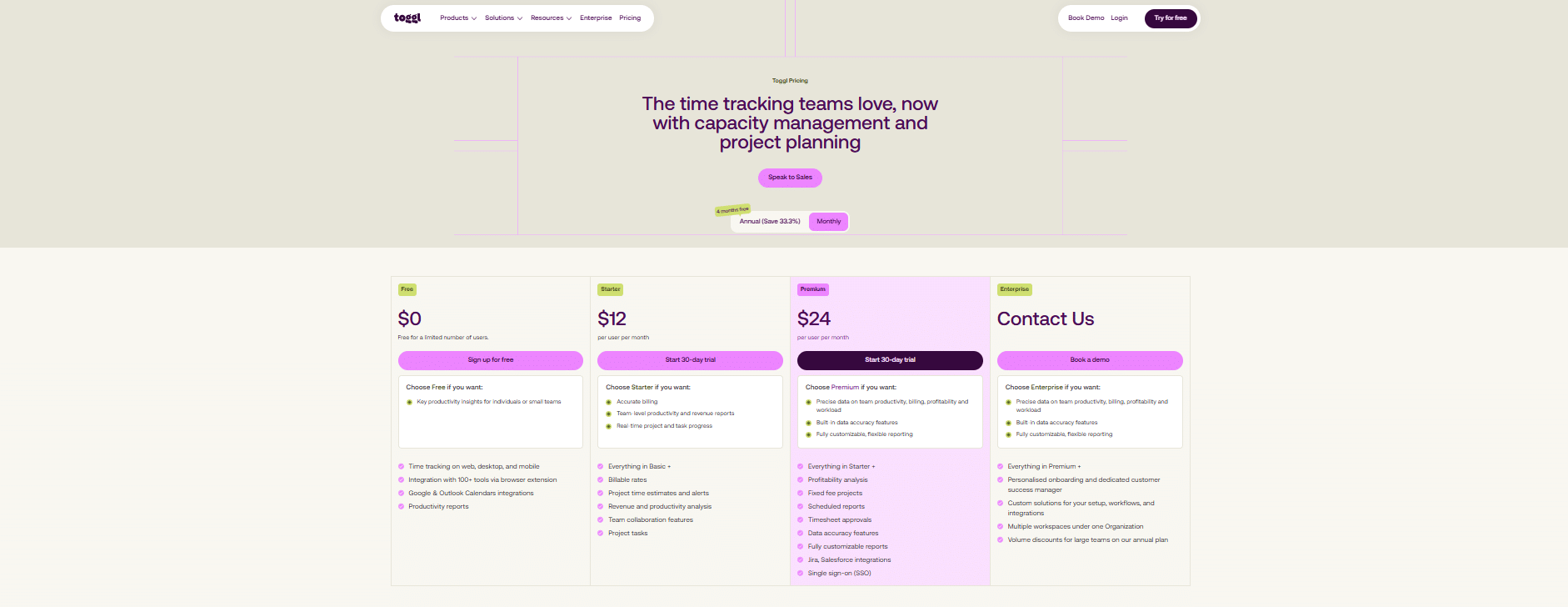
Source: Toggl Track
Toggl Track pricing, captured September 22, 2026
Image alt text: Toggl Track pricing page showing Free, Starter, Premium and Enterprise plans under annual billing, checked 22 September 2026.
How much does Toggl Track’s Free plan cost?
Pricing: $0, Free for up to 3 users on a team; individual freelancers on the free plan aren’t seat-limited
Best For: Key productivity insights for individuals or small teams
Free includes:
- Time tracking on web, desktop, and mobile
- Integration with 100+ tools via browser extension
- Google & Outlook Calendars integrations
- Productivity reports
How much does Toggl Track’s Starter plan cost?
Pricing: $9 per user per month billed annually ($12 per user per month)
Best For: Teams that need team-level productivity insights
Everything in Basic plus:
- Billable rates
- Project time estimates and alerts
- Revenue and productivity analysis
- Team collaboration features
- Project tasks
How much does Toggl Track’s Premium plan cost?
Pricing: $16 per user per month billed annually ($24 per user month)
Best For: Teams that need precise data on team productivity, billing, profitability and workload
Everything in Starter plus:
- Labor costs and Profitability reports
- Fixed fee projects
- Project dashboards: Time actuals vs. estimates, progress breakdowns by task and member
- Timesheet approvals
- Data accuracy features
- Jira and Asana integrations
- Single sign-on (SSO)
How much does Toggl Track’s Enterprise plan cost?
Pricing: Custom
Best For: Personalized onboarding and dedicated support to ensure successful adoption across your team
Everything in Premium plus:
- Personalised onboarding and dedicated customer success manager
- Custom solutions for your setup, workflows, and integrations
- Custom roles
G2 Rating
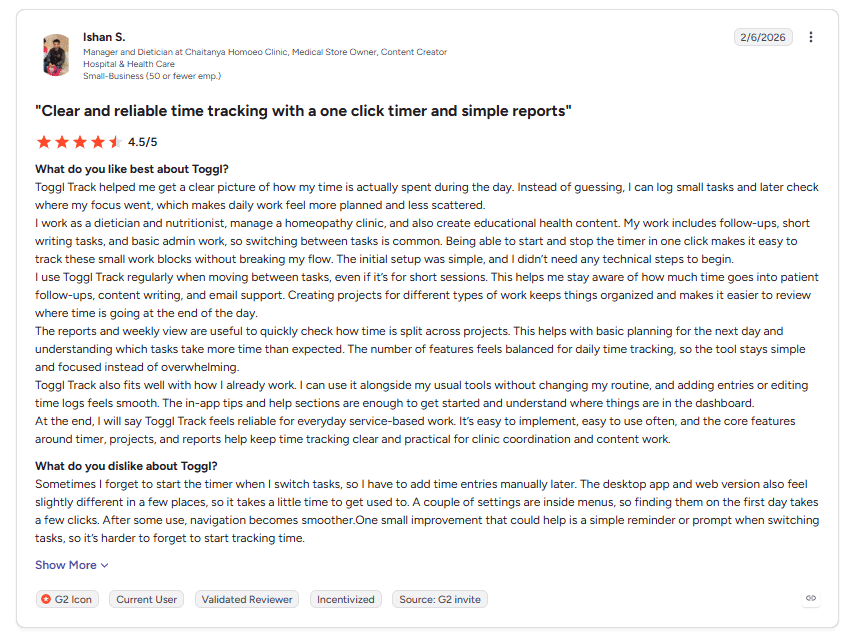
User Rating: 4.5/5
Image alt text: G2 review of Toggl Track’s simple timer, projects, and reports, dated June 6, 2026.
“Toggl Track feels reliable for everyday service-based work. It’s easy to implement, easy to use often, and the core features around timer, projects, and reports help keep time tracking clear and practical for clinic coordination and content work.” (Ishaan S., Manager and Dietician at Chaitanya Homoeo Clinic, Hospital & healthcare, G2 review, June 6, 2026)
On the other side, some reviewers note the mobile app and custom reporting could be stronger, and the interface takes a bit of getting used to.
What’s Missing from Toggl Track?
Toggl Track focuses on time tracking, planning, and project visibility. Tracking is largely controlled by the person doing the work. Before choosing Toggl Track, there are a few differences worth knowing.
- Does Toggl Track take screenshots? No. Toggl Track does not take screenshots, log keystrokes, or track employee location. Toggl calls this an anti-surveillance stance, built around the person doing the work staying in control of what gets tracked.
- Does Toggl Track automatically track apps and websites? Yes. Toggl offers a one-click timer and an automated tracker for app, website, and calendar activity, with detailed reports from the data collected.
- Does Toggl Track have a productivity score? No. Toggl Track reports on time, billing, profitability, and other tracked data, but it does not assign a standalone productivity score.
- Does Toggl Track offer client access? Yes. Toggl Track supports Guest access, which lets invited clients or partners view and comment on projects. It does not provide a dedicated client portal or executive dashboard focused on workforce analytics.
For teams comparing Toggl Track with an automated workforce analytics tool like Flowace, the key difference is how tracking and reporting work. Toggl Track gives users more control over when and what they track, while Flowace focuses more on automatic activity capture and workforce productivity insights.
See what automated tracking would look like for your team.
Book a DemoFlowace Pricing & How We Compare
Flowace is a productivity and workforce-analytics platform built around automatic time capture rather than manual timers. See the full pricing breakdown below.
Unlike Toggl, Flowace doesn’t have a free tier and no seat minimum, so a single user can start on the lowest tier. It offers a free 7-day trial (no credit card required) with every feature unlocked.
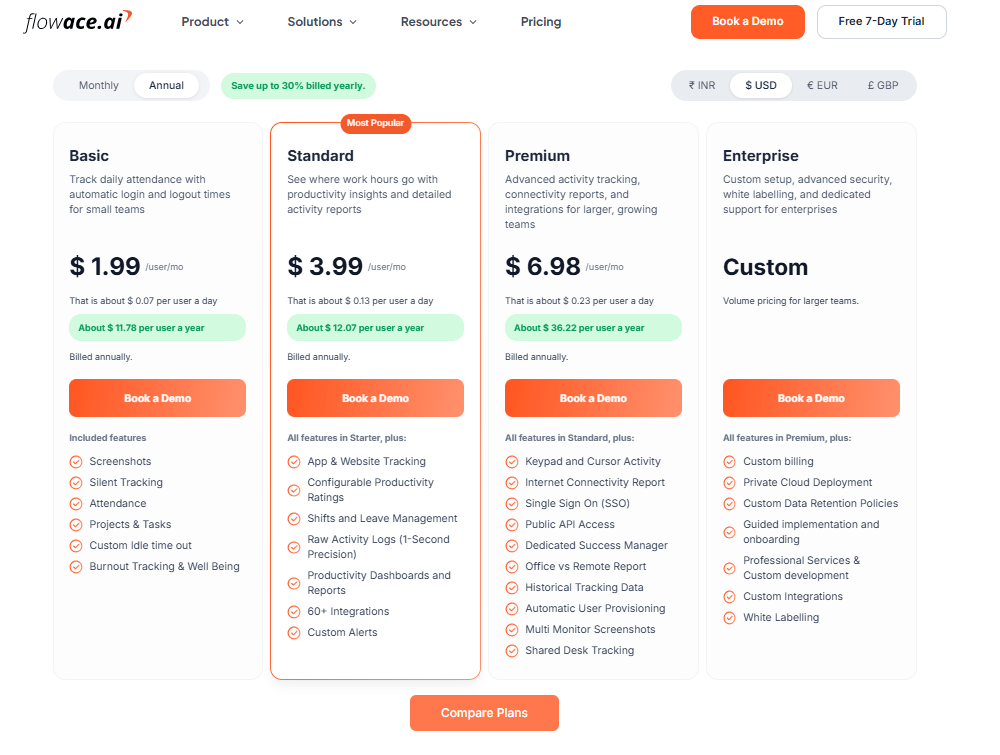
Source: Flowace
Flowace pricing, captured September 22, 2026
Image alt text: Flowace pricing page showing Basic, Standard, Premium and Enterprise plans under annual billing, checked 22 September 2026.
How much does Flowace’s Basic plan cost?
Pricing: $1.99 per user per month billed annually ($2.99 per user per month)
Best for: Small businesses or startups that need fundamental time tracking and attendance automation.
Included features:
- Screenshots
- Silent Tracking
- Attendance
- Projects & Tasks
- Custom Idle time out
- Burnout Tracking & Well Being
How much does Flowace’s Standard plan cost?
Pricing: $3.99 per user per month billed annually ($4.99 per user per month)
Best for: Growing and mid-sized teams that need productivity analysis and usage monitoring.
All features in Basic, plus:
- App & Website Tracking
- Configurable Productivity Ratings
- Shifts and Leave Management
- Raw Activity Logs (1-Second Precision)
- Productivity Dashboards and Reports
- 60+ Integrations
- Custom Alerts
How much does Flowace’s Premium plan cost?
Pricing: $6.98 per user per month billed annually ($10.00 per user per month)
Best for: Larger organizations, agencies serving clients, and teams that need SSO and dedicated support.
All features in Standard, plus:
- Keypad and Cursor Activity
- Single Sign On (SSO)
- Public API Access
- Dedicated Success Manager
- Office vs Remote Report
- Historical Tracking Data
- Automatic User Provisioning
- Multi Monitor Screenshots
- Shared Desk Tracking
How much does Flowace’s Enterprise plan cost?
Pricing: Contact sales for custom pricing.
Best for: Volume pricing for larger teams.
All features in Premium, plus:
- Custom billing
- Private Cloud Deployment
- Custom Data Retention Policies
- Guided implementation and onboarding
- Professional Services & Custom development
- Custom Integrations
- White Labelling
G2 Rating
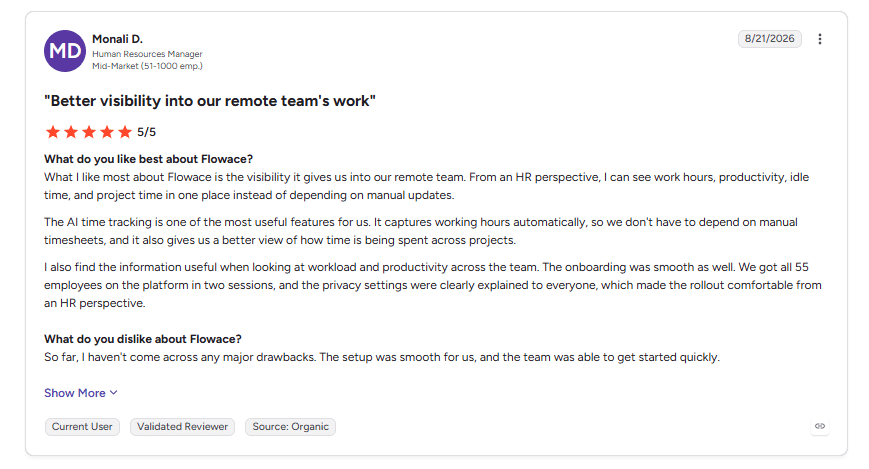
User Rating: 5/5
Image alt text: G2 review praising Flowace for remote team visibility and automatic time tracking, dated August 21, 2026.
“What I like most about Flowace is the visibility it gives us into our remote team. From an HR perspective, I can see work hours, productivity, idle time, and project time in one place instead of depending on manual updates.” (Monali D., Human Resources Manager, G2 review, August 21, 2026)
The review mainly highlights automatic time tracking, remote-team visibility, and an easy rollout. The reviewer also mentions that all 55 employees were onboarded quickly and that the privacy settings helped make the rollout comfortable for HR.
Side-by-Side Comparison: Toggl Track vs Flowace
|
Features |
Toggl |
Flowace |
| Free plan | Yes; free for up to 3 users | No |
| Time tracking style | Yes, offers a one-click timer and an automated tracker | Automatic, silent tracking |
| Idle time detection | Yes | Yes |
| Screenshots | No | Yes |
| Client-facing access | Yes; guest access (clients/partners can view and comment, but can’t track time or access billing) | Yes; from Premium plan |
| Integrations | 100+ via browser extension on all plans; Jira and Asana native from Premium | 60+; from Standard plan |
| Single Sign-On (SSO) | Yes; from Premium plan | Yes; from Premium plan |
| Starting price (annually) | $9 per user per month | $1.99 per user per month |
| Support | Yes; self-serve Help Center and community on all plans; priority support with faster SLAs from Enterprise | Yes; chat and email support on all plans; dedicated account rep from Premium |
| G2 Rating | 4.6/5 (1,644 reviews) | 4.6/5 (143 reviews) |
*Updated on September 22, 2026
Why Flowace Might Be a Better Fit
Flowace is better fit for teams that want automatic time tracking, attendance data, and workforce productivity insights without relying on employees to start and stop a timer.
1. Product positioning
Toggl Track focuses on time tracking, project planning, and billing, while Flowace combines time tracking, attendance, and productivity analytics to give managers a broader view of team activity.
2. Time tracking
Toggl Track supports both manual timers and automatic activity tracking. Flowace tracks work activity automatically in the background from the Basic plan, so employees do not need to start and stop a timer.
3. Analytics and reporting
Toggl Track reports show tracked time by project, client, and team member, with options for billing and timesheet review. Flowace adds productivity ratings, workforce dashboards, idle-time data, and workload insights on applicable plans.
4. Team management
Toggl Track includes team reporting, shared projects, and timesheet approvals on applicable plans. Flowace adds attendance and leave management, plus in-office and remote work reporting on higher plans.
5. Screenshots
Toggl Track does not use screenshots, keystroke logging, or location tracking. Flowace includes screenshots from Basic and Keypad and Cursor Activity from Premium. Teams should review each tool’s data collection against their own privacy and employee monitoring laws and policies.
6. Integrations
Toggl Track supports 100+ integrations and tools through its browser extension, with native Jira and Asana integrations on applicable plans. Flowace lists 60+ integrations from Standard, including project management, CRM, and communication tools.
7. Pricing
Toggl Track starts at $9 per user per month when billed annually, or $12 when billed monthly. Flowace starts at $1.99 per user per month when billed annually, or $2.99 when billed monthly. The two prices cover different feature sets, with Toggl Track including planning and billing features and Flowace focusing more on automatic tracking, attendance, and workforce management.
Talk through what Flowace could look like for your team.
Book A DemoFrequently Asked Questions About Toggl Track Pricing
1. Is Flowace cheaper than Toggl Track?
Yes, Flowace is cheaper than Toggl Track based on starting per-user pricing. Flowace starts at $1.99 per user per month when billed annually, while Toggl Track’s cheapest paid plan starts at $9 per user per month billed annually.
2. Does Flowace have a free plan like Toggl Track?
No, Flowace does not have a permanent free plan. It offers a 7-day free trial with all features unlocked and no credit card required. Toggl Track has a permanent Free plan capped at up to 3 users.
3. Can Flowace integrate with the tools my team already uses?
Yes. Flowace offers 60+ integrations from its Standard plan, including tools such as Jira, Trello, Slack, and Salesforce. Toggl Track supports 100+ tools through its browser extension, with native Jira and Asana integrations on applicable plans.
4. Does Flowace take screenshots, and does Toggl Track?
Flowace offers screenshots from its Basic plan, with multi-monitor screenshots available from Premium. Toggl Track does not offer screenshots, keystroke logging, or location tracking. Toggl describes this as part of its anti-surveillance approach. Toggl’s stated reasoning is that this keeps tracking under the employee’s control.
5. Who should consider Flowace instead of Toggl Track?
Flowace may suit teams that want automatic time tracking, productivity analytics, and workforce-level reporting. Toggl Track may suit teams that prefer user-controlled time tracking, project planning, and billing tools.