Employee Attendance Tracker Excel Template Free Download



Published: October 2026 · Last Updated: October 2026 · Last Verified: 22 October 2026
An employee attendance tracker Excel template is a ready made sheet. It records who was present, absent or on leave each day. Built in formulas total it for you.
This article has five free versions. Daily, weekly, monthly, a leave coded version for Indian teams and an all in one workbook with a yearly view and a payroll tab. You also get the exact formulas and steps to build one yourself.
Which Attendance Tracker Template Fits Your Team
|
Template |
Best For | Tracking Period | Includes Formula | Download |
| Daily Tracker | Small teams, shift work | One day | Yes | |
|
Weekly Tracker |
Teams that check attendance before payroll | One week | Yes | Get the free weekly template |
| Monthly Tracker | Teams that report once a month | One month | Yes | |
|
Leave Coded Tracker (India) |
Indian teams tracking CL, SL and EL | One month | Yes | |
| All in One Workbook | Teams that want every view in one file | Daily to yearly | Yes |
*Updated on 22 October, 2026
Free Employee Attendance Tracker Excel Templates You Can Download
Each free template below is a working spreadsheet, ready to use the moment you open it.
Every one has dropdown codes and automatic color coding, so a status turns the cell green, red or yellow the moment you pick it. Every one totals itself with formulas already in place.
Pick the single tracker that matches how often your team checks attendance. Or get the all in one workbook below if you want every view without managing four separate files.
1. Daily Employee Attendance Tracker Excel Template
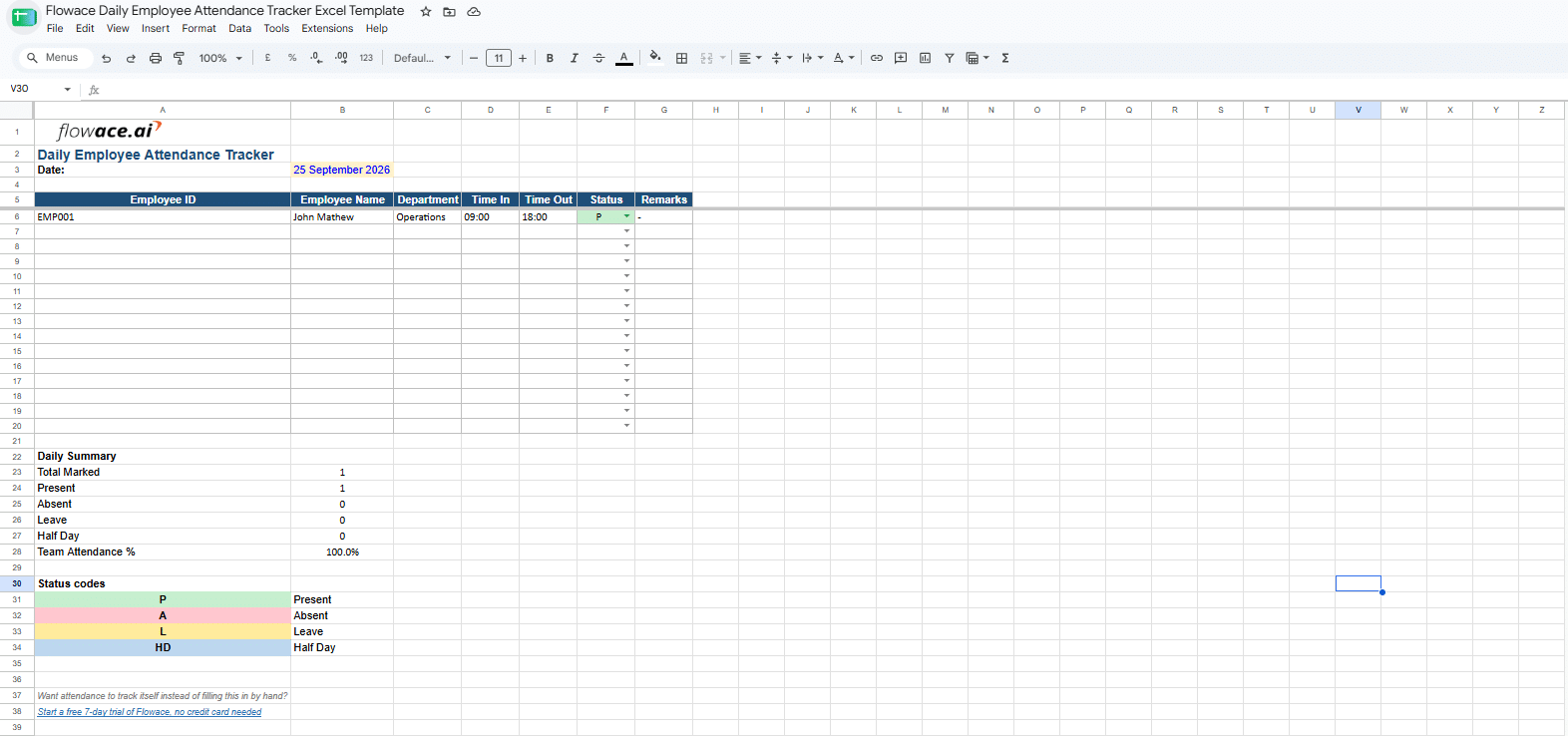
Free daily employee attendance tracker Excel template with color coded status dropdown
Best for: Small teams and shift based businesses that record attendance every day.
The daily attendance tracker gives each employee one row for the day. Pick present, absent, on leave or half day from the dropdown, and the cell colors itself. A summary block at the bottom totals the whole team’s day, with a pie chart showing the split at a glance.
Get the free daily attendance tracker2. Weekly Employee Attendance Tracker Excel Template
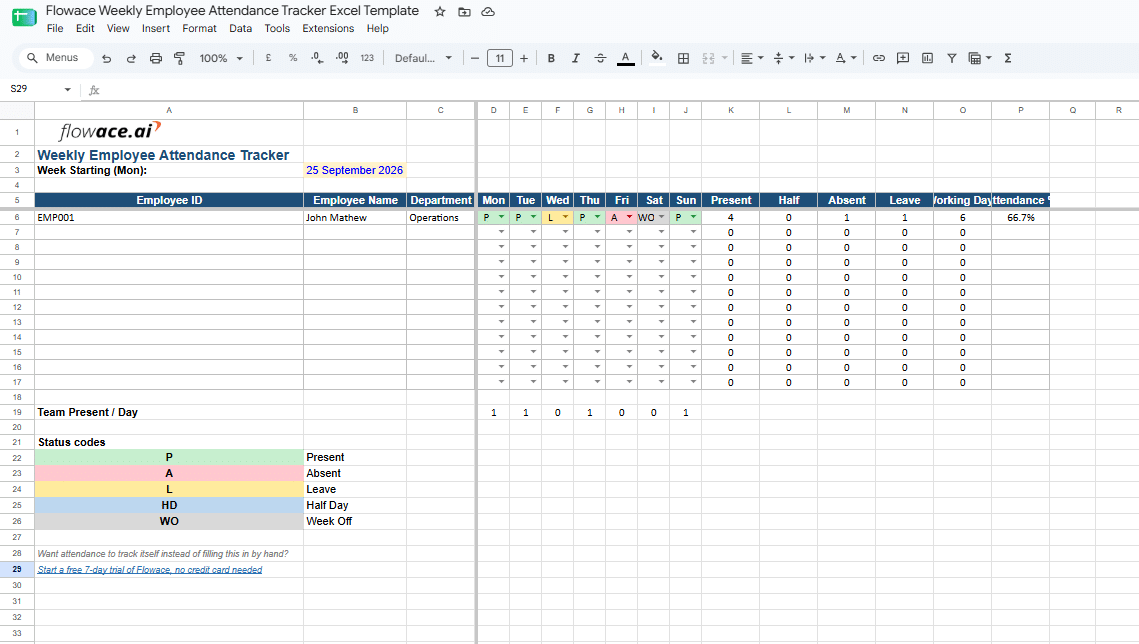
Free weekly employee attendance tracker Excel template showing Monday through Sunday columns
Best for: Teams that review attendance once a week before payroll.
Each employee gets one row for the week, Monday through Sunday. Present, absent, leave and half day totals sit next to each row. A working days count and an attendance percentage sit next to that, and week off days never count against the percentage.
Get the free weekly attendance tracker3. Monthly Employee Attendance Tracker Excel Template
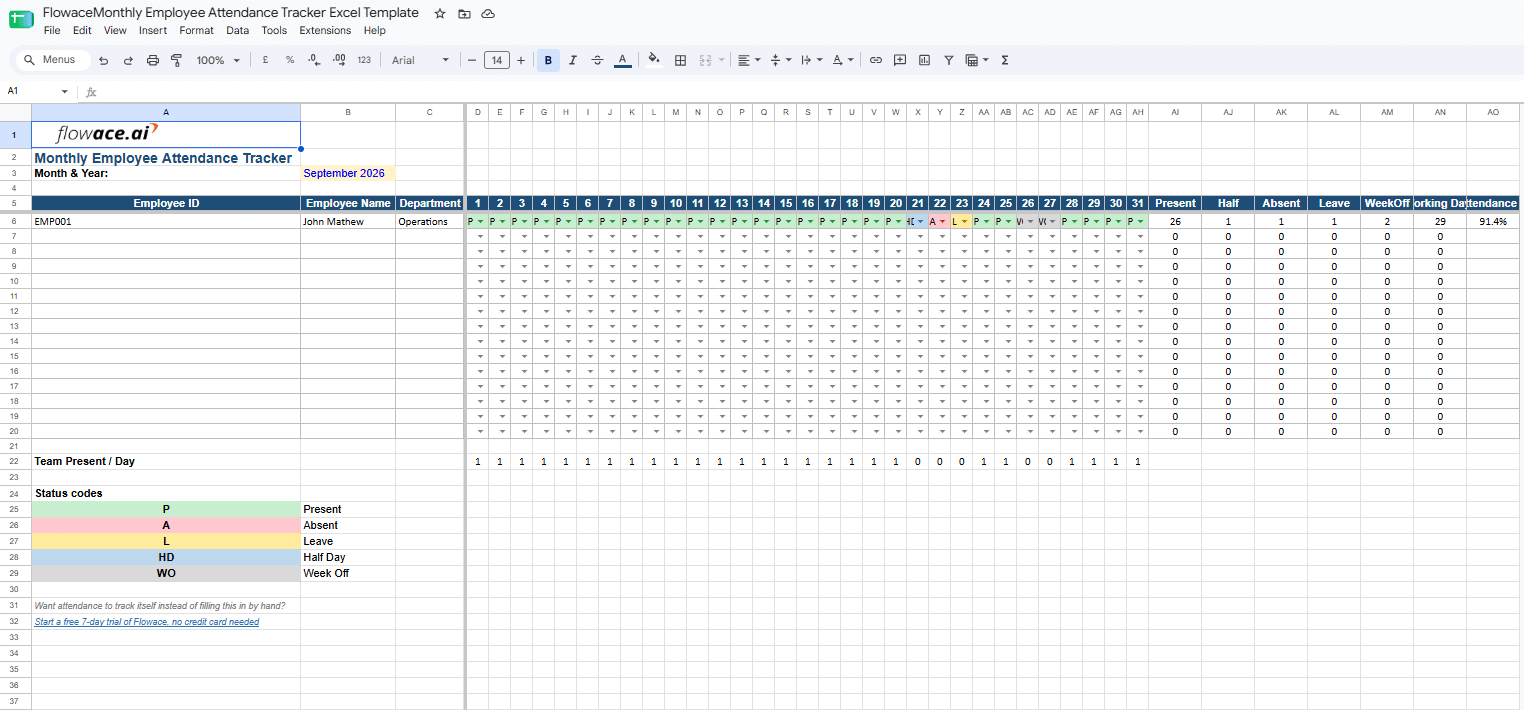
Free monthly employee attendance tracker Excel template with a 31 day attendance grid
Best for: HR teams that need one attendance sheet for the whole month.
Each employee gets one row. Each day of the month gets its own column. The sheet totals present, absent, leave, half day and week off counts on its own, then works out attendance percentage from working days alone.
This version also has a Dashboard tab with a day type breakdown and an attendance percentage chart by employee, so the pattern shows up without reading the raw grid.
Get the free monthly attendance tracker4. Leave Coded Attendance Tracker Excel Template for Indian Teams
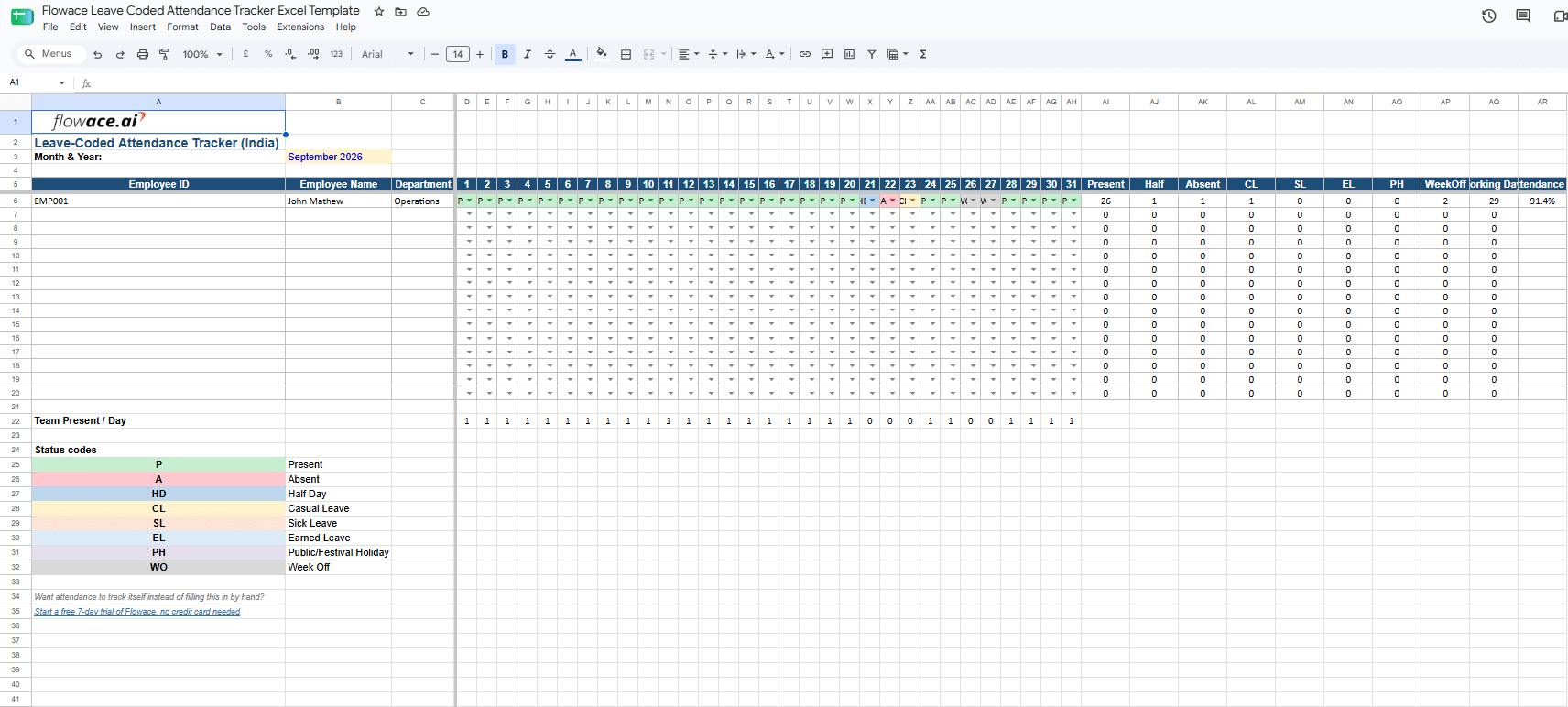
Free India leave coded attendance tracker Excel template with CL, SL, EL, PH, and WO columns
Best for: Small and mid sized teams in India that track different leave types.
The India leave-coded tracker uses the same monthly grid as the monthly template, with codes for CL, SL, EL and PH. CL stands for casual leave. SL stands for sick leave. EL stands for earned leave. PH covers public or festival holidays that vary by state. It also has a Leave Balance tab that tracks opening balance, days used and days left for each leave type on its own, pulled straight from the tracker.
Get the free leave coded attendance tracker5. All in One Attendance and Payroll Workbook
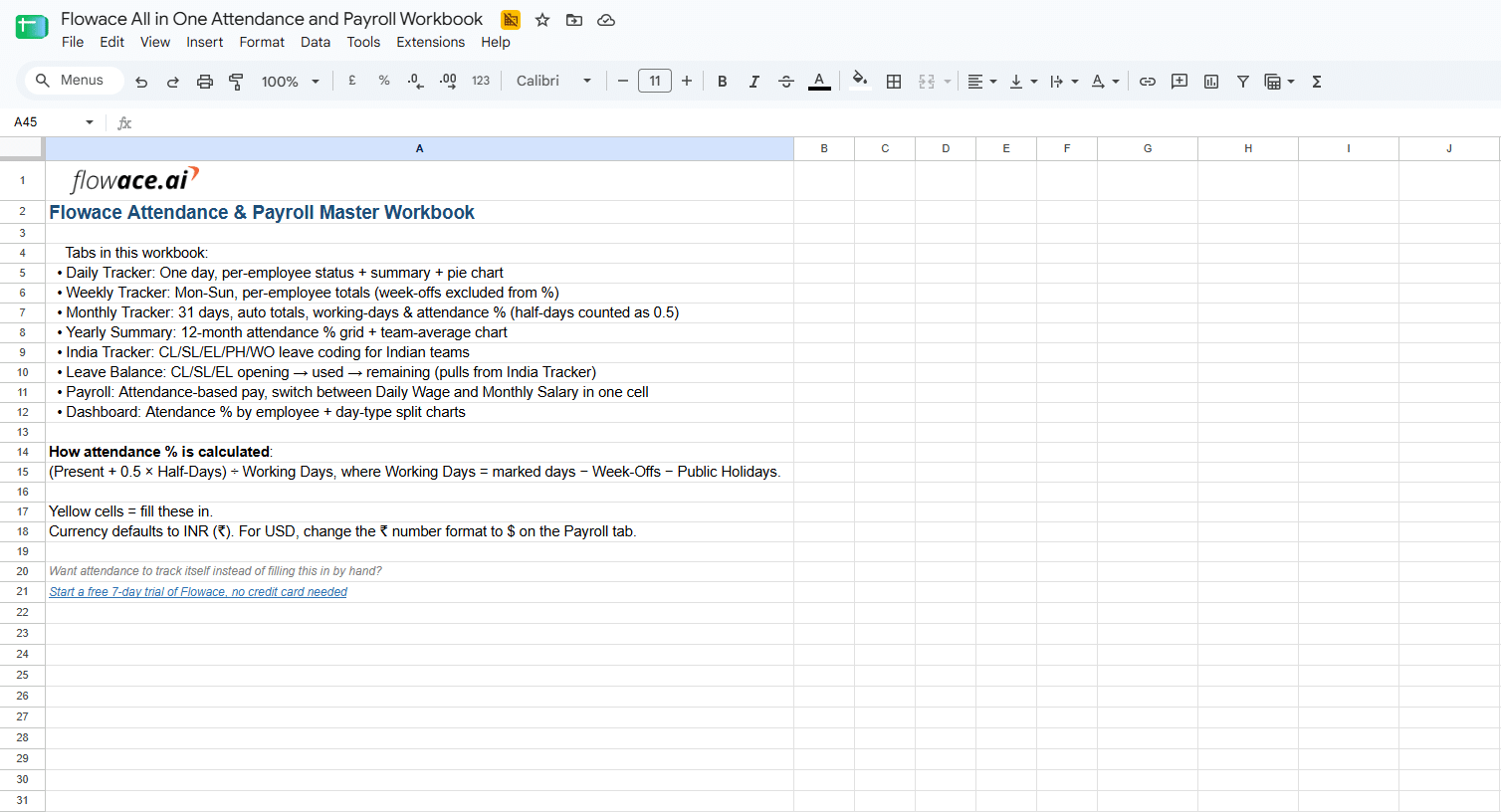
Free all in one attendance and payroll workbook with yearly summary and payroll tabs
Best for: Teams that want every view in one file instead of managing four separate downloads.
This workbook bundles all four trackers above into one file. It also adds two views the single downloads do not have. A Yearly Summary tab holds a 12 month attendance percentage grid for every employee, with a team average trend chart.
A Payroll tab works out pay straight from attendance and switches between a Daily Wage model and a Monthly Salary model in one cell.
Get the free all in one workbookWhat Is an Employee Attendance Tracker Excel Template
An employee attendance tracker Excel template is a spreadsheet. It records when each employee is present, absent, on leave or on a half day. It usually holds six fields. These are employee name, department, date, time in and out, attendance status and leave type. Built in formulas total these on their own, so nobody adds up rows by hand.
That’s why, a simple tracker is often the first way small teams spot this pattern.
A live dashboard can replace this whole sheet with one screen that updates on its own.
Preview the workforce management dashboardHow to Make an Attendance Sheet in Excel Step by Step
You can build an attendance sheet in Excel in four steps. List employees and dates, add status codes, add an attendance percentage formula, and total each status with COUNTIF. The detail that breaks most sheets is the working days count. Use COUNTA, not COUNT, because COUNT ignores text codes like P and A.
Step 1: Add Employee Names and Date Columns
Start with employee names in column A. Add one date for each working day in the columns to the right. Freeze the first row and first column so names and dates stay visible while you scroll.
Step 2: Add Attendance Status Codes
Use short codes to mark attendance. Common codes include P for present, A for absent, L for leave and HD for half day. Short codes keep the sheet easy to update and review.
L is a generic leave code at this step. The India template further down splits leave into CL for casual leave, SL for sick leave and EL for earned leave instead of one plain L.
Step 3: Add the Attendance Percentage Formula
Attendance percentage takes a little more than present days divided by total days. A half day counts as half a present day. A week off comes out of the count first, since it should never count against attendance.
=(COUNTIF(B2:AE2,”P”)+0.5*COUNTIF(B2:AE2,”HD”))/(COUNTA(B2:AE2)-COUNTIF(B2:AE2,”WO”))*100
This one formula gives each employee’s real monthly attendance percentage on its own. Notice the COUNTA in the working days part. A plain COUNT only reads numbers. It counts zero for text codes like P or A.
Once a week off day is in the row, that zero minus the week off count turns negative. The working days figure comes out as zero or negative, so the formula returns a #DIV/0! error or a meaningless percentage instead of a real one.
Format the result cell as a plain number, not as a percentage. Excel’s percentage format multiplies the number by 100 again, so a result like 90 would show as 9000%.
Step 4: Calculate Present, Absent and Leave Totals
Use the COUNTIF function to count each attendance status on its own.
=COUNTIF(B2:AE2,”A”)
This counts total absent days in a row. Copy the formula down to get a total for every employee.
Useful Excel Formulas for Tracking Attendance
These formulas cover the most common attendance tracking systems tasks in Excel. COUNTIF counts each status on its own, present, absent, leave or half day. COUNTA and COUNTIF together build the attendance percentage, with half days counted as half and week offs left out of the total entirely.
- Count present days: =COUNTIF(range,”P”)
- Count absent days: =COUNTIF(range,”A”)
- Count leave days: =COUNTIF(range,”L”)
- Count half days: =COUNTIF(range,”HD”)
- Attendance percentage: =(COUNTIF(range,”P”)+0.5*COUNTIF(range,”HD”))/(COUNTA(range)-COUNTIF(range,”WO”))*100
- Flag low attendance: Set a conditional formatting rule for less than 90 percent. Low rows turn red on their own.
The India template also subtracts public holidays from working days, since a PH day should not count against attendance either.
These formulas work the same way in Google Sheets.
What Should an Attendance Register Include in India?
An attendance register in India should include employee details, working hours, leave records, public holidays, and a monthly attendance summary. Employers should maintain accurate attendance records to meet the requirements of their state’s Shops and Establishments Act.
India’s attendance rules now sit at two levels. The Shops and Establishments Act is the state law most businesses have followed for years, and it still applies. Since 21 November 2025, four Labour Codes also apply nationwide, replacing 29 older central labour laws.
The central government notified the detailed rules under these Codes in May 2026, and each state is notifying its own rules separately, so the exact paperwork still depends on your state.
While the exact rules vary by state, employers are generally required to maintain attendance records for every employee. These records may be reviewed during labour inspections. You can refer to your state’s Shops and Establishments Act, such as the Delhi Shops and Establishments Act, for the specific requirements that apply to your business.
A compliant attendance register typically includes:
- Employee name and employee ID
- Date and day of the week
- Time in and time out
- Hours worked
- Leave type, such as Casual Leave (CL), Sick Leave (SL), or Earned Leave (EL)
- Public and festival holidays, based on your state’s holiday calendar
- A monthly summary of present, absent, and leave days
Attendance record retention requirements also vary by state. Check your state’s Shops and Establishments rules before deciding how long to keep attendance records.
Keeping accurate attendance records is important in other countries as well. In the United States, the Fair Labor Standards Act (FLSA) requires covered employers to maintain records of daily and weekly hours worked by non-exempt employees.
Common Mistakes to Avoid When Tracking Attendance in Excel
Most attendance sheet problems trace back to a small set of repeat mistakes.
- Multiple copies of the same file: One person edits a local copy. Someone else edits the shared one. The two stop matching.
- Manual typing errors: One wrong keystroke turns a present day into an absent day. Nobody notices until payroll.
- Formulas that break after new rows: Adding a new employee row in the middle can shift a formula’s range without warning.
- No leave type breakdown: Marking everything as plain absent hides how much is sick leave versus planned leave.
- No backup copy: One corrupted file can wipe out a full month of records, with nothing to fall back on.
Signs Your Team Has Outgrown a Spreadsheet
A team has usually outgrown a spreadsheet once headcount passes 30 to 40 employees, shifts or locations multiply, formulas start breaking, or payroll numbers stop matching attendance records.
Below that point, a spreadsheet still works well. The signals below help you tell which stage your team is actually in.
- Your team has passed 30 to 40 employees.
- You now run more than one shift or more than one location.
- Part of your team works hybrid or remote, so you cannot see attendance in person.
- Formulas keep breaking every time someone edits the sheet.
- Payroll numbers and attendance numbers stop matching most months.
If two or more of these sound familiar, the sheet below can still help while you get organized.
*BONUS
How Can AI Analyze an Attendance Sheet?
AI can analyze an attendance sheet in seconds. It can calculate attendance percentages, identify attendance patterns, find employees with frequent absences, write spreadsheet formulas, estimate payroll, and draft employee emails based on the data you provide.
Once you have a few weeks of attendance data, export the spreadsheet or copy the worksheet into your preferred AI tool. Then ask a question in plain language.
Here are a few useful prompts:
- What is the overall attendance percentage for this team?
- Which employees have the lowest attendance?
- Do you see any repeating attendance patterns, such as someone missing every Monday?
- Which employees have increased absences over the past month?
- Which employees have taken no leave this month?
- Write an Excel or Google Sheets formula to highlight attendance below 90%.
- Calculate payroll for each employee using the attendance data in this sheet.
- Draft a short and professional email for an employee whose attendance has declined.
Before sharing an attendance sheet with any AI tool, protect employee privacy. Replace employee names with employee IDs, or use an AI tool approved by your organization to keep employee data secure.
As your attendance records grow, AI can help you summarize data, identify trends, answer questions, and complete routine tasks without reviewing every row manually.
How Can I Automate Employee Attendance Tracking?
You can automate employee attendance tracking with software that records attendance automatically from an employee’s Windows, Mac or Linux computer instead of relying on manual spreadsheets. Flowace tracks when employees are online, offline, or idle, updates attendance records automatically, and sends alerts for late starts or missed hours.
Flowace’s AI Attendance Time Tracking records attendance as employees work, reducing manual data entry and spreadsheet updates.
Managers receive alerts for late starts, missed hours, and attendance issues on the same day. This helps teams address problems before payroll.
Attendance data also syncs with HR and payroll software through integrations with platforms like Keka HR and Darwinbox. Payroll teams can use accurate attendance records without copying data between systems.
Setup takes about a minute using a shareable link. Most teams begin seeing attendance patterns and trends within the first three days.
For small teams that only need a monthly attendance sheet, a spreadsheet may still be enough. As teams grow, automatic attendance tracking, real-time alerts, and payroll integrations help reduce manual work and keep attendance records accurate.
Ready to move beyond manual attendance tracking?
Start Your 7-Day Free TrialFrequently Asked Questions About Employee Attendance Sheet Excel Templates
1. What is the difference between an attendance sheet and a timesheet?
The difference between an attendance sheet and a timesheet is that an attendance sheet records whether an employee is present, absent, or on leave. A timesheet records the hours an employee works and, in many cases, the tasks completed during those hours. Some small businesses use one spreadsheet for both, but each record serves a different purpose.
2. Are companies in India legally required to maintain an attendance register?
Yes, employers in India are required to keep attendance records for every employee, under their state’s Shops and Establishments Act and under the central Labour Codes that took effect on 21 November 2025. Attendance records typically include hours worked and leave taken for each employee. The required format and record retention period vary by state, so check the rules that apply to your business.
3. Can I use Google Sheets instead of Excel for this attendance template?
Flowace’s five free attendance templates work in both Google Sheets and Microsoft Excel. Functions such as COUNTIF and COUNTA continue to calculate totals, attendance counts, and percentages correctly.
4. What formula calculates attendance percentage in Excel?
You can calculate attendance percentage in Excel with this formula:
=(COUNTIF(range,”P”)+0.5*COUNTIF(range,”HD”))/(COUNTA(range)-COUNTIF(range,”WO”))*100
This formula counts full attendance days, adds half-days, excludes weekly off days, and returns the attendance percentage.
5. How many employees can an Excel attendance tracker handle?
Many teams begin experiencing version conflicts, slower performance, or formula errors once an attendance tracker grows beyond 30 to 40 employees or several people edit the same file at the same time. The exact limit depends on the workbook’s complexity and how your team uses it.
6. What is included in the all-in-one attendance workbook?
The all-in-one attendance workbook includes daily, weekly, monthly, and India leave-coded attendance trackers in one file. It also includes a Yearly Summary tab that shows attendance trends across 12 months and a Payroll tab that calculates pay from attendance data. These additional tabs are available only in the all-in-one workbook.
7. How do I track paid leave such as sick leave and casual leave?
Add a leave code column to your attendance sheet and use short codes such as CL for Casual Leave, SL for Sick Leave, and EL for Earned Leave. You can use the COUNTIF function to calculate each leave type separately and monitor leave balances throughout the year.