Employee Productivity Tracker Features, Alternatives and Cost



An employee productivity tracker shows how work time is spent across apps, websites, activity, and idle periods. This article covers the key features to look for, compares Flowace with Time Doctor, Hubstaff, and Clockify, and explains how to estimate the cost of idle time for your team.
How Do These Productivity Trackers Compare?
If you’re comparing Flowace, Time Doctor, Hubstaff, and Clockify, the key question is how does each tool track idle and productive time?
|
Tool |
What It’s Best For |
Idle & Productivity Tracking |
|
Flowace |
Automated productivity tracking |
Tracks work activity automatically and helps estimate the cost of idle time. |
| Time Doctor | Time tracking and screenshots |
Productivity ratings and web/app usage reports are available from the Standard plan at $11.70/user/month when billed annually. |
|
Hubstaff |
Time tracking, scheduling, and payroll |
Its Insights workforce analytics is a paid add-on above the Team plan. It is included with Enterprise at $25/seat/month. |
| Clockify | Free time tracking for small teams |
Its browser extension can detect idle time and lets users choose whether to keep or remove that time. It does not automatically classify activity as productive or unproductive. |
*Updated on 5 October, 2026
Each tool has different features, pricing, and privacy controls, so the sections below look at each one in more detail.
What Is an Employee Productivity Tracker?
An employee productivity tracker is software that records work activity across apps, websites, and time spent working or idle. It helps managers see where work time goes and identify patterns that may affect productivity.
How Is It Different From a Time Tracker?
A time tracker records how many hours someone spends on a project, task, or client. A productivity tracker adds activity data, such as apps used, websites visited, active time, and idle time.
Employee monitoring software covers a wider range of workplace tracking tools. Depending on the software, it can include productivity data, screenshots, screen recording, keystroke logging, and other activity records.
The key question is what you want to understand from the data. Time tracking helps with hours and project costs. Productivity tracking helps identify work patterns and how time is being used.
For example, an employee may spend an hour reading a contract or planning a complex task. The tracker can show low computer activity during that time, but it cannot decide whether the work was valuable.
Productivity data shows how work time is being used. Managers still need context and human judgment to understand the quality and value of the work. For the full implementation picture, including rollout steps and mistakes to avoid, see Flowace’s complete guide to employee productivity software.
What Features Should an Employee Productivity Tracker Have?
The right productivity tracker should make work activity easier to understand without creating extra work for employees. Here are the key features to look for.
How Does Automatic Time Tracking Work?
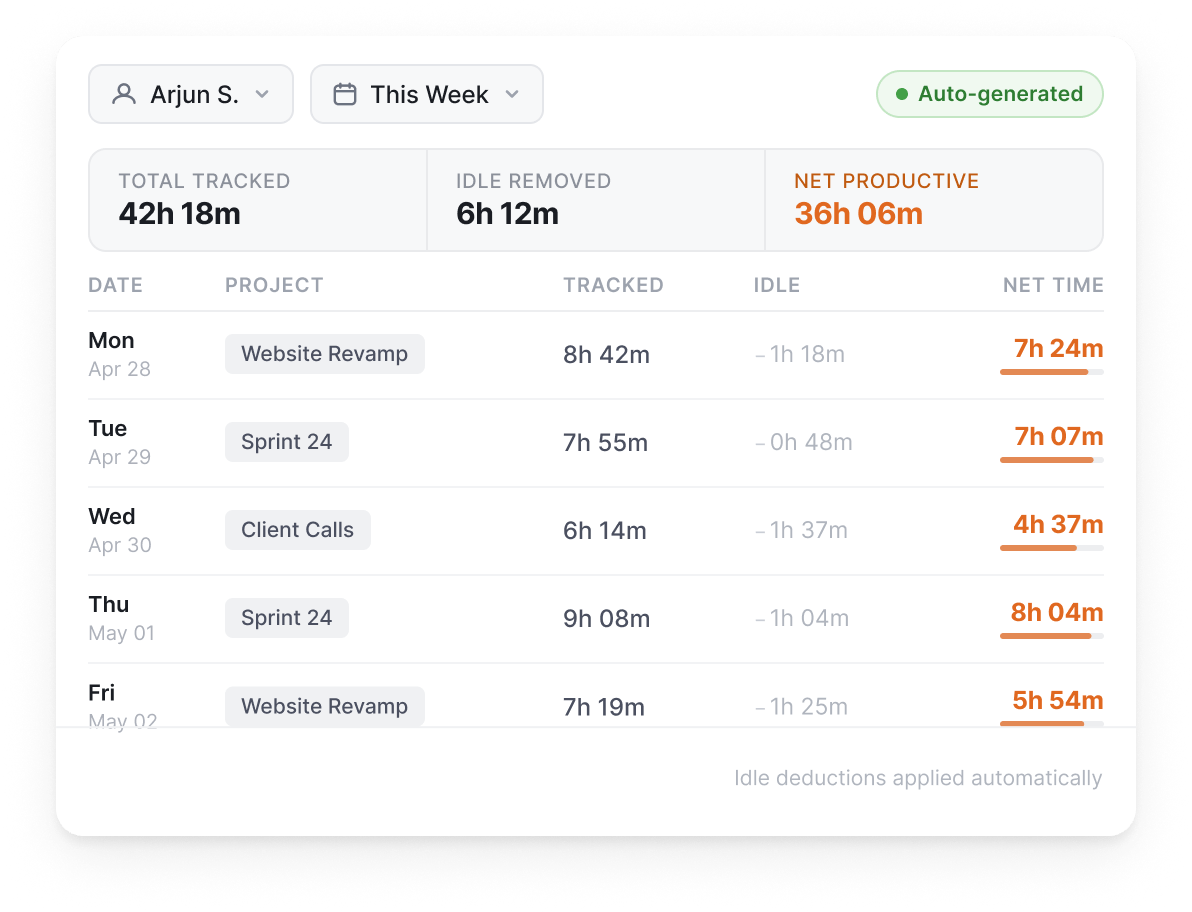
Automatic tracking records work activity in the background, so employees do not need to start timers or fill out timesheets manually.
Source: Flowace Automatic Timesheets
Flowace‘s Automatic Time Tracking records active work time as it happens. Its Automatic Timesheets feature also accounts for idle time when calculating total worked time.
Can You Mark Apps and Websites as Productive?
Yes. A good tracker should let teams classify apps and websites based on how they are used.
Flowace’s Productivity Ratings let you mark activity as productive, unproductive, or neutral at the individual, team, or company level. Custom Work Categories let businesses group tools based on how their teams use them.
How Does Idle Time Detection Work?
Idle-time detection identifies periods with little or no keyboard or mouse activity. Away-time tracking can help separate this from time spent in meetings, calls, or other approved activities.
Idle time also needs context. Meetings, phone calls, scheduled breaks, and work away from the computer can appear as idle activity. Flowace lets teams whitelist meeting apps and exclude scheduled breaks, which can make idle-time reports more accurate.
Use the raw idle percentage as a starting point for investigation. It should be reviewed alongside the employee’s work and circumstances.
Can a Tracker Alert Managers to Productivity Patterns?
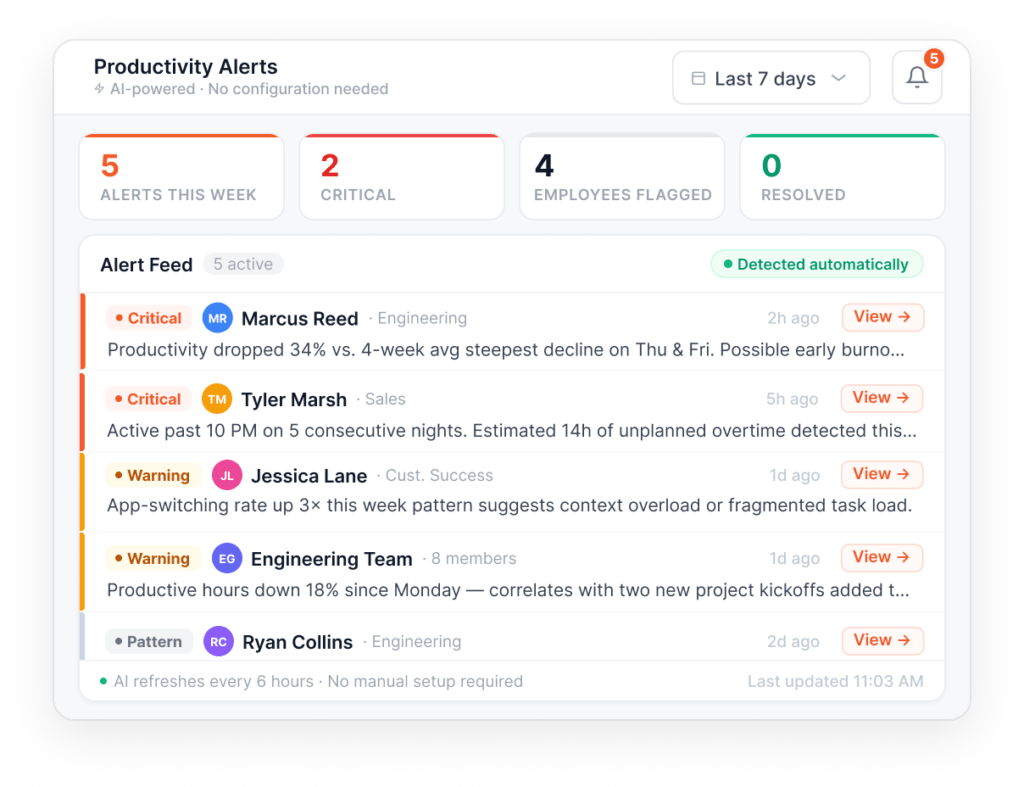
Yes. Some trackers can flag patterns automatically so managers do not have to check dashboards manually.
Source: Flowace Productivity Alerts
Flowace’s AI Alert Builder includes alerts for low productive hours, missing hours, high away time, late starts, and possible burnout. Hierarchy-Based Escalation can send alerts to the appropriate manager.
Can It Track Activity Without Recording Keystrokes?
Yes. A productivity tracker can measure keyboard and mouse activity without recording what an employee types.
Flowace’s Keypad and Cursor Activity measures how often the keyboard and mouse are used. It does not record the keys being pressed or the text employees type.
Try Flowace with your team and see how the tracking works in your day-to-day workflow.
Start a Free TrialWhat Should a Productivity Tracker Never Do?
Privacy and trust matter when choosing a productivity tracker. Before buying, check what the tool records, who can see the data, and whether employees can control their privacy settings.
How Much Visibility Should a Productivity Tracker Give Managers?
A productivity tracker should help managers understand work patterns across the team. Check whether the tool gives managers useful team-level reports and enough context to understand individual activity.
Can Employees See Their Own Data?
Check whether employees can see their own tracking data and understand when tracking is active.
TRST01, a Hyderabad-based climate-tech company, moved its 55-person remote team to Flowace to improve visibility across its distributed workforce. During onboarding, employees were shown how Flowace’s Privacy Mode and Work Mode controls work, so they understood when tracking was active and what privacy options were available to them.
Flowace also shows an on-screen reminder when Privacy Mode is enabled. TRST01’s case study highlights this approach as part of giving employees clear visibility into how tracking works before they start using the tool.
For any productivity tracker, check whether employees can access their own data, understand what is being tracked, and clearly see when privacy controls are active.
Does the Tracker Take Screenshots or Use Webcams?
Check exactly what the software records before rolling it out to your team.
Flowace can take periodic screenshots at a configurable interval and does not use webcam capture. Screenshot settings and other monitoring features vary by product, so review the vendor’s privacy controls before choosing a tool.
How Do Time Doctor, Hubstaff, and Clockify Compare?
Time Doctor, Hubstaff, and Clockify are common options for teams comparing employee productivity insights and time-tracking software. Here’s how their features, pricing, and productivity tracking compare with Flowace.
What Does Time Doctor Offer?
Source: Time Doctor
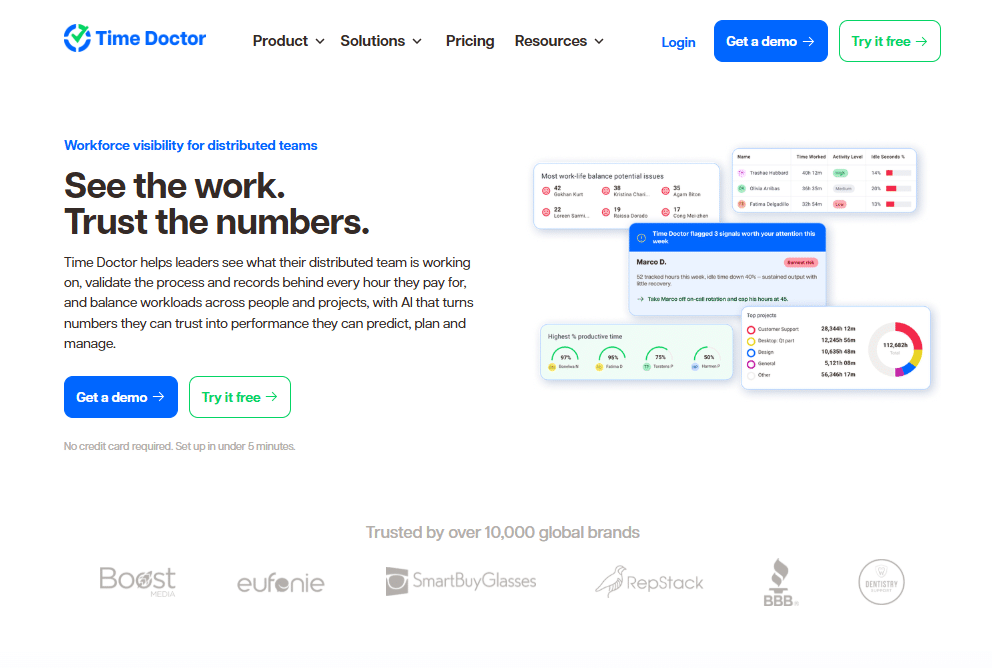
Time Doctor provides automatic time tracking, screenshots, app and website usage reports, productivity ratings, and activity reports.
Its current published pricing is:
- Basic: $6.67/user/month when billed annually or $8 monthly
- Standard: $11.67/user/month annually or $14 monthly
- Premium: $16.70/user/month annually or $20 monthly
- Enterprise: Custom pricing
Web and app usage reporting and Productivity Ratings start with the Standard plan. Premium adds features such as Benchmarks AI, Unusual Activity Reports, video screen recording, and software cost insights. Time Doctor offers a 14-day free trial with access to its available features during the trial.
See the full Time Doctor vs. Flowace comparison for more detail.
What Does Hubstaff Offer?
Source: Hubstaff
Hubstaff combines time tracking with activity monitoring, scheduling, payments, payroll, and workforce analytics.
Its current annual pricing is:
- Starter: $4.99/seat/month when billed annually or $7 monthly
- Grow: $7.50/seat/month when billed annually or $9 monthly
- Team: $10/seat/month when billed annually or $12 monthly
- Enterprise: $25/seat/month when billed annually
Hubstaff’s Insights add-on provides features such as productive and unproductive app and URL classification, activity benchmarks, productivity comparisons, smart notifications, and work-time classification. Insights is available as a paid add-on on Grow and higher plans, comes with a three-month trial on Team, and is included with Enterprise.
See the full Hubstaff vs. Flowace comparison for more detail.
What Does Clockify Offer?
Source: Clockify
Clockify focuses on time tracking and also offers activity monitoring, screenshots, reports, and productivity features on its paid plans.
Its current published pricing is:
- Free: $0 for up to 5 users
- Basic: $3.99/seat/month billed annually or $4.99 monthly
- Standard: $5.49/seat/month annually or $6.99 monthly
- Pro: $7.99/seat/month annually or $9.99 monthly
- Enterprise: $11.99/seat/month annually or $14.99 monthly
- Cake.com bundle: $12.99/seat/month annually or $15.99 monthly
The Free plan includes time tracking, an auto tracker, idle detection and reminders, team activity, and reports. Clockify’s Pro plan adds activity monitoring and screenshots. Its screenshots can be taken every five minutes while a user is on the clock.
See our Clockify pricing plans and costs article for more detailed comparison.
What Does Unmeasured Idle Time Cost?
A simple way to estimate the cost is to multiply your team size, hourly employee cost, monthly working hours, and idle-time rate.
For example, using U.S. labor-cost data and AM2PM’s published idle-time rate before it started using Flowace, a 50-person team could have about $112,900 in monthly labor time classified as idle. This is an illustration based on one company’s reported idle rate, not an industry average or a prediction for every team.
How Do You Calculate Monthly Idle Cost?
|
Monthly idle cost = team size × hourly employee cost × hours per month × idle-time rate |
Here is what each number means:
|
Input |
Value |
What This Number Means |
|
Team size |
50 people |
An illustrative team size. Replace this with your own headcount. |
|
Average fully loaded hourly cost |
$54.00/hour |
U.S. Bureau of Labor Statistics data for full-time private-industry workers in June 2026. This includes wages and benefits. It is a national average, so use your own payroll data if you have a more accurate figure for your team. |
|
Working hours per month |
168 hours |
An illustrative assumption based on 40 hours per week, used to keep the calculation consistent with other Flowace calculations. |
|
Idle-time rate |
24.9% |
AM2PM Support’s published idle-time rate before using Flowace. AM2PM later reported that idle time fell from 24.9% to 15.1% as the team scaled. This is one company’s reported result, not an industry average. |
The Calculation
For a 50-person team:
50 people × $54.00/hour × 168 hours = $453,600 in monthly labor cost
Then:
$453,600 × 24.9% = $112,946.40
Rounded to the nearest hundred, that is about $112,900 per month in labor time classified as idle.
What Does the $112,900 Estimate Mean?
The $112,900 figure shows what a 24.9% idle rate would represent for a hypothetical 50-person team using the BLS $54/hour figure.
It combines one real government figure with one real customer-reported idle rate from AM2PM. AM2PM reported that its idle rate fell from 24.9% to 15.1% after using Flowace, while activity rates increased from 75.1% to 84.9%.
The calculation does not mean a 50-person team has already lost $112,900, and it does not predict how much your team could save. Idle time can also include meetings, breaks, phone calls, reading, or other work that happens away from the keyboard or mouse.
Use the figure as a starting point for investigating idle time. Your actual number will depend on your team size, employee costs, working hours, and what your tracker classifies as idle.
How Much Could Idle Time Cost Your Team?
The example above uses AM2PM’s reported idle-time rate. Use the cost estimator below for your own team.
Idle Time Cost Estimator
|
Input |
Default | Change it to |
| Team size | 50 people |
Your own headcount |
|
Average hourly cost |
$54/hour (BLS, full-time private industry, June 2026) | Your own fully loaded hourly cost |
| Working hours per month | 168 hours |
Your own monthly work-hour estimate |
|
Idle time rate |
24.9% (AM2PM’s rate before Flowace) |
Your own measured rate, if available |
Estimated monthly idle cost: Calculated from the numbers you enter using the formula shown earlier.
The estimate uses the idle-time rate you enter. If you use the 24.9% default, that figure comes from AM2PM’s reported rate before using Flowace. Idle time can also include meetings, breaks, phone calls, or work away from the keyboard, so review the number with that context.
Run the numbers for your own team with Flowace.
Start a Free TrialFrequently Asked Questions About Employee Productivity Trackers
1. Is employee productivity tracking legal in the US?
Yes, employee monitoring is allowed in many workplaces but the rules vary by state, type of monitoring, device, and workplace. Some states, including New York, Connecticut, and Delaware, have employee-notice requirements for certain types of monitoring. Check the rules that apply to your state and have your legal team review the policy before rollout.
2. Does Flowace productivity tracker record keystrokes?
Flowace’s Keypad and Cursor Activity feature measures keyboard and mouse activity without recording the keystrokes.
3. Is Clockify Free?
Yes. Clockify has a free plan with core time-tracking features and up to 5 users. Its Free plan also includes Unlimited tracking, time tracker, timesheet, auto tracker, calendar, mobile & desktop app, pomodoro timer, idle detection & reminders, tracking integrations, team activity, and reports.
4. How much does an employee productivity tracker cost?
Employee productivity tracker cost varies by product and plan. Flowace’s current pricing starts at $1.99 per user per month when billed annually. Time Doctor, Hubstaff, and Clockify also offer different plans, ranging from free to higher-priced plans with more advanced productivity and workforce features.
5. Can I try an employee productivity tracker before buying?
Yes. Flowace, Time Doctor, and Hubstaff offer free trial options, while Clockify offers a free plan that you can use without paying. Trial length and available features vary by product, so check the current plan details before signing up.
6. Does productivity tracking work for remote and hybrid teams?
Yes. Productivity trackers can work with remote, hybrid, and office-based teams. They use activity from the apps, websites, and devices employees use for work, so the same basic tracking features can work across different work locations.