Attendance Management Systems: Types & Benefits (2026)



An attendance management system is software that records, tracks, and reports employee work hours. Businesses use it to manage attendance, improve payroll accuracy, reduce manual work, and maintain attendance records for compliance where required.
Common examples include digital timesheets, biometric systems, and cloud-based attendance software.
This article explains the main types, key benefits, features to look for, and how to choose the right attendance management system in 2026.
What Is an Attendance Management System?
An attendance management system is software that helps businesses record, manage, and monitor employee attendance. It tracks work hours, breaks, leave, and overtime while keeping attendance records organized in one place.
These systems help companies reduce manual attendance work, improve payroll accuracy, and give HR teams better visibility into employee schedules and attendance patterns. They can use different methods such as biometric devices, mobile apps, RFID cards, or web-based check-ins.
Accurate attendance records also support payroll processing, audits, and workplace recordkeeping requirements where applicable.
How Does an Attendance Management System Work?
An attendance management system follows a simple process. It captures attendance data, applies company rules, and prepares records for payroll and reporting.
- Employee checks in
Employees record their attendance through a fingerprint scanner, RFID card, mobile app, GPS check-in, or web portal.
- The system verifies and stores the record
The system matches the attendance entry with the employee profile and saves the check-in or check-out details.
- Attendance rules are applied
The system calculates working hours, breaks, overtime, shifts, and leave based on company policies. It can also identify issues such as missed punches or unusual attendance patterns.
- Reports are generated for payroll and HR
Approved attendance data can be shared through payroll integrations or exported reports, depending on the system.
What Are the Types of Attendance Management Systems?
The main types of attendance management systems are biometric, GPS and mobile, card and RFID, and cloud-based systems. Each type records attendance differently based on where employees work and how teams manage check-ins.
Comparison of the Four Main Types of Attendance Management Systems
The table below compares how biometric, GPS and mobile, card and RFID, and cloud-based attendance systems differ in setup effort and best use case.
|
Type |
Best For | Setup Effort |
Common Limitation |
| Biometric | Office, factory, and single-location teams | Medium | Requires attendance hardware | Limited support for remote or field teams |
| GPS and mobile app | Field teams, sales teams, and remote workers | Low | Uses existing smartphones | Depends on device access and location accuracy |
| Card and RFID | Factories, campuses, and high-traffic workplaces | Medium | Requires card readers | Cards can be lost, shared, or forgotten |
| Cloud-based and web-based | Hybrid and distributed teams | Low | Works through apps or browsers | May need additional verification controls |
1. Biometric Attendance Systems
Biometric systems use fingerprint or face recognition to verify employee check-ins. They work well for teams based at one location because they help reduce buddy punching. These systems usually require dedicated hardware at entry points.
2. GPS and Mobile App Based Systems
GPS and mobile attendance systems allow employees to check in through a smartphone app. They are useful for field workers and remote teams because attendance can be recorded outside a fixed office location.
3. Card and RFID Based Systems
Card and RFID systems use badges or cards that employees scan at a reader. They are common in factories, campuses, and large offices where many employees enter at the same time. Cards can be lost, shared, or forgotten, which may affect accuracy.
4. Cloud Based and Web Based Systems
Cloud-based systems allow employees to record attendance through a browser or mobile app. They work well for hybrid and distributed teams because data updates centrally without requiring on-site hardware. Many businesses use verification features such as approvals, GPS checks, or device controls to improve attendance accuracy.
What Features Should an Attendance Management System Have?
The key features of an attendance management system include flexible check-ins, payroll integration, leave tracking, shift management, real-time dashboards, and detailed attendance reports.
These features help businesses reduce manual work, improve accuracy, and manage employee attendance more easily.
- Multi-mode check-in: Allow employees to record attendance through fingerprint, face recognition, GPS, mobile apps, RFID cards, or web login based on how the team works.
- Leave and shift tracking: Manage leave balances, shift schedules, and rotating shifts without relying on spreadsheets.
- Payroll integration: Connect attendance data with payroll systems to reduce manual data entry and improve overtime calculations.
- Live dashboards: View who is present, late, absent, or working remotely in real time.
- Geofencing: Verify attendance based on approved locations for field teams and remote workers.
- Overtime rules: Apply company overtime policies to calculate extra hours and support accurate payroll processing.
- Detailed attendance reports: Export clear records for payroll reviews, audits, compliance needs, and attendance disputes.
- Mobile self-service: Allow employees to check attendance, request leave, and view their records from a mobile device.
What Attendance Records Are Employers Required to Keep?
Employers must maintain accurate records of employee work hours, attendance, and payroll-related information. The exact requirements vary by region, but laws in the US, EU, and India require businesses to keep reliable attendance records.
Attendance Recordkeeping Requirements Across Major Regions
The table below shows what each region legally requires employers to record and keep on file.
|
Region |
Main Requirement |
Key Record Types |
| United States (FLSA) | Track accurate hours worked and wages paid | Work hours, overtime, and payroll records |
| European Union | Measure working time objectively and reliably | Daily working hours and rest periods |
| India (Labour Codes) | Maintain attendance and wage records | Attendance, wages, and employment records |
United States: FLSA Recordkeeping Requirements
The Fair Labor Standards Act (FLSA) requires covered employers to maintain accurate records of hours worked and wages paid for non-exempt employees. The law does not require one specific attendance system. Digital time clocks, apps, and spreadsheets can be used if records remain accurate.
Under FLSA rules, employers generally keep time records for at least two years and payroll records for at least three years.
(Source: U.S. Department of Labor, Fact Sheet #21)
European Union: The Working Time Directive and the CCOO Ruling
The Court of Justice of the European Union ruled in CCOO v Deutsche Bank, Case C-55/18, that employers must have systems to measure daily working time objectively, reliably, and accessibly.
The ruling requires employers to maintain records that show working hours. Employees are not responsible for proving their total working time when such records should exist.
(Source: Court of Justice of the European Union, Press Release No. 61/19)
India: The 2026 Labour Codes
India’s four Labour Codes came into force nationwide on 21 November 2025, replacing 29 older labour laws.
As of 2026, the Codes are in force, while detailed central rules continue to be finalized. Draft central rules were published in December 2025, and the government has targeted final central rules for around April 2026, though individual states are notifying their own rules at their own pace.
The Codes require employers to maintain attendance and wage records, and electronic records are accepted where permitted by the applicable rules.
(Source: Ministry of Labour and Employment, Government of India)
Will your attendance records pass an audit? See how Flowace keeps tracking accurate.
See How Flowace WorksHow Do You Choose the Right Attendance Management System?
Choose attendance management systems based on your team’s work style, payroll needs, compliance requirements, budget, and support expectations. The right system should fit how your employees work and how your business manages attendance data.
1. Match the system to your team setup
Office, remote, field, and hybrid teams need different check-in methods. Choose a system that supports the way your employees actually work.
2. Check payroll and HR integrations
Make sure the system connects with your existing payroll and HR tools to reduce manual data entry.
3. Review compliance and reporting features
Look for accurate records, reporting tools, and data storage options that support your region’s attendance requirements.
4. Compare the total cost
Consider more than the starting price. Check user fees, setup costs, integrations, and additional features before deciding.
5. Test setup and customer support
Understand how long implementation takes and what support is available after purchase.
Why are more businesses using attendance management systems?
More businesses are replacing manual attendance tracking with digital systems.
The estimates differ because they use different base years and research methods, but both point to steady market growth.
Which Attendance Management Systems Are Worth Comparing in 2026?
Choosing an attendance management system depends on your team size, work setup, and the problems you need to solve. A small office, a remote team, and a field workforce may need very different tools.
Users often face this decision when they start looking for attendance software. In Reddit discussions, business owners and HR professionals commonly compare tools based on their team structure, attendance needs, and required features.
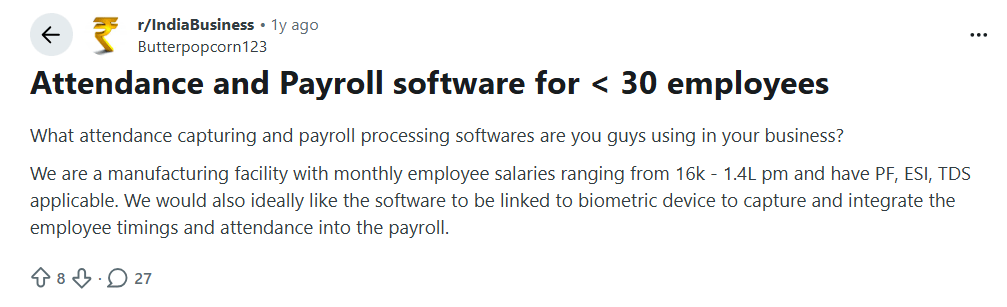
Image alt text: Reddit post asking what attendance and payroll software small manufacturing businesses use for under 30 employees
On r/IndiaBusiness, a manufacturing business owner with under 30 employees on Reddit asks what attendance and payroll software other founders use, since they need biometric attendance linked directly to PF, ESI, and TDS payroll calculations.
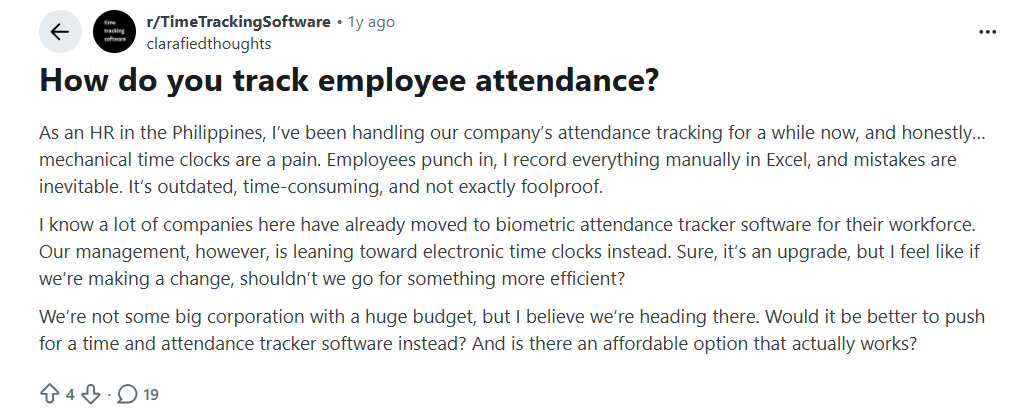
Image alt text: Reddit post from an HR professional asking how to track employee attendance without manual Excel logs
An HR professional from the Philippines on Reddit describes manually logging attendance from mechanical time clocks into Excel, and asks whether an affordable biometric or electronic attendance tracker is worth the switch for a growing team.
These discussions show why there is no single tool that works for every business. The right choice depends on factors like employee location, payroll requirements, budget, and the level of tracking your team needs.
Quick Comparison Table of the Top Attendance Management Systems
The table below compares each tool’s best-fit use case, standout feature, starting price, and G2 rating.
|
Attendance Management Systems |
Best For | Key Strengths | Starting Price |
G2 Rating |
| Flowace | Hybrid and remote teams that want attendance tracking with productivity insights | Automatic attendance tracking, productivity insights, automatic timesheets, workforce reports, privacy controls | Starts at $1.99/user/month billed yearly. | 4.6/5 (137 reviews) |
| Keka | Indian businesses that want attendance, HR, and payroll in one platform | Biometric and mobile attendance, facial recognition, shift management, payroll integration, attendance reports | Custom pricing based on HR modules and business needs | 4.4/5 (2,210 reviews) |
| Buddy Punch | Small businesses that need simple time tracking with attendance verification | GPS tracking, facial recognition, IP restrictions, scheduling, time-off tracking, payroll reports | Starts at $4.99/user/month + $19/month base fee billed annually | 4.8/5 (388 reviews) |
| OnTheClock | Small businesses looking for affordable employee time tracking | Time tracking, scheduling, PTO management, GPS tracking, employee self-service, payroll support | Starts at $4/employee/month + $5/month base fee | 4.4/5 (251 reviews) |
| Connecteam | Deskless and field teams managing mobile employees | GPS time tracking, scheduling, task management, employee communication, payroll integrations | Starts at $29/month billed annually | 4.6/5 (3,505 reviews) |
*Updated August 2026
1. Flowace
Best for: Hybrid and remote teams that want attendance tracking with productivity insights.
Flowace is an attendance and workforce management platform that combines automatic time tracking, attendance monitoring, productivity insights, and reporting in one system. It helps teams understand work hours, attendance patterns, project time, and workforce activity from a single dashboard.
Key features of Flowace:
- Automatic attendance tracking: Records attendance through desktop activity and online/offline status without relying only on manual check-ins.
- Productivity insights: Shows how time is spent across apps, websites, and work categories through dashboards and reports.
- Automatic timesheets: Creates timesheets from tracked work data and helps teams manage project hours.
- Workforce management: Manages attendance, shifts, leave, approvals, and employee availability from one platform.
- Reports and dashboards: Provides workforce activity reports, time reports, and project-level insights for managers.
- Privacy controls: Includes tracking controls and privacy options for teams that need visibility with employee transparency.
Flowace is suitable for businesses that want attendance data connected with productivity and workforce insights instead of using attendance tracking as a standalone system.
Pricing:
- Basic Plan: Starts at $1.99 per user/month (billed annually)
- Standard Plan: Starts at $3.99 per user/month (billed annually)
- Premium Plan: Starts at $6.98 per user/month (billed annually)
- Enterprise Plan: Custom pricing
- Free Trial: Try Flowace free for 7 days; no credit card required.
Note: Flowace also offers an AI chatbot (currently in BETA) that helps you get quick answers and insights from your work data. MCP integration is planned soon.
What can the Flowace AI Chatbot do?
- Currently available in BETA, with MCP integration planned soon.
- Ask questions in plain English about employee productivity, attendance, projects, apps, and team activity.
- Get instant, context-aware answers from dashboards, reports, and workforce data.
- Search across connected apps, documents, and the web from one place.
- Summarize reports and highlight the insights that matter most.
G2 Rating
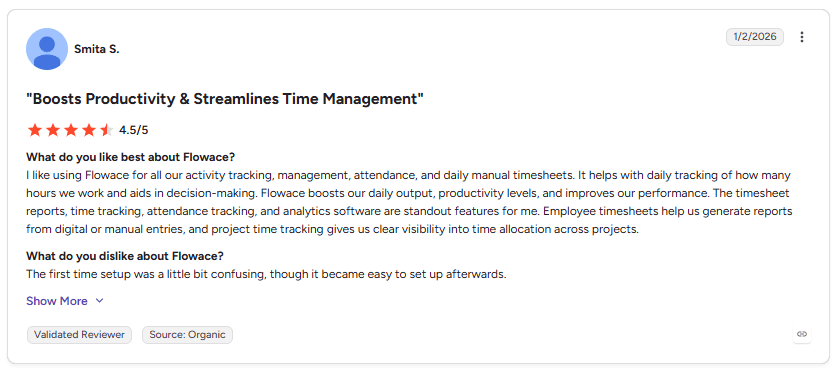
Image alt text: G2 customer review highlighting Flowace’s attendance tracking, activity tracking, timesheets, and productivity features.
This customer review highlights how Flowace helps teams manage attendance, track work hours, and generate accurate timesheets from one platform. The reviewer also mentions improved productivity, clearer visibility into time allocation, and easier project tracking. It shows how automatic attendance and time tracking can reduce manual work while giving managers more reliable workforce data.
Still comparing tools? See what Flowace offers for modern teams.
Explore Flowace Features2. Keka
Best for: Indian businesses that want attendance management combined with HR and payroll.
Keka is an HR platform that combines attendance tracking, leave management, payroll, and employee management features. It supports multiple attendance methods, including biometric devices, RFID, facial recognition, and mobile-based attendance tracking.
Keka is a good fit for companies that want attendance data connected directly with HR processes. It helps teams manage employee hours, shifts, overtime, leave approvals, and payroll-related workflows from one platform.
Key features of Keka:
- Multi-mode attendance tracking: Supports biometric devices, RFID, facial recognition, and mobile attendance options for different workplace setups.
- Selfie and facial recognition attendance: Employees can check in through selfie-based verification, where the system matches the captured image with employee records.
- Shift and overtime management: Helps businesses configure shifts, track overtime, and apply attendance rules based on company policies.
- Payroll integration: Attendance, leave, and overtime data can connect with payroll workflows to reduce manual calculations.
- Attendance dashboards and reports: Provides visibility into attendance patterns, leave data, and workforce records through analytics dashboards.
Pricing:
- Keka pricing depends on the HR modules selected, business needs, and employee count.
- Attendance pricing is not listed separately as a fixed plan.
- Pricing details are available through Keka’s official pricing page with customized quotes.
G2 Rating:
3. Buddy Punch
Best for: Small businesses that need simple time tracking with attendance verification features.
Buddy Punch is an online employee time tracking tool that helps businesses manage clock-ins, schedules, time off, locations, and timesheet reporting. Employees can track work hours through web browsers or mobile apps, and managers can review and export time data for payroll processing.
Buddy Punch is useful for teams that need a straightforward attendance system with features that help verify employee clock-ins and reduce manual timesheet work.
Key features of Buddy Punch:
- Multiple clock-in options: Employees can clock in through web browsers or mobile apps, with options such as facial recognition and GPS tracking.
- GPS and location tracking: Helps businesses monitor where employees clock in when location verification is needed.
- IP address restrictions: Allows businesses to limit clock-ins to approved locations or networks.
- Time-off management: Employees can request time off, while managers can review approvals without manual spreadsheet tracking.
- Timesheet reports: Managers can review, edit, and export attendance data for payroll processing.
- Scheduling tools: Helps businesses create employee schedules and manage shift information.
Pricing:
- Starter Plan: Starts at $4.99/user/month (billed annually) + $19/month base fee.
- Pro Plan: Costs $6.99/user/month (billed annually) + $19/month base fee.
- Advanced Plan: Costs $12.99/user/month (billed annually) + $19/month base fee.
- Payroll Plan: Starts at $8/user/month + $49/month base fee.
G2 Rating:
4. OnTheClock
Best for: Small businesses that need simple and affordable employee time tracking.
OnTheClock is an employee time tracking platform designed to help small businesses manage attendance, employee schedules, PTO requests, and timesheets. It supports office teams and remote employees with web-based time tracking and location-based attendance features.
OnTheClock helps businesses track work hours, review attendance data, manage employee schedules, and prepare records for payroll processing.
Key features of OnTheClock:
- Employee time tracking: Employees can clock in and out through online time tracking tools while managers review attendance records.
- Scheduling management: Businesses can create employee schedules and manage shift information.
- PTO tracking: Employees can submit time-off requests, while managers can review and approve them.
- GPS and location tracking: Helps businesses monitor employee clock-in locations when required.
- Employee self-service: Employees can view their hours, schedules, and attendance information.
- Timesheet management: Managers can review, edit, and export timesheet data for payroll needs.
- Payroll support: Attendance data can be exported or connected with payroll processes to reduce manual entry.
Pricing:
- Time Tracking, Scheduling & PTO Plan: Start at $4/employee/month + $5/month base fee after a free 30-day trial.
- Payroll Plan: Costs $6/employee/month + $40/month base fee.
- Enterprise Plan: Businesses with 100+ employees can contact OnTheClock for custom pricing.
G2 Rating:
5. Connecteam
Best for: Deskless and field teams that need attendance tracking, scheduling, and employee management in one platform.
Connecteam is an employee management platform built for businesses with mobile and non-desk workers. It combines employee time tracking, scheduling, communication, task management, and workforce tools in one system.
Connecteam helps businesses track work hours, manage shifts, monitor field attendance, and keep teams connected through mobile apps. It is commonly used by companies with employees who work outside a traditional office.
Key features of Connecteam:
- GPS time tracking: Employees can clock in and out through a mobile app, while managers can view location details when location tracking is enabled.
- Employee scheduling: Managers can create shifts, assign schedules, and update workers about upcoming jobs.
- Time tracking and timesheets: Tracks employee hours and helps prepare attendance data for payroll processing.
- Task management: Allows managers to assign tasks, track completion, and monitor field activities.
- Employee communication: Provides chat and updates to keep deskless teams connected.
- Forms and checklists: Helps businesses collect information, complete inspections, and standardize daily processes.
- Payroll integrations: Connects attendance and time data with payroll tools to reduce manual work.
Pricing:
- Basic Plan: Starts at $29/month (billed annually).
- Advanced Plan: Costs $49/month (billed annually).
- Expert Plan: Costs $99/month (billed annually).
- Enterprise Plan: Custom pricing based on business needs.
G2 Rating:
How Does Flowace Track Employee Attendance?
Flowace records employee attendance automatically when work begins. Employees do not need to clock in manually. Attendance records are created as work starts, which helps reduce missed check-ins and manual errors.
Attendance data appears alongside work hours, focus time, and workload insights. Managers can view attendance and work activity from one dashboard instead of switching between different tools.
Flowace is built to be transparent. Teams know what is tracked before monitoring begins. The platform tracks work hours and work-related activity, helping businesses manage attendance while giving employees clear visibility into the process.
Ready to see attendance tracking in action?
Start Your Free TrialFrequently Asked Questions About Attendance Management Systems
1. What is an attendance management system?
An attendance management system is software that records employee attendance, work hours, breaks, leave, and overtime. It stores attendance records in one place and helps businesses prepare accurate payroll, reports, and compliance records.
2. How do attendance management systems work?
Employees check in using a biometric device, mobile app, GPS, RFID card, or web browser. The system records attendance, applies company rules for shifts, breaks, leave, and overtime, then prepares approved work hours for payroll and reporting.
3. What is the difference between attendance management and time and attendance software?
The difference between attendance management and time and attendance software is the scope of features. Attendance management focuses on employee attendance, shifts, leave, and attendance records. Time and attendance software usually includes those features plus work hours, overtime tracking, project time, and payroll integrations.
4. Can small businesses use an attendance management system?
Yes. Many attendance management systems are designed for small businesses. Cloud-based tools are easy to set up, charge per employee, and often include attendance tracking, leave management, scheduling, and payroll integrations.
5. Can remote employees use an attendance management system?
Yes. Many systems let remote employees check in through mobile apps, GPS, or web browsers. Some also support geofencing and location verification for field and hybrid teams.
6. Can an attendance management system reduce payroll errors?
Yes. Attendance systems calculate work hours, breaks, overtime, and leave before sending approved hours to payroll. This reduces manual data entry and helps improve payroll accuracy.
7. How much does an attendance management system cost?
Pricing depends on the vendor, features, and team size. Some tools start at a few dollars per employee each month, while larger HR platforms use custom pricing. Always check the vendor’s latest pricing before making a decision.
8. How does an attendance management system prevent buddy punching?
Many systems use biometric verification, facial recognition, GPS, or geofencing to confirm that the right employee is checking in from the correct location. These features help reduce buddy punching and improve attendance accuracy.
9. Is attendance tracking required by law?
Many countries require employers to keep accurate attendance or work-hour records. The exact requirements vary by region, but digital attendance records are widely accepted when they meet local recordkeeping rules.