













Enterprise-grade security backed by GDPR, HIPAA, ISO 27001 & SOC 2 compliance. Know more
Workforce Productivity Platform

Surface problems before they escalate.

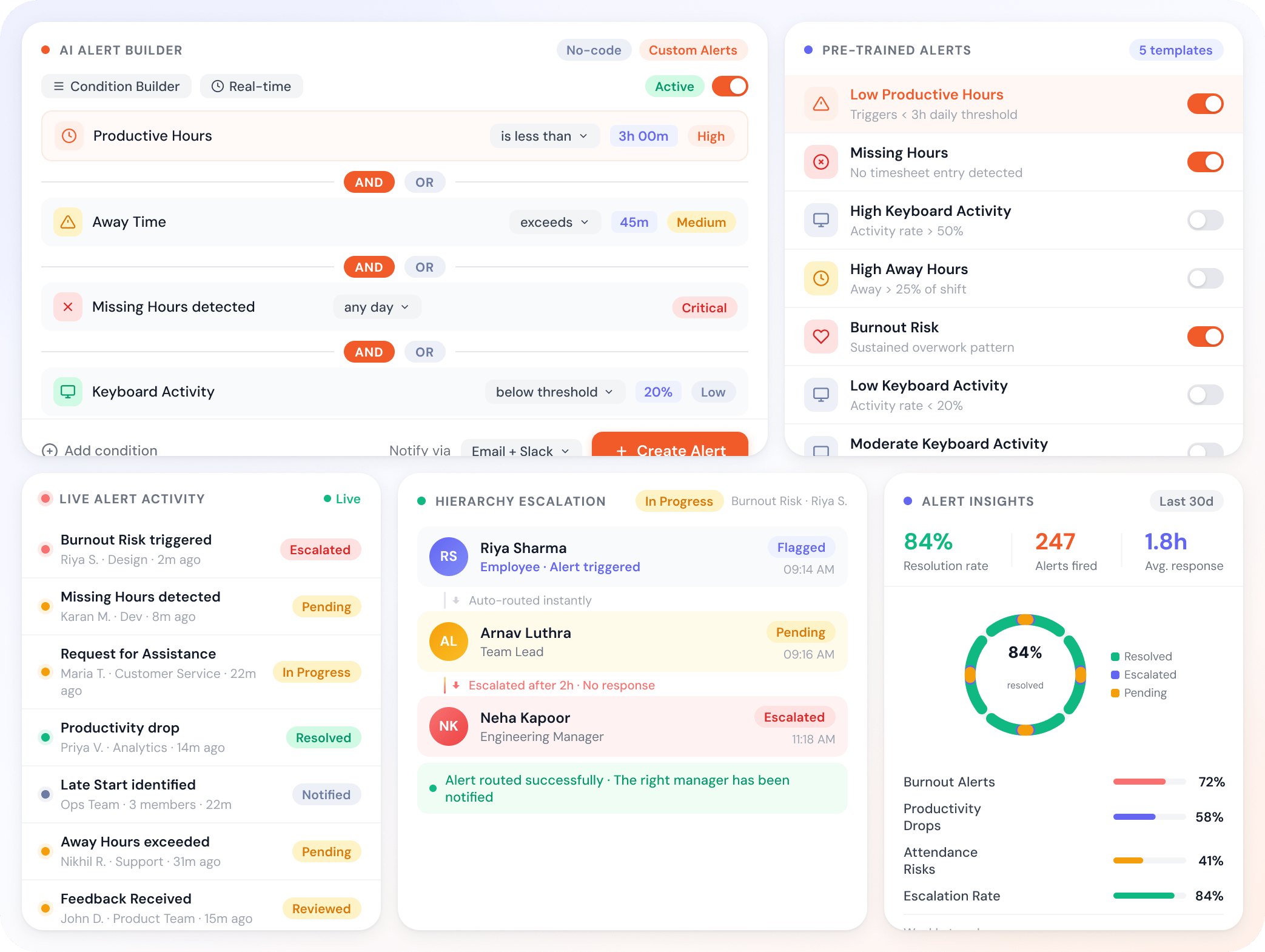
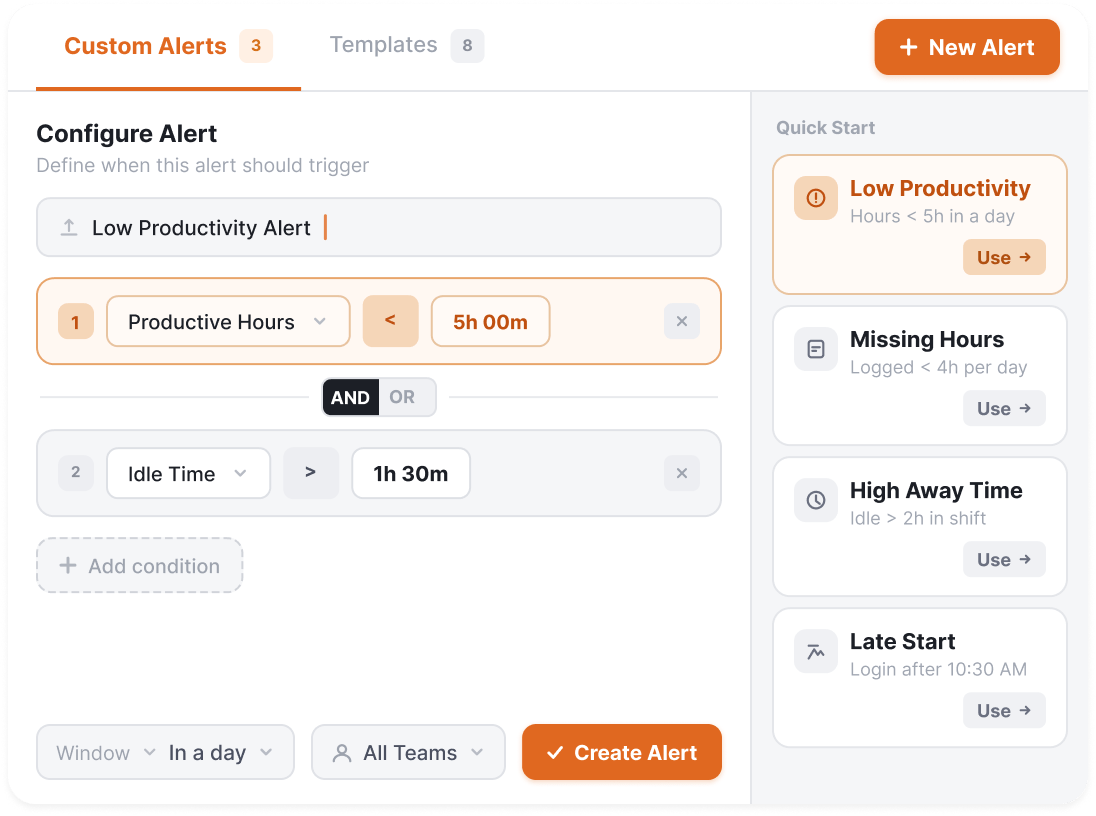
Build custom no-code alerts in minutes. Plus five pre-trained alerts ready for burnout, missing hours, and productivity drops. Your hierarchy decides who hears about each.

Free 7-day trial No credit card required 5-minute setup Dedicated onboarding
Productivity Insights

Trusted by teams at

Flowace Client Logo Flowace Client Logo Flowace Client Logo Flowace Client Logo Flowace Client Logo Flowace Client Logo Flowace Client Logo Flowace Client Logo Flowace Client Logo Flowace Client Logo Flowace Client Logo Flowace Client Logo Flowace Client Logo Flowace Client Logo Flowace Client Logo
How it works

From signal to action, in five steps.

A workflow tuned for catching problems before they become problems.

  1. Step 1: Use what's pre-trained

    Five built-in alerts, ready to enable.

    • Low Productive Hours, Missing Hours
    • High Away Hours, Late Start, Burnout
    • Low Keyboard and Mouse Activity
  2. Step 2: Or build your own

    No-code custom alerts in minutes.

    • Configurable trigger conditions per alert
    • Threshold logic without writing code
    • Configure once, applies across teams
  3. Step 3: Cover every signal

    Productivity, attendance, activity, time.

    • Productivity drops, missing hours, away time spikes
    • Attendance and activity events
    • Combine pre-trained logic with custom conditions
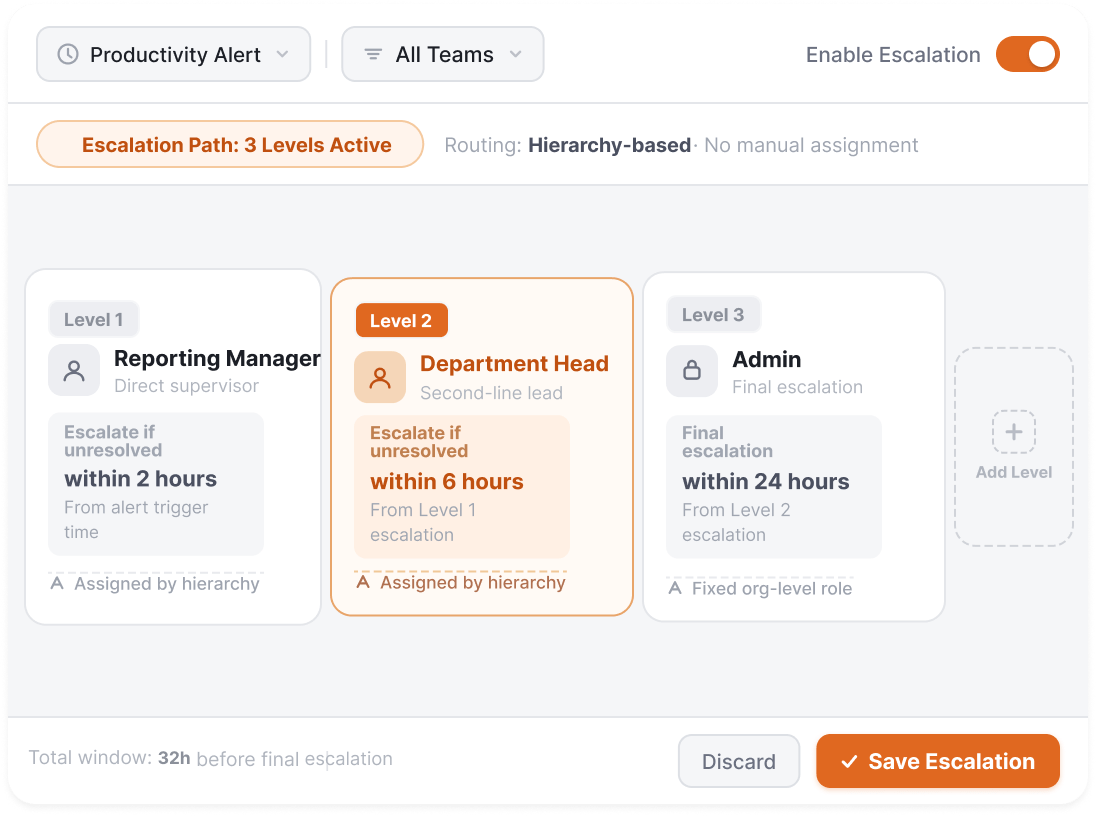
  4. Step 4: Route through your hierarchy

    The right manager hears about each.

    • N-level org hierarchy escalation
    • Approver-absent fallback chains
    • Manager and direct-report visibility
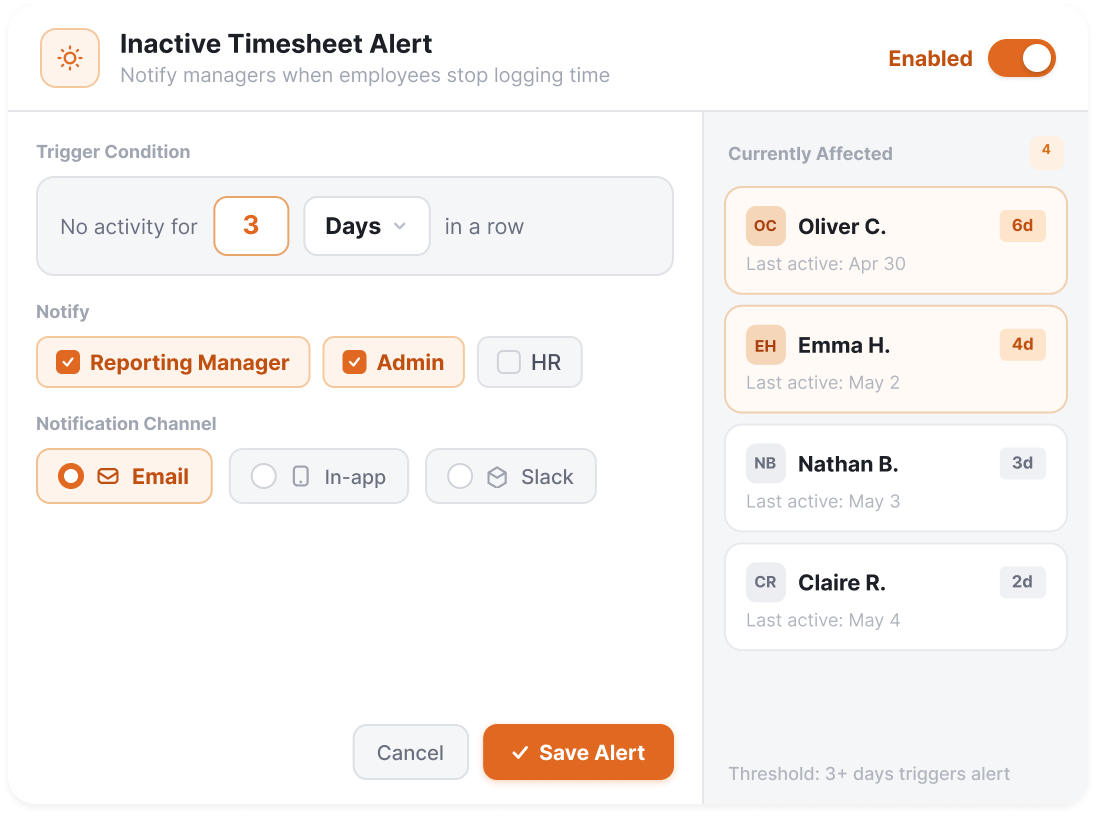
  5. Step 5: Catch what shouldn't be missed

    Inactive timesheet alerts and exception cases.

    • Email notifications for inactive employees
    • Configurable absence thresholds
    • Catch payroll-affecting gaps before period close
All features

Every capability in Intelligent Alerts.

Everything you need to surface signals before they become problems, route them to the right people, and catch the cases that shouldn't slip.

Feature Image Feature Image Feature Image

Ready to surface problems before they escalate?

Free 7-day trial.
No credit card required.
Live in under 5 minutes.
Frequently asked

Everything else, answered.

Flowace Intelligent Alerts is the alerting layer of Flowace's workforce intelligence platform. Two kinds of alerts ship: five pre-trained alerts cover the most common patterns (Low Productive Hours, Missing Hours, High Away Hours, Late Start / Burnout, Low Keyboard and Mouse Activity), and the AI Alert Builder lets you create custom alerts with no code by combining productivity, attendance, and activity signals.
No. The pre-trained alerts are ready to enable in minutes, no configuration required beyond turning them on. The AI Alert Builder uses a visual no-code interface for custom alerts. No threshold formulas to write, no rule books to maintain.
When an alert triggers, it routes to the right person based on your org hierarchy. The direct manager sees it first. If unresolved or if the manager is absent, escalation flows to the next level. Configurable per alert type. The same hierarchy you use for approvals.
Same engine, different surfaces. Productivity Alerts is what we call the alerts capability when it's surfaced inside the Productivity Insights pillar (focused on burnout, low productivity, missing hours). The AI Alert Builder is the underlying tool that lets you build any custom alert across productivity, attendance, and activity signals. Both run on /alerts-and-smart-notifications/.
Yes. Alerts can be built across any signal Flowace tracks. Attendance gaps, missing timesheets, shift adherence issues, expense submission delays, billable hour shortfalls, late starts. The AI Alert Builder lets you combine signals across pillars in a single alert.
Inactive Timesheet Alerts are a specific built-in pattern: email notifications when employees haven't logged time for N days. Configurable threshold. They run automatically once enabled. The AI Alert Builder can do similar things with custom thresholds, but Inactive Timesheet Alerts ship pre-configured for the common payroll-affecting case.
Both, plus Slack notifications. Email for managers and escalation chains. In-app notifications in the Flowace dashboard. Slack integration for teams that prefer real-time channel updates. Configurable per alert and per role.
That's the universal concern, and the reason cadence is configurable per alert. Real-time intraday alerts make sense for a BPO ops floor running on schedule adherence. Daily digests fit accounting busy season. Weekly strategic digests fit how partners at law firms actually want to consume alerts. The pre-trained alerts ship with sensible defaults; the AI Alert Builder lets you set thresholds and digest frequency to match how your team actually operates. Start with the alerts that protect your highest-stakes outcomes; ignore the rest.
BPO and call centers (real-time intraday alerts on schedule adherence and SLA risk), healthcare RCM (queue throughput and AR aging signals on a same-day cadence), IT services (capacity, burnout, and after-hours signals delivered weekly to delivery directors), accounting and KPO firms (engagement profitability and busy-season capacity, daily during the cycle), and legal practices (billable pace and matter staleness, weekly strategic digest). The same alert engine, tuned for very different alert cultures.

Surface problems before they escalate.

Try Flowace free for 7 days.
No credit card.
Live in under 5 minutes.