Time Tracking Software for IT Services



Most IT services firms in India and globally already know margins are getting squeezed. What they do not know is exactly where the hours are slipping away. Time tracking software for IT services is the operational layer that ties delivery work to financial outcomes; without that layer, scope creep, billing disputes, and margin decay stop being exceptions and start being the norm.
For IT services leaders in India and globally, five non-negotiables define effective time tracking implementation:
This piece breaks down how delivery teams, heads of operations, and finance leaders can use time tracking to tighten billing accuracy, defend project margins, and produce reporting clients will actually accept. We will start with where the leakage happens, then move into a workable setup and the steps to make it stick.
Why IT Services Firms Lose Margin Without Realizing It
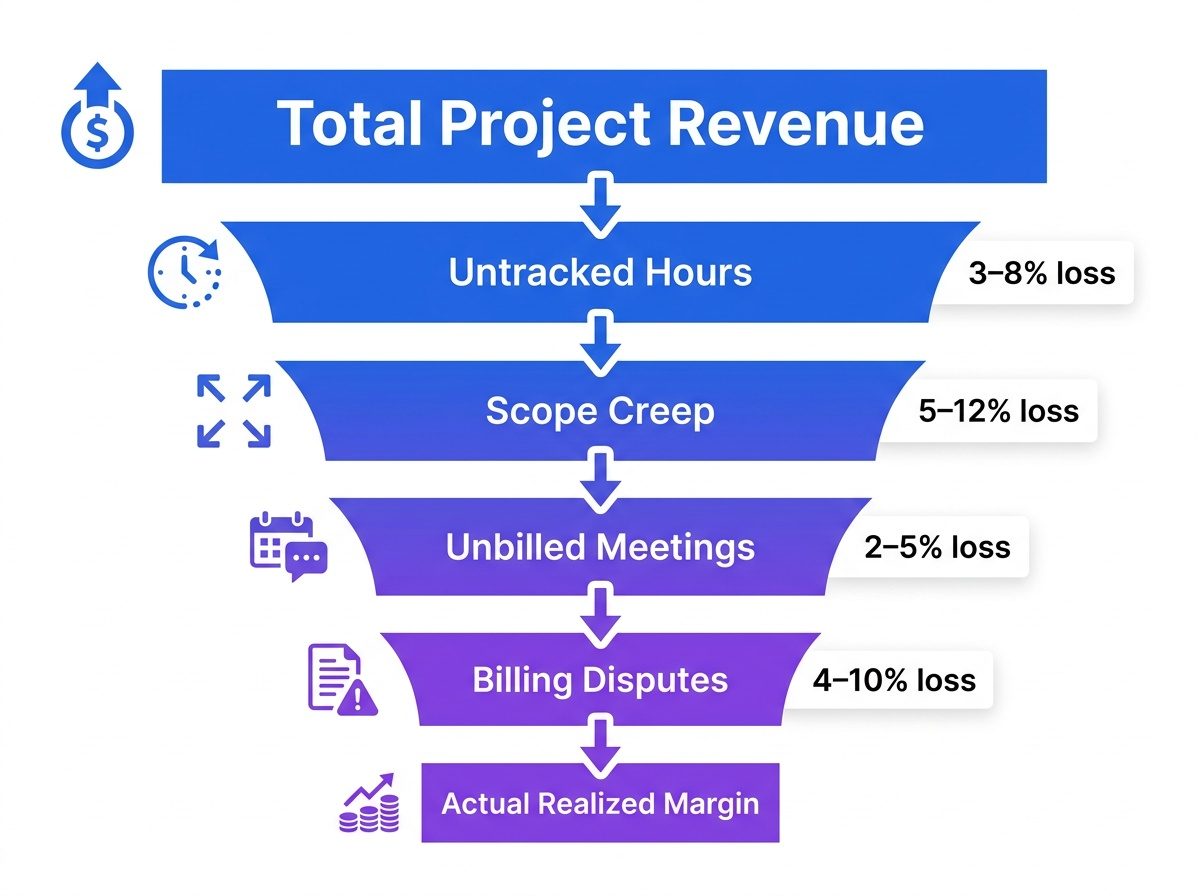
Margin erosion in IT services almost never shows up as a single dramatic failure. It shows up as a hundred small misses: a developer spends two hours but logs one, QA runs longer than the scope assumed, a client call happens and nobody captures it. Many professional services firms struggle with incomplete or delayed time reporting, particularly across multi-project environments, and every untracked minute cuts into profitability, regardless of whether you bill hourly or sell fixed-fee work.
The silent killer is variance: the distance between what you estimated and what you actually delivered. Knowcraft Analytics, for example, successfully grew their billable hours by 12.7% without adding headcount by gaining this exact visibility.
Track project hours before margins leak
Once invoicing enters the picture, the damage spreads. Inaccurate invoices weaken client trust and create real operational cost through rework, corrections, and dispute handling. If you want a clearer view of the mechanics, understanding that losses are already there—just invisible in your current reporting—is the first step to reclaiming them.
The Margin-to-Invoice Framework: A 5-Layer Approach
Effective time tracking for IT services is not about watching people work. It is about building a dependable data layer that links activity to budgets and invoices. That framing matters: when teams feel monitored, they will optimize for appearances, and time data that has been “managed” is worse than missing data.
A solid setup captures time at the task and project level, ties it to client accounts, and makes variance obvious enough for operations and finance to act. This is the core of the Margin-to-Invoice Framework, a structure for turning raw activity into profitable, billable work. It consists of five layers:
The 5 Layers of the Margin-to-Invoice Framework:
- Layer 1: Capture: Logging time as it happens, automatically where possible, to create a complete record.
- Layer 2: Classify: Tagging every entry as billable or non-billable and assigning it to the correct project and task.
- Layer 3: Validate: Reviewing logged hours against project plans to catch errors, gaps, and scope creep before they hit an invoice.
- Layer 4: Invoice: Generating accurate, client-ready invoices directly from validated time data.
Explore Flowace all features to automate your work reporting.
According to Grand View Research’s 2025 Time Tracking Software Market Report, the global market is estimated to grow from $6.13 billion in 2025 to $17.39 billion by 2033 at a CAGR of 14.2%, reflecting increasing demand for workforce visibility and operational analytics. This growth reflects a shift in accountability: operations and finance leaders want the numbers behind delivery, including in IT services.
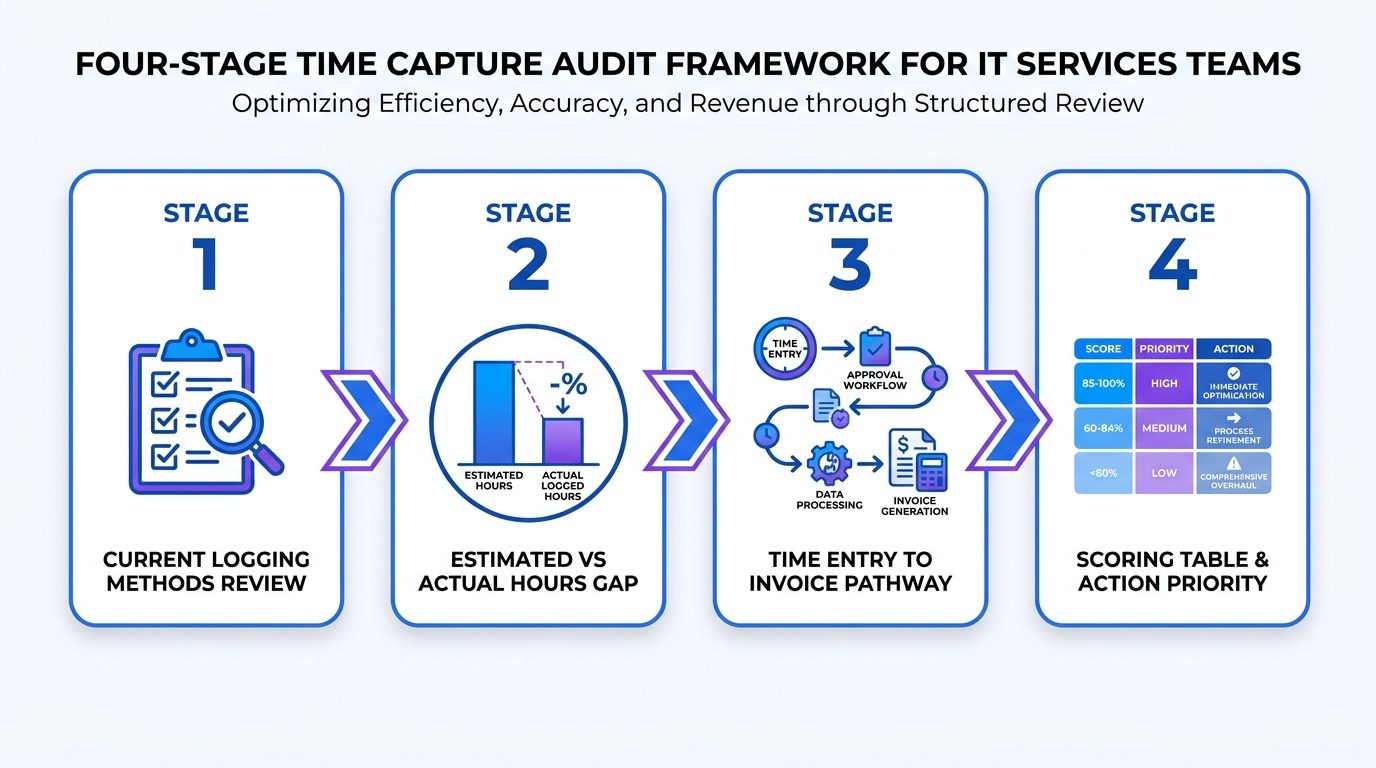
Step 1 (Layer 1): Audit Your Current Time Capture Process
Before you pick a new tool or overhaul an existing one, start with an honest audit of how time is captured today. In most IT firms it is a patchwork: one team logs in a project management tool, another keeps a spreadsheet, and a meaningful slice of billable work never makes it into any system.
Your audit needs to answer three practical questions. First: what share of logged hours is actually billable? Second: how quickly does logging happen after the work (same day, end of week, or not at all)? Third: what is the path from time logs to invoices, and how many manual handoffs exist along the way?
Delayed logging is a repeat offender when billing accuracy slips. When engineers fill in timesheets on Friday, they are reconstructing the week from memory. That is how recurring work disappears: a 15-minute daily standup that never gets logged becomes more than an hour per week per person, and across a 10-person team on a six-month engagement, that turns into hundreds of unbilled hours.
Step 2 (Layer 2): Map Billing Models to Tracking Requirements
Billing in IT services is not one-size-fits-all, and your tracking rules cannot be either. A time-and-materials engagement needs different controls than a fixed-fee build or a managed services retainer.
A common source of pain in professional services is when teams track work one way, then try to invoice it another way. That mismatch creates revenue leakage and gives clients room to dispute what they are being charged for.
Here is how the tracking priorities change by billing model:
Billing model vs. tracking priority:
- Time and Materials: Every hour must be logged, classified as billable or non-billable, and tied to a rate card. Real-time visibility is critical.
- Fixed-Fee Projects: Tracking focuses on budget burn rate. You need to know when actual hours are outpacing the estimate so you can renegotiate or absorb the loss consciously.
- Retainers / Managed Services: Tracking validates that the agreed scope is being delivered. It also protects you when clients claim work wasn’t done.
- Milestone-Based Billing: Time data supports milestone sign-off and helps you understand which phases are profitable and which are not.
Many IT firms run multiple billing models across their client base, often at the same time. That is why the importance of time tracking without hourly billing gets underestimated: even when the invoice is not tied to hours, time data is what tells you whether you priced the work correctly and how to quote the next deal.
Step 3: Choose a Tool That Fits IT Services Workflows
Time tracking software for IT services has to match how technical teams actually operate, plug into the systems you already run, and produce outputs finance can use without a week of cleanup. A generic tracker built for solo freelancers usually falls apart once you add multiple projects, multiple clients, and review workflows.
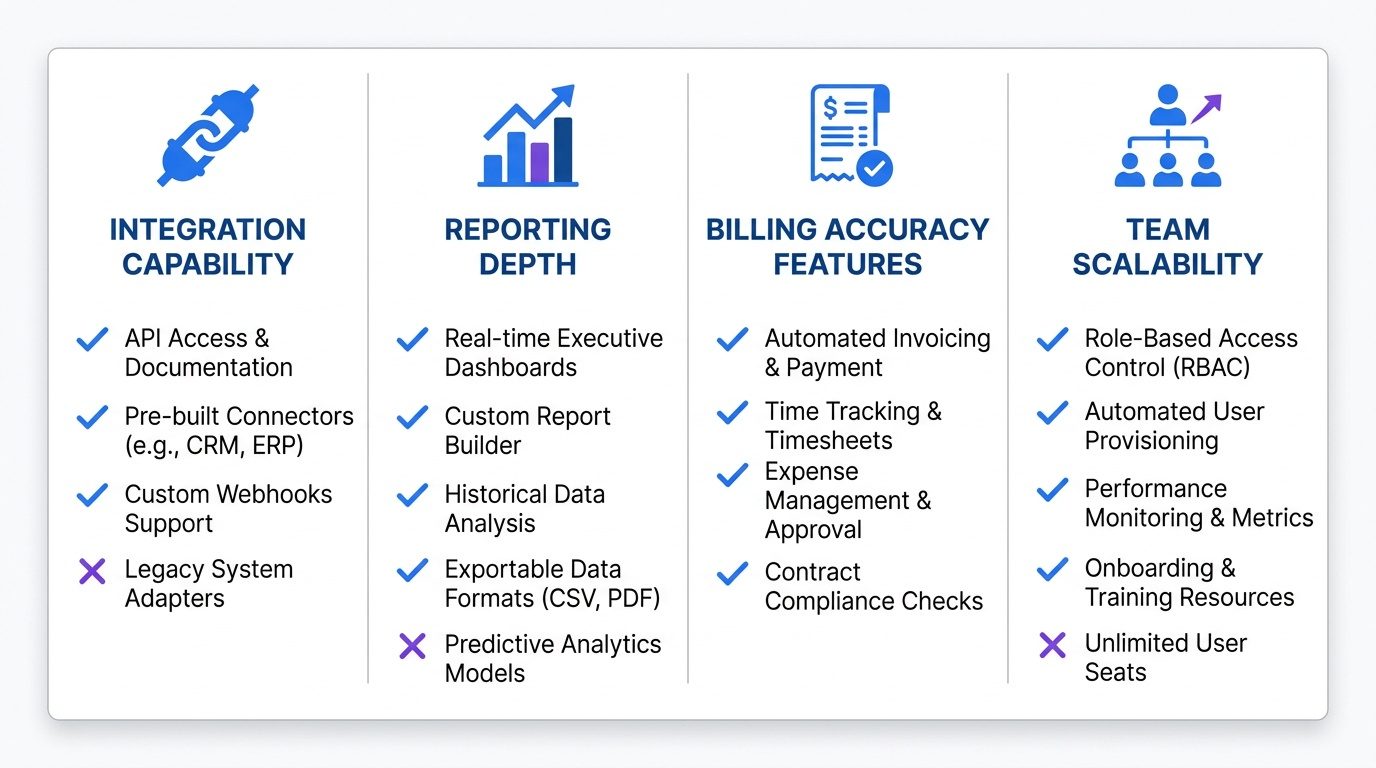
Flowace is built for this environment. It combines workforce analytics with project- and team-level visibility, and it uses automatic activity tracking to reduce the admin load on engineers. Flowace’s features include project-level time allocation, billable hour classification, and reporting designed to line up with client billing cycles.
When you evaluate tools, treat time tracking integrations as table stakes. If your tracker cannot connect to your project management platform, your CRM, or your invoicing system, you are signing up for manual reconciliation and spreadsheet triage. Different platforms take different approaches to project reporting, workforce analytics, and activity tracking. The right choice depends on whether your priority is billing accuracy, capacity planning, or both.
Step 4 (Layers 3 & 4): Build a Billing Accuracy Workflow
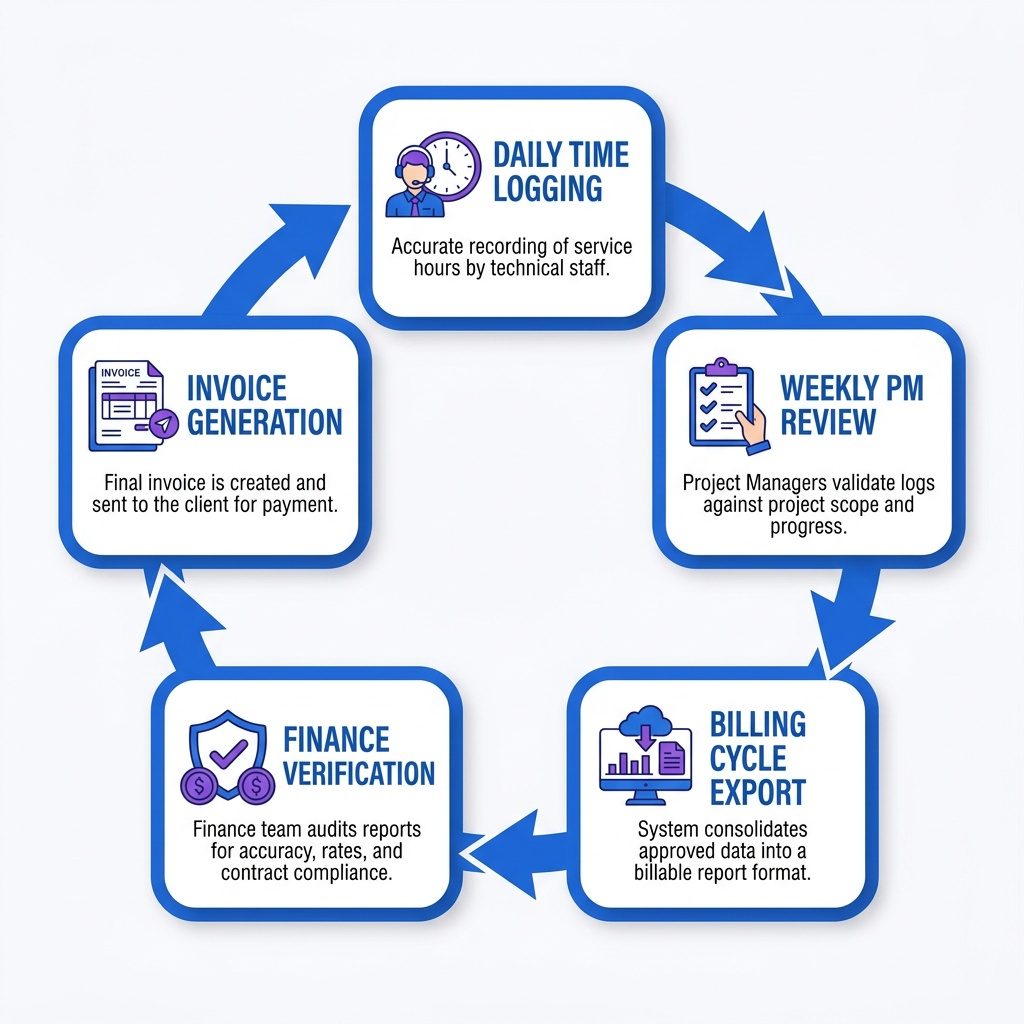
Picking a tool only gets you halfway. The rest is process: a workflow that makes time data complete, reviewed, and approved before it touches an invoice. Most billing errors are not software bugs. They are the predictable result of skipping review and hoping the numbers work out.
A billing accuracy workflow that holds up in IT services is straightforward. Engineers log time daily, not in a weekly batch. Each Friday, the project manager checks logged hours against the plan and flags gaps, misclassifications, or work that looks like unapproved scope. At the end of the billing cycle, finance pulls the billing report, verifies it against the approved scope, and generates the invoice from that validated dataset. Done well, this is measured in hours, not days.
Approve timesheets before billing errors happen
The review step is where the money is. A 30-minute weekly pass by a project manager catches hours booked to the wrong project code, non-billable admin time that accidentally got tagged as client work, and scope additions that never went through approval. Each catch either preserves revenue or prevents a dispute that will cost you more than it should.
Step 5 (Layer 5): Use Time Data to Improve Future Project Estimates
Historical project data is the most overlooked payoff from time tracking. Once you have six months of clean logs, you have a pricing and estimation asset. Most IT firms do not build that asset until they have repeated the same margin mistake three or four times on similar work.
Make post-project analysis a standard closeout step. Compare estimated hours to actuals by phase and role. Call out the project types that routinely run over and quantify the overage. Feed those numbers back into your next estimate for similar scope. That is the difference between reacting to margin erosion and pricing with intent.
Reconcile billable hours with reports
Compliance, Privacy, and Scalability
For IT firms in India handling global clients, compliance is mandatory. Flowace ensures data security by adhering to SOC 2 Type I, GDPR, ISO, and HIPAA standards. This positions time tracking as a visibility and productivity tool, ensuring that capacity planning occurs within a secure, ethical framework rather than one focused on surveillance.
What IT Services Firms Get Wrong About Time Tracking
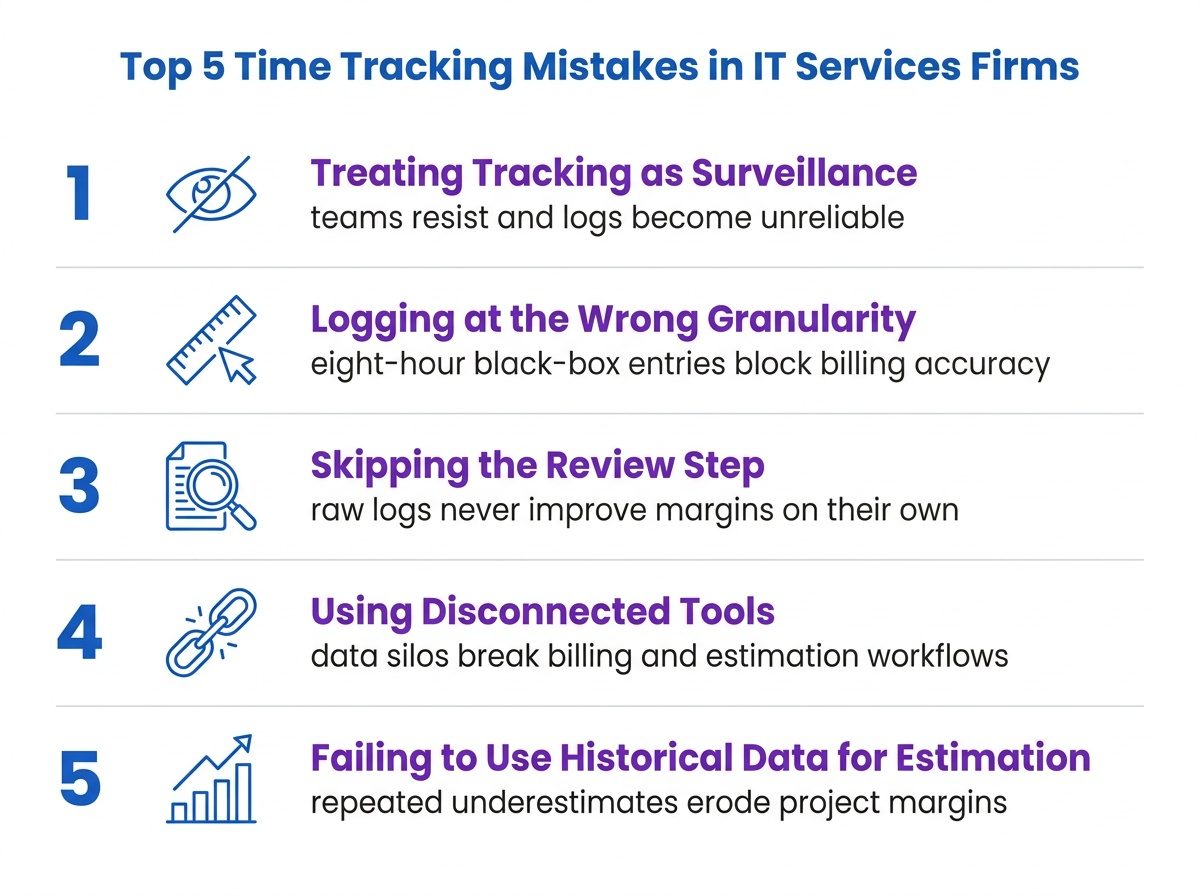
The most common failure is positioning time tracking as HR or compliance instead of operations and finance. When it is sold as oversight, teams resist and the logs become unreliable. When it is positioned as the data layer that protects budgets and keeps client billing accurate, adoption tends to follow.
Another mistake is collecting time and never looking at it. A database full of raw logs does not improve margins on its own. The value is in review and analysis: which projects are profitable, which clients are pushing untracked scope, and where the plan keeps underestimating effort.
The third issue is granularity. Logging eight hours to “Project X” is a black box. Logging two hours to “API integration, Phase 2, billable” is actionable for billing and for the next estimate. The taxonomy you define in the tool matters as much as the tool. For smaller IT firms, time tracking software for small businesses often hits the right tradeoff: enough detail for billing and margin work, without burying a lean team in categories.
From Process to Profit
Margin erosion in IT services stays hidden until you can compare clean time data against the estimate. Billing accuracy comes from workflow, not wishful thinking: daily logging, weekly review, and finance verification before invoicing. Your billing model (T&M, fixed-fee, retainer) dictates what your time tracking needs to capture and how it must report. Over time, that historical data becomes your most valuable input for future estimates and pricing. When positioned as a financial operations tool, not a monitoring program, time tracking software for IT services becomes a core driver of profitability.
Protect Project Margins With Accurate Time
Start Free TrialFrequently Asked Questions on Time Tracking Software
1. What is time tracking software for IT services?
Time tracking software for IT services is an operational layer that records work hours across projects. By using time tracking software for IT services, firms in India and globally can link delivery work to financial outcomes through clear visibility.
2. How does time tracking software for IT services improve project margins?
It protects margins by exposing where hours are lost to untracked tasks. Implementing time tracking software for IT services ensures that every minute spent on technical delivery is accounted for in the final billing cycle.
3. Which billing models benefit most from time tracking software for IT services?
While T&M depends on it for billing, fixed-fee and retainer models use time tracking software for IT services to monitor budget burn rates and validate scope, ensuring project profitability remains intact.
4. How do you get IT teams to actually log time using time tracking software for IT services?
The best way to drive adoption is to focus on visibility and fair workload planning. When time tracking software for IT services is automated and low-friction, it becomes a natural part of the technical workflow.
5. What should IT services firms look for in time tracking software for IT services?
Look for project-level reporting, capacity planning features, and deep integrations. Robust time tracking software for IT services should also meet global security standards like SOC 2, HIPAA, and GDPR.