How In Office Employee Monitoring Works (and What to Track)



Published: September 2026 · Last Updated: September 2026 · Last Verified: September 2026
In office employee monitoring means tracking employee attendance, work time, computer activity, and other work activity while people work at a company site.
This article explains how it works, what companies can track, what they should leave alone, and the basic workplace privacy rules in the US and India.
What Is In Office Employee Monitoring?
In office employee monitoring means tracking employee attendance, work time, computer activity, and other work activity while people work at a company site. Companies can use attendance systems, workplace software, and other tools to see when employees are present and how work time is being used.
Most in office monitoring systems focus on a few common signals.
Attendance data shows when an employee was present. Activity data can show which apps and websites were used during work time. Reports can help managers understand how time and activity are spread across a team or shift.
Some tools also offer features such as screenshots, keyboard and mouse activity, or app and website tracking.
How Is In Office Monitoring Different From Remote Monitoring?
In office monitoring focuses on employees working at a company location, while remote monitoring focuses on employees working outside the office.
For office teams, attendance, desk time, and workstation activity can provide useful context about when employees are present and active at their workstations. Remote teams may use different signals, such as time-zone-aware schedules and activity across different locations.
For a deeper look at monitoring employees who work from home or across different locations, see our remote employee monitoring software article.
How In Office Employee Monitoring Works
In office employee monitoring collects work-related data while employees work at a company site and turns that data into reports. Depending on the setup, it can use attendance systems, workstation activity, app and website data, idle time, and other signals to show when employees are present and how they use their work time.
How In Office Attendance Gets Recorded
Attendance can be recorded through a workstation login, access system, time clock, or another attendance system, depending on the office setup. Some workplace monitoring tools can also connect attendance data with employee work activity.
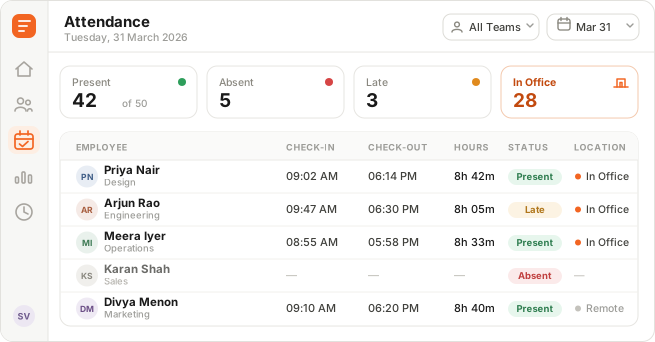
Image alt text: Flowace attendance dashboard showing employee check-in times, check-out times, and attendance data for an in office team.
This screenshot shows how an attendance dashboard can show when employees started and ended their workday.
App and Website Activity, Idle Time, and Screenshots
After attendance is recorded, some monitoring systems can collect computer activity such as app and website use, active time, and idle time. The exact data depends on the tool and the settings a company enables.
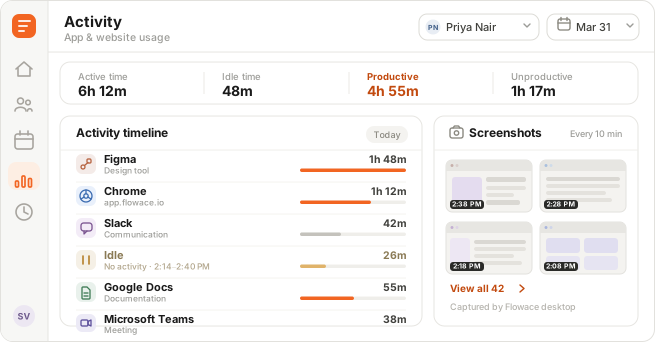
Image alt text: Flowace activity timeline showing active time, idle time, and app usage across an employee’s workday.
This type of timeline shows how computer activity was spread across the workday. Desk time usually refers to time when an employee is active at their workstation based on the signals the system records. It is different from attendance because someone can be present for eight hours and still have periods of inactivity.
Neither attendance nor desk time tells you whether the work was good or productive. They are signals that provide context about how work time was spent.
Screenshots can provide another layer of context when a company enables them. Whether screenshots are available, how often they are taken, and who can view them depends on the monitoring tool and company settings.
What Happens When Employees Share Computers
Shared computers can make employee activity harder to attribute to the right person. This is common in workplaces where several employees use the same workstation across different shifts.
If everyone uses the same account, the system may show that activity happened on the computer without clearly showing who performed it.
Using a separate account for each employee can make activity easier to attribute to the right person. This matters for call centers, help desks, shared workstations, and other office teams where multiple people use the same device.
Why Offices Need Monitoring Even When Everyone Works in the Same Place
It is easy to assume office teams are easier to manage because everyone works in the same building. But simply seeing who is at their desk does not show everything happening during the workday.
What Is Proxy Attendance?
Proxy attendance, also called buddy punching, happens when one employee clocks in or logs in for another employee. This can create inaccurate attendance records and, in some workplaces, lead to incorrect payroll.
Shared badges, punch codes, or login details can make this easier to do. Using individual employee accounts and attendance records makes it easier to match attendance and activity to the right person.
What Is Presence Theater?
Presence theater means looking busy at work without getting much real work done.
It can look like:
- Staying logged in late
- Switching between tabs without making progress
- Sitting quietly in meetings without adding much
- Spending long periods at a desk without doing meaningful work
Presence theater is more common in physical offices because managers can easily mistake being visible for being productive.
Someone can be at their desk for eight hours and still have long periods of inactivity. Another employee may spend less time visibly active but get more work done.
This can lead managers to reward people who look busy, while missing quieter, focused work that produces better results.
Activity and desk-time data can show the gap between logged hours and hours actually worked. A walk around the office cannot show that gap.
These tools can add useful context to attendance data, but they cannot prove that someone was productive or that their work was good.
What In Office Monitoring Can Reveal
Real workplace examples show why attendance and activity data can be useful.
AM2PM, a 96-agent team, used Flowace to get a clearer view of employee activity during the workday. Its activity rate increased from 75.1% to 84.9%. The example shows how activity data can help a large office team spot changes in work patterns that are difficult to see from attendance alone.
A CA firm had a different problem. Its manual attendance records were only 80-85% accurate, which meant HR had to spend extra time checking attendance. After moving to Flowace, the firm reported 99%+ attendance accuracy and saved 3-5 days of HR work during each payroll cycle.
These examples show two different uses of in office monitoring. Activity data can help teams understand work patterns, while automated attendance data can reduce errors and manual HR work.
In short, attendance shows who was there while activity data adds context about how work time was used.
Want a closer look at how office teams manage attendance and work activity?
Check In Office Monitoring SoftwareWhat IT Teams Say About Tracking In Office Presence
A Reddit discussion shows how tricky office presence tracking can be in a hybrid workplace. The team had tried badge data and computer activity, but neither gave a complete picture of who was actually in the office.
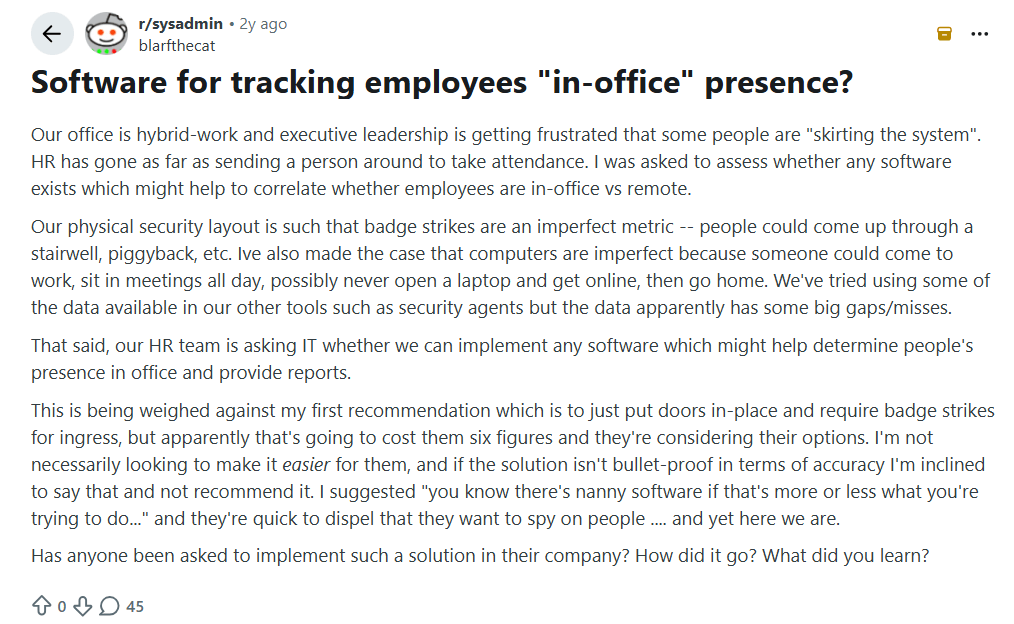
Image alt text: Reddit discussion about software for tracking employee presence in a hybrid office.
The discussion highlights an important point. Badge scans, computer activity, and attendance software can each miss part of the picture. One commenter also questions whether any software can reliably prove that someone was physically working in the office all day.
What In Office Monitoring Should Track
Good office monitoring focuses on a small set of work signals that have a clear business reason.
- Login and logout time to track attendance and shift times.
- App and website activity to understand how work time is spent across different tools.
- Idle time with context because being inactive at a computer does not always mean someone is wasting time. They could be in a meeting, on a call, or working away from the keyboard.
- Project or task time when teams need to track work by client, project, or task.
- Shift and schedule adherence for teams that work fixed hours or rotating shifts.
The goal is to collect information that helps answer a specific workplace question. If a data point has no clear use, there is little reason to collect it.
What Should Office Monitoring Avoid?
Office monitoring should have clear limits. Companies should avoid collecting personal or sensitive information they do not need for a clear work purpose.
- Continuous webcam surveillance: Constant camera monitoring can raise privacy concerns without adding much useful information. In an office, managers can already see whether someone is physically present.
- Unrestricted keystroke logging: Recording every key someone types can capture passwords, personal messages, and other sensitive information unrelated to work.
- Always-on screen recording: Recording an entire workday can create large amounts of sensitive data that few people will ever review.
- Using idle time to measure productivity: Idle time alone can be misleading. Someone may be in a meeting, talking to a client, thinking through a problem, or working away from their keyboard.
- Monitoring personal devices without clear limits: Personal phones and computers can contain private messages, photos, apps, and browsing data. Any monitoring of personal devices needs a clear purpose, clear limits, and appropriate notice.
A simple rule is to track only what you need to answer a real work question. Avoid collecting personal data that does not serve that purpose.
How to Set Up Office Employee Monitoring
Before turning on employee monitoring, decide what you need to track, why you need it, and who should have access to the data. Keep the scope as small as possible and tell employees what will be collected.
What to Do Before Rollout
- Choose a clear purpose: Decide whether you need to track attendance, work time, activity, project time, or shift adherence.
- Choose the right attendance method: Use a workstation login, badge system, time clock, or another method that fits your workplace.
- Set clear data limits: Decide what data you will collect, how long you will keep it, and who can access it.
- Tell employees before monitoring starts: Explain what you track, why you track it, and how the data will be used.
- Give employees access to their own data where practical: This can make the system easier to understand and help build trust.
- Check local requirements first: Review applicable laws, privacy rules, and company policies before rollout.
For monitoring practices that can create unnecessary privacy or security risks, see the above section.
Is In Office Employee Monitoring Legal?
In many cases, yes, but the rules depend on what you monitor, how you monitor it, and where your employees work. Company-owned devices and networks can still be subject to privacy and electronic-monitoring rules, so employers should define the purpose, limit the data collected, and check the rules that apply before rollout.
United States
In the US, federal laws such as the Electronic Communications Privacy Act (ECPA) can apply to employee monitoring. Whether an employer can monitor an activity depends on the type of communication or data collected and the situation. State laws may also apply.
For example:
- Connecticut: § 31-48d requires employers using electronic monitoring to give affected employees written notice about the types of monitoring that may occur, with some exceptions. From October 1, 2026 Public Act 26-73 amends § 31-48d. Notices must name the specific workplace locations where monitoring may occur and give new hires a plain-language statement about what may be monitored without prior notice.
- Delaware: Title 19 § 705 has notice requirements for monitoring employee telephone, email, and internet use.
Before starting monitoring, companies should check federal requirements and the laws of the states where their employees work. In Connecticut, they should also check the October 1, 2026 effective date.
See our employee monitoring laws guide for a state-by-state breakdown.
India and the DPDP Act
India’s Digital Personal Data Protection Act, 2023 (DPDP Act) is also relevant when employee monitoring involves personal data. The law includes provisions that can cover processing related to employment, but companies still need to consider the purpose of processing, the data involved, and the requirements that apply to their situation.
India notified the Digital Personal Data Protection Rules, 2025, on November 13, 2025. The government set different commencement dates for different parts of the Act, with several key provisions scheduled to take effect 18 months after publication.
For an office rollout, companies in India should review the DPDP Act, the applicable Rules, their internal privacy policy, and any other employment or sector-specific requirements that apply.
Before monitoring employees, know what data you are collecting, why you need it, who can access it, how long you will keep it, and what notice your employees must receive.
Disclaimer: This section provides general information, not legal advice. Laws can change and may apply differently based on your location, monitoring method, and business. Get legal advice for your specific situation before rollout.
Employee Privacy When Monitoring Work Devices in the Office
Employees can still have privacy interests when they use a company device. What those rights cover depends on the country or state, the type of data being collected, the company’s policy, and how the monitoring is used.
A good monitoring policy should clearly explain what is tracked, why it is tracked, who can access it, and how long the data is kept. Companies should also avoid collecting personal information that has no clear connection to the stated business purpose.
For office teams, that usually means keeping monitoring focused on work-related data such as attendance, work time, app and website activity, or project time. Personal messages, personal accounts, and other private information should not be collected unless there is a specific lawful reason and appropriate notice.
So, collect the least amount of data you need for a clear business purpose, and tell employees what you are collecting. See our pages on employee privacy controls and whether employee monitoring is legal for more detail on how Flowace handles this.
In Office Monitoring Tools for India and APAC
If you are comparing software for an in office team, tools such as ProHance, TimeChamp, We360, and Flowace cover different monitoring and workforce management needs.
This article focuses on how in office employee monitoring works and what responsible monitoring should cover. It is not a tool-by-tool comparison. For current features and pricing, use the dedicated comparison pages:
How Flowace Fits Into In Office Employee Monitoring
Flowace brings attendance, desk time, and activity data into one place for teams working from an office. It can help teams track when employees start and finish work, understand activity during the workday, and add more detail when needed.
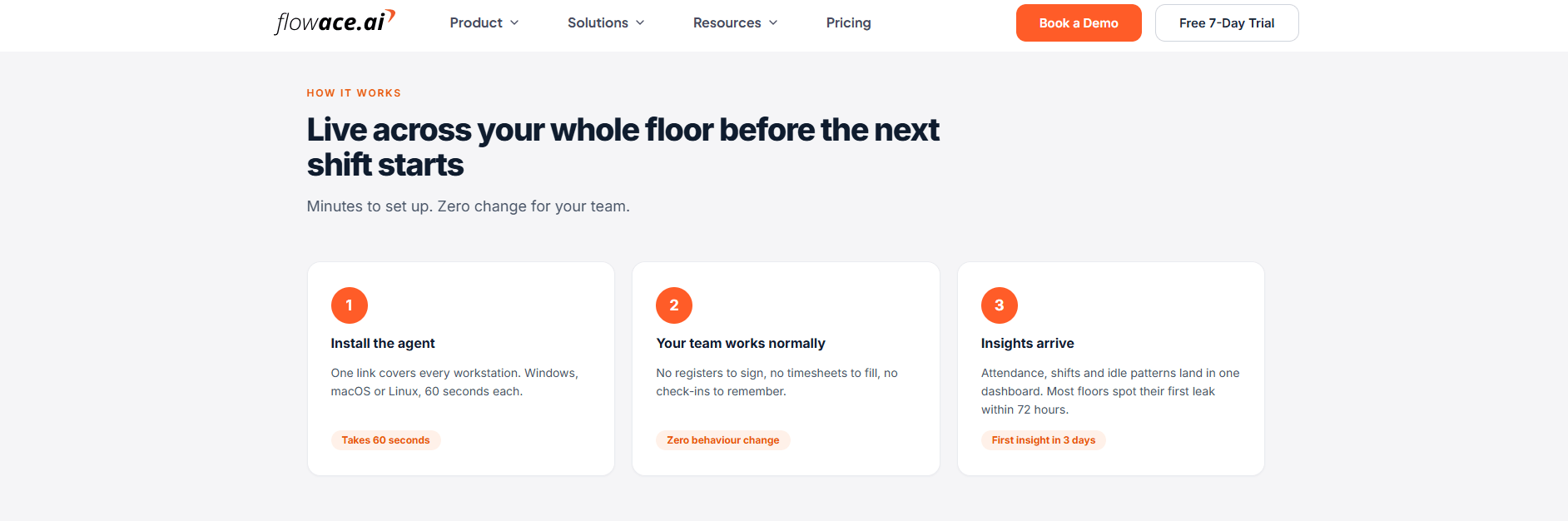
The setup can also be adjusted to the company’s monitoring needs. Teams can decide which activity data to collect and how much detail managers can access.
For teams that want to put these ideas into practice, Flowace brings in office attendance and work activity tracking into one place.
Ready to look at how employee monitoring works in practice?
Explore Employee Monitoring SoftwareFrequently Asked Questions About In Office Employee Monitoring
1. What is in office employee monitoring?
In office employee monitoring means tracking employee attendance, work time, computer activity, and other work activity while people work at a company site. It can use attendance systems, workplace software, and device activity data.
2. How does employee monitoring work in an office?
Employee monitoring collects work-related data such as login times, app and website activity, idle time, and project time. Depending on the setup, it may also include screenshots or other activity signals.
3. Is employee monitoring legal for office employees?
It can be legal, but the rules depend on what you monitor, how you monitor it, and where your employees work. US employers may also need to follow state-specific notice and privacy requirements.
4. Is employee monitoring legal in India under the DPDP Act?
The DPDP Act, 2023 can apply when employee monitoring involves personal data. Companies should check the applicable requirements, purpose of processing, notice rules, and other workplace obligations before rollout.
5. What can employee monitoring software track in an office?
Employee monitoring software can track login and logout times, app and website activity, idle time, project or task time, and shift adherence. Some systems also offer screenshots or other activity tracking features.
6. What should employee monitoring software avoid tracking?
Companies should avoid unnecessary webcam surveillance, unrestricted keystroke logging, excessive screen recording, and personal data that has no clear work purpose. Monitoring should stay focused on a defined business need.
7. Does in office monitoring hurt employee trust?
It can when monitoring is hidden, excessive, or used without a clear purpose. Clear notice, limited data collection, and transparent policies can help protect employee trust.
8. What Is Presence Theater at Work?
Presence theater means looking busy without doing meaningful work, such as staying logged in late or switching between tabs without making real progress. It is a common blind spot in physical offices because being present is easy to fake and easy to reward by accident.