CurrentWare Alternative: Flowace vs CurrentWare on Non-Invasive Monitoring (2026)




Published: September 2026 · Last Updated: September 2026 · Last Verified: September 23, 2026
CurrentWare is an employee monitoring platform that offers non-invasive monitoring without keystroke logging or webcam access by default. This article compares CurrentWare with Flowace, focusing on non-invasive monitoring, Silent Mode (also called Stealth Mode), 2026 pricing, and key differences.
Quick Comparison Table
The table below compares CurrentWare’s BrowseReporter and Flowace side by side on monitoring style, pricing, and deployment, the exact things a non-invasive claim actually comes down to.
|
Features |
CurrentWare (BrowseReporter) |
Flowace |
| Keystroke logging | No | No |
| Webcam or live screen view | No | No |
| Screenshots | Paid add-on | Included on every plan |
| Silent (or Stealth) mode | Default behavior | Included on every plan |
| Employee-visible dashboard | Not published on their site | Interactive Mode |
| Activity log detail | Not disclosed | Every 1 second |
| On-premise option | Yes | No, cloud only |
| Prices idle time in dollars | Not a listed feature | Yes, on every plan |
| Starting price | $12 per user/month | $1.99 per user/month |
| Account minimum | $1,440 per year | None |
| G2 Rating | 4.6/5 (42 reviews) | 4.6/5 (143 reviews) |
*Updated on 23, September 2026
What Do Verified G2 Reviewers Actually Say?
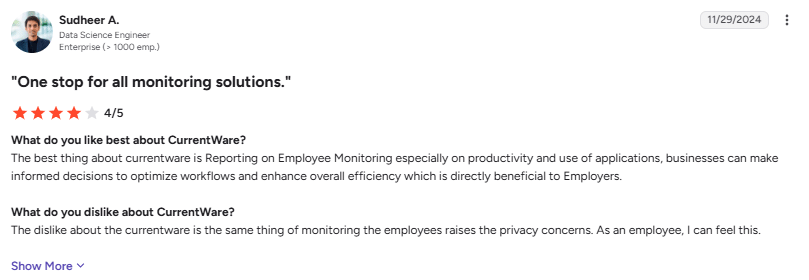
User Rating: 4/5
Image alt text: G2 review on employee productivity monitoring dashboard highlighting reporting capabilities and privacy concerns, dated November 29, 2026.
“The dislike about the currentware is the same thing of monitoring the employees raises the privacy concerns. As an employee, I can feel this.” (Sudheer A., Data Scientist Engineer, Enterprise (> 1000 emp.), G2 review, November 29, 2026)
While CurrentWare offers useful visibility into employee productivity and application usage, its monitoring can raise privacy concerns for employees. This creates an opening to explore how Flowace approaches productivity tracking with greater transparency and employee comfort.
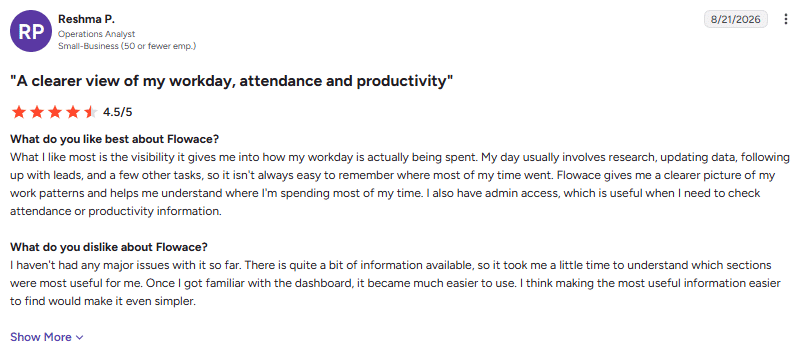
User Rating: 4.5/5
Image alt text: G2 review from Reshma P., an Operations Analyst, praising Flowace for providing clear visibility into workday time, attendance, and productivity, dated August 21, 2026.
“Flowace gives me a clearer picture of my work patterns and helps me understand where I’m spending most of my time. I also have admin access, which is useful when I need to check attendance or productivity information.” (Reshma P., Operations Analyst, G2 review, August 21, 2026)
What Does CurrentWare Mean by “Non-Invasive” Monitoring?
CurrentWare uses “non-invasive” to mean employee monitoring without keystroke logging or webcam access. Its BrowseReporter tool tracks work activity such as websites, applications, active and idle time, bandwidth use, and location data.
Does CurrentWare take screenshots?
Yes. Screenshot monitoring is available as a separate add-on and is off by default as part of CurrentWare’s privacy-first controls. CurrentWare lists BrowseReporter at $12 per user per month, while screenshot monitoring is priced separately on its store page.
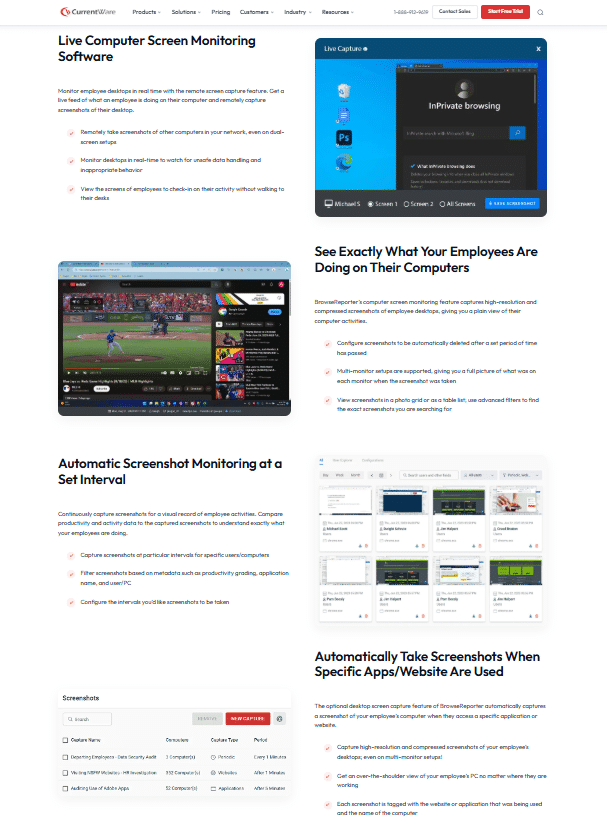
Source: Currentware
Currentware screenshot monitoring, captured 23 September, 2026
The next section looks at how CurrentWare’s approach compares with Flowace’s monitoring modes and privacy controls.
How Does Flowace’s Silent (or Stealth) Mode Compare with CurrentWare?
Flowace does not use keystroke logging or webcam access on any plan. It also offers a Silent Mode, also called Stealth Mode, that a manager can switch on for a team without reinstalling the desktop app.
What does Flowace Silent Mode do, and is it the same thing as stealth mode?
Silent mode, or commonly known as stealth mode hides the Flowace app from the employee. Flowace’s stealth employee monitoring page describes it as software that “is installed and operates incognito,” working as “the silent observer in the background”. There is no visible interface or icon to interact with, while the same monitoring continues in the background.
CurrentWare’s BrowseReporter also runs without a visible employee-facing interface by default. Flowace gives teams the option to switch Silent Mode on or off per team as their needs change.
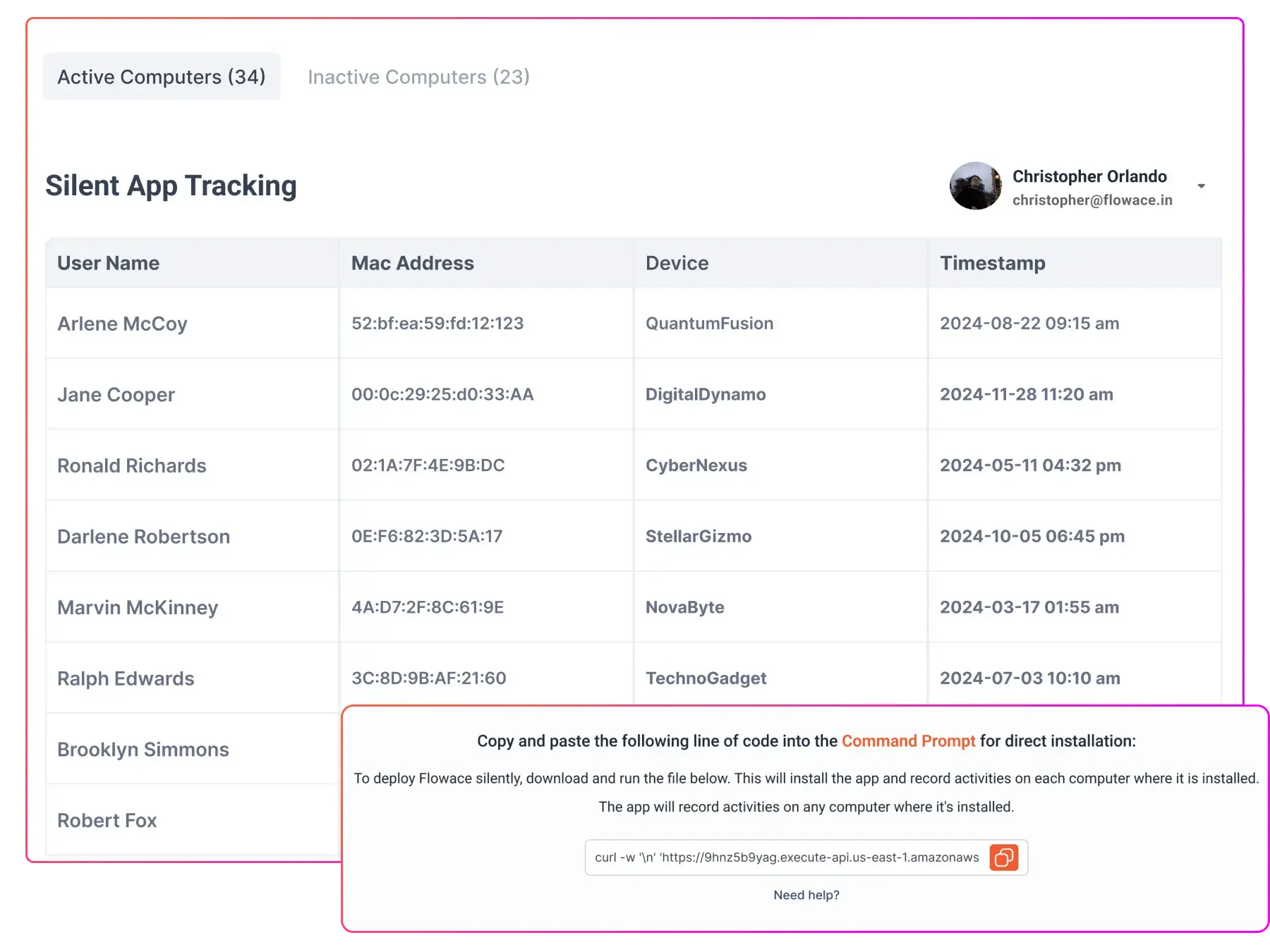
Source: Flowace
Silent App Tracking, captured 23 September, 2026
A quick walkthrough can show how Flowace's monitoring works for your team.
Book A DemoHow Much Does CurrentWare Cost Compared to Flowace in 2026?
Prices below were checked directly against Currentware and Flowace pricing on September 23, 2026. The prices below use each vendor’s annual US-dollar list price.
CurrentWare has a minimum purchase threshold of $1,440 per year with the exact pricing available from its sales team.
CurrentWare also offers volume discounts starting at 100 seats, but those rates are not published. The 100- and 200-seat CurrentWare prices shown here use the published list price and may be higher than an actual quote.
| Seats | CurrentWare (BrowseReporter) | Flowace (Standard plan) |
| 5 | $1,440 |
$239 |
|
10 |
$1,440 | ~$479 |
| 25 | $3,600 |
$1,197 |
|
50 |
$7,200 | $2,394 |
| 100 | $14,400 |
$4,788 |
|
200 |
$28,800 |
$9,576 |
*Updated on 23 September, 2026
A few things are worth knowing about these numbers:
- CurrentWare has a stated $1,440/year account minimum, so that minimum applies instead of the raw per-seat total. In other words, CurrentWare won’t accept an order below $1,440 per year, regardless of how few seats you purchase. That’s why 5 seats and 10 seats cost the same in the table above, both fall under the minimum.
- CurrentWare’s published volume discounts start at 100 seats, but the discounted rate isn’t disclosed. Treat the 100- and 200-seat figures above as ceilings, since the actual price at those volumes could be lower.
- Flowace has no minimum order size, regardless of the number of seats.
- If you want a lower-cost option than Standard, Flowace’s Basic plan is $1.99 per user per month billed annually ($2.99 billed monthly). If you need additional features such as single sign-on or a public API, its Premium plan is $6.98 per user per month billed annually ($10.00 billed monthly).
- If you want CurrentWare’s web filtering and device control bundled with monitoring, its full Suite costs $20 per seat per month, compared with $12 for monitoring alone.
See full Flowace pricing plan comparison for what each plan includes beyond price.
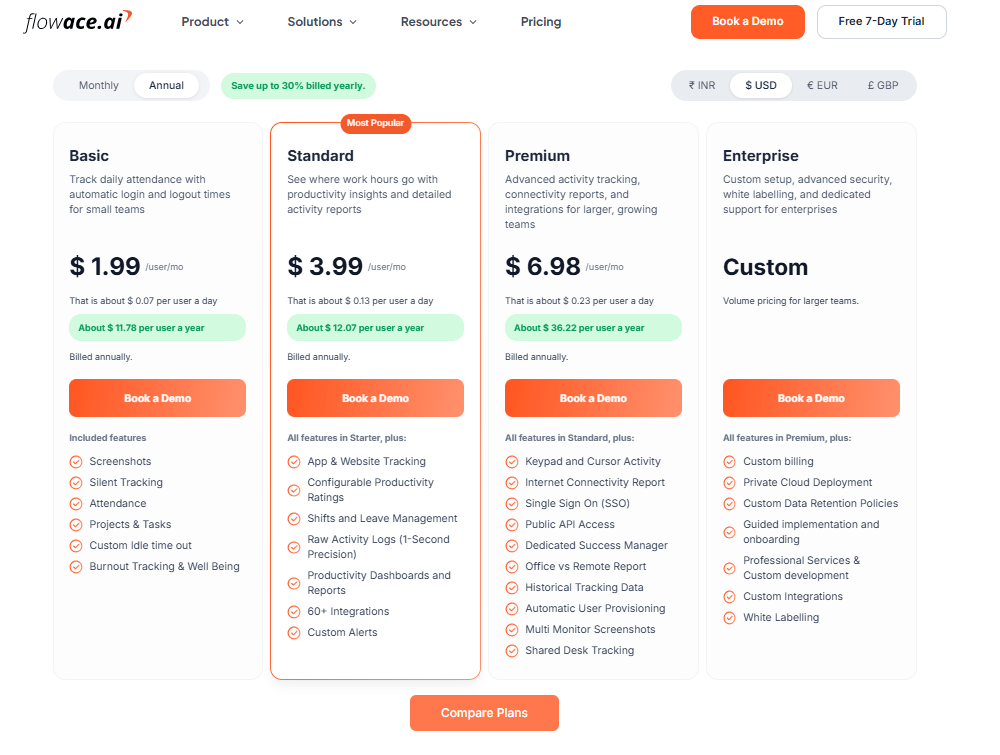
Source: Flowace
Flowace pricing, captured 23 September, 2026
Image alt text: Flowace’s official pricing page showing the Basic, Standard, Premium, and Enterprise plans, captured September 23, 2026
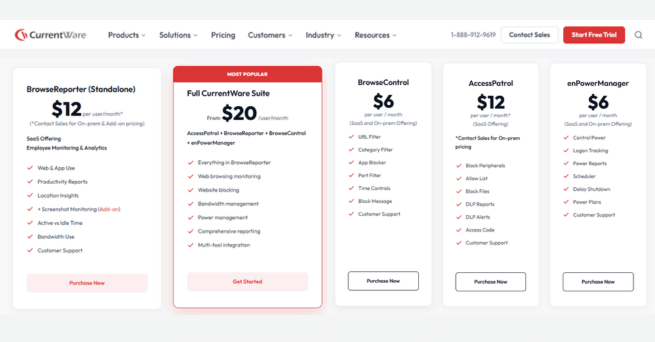
Source: Currentware
Currentware pricing, captured 23 September, 2026
Image alt text: Currentware’s official pricing page showing the BrowseReporter, BrowseControl, AccessPatrol, and enPowerManager plans, captured September 23, 2026
Can CurrentWare Show The Cost of Idle Time?
CurrentWare’s BrowseReporter tracks active and idle time and reports idle time as part of its activity data. Its public documentation does not show a dollar cost for that idle time. Flowace can connect idle time to the billable rate set for each person.
A published Flowace case study of a 750-user talent platform shows what that can look like with real numbers.
- Idle time: The company found that 35.3% of logged hours were idle in its first week. The case study puts the monthly idle cost at about ₹2.13 crore.
- Recovering idle time: Flowace’s case study states that cutting idle time by 1% recovers about ₹2.13 lakh a month at this company’s size and pay scale, and cutting it by 5% recovers about ₹10.65 lakh a month. This is the lever the case study itself names, it isn’t a linear share of the ₹2.13 crore total above and shouldn’t be read as one.
- Reported return: The case study models a 20% reduction in idle time and estimates ₹5.04 crore as recoverable in year one against ₹6.7 lakh in platform costs. This is a modelled scenario, not a result the client has already booked.
- Per-seat view: The ₹2.13 crore monthly idle cost works out to about ₹28,400 per seat per month, or roughly ₹3.4 lakh per seat per year, if the same level of idle time continues.
Flowace case study shows why team-level reporting matters. Overall productivity stayed at 54.4% for three quarters, while three of seven delivery teams were declining. One Operations team fell from 16.0% to 9.8% in a quarter. When comparing monitoring tools, ask whether reporting can show these team-level changes.
Industry context: Three published Flowace case studies, covering AM2PM, the 750-user talent platform, and a 1,391-employee data insights firm, reported idle time averaging about 30%. This comes from three specific customer cases and should be treated as a reference point rather than a general industry benchmark.
What Can CurrentWare Do That Flowace Does Not?
CurrentWare has a few options that may matter depending on your setup:
- On-premise deployment: CurrentWare can be deployed on your own servers if monitoring data needs to stay within your network. Flowace is cloud-based.
- A-la-carte modules: CurrentWare lets you buy tools separately. For example, BrowseControl starts at $6 per user per month for web filtering.
- AI usage tracking: CurrentWare offers a feature for identifying AI tools employees use and helping admins enforce AI usage policies.
What Does Flowace Offer That CurrentWare Does Not?
Flowace has a few features that are different from CurrentWare’s documented offering:
- Idle time cost tracking: Flowace can connect idle time to the billable rate set for each employee. CurrentWare’s public pages do not describe an equivalent dollar-based idle cost calculation.
- Lower starting price: Flowace Basic starts at $1.99 per user per month billed annually ($2.99 billed monthly), with no seat minimum. CurrentWare’s BrowseReporter starts at $12 per user per month, with a $1,440 annual minimum purchase threshold.
- Team-level reporting: Flowace can show changes at the team level, which can help managers spot declines hidden by an overall company average.
How does Flowace support ethical employee monitoring?
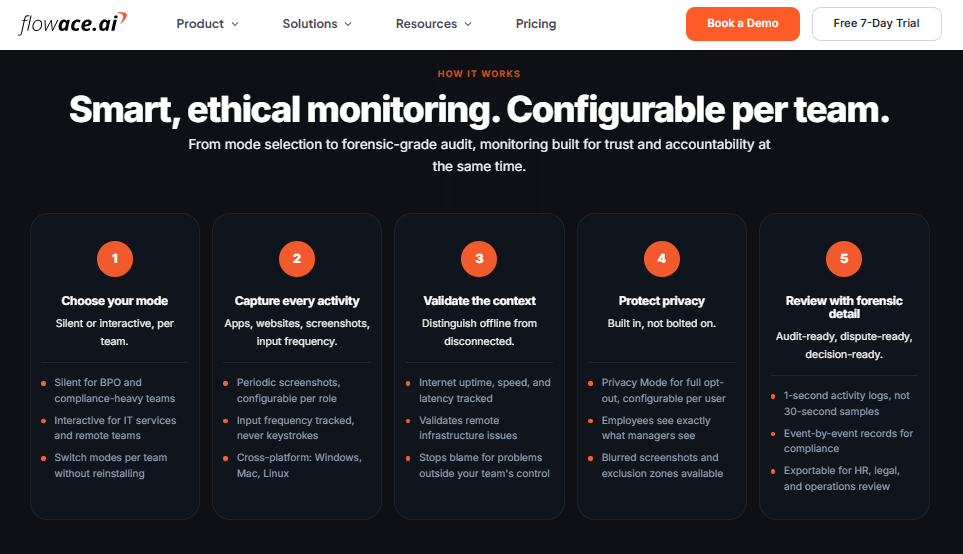
Source: Flowace
Flowace Ethical Monitoring, captured 23 September, 2026
Flowace focuses on non-invasive, ethical monitoring that gives teams control over what gets monitored, who sees the data, and when monitoring is active. Teams can choose Silent or Interactive Mode by team, while Privacy Mode can turn tracking off for individual users. Employees can also see the same activity data available to managers.
Flowace does not use keystroke logging or webcam access on any plan. It measures keyboard and mouse activity as input frequency rather than recording the actual keys employees press. Screenshots are configurable and can be turned off when they are not needed.
For teams concerned about surveillance, these controls help keep monitoring focused on work activity and a defined business purpose, while giving employees visibility and privacy controls.
Key controls include:
- Employee visibility: Employees can see the same activity data their managers see.
- Privacy Mode: Tracking can be disabled for a user, including screenshots and activity data.
- No keylogging: Flowace measures input frequency without recording the actual keystrokes.
- Configurable screenshots: Teams can choose whether screenshots are captured and set the interval.
- Team-level control: Silent and Interactive monitoring can be configured based on the needs of each team.
See what Flowace can actually find in your own team's data.
Book A DemoFrequently Asked Questions About CurrentWare Alternative
1. Is CurrentWare’s employee monitoring actually non-invasive?
Yes. CurrentWare’s employee monitoring is actually non-invasive. It doesn’t log keystrokes or access your webcam. It does capture screenshots, but that’s a paid add-on you choose to turn on, not something included by default.
2. Does CurrentWare capture screenshots?
Yes. CurrentWare captures screenshots through BrowseReporter’s screenshot add-on. It costs extra on top of the base $12 per user per month price.
3. How much does CurrentWare cost per user in 2026?
BrowseReporter, the productivity monitoring module, starts at $12 per user per month billed annually. The full CurrentWare Suite with all four modules is $20 per user per month, and there’s a $1,440 a year account minimum.
4. What is the best non-invasive employee monitoring software?
CurrentWare and Flowace both skip keystroke logging and webcam access by default, so both qualify by that common definition. CurrentWare adds on-premise hosting and device control. Flowace adds Stealth Mode background monitoring and prices idle time in dollars.
5. Can CurrentWare be deployed on-premise instead of the cloud?
Yes. CurrentWare offers on-premise, self-managed, and cloud deployment. Flowace is cloud-only, so if your data has to stay on your own servers, CurrentWare is the one built for that.
6. Does Flowace have a silent tracking mode?
Yes. Flowace calls it Silent Mode, commonly known as stealth mode and describes it as operating incognito in the background. It runs with no visible app on the employee’s screen, and it can be switched on or off per team without reinstalling anything. Most US states still require you to tell employees that monitoring is happening, even in Silent Mode.
7. What is the difference between Flowace and CurrentWare?
The difference between CurrentWare and Flowace is that CurrentWare is built around on-premise deployment, device control, and web filtering sold as separate modules. Flowace is a single cloud platform that measures activity every second and turns idle time into a dollar figure on every plan.
8. Do employers have to tell employees they’re using monitoring software like this?
In most cases, yes, and in some states it’s the law. Connecticut, Delaware, and New York all require written notice before this kind of monitoring starts. Check the specific rule for your state before you turn anything on.