Billable Hours Tracking for Agencies and Consulting Firms



Billable hours tracking software captures work as it happens, without asking employees to log hours by hand, hop between apps, or rebuild their day from memory. In agencies and consulting firms, that difference is not cosmetic; it changes what you can trust in billing, payroll, and delivery reporting. With a small team, manual time entry is a nuisance you can muscle through.
Once a company grows, it turns into a process problem. Billing disputes start to feel routine. Payroll fixes become a recurring fire drill. Profitability reporting drifts from data to guesswork. This content breaks down what billable hours tracking is, how it functions in agency and consulting environments, and where the manual model starts failing under real scale.
In professional services firms, even small gaps in time capture can create revenue leakage, distort utilization reporting, and weaken project profitability visibility. That is not noise in the numbers. On a 20-person consulting team billing at even modest rates, it turns into a steady revenue leak that keeps compounding month after month.
This piece lays out a workable way to set up billable hours tracking from zero: define what counts as billable, configure the tool, train the team, then use utilization data to make smarter resourcing calls. Boutique agency or mid-size consulting practice, the mechanics do not change much; the discipline does.
What Are Billable Hours and Why Does the Definition Matter?
Billable hours are the time units spent on client work that you are allowed to charge under a contract or agreement. The model is standard across professional services, from law and accounting to creative agencies and management consulting. According to Thomson Reuters’ history of the billable hour, it started in legal services and then spread to most knowledge-work businesses. For instance, a global insights firm discovered it was leaking ₹169L a month before implementing automated visibility.
On paper, the definition is straightforward. In the real world, it is where billing disputes, revenue leakage, and team frustration usually begin. Many firms never write down what is billable and what is not, so consultants and account managers make judgment calls on the fly. Those calls tend to be conservative, and conservative is just another way of saying you do not invoice for time you actually delivered.
Activities that are typically billable:
- Direct client work: research, analysis, strategy, design, development, writing
- Client meetings and calls, including preparation time
- Revisions and feedback cycles within agreed scope
- Travel time to client sites (if contractually agreed)
- Internal reviews directly tied to a client deliverable
Activities that are typically non-billable:
- Business development and proposal writing
- Internal team meetings not tied to a specific client
- Training and professional development
- Administrative work: invoicing, HR, IT
- Unbillable overruns caused by internal errors
Before you touch any tool configuration, get leadership aligned and put the rules in writing. One page is plenty. If the policy is fuzzy, you will pay for it later in write-offs and awkward client conversations, not in software fees.
What Billable Utilization Rate Should You Actually Target?
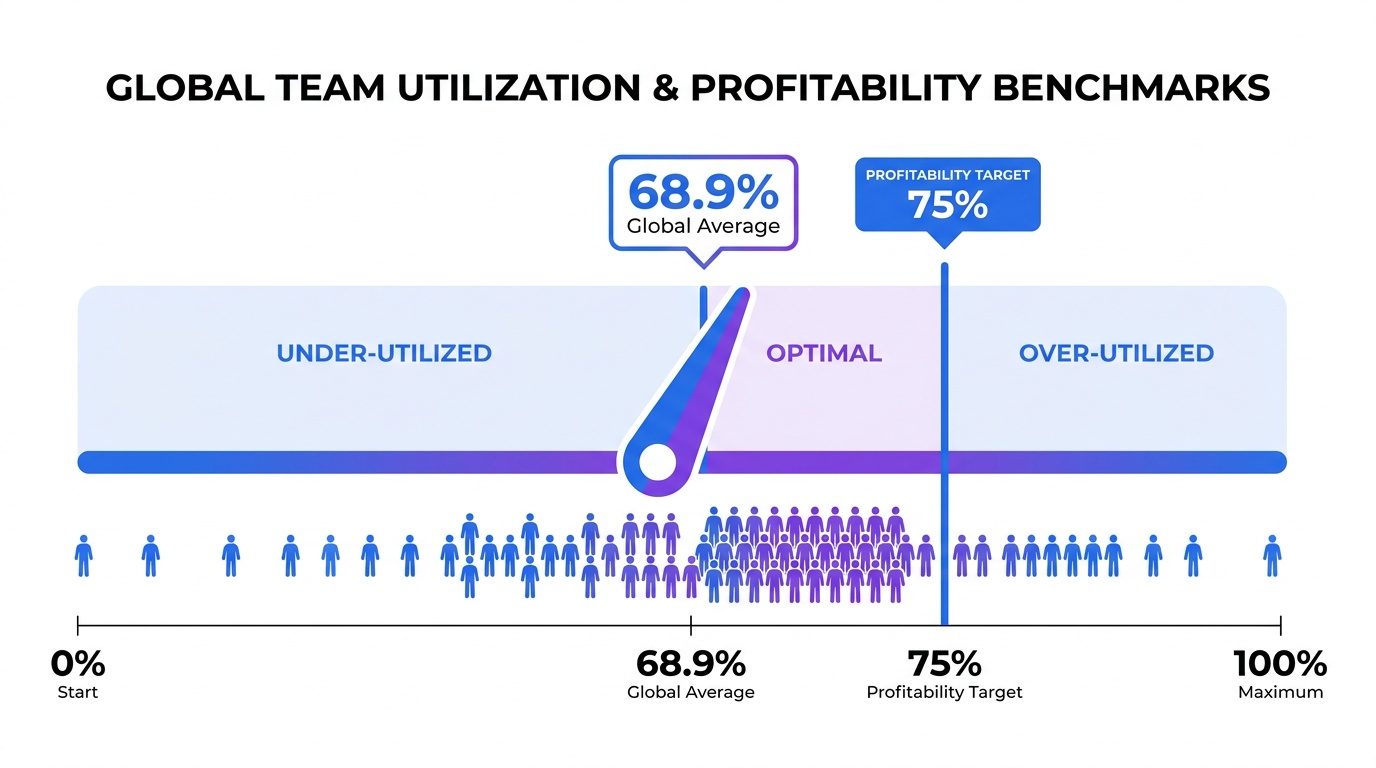
Industry benchmark studies consistently show that utilization rates below profitability targets create pressure on margins and resource planning. The profitability threshold most firms should anchor to is closer to 75 percent, according to the SPI Professional Services Maturity Benchmark 2025. That gap is often the line between keeping the lights on and having room to scale. In one case, a B2B data platform found its unit costs were running 46% higher than assumed because of unmeasured gaps in billable work.
The math is simple: billable hours divided by total available hours, expressed as a percentage. If someone has 160 available hours in a month and logs 120 billable hours, that is 75 percent utilization. Where it breaks down is data quality; inconsistent time entry makes the calculation look precise while being fundamentally wrong.
Trying to run at 100 percent utilization is how you burn out a team and starve the business. You need space for business development, training, internal coordination, and the thinking time that produces good work. Treat 75 percent as the right anchor: a floor for senior delivery roles, and a sanity check for junior staff who can get over-allocated without anyone noticing until quality drops.
How to Choose the Right Billable Hours Tracker for Your Firm
Picking the tool comes down to three realities: how the team actually works day to day, how you bill clients, and what finance needs to close invoices cleanly. Many agencies and consulting firms in India run hybrid or distributed teams, so the tracker has to hold up across devices and time zones without forcing people into manual syncing rituals. Crucially, Flowace adheres to enterprise-grade security standards including SOC 2 Type I, GDPR, ISO 27001, and HIPAA.
Use this as a practical filter. Before you commit, pressure-test any tool against five criteria:
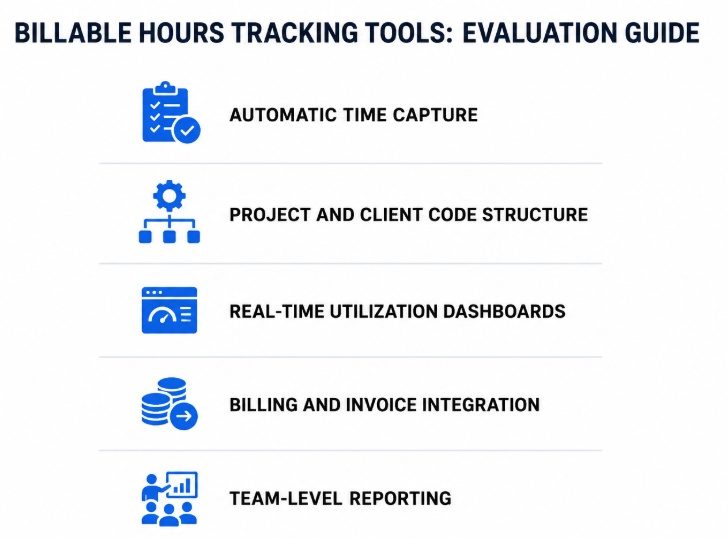
Five criteria for evaluating a billable hours tracker:
- Automatic time capture: Manual timers beat spreadsheets, but they still depend on memory and good habits. Automatic activity tracking solves the “I will log it later” problem. Delaying time entry increases the likelihood of missed or incomplete billable work. Consultants and agency teams run into the same decay.
- Project and client code structure: Time must map cleanly to a client, a project, and a task type. If you cannot attribute work precisely, you cannot invoice precisely, and utilization data becomes meaningless.
- Real-time utilization dashboards: You should be able to see utilization by person, team, and project without building a report from scratch. If your Head of Delivery is exporting spreadsheets to understand capacity, the system is not earning its place.
- Billing and invoice integration: Time data should move straight into the billing workflow. Every manual handoff between delivery and finance is another chance to introduce errors or delays.
- Team-level reporting: Single time logs matter; patterns matter more. The tool should make it obvious which projects are overrunning, which clients consume disproportionate capacity, and where the firm is actually spending its highest-value hours.
Flowace checks these boxes with automatic activity tracking, project-level attribution, and real-time utilization dashboards designed for distributed teams. You can review Flowace pricing plans to match a tier to your headcount. If you want the full scope of what gets captured, start with the time tracking features page.
Visit the Flowace website for complete business visibility.
Step-by-Step: Setting Up Your Billable Hours Tracking System
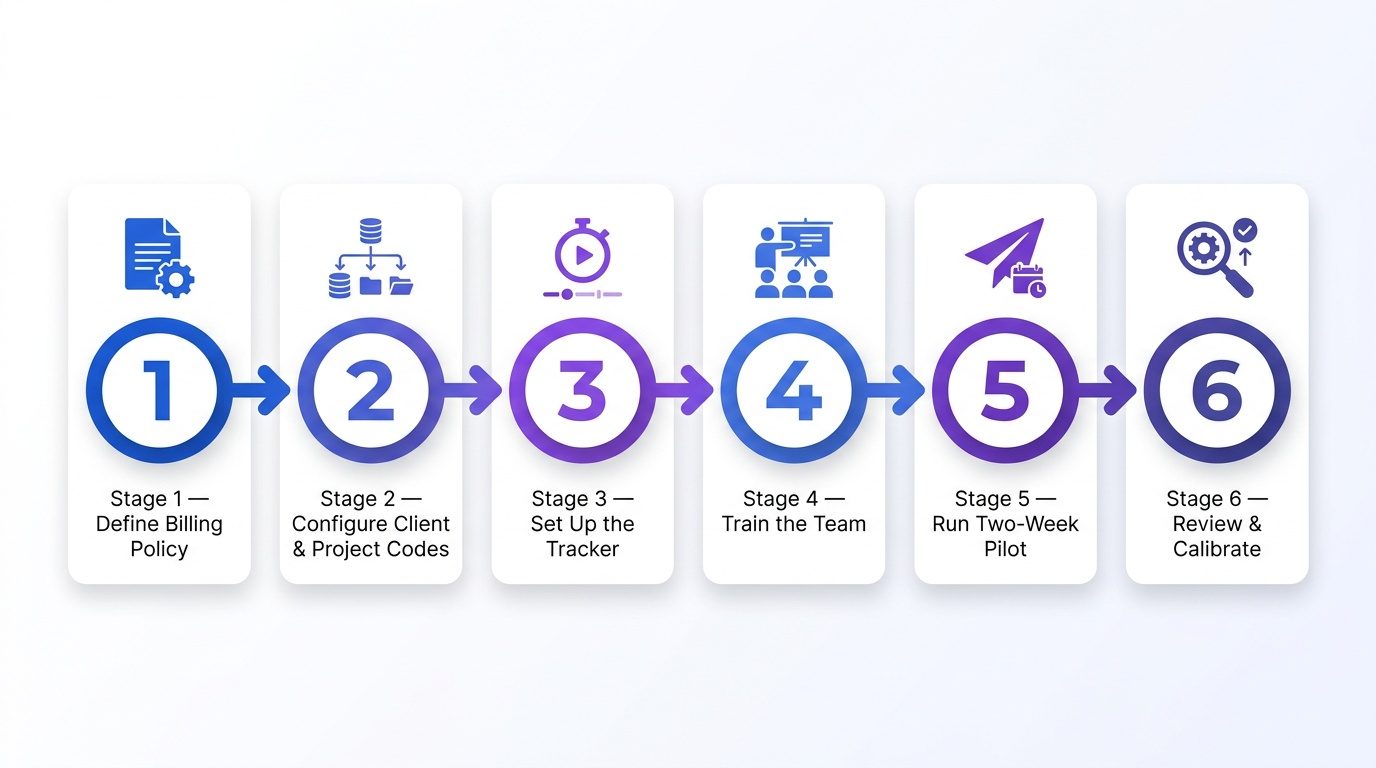
Time tracking rollouts usually fail for a boring reason: teams skip the unglamorous setup work and jump straight to the tool. Follow this sequence instead:
Stage 1: Define Your Billing Policy in Writing
Write down what is billable, what is not, and how you handle the messy edges: travel, internal review cycles, and scope creep. Get explicit sign-off from your Head of Delivery and CFO. Automated systems can significantly reduce the burden.
During peak workload periods, one chartered accountancy firm replaced manual timesheets with automated tracking and saved around 15–25 hours per month per timesheet. The result was cleaner billable-hour visibility, fewer follow-ups, and better control over busy-season capacity.
Stage 2: Build Your Client and Project Code Structure
Every entry should resolve to a client, a project, and a task type. Keep the hierarchy plain: Client > Project > Task Category. Do not create an encyclopedia of categories; if people spend more time tagging work than doing it, accuracy will collapse. Five to eight task categories per project type is typically enough.
Stage 3: Configure the Tracker and Set Utilization Targets
Configure the tracker using the client and project structure from Stage 2, then set utilization targets by role rather than by individual. A senior consultant might sit at 75 percent, while a partner-level role may be closer to 50 percent to reflect business development time. For more detail on task-level setup, see this guide to employee task tracking.
Stage 4: Train the Team on the Why, Not Just the How
Teams push back on time tracking when it feels like surveillance. Position the rollout around billing accuracy and capacity planning, not performance policing. When people see that clean time logs reduce billing disputes and lead to better staffing decisions, adoption becomes much easier. The best time tracking software for consultants article goes deeper on the adoption side.
Stage 5: Run a Two-Week Pilot Before Full Rollout
Choose one or two active projects and run the tracker alongside your current process for two weeks. Then compare the outputs. You will almost always see a gap between actual time and what was estimated or invoiced. That gap is not a surprise; it is the reason you are implementing the system.
Stage 6: Review, Calibrate, and Lock In the Process
After the pilot, sit down with your Head of Operations and the finance team and review what the data is telling you. If categories are being misused, fix the project code structure before you scale it. Set a weekly cadence to review utilization reports, then roll out to the full team with the tighter setup.
Explore our full suite of automated productivity features.
What Most Firms Get Wrong About Non-Billable Time
Non-billable time is not the enemy. It is the overhead that makes billable work possible: selling, training, coordinating, and keeping the business running. The common mistake is treating non-billable hours as something to squeeze down, instead of a cost category to manage deliberately.
If your team sits at 90 percent billable utilization month after month, treat it as a warning sign. Either people are heading toward burnout, the business development pipeline is being ignored, or training and quality controls are being skipped. Any of those will show up as a real problem within 12 months.
Track non-billable time with the same discipline you apply to client work, and break it into categories: business development, internal meetings, training, administration. That split shows where overhead is accumulating and whether it matches your revenue model. For agencies, profitability tracking for creative agencies explains how to tie time data back to margins.
How Should Finance Teams Use Billable Hours Data for Billing Accuracy?
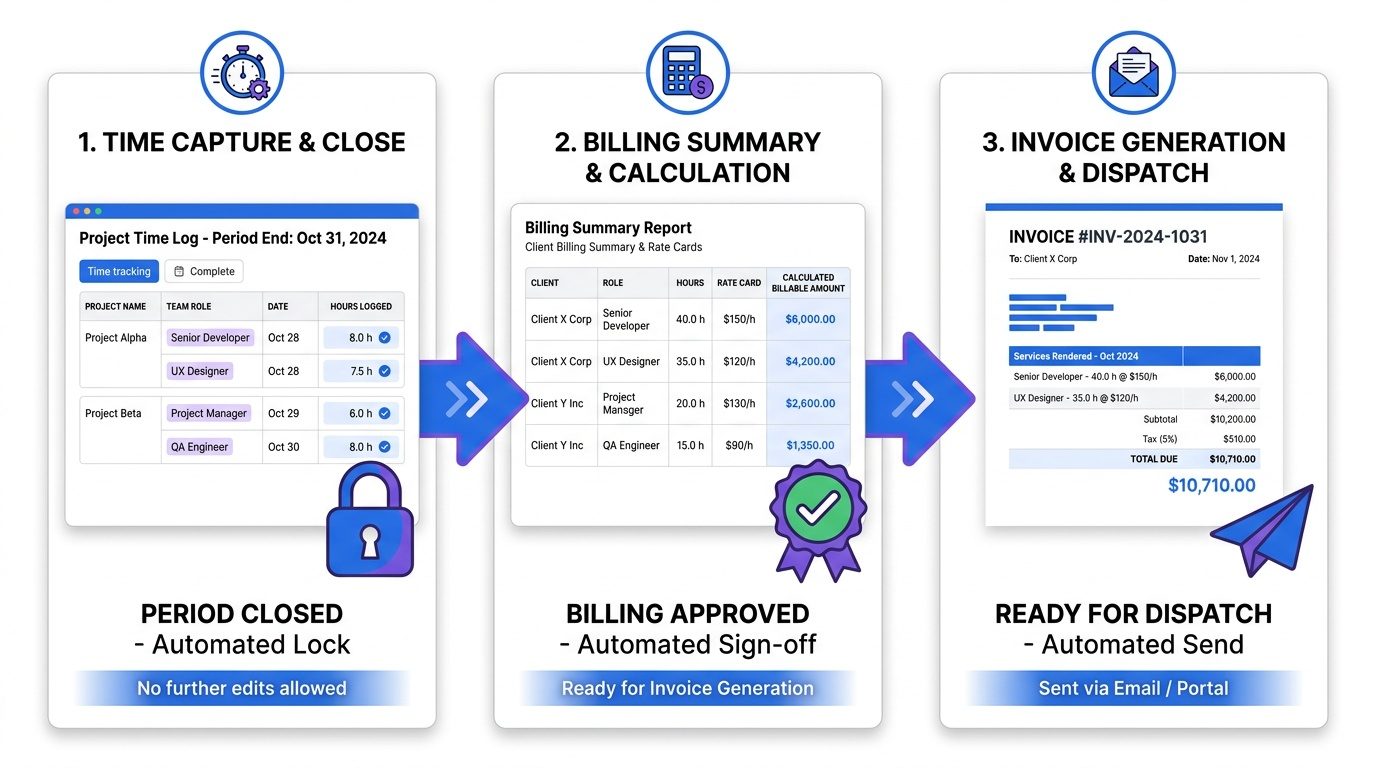
For finance, the north star is invoice accuracy. When clients dispute billed hours, relationships take a hit and payments slip. A properly configured billable hours tracker prevents most of those disputes by tightening the process upstream.
A finance-friendly setup has three parts. First, lock time entries at the end of each billing period so hours cannot be edited after invoices are generated. Second, set up rate cards by role and project type so billable amounts are calculated automatically instead of relying on manual rate lookups. Third, generate a client-level time summary before every invoice run and require account-lead sign-off. That sign-off step catches issues before they land in a client’s inbox.
Fixed-fee and retainer work uses the same data for a different question: is the engagement profitable at the agreed price? If a fixed-fee project keeps consuming more hours than budgeted, you have either a pricing issue or a scope issue. In both cases, you need clean time data to have the conversation early. For an adjacent professional services view, see how time and billing software approaches it.
Streamline your agency billing with automated time tracking.
Advanced Considerations: Utilization Reporting and Capacity Planning
Once tracking is consistent for 60 to 90 days, the payoff goes beyond cleaner invoicing. You have enough signal to make forward-looking resourcing decisions based on actual capacity patterns, not gut feel.
Review utilization by role and by project type across the trailing 90 days. In most firms, a few project types will reliably overrun estimates while others come in under. That pattern is your pricing signal: it shows which service lines are underpriced and which ones can absorb more scope without putting margin at risk.
Capacity planning gets far more predictable when you can separate “available hours” from “historical billable output.” If senior consultants are running at 80 percent utilization and you are about to onboard two new clients, you can calculate how many hires or contractor hours you need before delivery starts slipping. For a broader framework, The Ultimate Guide to Employee Productivity connects time data to team performance.
One nuance to keep in mind: utilization is a lagging indicator. It tells you what already happened. Pair it with pipeline data to see pressure before it hits delivery. If three large engagements are likely to close in the next 30 days and the team is already at 75 percent utilization, the hiring or subcontracting decision belongs on this month’s agenda, not next quarter’s.
Track Billable Hours Without Leakage
Start Free TrialFrequently Asked Questions on Billable Hours Tracking
1. What is a billable hours tracker?
A billable hours tracker records the time employees spend on client work and connects it to the right project, task, or client account. This helps agencies create accurate invoices and understand how much effort each client actually requires.
2. How do you calculate billable utilization rate?
Billable utilization rate is calculated by dividing billable hours by total available working hours, then multiplying by 100.
Formula: Billable utilization rate = (Billable hours / Available hours) × 100
For example, if an employee has 120 billable hours out of 160 available hours, the utilization rate is 75%.
3. What is the difference between billable and non-billable hours?
Billable hours are spent on work that can be charged to a client, such as project delivery, consulting, design, development, or client meetings. Non-billable hours include internal meetings, admin work, training, hiring, and business development.
4. How should agencies track fixed-fee projects?
For fixed-fee projects, agencies should track actual hours against the planned budget. This shows whether the project is still profitable, where time is being overused, and whether scope changes need to be discussed before margins drop.
5. Why do agencies miss billable hours?
Agencies often miss billable hours when employees update timesheets late, forget small tasks, switch between tools, or track time manually. Automatic tracking reduces these gaps by capturing work activity as it happens.