What is a timesheet? Meaning, uses, and how it works




When your team works, those hours need to be tracked so employees get paid correctly, clients get billed accurately, and you know how much a project actually costs. A timesheet is just the tool that makes sure those hours don’t get lost.
Many businesses don’t take it very seriously. They either guess the time, use lump-sum timings and track it manually, but it is risky. When companies guess or use messy paper tracking, they make mistakes.
In fiscal year 2023, the US Department of Labor’s Wage and Hour Division recovered more than $274 million in back wages for over 163,000 workers, with overtime violations. This often happens because of inaccurate time records. This accounts for the largest share of claims.
In this blog we will understand in detail about what is a timesheet, how it works, what are its use cases and how it can benefit your business.
What is a timesheet?
A timesheet is a structured record that logs the hours an employee or contractor works during a given period. It captures start and end times, breaks, and the specific tasks or projects that time was spent on. This data feeds directly into payroll calculations, client invoices, and project cost tracking.
What does a timesheet record?
A timesheet records five core things:
- Employee name and ID: who the hours belong to
- Date range: the pay period or project window covered
- Hours worked each day: broken down by start time, end time, and daily total
- Task or project: what the time was spent on, down to client or activity level
- Approval status: whether the entry has been reviewed and signed off by a manager
Some timesheets also include overtime flags, billable vs non-billable status, and work notes. The level of detail depends on purpose. A payroll timesheet needs fewer fields than a client billing timesheet, which requires task-level precision to support an invoice.
Is it ‘timesheet’ or ‘time sheet’?
Both spellings are correct. “Timesheet” (one word) is the dominant spelling and what most HR software and payroll platforms use. “Time sheet” (two words) appears in older documentation and some legal and government contexts. This post uses “timesheet” throughout for consistency.
What is a timesheet used for?
A timesheet is used for four things: payroll, client billing, project management, and labour compliance. Each use case calls for a different level of logging detail, but the goal is consistent. Time spent on work needs a verifiable record that can be acted on.
Here’s a quick glance at what are timesheets used for.
| Use | What it enables |
| Payroll | Accurate wage calculation for hourly and variable-pay employees |
| Client billing | Hour-based invoices for professional services |
| Project management | Real-time budget tracking against estimated hours |
| Labour compliance | Documented proof of adherence to working time laws |
Let’s look at them one-by-one in detail.
1. Payroll
A timesheet keeps payroll accurate by providing the verified hour data behind every wage calculation. It determines regular hours, overtime, and deductions for unpaid leave. Without it, payroll is built on estimates, which creates errors, underpayment risk, and potential legal exposure.
Salaried employees may also use timesheets, not to calculate pay, but to track leave accruals, project allocations, or compliance with contracted hours.
2. Client billing
A timesheet is what makes hourly client billing possible. For agencies, consultancies, legal practices, and accounting firms, the hours logged against a project are the direct basis for every invoice issued.
When those hours are not logged accurately, invoices are built on approximations. That means either billing less than the actual cost of the work, or billing more and inviting client disputes. Neither is sustainable for a services business running on tight margins.
3. Project management
A timesheet tells you whether a project is on budget, not just on schedule. A project that looks on track against its milestones may already be over budget in hours. That gap only becomes visible when you compare estimated time to logged time.
Project managers use timesheet data to reforecast budgets, redistribute workloads, and build more accurate estimates for the next engagement.
4. Labour compliance
A timesheet is the document that proves labour law compliance. Most jurisdictions require employers to keep records of hours worked, covering maximum hours, rest breaks, and overtime thresholds.
In the US, the Fair Labor Standards Act (FLSA) requires employers to keep time records for non-exempt employees for a minimum of two years. In the UK, the Working Time Regulations 1998 place similar record-keeping obligations on employers.
What does a timesheet look like?

A timesheet is typically a grid: employees in rows, dates or time periods in columns, with hours entered at the intersection. Every timesheet contains four core elements: employee information, the date range covered, the time entries themselves, and the task or project those hours were assigned to. The format varies by industry, but those four fields are constant.
What information goes on a timesheet?
| Field | What it captures |
| Employee details | Name, ID number, department, and reporting manager |
| Date range | The pay period covered (daily, weekly, bi-weekly, or monthly) |
| Time entries | Start time, end time, and daily total hours |
| Task or project | What the hours were spent on, down to client or activity level |
| Approval status | Whether the timesheet has been reviewed and signed off |
Some organisations add columns for billable vs non-billable status, expense notes, or overtime flags. As a rule, the simpler the format, the more consistently employees fill it in.
How often should teams submit timesheets?
The right submission frequency depends on how the data will be used.
| Frequency | Best suited for | Trade-off |
| Daily | Billable client work, legal, consulting | Higher daily admin burden |
| Weekly | Most teams; aligns with standard payroll cycles | Good balance of accuracy and effort |
| Bi-weekly or monthly | Simple payroll for salaried teams | Higher risk of inaccurate, reconstructed entries |
For most teams, weekly is the practical default. For project-based or client-billable work, daily is worth the additional effort. The longer the gap between work done and timesheet submitted, the more reconstruction is involved. Reconstructed entries are estimated entries.
If your team is still tracking time in spreadsheets, checkout Employee Timesheet by Flowace AI Know more
How do timesheets work?
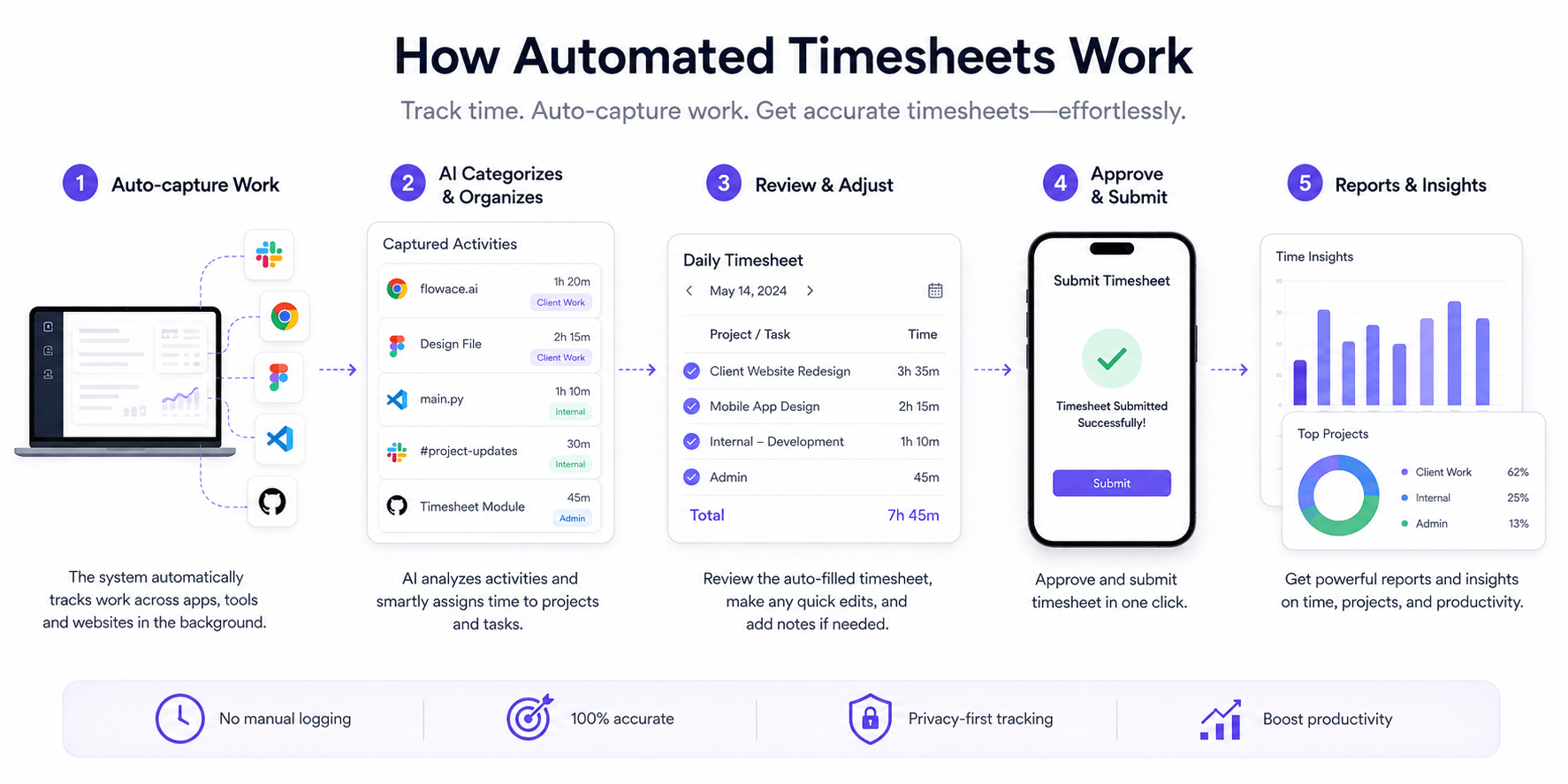
A timesheet works by capturing time at the point of work and converting it into a structured record. An employee logs their hours, assigns them to a task or project, and submits the completed sheet for review. A manager approves it, and the data flows downstream into payroll, billing, or project reporting.
Where did the timesheet originate, and why does it still matter?
The timesheet has its origins in the industrial era, when factories needed to account for labour costs at scale. The first practical timesheet was the mechanical punch card, which was introduced in the late 19th century. Workers punched in at the start of a shift and out at the end, and the timestamp was the record.
By the mid-20th century, paper timesheets had become standard in white-collar settings, particularly in legal and accounting firms where revenue was determined by billable hours. The spreadsheet era of the 1980s moved the format from paper to digital grids, but the underlying logic stayed unchanged: log time, assign it somewhere, report on it.
The reason we are talking about the history of the timesheet is to know the origin of the timesheet structure. The frustration regarding the timesheet be it inaccurate data, additional efforts to report timings is because of this structure. The format was built for shift workers clocking factory hours. When we use the same structure for knowledge work, where tasks overlap and resist neat categorisation in real time, it creates predictable problems.
There are two types of timesheets majorly discussed:
- Manual timesheet
- Digital timesheet
Let’s quickly understand them at a glance. Although both of them have the underlying structure of the original timesheet back in the 19th century.
How does a manual timesheet work?
A manual timesheet, whether paper or spreadsheet, follows the same process: the employee recalls their hours, enters them against tasks or projects, and submits to a manager or payroll team. The process looks simple. In practice, it has several consistent failure points.
Memory degrades between the work and the submission. Employees round numbers. Managers approve without checking. Spreadsheet timesheets carry no audit trail when a number is changed after submission.
How does a digital timesheet work?
A digital timesheet uses software to collect, store, and process time data. At the basic level, it mirrors a spreadsheet: open an app, enter hours, submit. But digital tools add layers that manual timesheets cannot: validation rules, automatic reminders, approval workflows, payroll integrations, and a full log of every entry and change.
More advanced tools go further. Rather than asking employees to self-report, they track time automatically from app and calendar activity, then present a pre-filled timesheet for the employee to review and confirm. This removes the memory gap that makes manual entries unreliable.
There is now another type of timesheet known as automated timesheet, we will discuss it in detail later in this blog. But here’s a quick sneak peak of all three types of timesheet.
At a glance: manual vs digital vs automated
(can be an image as well)
| Format | How time is logged | Accuracy risk | Audit trail | Best fit |
| Paper or spreadsheet | Employee recalls and enters manually | High | None | Very small or informal teams |
| Digital app | Employee enters via software | Medium | Basic | Most businesses |
| Automated software | System captures from activity data | Low | Complete | Billing-heavy or compliance-sensitive teams |
What are the disadvantages of manual timesheets?
Manual timesheets have been the default for decades, and for very small teams with straightforward payroll, they can still work. For most businesses, though, three structural problems surface consistently: entries come in late, hours get rounded, and the data reaching payroll or billing reflects what employees remember rather than what actually happened.
These are the core limitations:
- Memory dependency: Time is logged retroactively, often days after the work was done. Most employees reconstruct the week from calendar entries, emails, and best guesses.
- No enforcement mechanism: Without automatic reminders or locked submission windows, timesheets arrive late or not at all. Managers spend time chasing them rather than reviewing them.
- No audit trail: In a spreadsheet, any cell can be edited after submission with no record of the change. In billing disputes or compliance audits, this creates a significant liability.
Why do employees fill timesheets wrong or late?
The most common reason is straightforward: employees are not tracking time as they work. They are doing the work. When the deadline arrives, they reconstruct the week from whatever evidence is available.
The root causes break down into three patterns:
- Recall decay: The longer the gap between work done and timesheet submitted, the less accurate the entries become. Most employees submit weekly at best, meaning five days of reconstruction every cycle.
- Rounding habits: Employees naturally round up or down to the nearest 30-minute block. Across a month and a team, these small inaccuracies compound.
- Cultural perception: When employees associate timesheets with monitoring rather than planning, they fill them in quickly. Quick tends to mean approximate.
What happens when a timesheet is inaccurate?
The consequences differ depending on how the data is used:
- Payroll: Underpayment creates legal exposure under wage and hour laws. Overpayment is difficult to recover once processed.
- Client billing: Inaccurate invoices either leave revenue uncaptured or trigger disputes when clients query hours against deliverables.
- Project management: Cost overruns surface at project close, when it is too late to adjust scope, resourcing, or budget.
None of these are problems with the concept of a timesheet. These are problems with asking a person to self-report something they were not tracking in real time. And honestly is it humanly impossible to be 100% accurate.
Flowace builds the timesheet from actual activity data, with no manual entry required.
Now to round back on our previous conversation about automated timesheets. This is the solution to the problems we discussed with the timesheets with the base structure from the 19th century.
What is an automated timesheet?
An automated timesheet is a record generated by software rather than filled in by an employee. Instead of asking workers to self-report, the software captures time from actual activity: which apps are in use, which projects are active, and when the device is running. It then organises that data into a timesheet format automatically.
How does automated time tracking work?
Automated time tracking software runs in the background on a work device. It records activity across apps, documents, browser tabs, and meetings, then assigns that time to the relevant project or task based on rules the employer or employee sets.
Some tools integrate with calendars and project management platforms to add context to raw activity data. Flowace, for example, captures activity across desktop applications, browser tabs, and calendar events, then pre-fills the timesheet with entries already tagged to the relevant project, leaving employees to review and confirm rather than reconstruct from memory.
The employee reviews a pre-populated grid and corrects any miscategorised entries, rather than building one from scratch. The result is a record of what actually happened, not what someone recalls two days later.
What does a timesheet look like when it fills itself?
The format is identical to any other timesheet: rows of dates, columns for projects and hours, and a summary total. The difference is in how the fields get populated.
Instead of blank cells waiting for input, the employee opens a pre-populated grid. Each row shows what the system recorded: time in a specific application, a meeting, a document, tagged to the relevant project. The employee reviews it, adjusts anything miscategorised, and submits. The process is faster, the entries more accurate, and the audit trail completes from the moment work begins.
Manual vs automated: a direct comparison
(can be an image as well)
| Manual timesheet | Automated timesheet | |
| How time gets logged | Employee recalls and enters | System captures from activity |
| Accuracy | Depends on memory and timeliness | Based on real activity data |
| Submission timing | Weekly batch, often submitted late | Available in real time |
| Audit trail | None (spreadsheets) or basic (apps) | Complete, timestamped from the start |
| Approval workflow | Often informal or skipped | Built-in and enforced |
| Billable hour precision | Approximate | Reflects actual time worked |
| Admin time per employee | ~15–20 min per week to fill in (practitioner estimate) | Minutes to review and confirm |
How do you choose the right timesheet software?
The right timesheet software depends on what you need the data for. Payroll-focused teams and client-billing teams have different requirements, but four capabilities matter in almost every context.
| What to check | Why it matters |
| Approval workflows | Locks data before it flows to payroll or billing; creates an audit trail |
| Billable vs non-billable tracking | Enables accurate client invoices and utilisation reporting |
| Offline and cross-device support | Prevents record gaps for remote or field-based teams |
| Payroll and project integrations | Removes manual data handoffs and reduces entry errors |
Does it have approval workflows?
A timesheet must have an approval step to avoid unverified self-report. Approval workflows create a checkpoint: the employee submits, a manager reviews, and the data is locked before flowing into payroll or billing systems.
Solid approval workflows let managers flag entries, request corrections, and add notes. They also maintain a timestamped audit log, so there is a clear record of who approved what and when.
Does it track billable and non-billable hours?
Not all hours are billable. A consultant may spend part of their day on internal meetings or admin work that cannot be charged to a client. The software must distinguish between billable and non-billable time, or else the data is only useful for payroll but not for invoicing.
Look for software that lets you tag hours at the project or task level, set billing rates per client, and generate utilisation reports showing billable hours as a percentage of total hours worked.
Does it work offline and across devices?
For teams working across locations, connectivity gaps create record gaps.
Offline tracking with automatic sync when connectivity resumes means no activity is lost. Cross-device support across desktop, mobile, and tablet ensures the tool works wherever the work happens.
Does it connect to payroll and project tools?
A timesheet that exists in isolation creates manual work. Someone has to export the data, reformat it, and import it into payroll or project software. Every step in that chain is a potential error.
Look for native integrations with the platforms you already run: payroll systems, project management tools, HR software, and accounting platforms. The fewer manual handoffs between time data and downstream systems, the more reliable the final numbers.
Work. Track. Review. Submit.
Flowace AI automates the entire timesheet process: from activity tracking to insightful reports.
Get Started FreeFrequently asked questions about timesheet
1. What is the difference between a timesheet and a timecard?
A timecard records when an employee starts and ends work. A timesheet records what they worked on during those hours. Timecards answer “how many hours?” while timesheets answer “doing what, and for which project?” Many digital tools now combine both functions, though the distinction matters for client billing and project tracking.
2. What is a timesheet in payroll?
In payroll, a timesheet is the source record used to calculate wages for hourly employees. It determines regular hours, overtime, and leave deductions. Without verified timesheet data, pay calculations default to estimates, which creates both compliance risk and margin leakage.
3. What is a timesheet for employees vs contractors?
Employees use timesheets for payroll processing and project tracking. Contractors use them to generate client invoices, where logged hours translate directly into billable fees. The format is similar, but contractors typically need more granular task-level detail because clients may audit the invoice before paying.
4. What is timesheet audit?
A timesheet audit is a review of submitted time records to verify that logged hours match system activity, project outputs, or meeting data. Audits occur during internal compliance checks, client billing disputes, and regulatory or tax investigations. Regular internal audits improve submission accuracy over time.
5. What is 15 minutes on a timesheet?
15 minutes is 0.25 hours in decimal notation. Most systems use decimals: 30 minutes is 0.5, 45 minutes is 0.75. Legal practices often use six-minute increments (0.1 of an hour) as their minimum billable unit, which produces different logged totals from 15-minute rounding even when actual time worked is identical.