Enterprise-grade security backed by GDPR, HIPAA, ISO 27001 & SOC 2 compliance. Know more

DeskTime vs Flowace: Screenshots and Scheduling From $1.99
On DeskTime, screenshots and shift scheduling start on the Premium plan at $9.17 a user. Flowace includes both from Basic at $1.99, and someone from our team helps you set it up.
- 7-day free trial, no credit card
- Free migration from DeskTime

TRUSTED BY GROWING TEAMS WORLDWIDE















The short version
DeskTime is a polished tracker with a dashboard people like. Flowace puts more of the useful parts on the cheaper plans, and someone helps you set it up.
Screenshots on the first plan.
DeskTime adds screenshots at Premium, $9.17 a user. On Flowace they're part of Basic, which costs $1.99.
Shifts and leave from day one.
Schedules, shift rosters and leave approvals come with every Flowace plan. DeskTime keeps shift scheduling for Premium.
Someone to call during setup.
Every Flowace plan includes onboarding and training. DeskTime saves its account manager and onboarding for Enterprise, which starts at 200 users.
Side by side
DeskTime vs Flowace: Features and pricing compared
| What you're really buying | Flowace | DeskTime |
|---|---|---|
| Cheapest plan with screenshots | Basic, $1.99 | Premium, $9.17 |
| Shift scheduling | Every plan | Premium and up |
| Onboarding and training | Every plan | Enterprise, 200+ users |
| Account or success manager | From Premium | Enterprise |
| AI | Ask Flowace AI your own questions (admins) | AI Summary of each workday |
| Project tracking | Every plan | Every plan |
| Mobile app | No | Yes |
| Free trial | 7 days | 14 days |
| Feature | Flowace | DeskTime |
|---|---|---|
| TRACKING | ||
| Automatic time tracking | Yes | Yes |
| Activity logs | 1-second raw, from Standard | Productivity tracking |
| Screenshots | From Basic | Premium and up |
| Project tracking | Every plan | Every plan |
| SCHEDULING & ATTENDANCE | ||
| Shift scheduling | Every plan | Premium and up |
| Leave and absence calendar | Every plan | |
| AI | ||
| AI feature | Flowace AI: plain-English questions, for admins | AI Summary of each workday, every plan |
| PLATFORM | ||
| Desktop | Windows, macOS, Linux | Windows, macOS, Linux |
| Mobile app | No | Yes |
| API | From Premium | |
| SUPPORT | ||
| Live support | Live chat on every plan | |
| Onboarding and training | Every plan | Enterprise |
| Account or success manager | From Premium | Enterprise |
| SECURITY | ||
| Flowace certifications | SOC 2 Type II, ISO 27001, GDPR, HIPAA-aligned | ISO 27001, GDPR |
| COMMERCIAL | ||
| Entry plan, annual | Basic $1.99 | Pro $6.42 |
| Cheapest plan with screenshots and shifts | Basic $1.99 | Premium $9.17 |
| Premium, annual | $6.98 | $9.17 |
| Enterprise | Custom | Custom, 200+ users |
| Free trial | 7 days, no card | 14 days |
Strengths mapped
Where each platform is stronger
DeskTime comes out ahead on two of these, and the bars show it.

Features on the cheaper plans

Price for screenshots and shifts

Setup help for small teams

Getting answers from your data

Tracking on phones

Dashboard drill-down
Value per seat
DeskTime's useful features start on Premium
Pro costs $6.42 a user and covers time and productivity tracking. Screenshots and shift scheduling need Premium, at $9.17.
- Automatic time tracking
- Scheduled screenshots
- Shift scheduling
- Leave and attendance
- Project and task tracking
- Onboarding and training
- Live chat support
- Pro, $6.42 a user per month, time and productivity tracking
- Premium, $9.17, adds screenshots and shift scheduling
- Enterprise, custom price for 200+ users, adds an account manager and onboarding
Yes, Flowace has add-ons too. There are five, all for IT teams: single sign-on, user provisioning, API access, extra screenshots and shared-desk tracking. Premium includes every one of them. Tracking, screenshots and reports have never been sold separately.
Why teams move
Why teams start looking past DeskTime
Taken from DeskTime's own plan page.
Screenshots sit one plan up
- You pick Pro for the price
- Then screenshots turn out to need Premium
- That's $9.17 a user instead of $6.42
With Flowace:
Screenshots are on Basic, at $1.99.
Shift planning lives on Premium too
- Pro tracks time but not shifts
- Rosters need the upgrade
- Or a second tool just for scheduling
With Flowace:
Shifts, leave and attendance come on every plan.
Setup is on you
- Onboarding is an Enterprise perk
- Enterprise starts at 200 users
- A 30-person team works it out alone
With Flowace:
Every plan includes onboarding and training.
A summary doesn't answer follow-ups
- DeskTime's AI Summary describes each workday
- It's the same shape every day
- Specific questions still mean opening reports
With Flowace:
Admins ask Flowace AI and get the number back.
The platform
Four things a Flowace plan includes that the same DeskTime plan doesn't
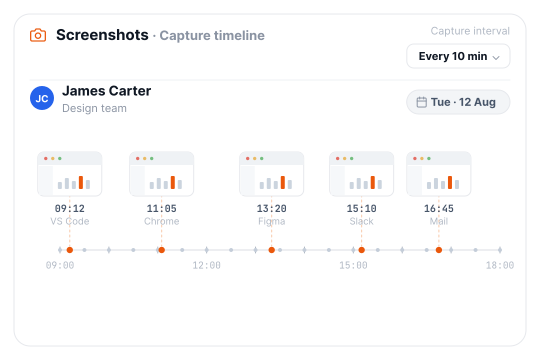
Screenshots from the first plan
- Set the capture interval to match your policy.
- Your Basic plan already has them, so there's no upgrade to approve.
DeskTime
Premium and up.
Flowace
Basic, $1.99.
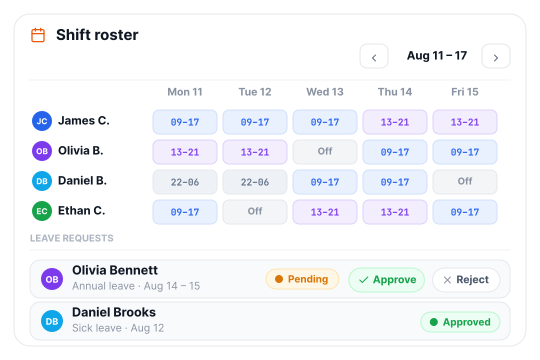
Shift scheduling on every plan
- Build rosters and set work hours once.
- Approve leave in the same place you check hours.
DeskTime
Premium and up.
Flowace
Every plan.
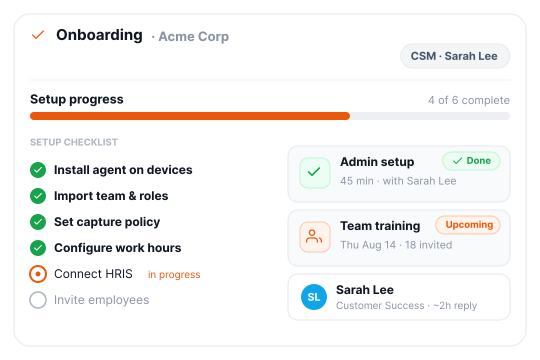
Onboarding for teams of any size
- A person from our team walks your admins through setup.
- Employees get training too, so adoption doesn't stall in week two.
DeskTime
Enterprise, 200+ users.
Flowace
Every plan.
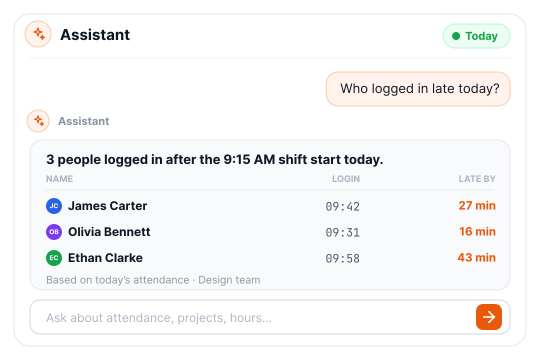
Answers to your own questions
- Ask who logged in late today, or which projects took the most time this week.
- Flowace AI replies with the figure and the people behind it.
DeskTime
Daily AI Summary.
Flowace
Flowace AI, for admins.
Results
What teams measured once Flowace was running

8,239 hrs of work captured, with no timesheets
- 95.9% Of tracked time spent on productive work
- 2 sessions To onboard all 55 remote users
The onboarding felt smooth from the very first call. And once we got into AI time tracking, that is the one that really stood out for us.55 remote users onboarded in two one-hour sessions

24.9% 15.1% idle time, quarter after quarter
- 14.6% Productive-hour growth over nine months
- 3× Faster output growth than headcount
Even while scaling, Flowace helped us uncover 6,000 idle hours and boost activity rates from 75.1% to 84.9%.Activity rate rose from 75.1% to 84.9% as the team grew from 66 to 96 agents

+12.7% billable growth, with zero new hires
- −24% Non-billable hours, Q2 to Q3
- 72× Return on idle visibility
Hours that had been untracked or broadly logged became visible and defensible. We didn't work more, we measured what we'd been doing.Billable hours grew from 71,591 to 80,714 in nine months
Deployment
Moving from DeskTime to Flowace takes a day, not a project.
We import your data.
Teams, settings, and history migrated free.
Deploy in 60 seconds.
One link installs the agent on Windows, macOS, and Linux.
First insight in 72 hours.
Dashboards go live in minutes. Most teams find their first inefficiency within three days.
Our candid take
Which should you pick?
DeskTime may fit if:
- You track people on their phones as well as their computers.
- You like a dashboard that goes from company to person in one click.
- You want a 14-day trial and a long review history behind the product.
Flowace is the stronger choice if:
- You need screenshots or shift scheduling and don't want to pay Premium prices for them.
- Your team is under 200 people and you'd still like help getting set up.
- You'd rather ask your data a question than read a daily summary.
- Attendance, shifts and leave should sit in the same tool as your hours.
Frequently Asked Questions
FAQs About DeskTime vs Flowace
DeskTime is an established time and productivity tracker with a clean dashboard and a mobile app. It keeps screenshots and shift scheduling for its Premium plan, and onboarding for Enterprise. Flowace includes screenshots, scheduling, leave and onboarding from its $1.99 Basic plan, and runs on desktops only.
Flowace is cheaper at every level we compared. Its Basic plan is $1.99 a user, against $6.42 for DeskTime Pro. For screenshots and shift scheduling, Flowace still costs $1.99 while DeskTime needs Premium at $9.17. A 25-person team paying annually spends $597 a year on Flowace Basic and $2,751 on DeskTime Premium.
DeskTime added an AI Summary in March 2026 that describes each workday in plain language. Flowace AI works differently: admins type a question, such as who logged in late today, and get the answer with the people behind it.
DeskTime includes screenshots on Premium and Enterprise, so Pro users have to upgrade. Flowace includes screenshots from its Basic plan, and you choose how often they’re taken.
Flowace includes shift scheduling, attendance and leave management on every plan, Basic included. On DeskTime, shift scheduling starts at Premium.
Flowace includes onboarding, employee training and live chat support on every plan, and a named success manager from Premium. DeskTime keeps its account manager and onboarding for Enterprise customers, which starts at 200 users.
Flowace doesn’t have a mobile app and doesn’t track phones. It runs on Windows, macOS and Linux. DeskTime offers a mobile app, so it’s the better fit if you need to track people on their phones.
Flowace never logs keystrokes or records screen video. It measures how often the keyboard and mouse are used and takes screenshots at the interval you set. There’s no live screen view.
Flowace has five add-ons, all for IT teams: single sign-on, user provisioning, API access, extra screenshots and shared-desk tracking. Premium includes all five. Tracking, screenshots and reports come with every plan. See Flowace pricing.
Moving from DeskTime to Flowace usually takes a day. We migrate your teams, settings and history for free, and the agent installs in about a minute per device. Book a demo and we’ll plan it with you.
Flowace is SOC 2 Type II certified. It is also ISO 27001 certified, GDPR compliant and HIPAA-aligned, on every plan. Sales can send the SOC 2 report the same day under NDA.
Flowace is a DeskTime alternative for teams that want screenshots, scheduling and onboarding without paying for a higher plan. Hubstaff, Time Doctor and ActivTrak also come up often, and we’ve compared Flowace with Hubstaff, Time Doctor and ActivTrak.
Run DeskTime and Flowace side by side for a week.
Install Flowace next to DeskTime, then compare what each plan actually gives you and how much help you get setting it up.
- No credit card
- Free migration
- Cancel anytime





Maximize Your Potential with Flowace!
Experience seamless time tracking and productivity enhancement like never before. Join the Flowace revolution and unlock your full potential. Start your journey to success today!”
