10 Best Employee Monitoring Software for 2026, Ranked and Compared



Published: August 2026 · Last Updated: August 2026 · Pricing verified: August 2026
There is no single best employee monitoring software for every team. The right choice depends on your team size, budget, privacy requirements, and the features you need.
This article ranks and compares the 10 best employee monitoring software solutions for 2026 based on features, pricing, ease of use, integrations, and the teams they suit best.
Employee monitoring works best when it is transparent and fair to everyone involved. This is Flowace’s main comparison guide for teams evaluating options in the US and India to help you evaluate and choose the right software.
What is Employee Monitoring Software?
Employee monitoring software gives leaders a clear view of team activity and productivity. It tracks workflows, task completion, and resource use, helping executives make informed decisions without guesswork.
Modern tools combine features like time tracking, project integration, and reporting dashboards to optimize processes while maintaining transparency and trust.
Why Employee Monitoring is Crucial in 2026
The modern workplace is more complex than ever. Remote and hybrid teams, multiple collaboration tools, and evolving business goals make it harder for leaders to maintain visibility. Moonlighting or unnoticed bottlenecks can quietly erode productivity.
Employee monitoring software provides peace of mind for executives. It delivers real-time visibility, data-driven performance insights, and workload optimization. Leaders can spot trends, support team well-being, and make strategic decisions that align with organizational goals.
In 2026, monitoring is not about control—it’s about clarity, accountability, and growth. Ethical, transparent monitoring ensures teams stay productive while fostering trust and engagement. It can even reveal patterns like “coffee badging,” helping optimize workflow without micromanaging.
Our Methodology: How We Selected the Top 10 for 2026
Choosing the right employee monitoring software requires more than a simple feature list. We evaluated solutions based on real-world business impact, usability, and ethical monitoring practices. Our goal was to highlight platforms that help leaders make informed decisions while fostering trust and accountability.
Criteria for Evaluation
We assessed each tool against a set of strategic criteria:
- Productivity and Performance Insights – Does the software provide actionable, real-time data to optimize workflows and drive team efficiency?
- Ease of Use – Is the interface intuitive for both managers and employees, reducing adoption friction?
- Integration Capabilities – Can it seamlessly connect with project management, communication, and HR tools?
- Security and Privacy – Are data protection and ethical monitoring practices built into the platform?
- Scalability and Flexibility – Can it adapt as teams grow or workflows evolve?
- Customer Support and Reliability – Is there dependable support to handle technical or operational challenges?
Testing and Review Process
Our team conducted hands-on testing for each software, simulating real-world scenarios for remote, hybrid, and on-site teams. We analyzed dashboards, reporting accuracy, and alerts, and measured how effectively each platform supports management decisions without eroding employee trust.
We also incorporated user feedback and expert reviews, focusing on tools that combine actionable insights, ethical monitoring, and operational efficiency. This thorough methodology ensured that the top 10 software solutions we present deliver measurable impact and strategic value for leaders in 2026.
Essential Features to Look for in Employee Monitoring Software
Choosing the right employee monitoring software goes beyond brand names or pricing. The right tool should provide actionable insights, seamless workflows, and ethical oversight. For executives, the goal is to optimize productivity, ensure accountability, and protect business assets—without creating a culture of surveillance.
Below are the key features every modern monitoring solution should offer:
Activity Tracking (Website & Application Usage)
Track which apps and websites employees use during work hours. This helps leaders identify productivity patterns, spot bottlenecks, and uncover distractions like excessive social media usage. Monitoring activity ethically ensures employees remain engaged without feeling micromanaged.
Time and Attendance Management
Automated time tracking and attendance logs reduce administrative overhead and provide accurate records for payroll, performance analysis, and compliance reporting. Flowace takes this further with automatic attendance tracking, idle time detection, and offline tracking, making it easy to manage teams across time zones or hybrid setups.
Real-Time Monitoring and Alerts
Live dashboards and customizable alerts give executives instant visibility into productivity and task completion. This ensures timely interventions, workload balancing, and proactive support without constant supervision. With Flowace, managers also get smart notifications that flag unusual work patterns early.
Visual Monitoring (Screenshots & Screen Recording)
Capture screenshots or record sessions at defined intervals to verify work progress. When used ethically, this feature provides accountability and prevents errors or data loss—without creating a culture of fear. Flowace supports screenshot monitoring without keylogging, ensuring work validation stays respectful.
Keystroke Logging (with Ethical Caveats)
Keystroke logging can reveal workflow patterns and highlight inefficiencies. However, it should be used transparently and only on company-owned devices, with clear communication to employees to maintain trust.
Reporting and Analytics
Robust analytics transform raw data into actionable insights. Flowace provides detailed productivity reports, ROI summaries, and workload analysis so leaders can measure not just hours worked, but outcomes achieved.
Security and Data Protection
Security is non-negotiable. Your monitoring software should safeguard company data with encryption, role-based access, and regular updates to protect against breaches.
Integrations and Compatibility
Seamless integration with tools like Slack, Teams, Trello, or project management platforms ensures monitoring fits naturally into workflows without friction. Flowace’s wide integration library makes it easy to plug into existing ecosystems.
Privacy Controls and Settings
Ethical monitoring requires strong privacy controls. Features like adjustable monitoring levels, anonymized data, and opt-in configurations empower employees while maintaining transparency.
Best Time Tracking Tools by Use Case
A quick-reference table for time tracking tools by scenario. For employee monitoring software specifically, see the full comparison table below.
| Decision Factors | 3 Best Time Tracking Software |
|---|---|
| Remote Team | Apploye, Insightful, Hubstaff |
| Simple Time Tracking | Apploye, Tick, Harvest |
| Hybrid Team | Apploye, TimeCamp, Insightful |
| Field Employees | FieldServicely, AllGeo, Hellotracks |
| Personal Time Tracking | TMetric, Apploye, MyHours |
| Cost-effectiveness | Apploye, Timeneye, Clockify |
| AI Automated Timesheet | Timely, Apploye, Time Doctor |
| For using with QuickBooks | QuickBooks Time, Tick, ClickTime |
| Large Deskless Team | Apploye, QuickBooks Time, AllGeo |
| Independent Contractor | Apploye, Toggl, Clockify |
| Invoicing | Apploye, Harvest, QuickBooks Time |
| Mobile Devices | Apploye, Tick, Harvest |
Quick Comparison of 10 Best Employee Monitoring Softwares
The table below compares the 10 best employee monitoring software tools for 2026 by price (billed annually), features, free trial and user rating.
Note: India pricing basis: figures below are arithmetic conversions of each vendor’s own USD price at ~95.45 INR per USD (mid-market rate, 15 August 2026), rounded to the nearest rupee. Convert at the current rate before publishing, and note the conversion date on the page since exchange rates move.
*Pricing last updated: August 2026
|
Tool |
Best For | Starting Price – US
(billed annually) |
Starting Price – India
(billed annually) |
Free Trial | G2 Rating |
Key Features |
| Flowace | AI-powered productivity tracking & Employee Monitoring | $1.99/user/mo | ₹166/user/mo | 7 days | 4.6/5 (137 reviews) | Automatic time tracking, smart project mapping, well-being alerts, ethical monitoring |
| Hubstaff | Remote & mobile workforce | $4.99/seat/mo | ~₹476/seat/mo | 14 days | 4.4/5 (2,311 reviews) | Activity monitoring, GPS tracking, automated payroll, screenshots |
| ActivTrak | Productivity analytics without overreach | $10worker/mo | ~₹955worker/mo | 14 days | 4.3/5 (340 reviews) | AI activity categorization, real-time dashboards, benchmarks |
| Time Doctor | Remote teams with detailed activity tracking | $6.67/user/mo | ~₹637/user/mo | 14 days | 4.4/5 (493 reviews) | Keystroke logging, screenshots, distraction alerts, task tracking |
| Teramind | High-security & DLP needs | ~$14/seat/mo | ₹1314/seat /month | 7 days cloud / 14 days on-premise | 4.6/5 (181 reviews) | Insider threat detection, session recording, keystroke logging, BI dashboards |
| DeskTime | Simple automatic time tracking | $6.42/user/mo | ~₹367/user/mo | 14 days | 4.5/5 (400 reviews) | Idle detection, productivity scoring, Pomodoro timer, offline tracking |
| TimeCamp | Freelancers & agencies | $2.49/user | ~₹238/user | 14 days | 4.7/5 (386 reviews) | Billable hours tracking, invoicing, attendance, project categorization |
| KeepActive | Real-time monitoring & activity logs | $2.75/user/mo | ~₹262/user/mo | 14 days | 4.8/5 (148 reviews) | Live monitoring, screenshot capture, keystroke logging, activity heatmaps |
| EmpMonitor | Session recording & detailed monitoring | $4.66/user/mo | ~₹445user/mo | 15 days | 4.9/5 (21 reviews) | Random screenshots, idle time detection, session recording |
| RescueTime | Focused on individual & team productivity | $10/user/month | ~₹955/user/month | 14 days | 4.2/5 (93 reviews) | Goal setting, focus mode, distraction alerts, automatic tracking |
*Note: Only the pricing needs to be updated. The rest of the information is correct from the existing table. While updating the article, I’ll also update the pricing in each tool’s section.
1. Flowace
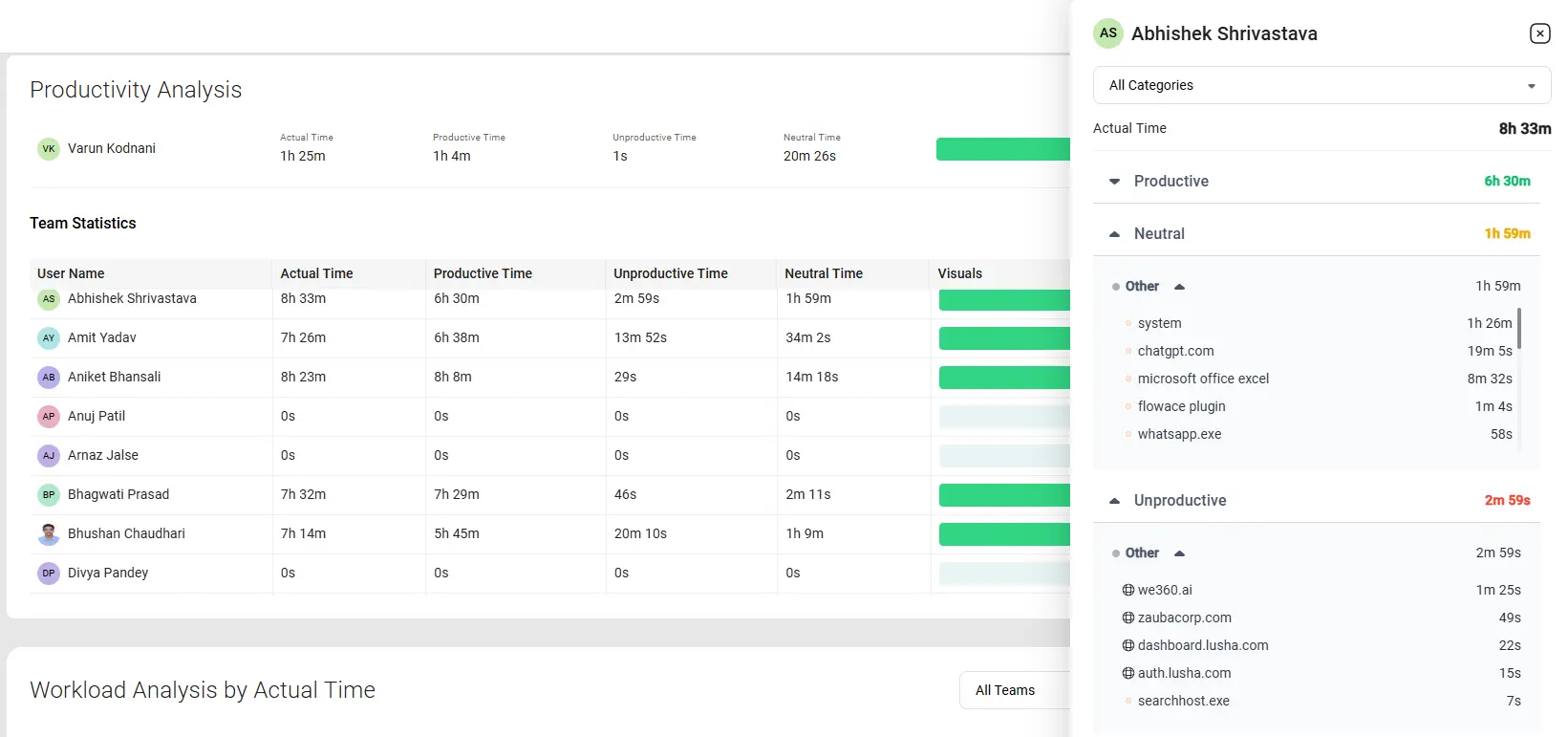
Flowace is the best employee monitoring software and workforce analytics platform for remote, hybrid, and in-office teams.
It automatically tracks work hours, app and website usage, attendance, and project time while providing real-time dashboards and productivity insights. The platform helps businesses improve productivity, simplify time tracking, and support employee well-being without relying on manual timesheets.
Key Features
Automatic Time Tracking
Flowace automatically records work hours, app usage, website activity, and project time to create accurate timesheets and productivity reports.
Real-Time Productivity Dashboard
Managers can monitor live productivity, attendance, active hours, and workload trends from a single dashboard to identify bottlenecks and improve team performance.
Intelligent Alerts & Insights
AI analyzes work patterns and sends alerts for missed hours, high idle time, unusual activity, and potential burnout. Managers can also create custom alerts based on their business needs.
Employee Monitoring
Track app and website usage, productive and idle time, attendance, and employee activity with flexible monitoring options and detailed reports.
Workforce Management
Flowace combines task tracking, attendance management, leave management, workforce analytics, and automatic timesheets in one platform.
Privacy-First Monitoring
Privacy Mode and configurable monitoring settings help organizations balance productivity monitoring with employee privacy.
Integrations
Flowace integrates with popular tools, including Slack, Microsoft Teams, Zoom, Google Calendar, Asana, Jira, Trello, ClickUp, GitHub, and more.
Pros
- Automatic attendance and time tracking without manual timers.
- AI-powered productivity insights and alerts
- Real-time dashboards and workforce analytics
- Attendance, leave, and task management
- Privacy Mode with flexible monitoring settings
- Easy integration with popular workplace tools
Cons
- Advanced workforce analytics and monitoring features are available in higher-tier plans.
- Teams may need to customize productivity categories during initial setup for the most accurate reports.
Pricing
Flowace pricing starts at $1.99 per user/month for the Basic plan, $3.99 for Standard, and $6.98 for Premium when billed yearly. Enterprise pricing is custom. A 7-day free trial is available without a credit card.
It also offers newer features like an AI chatbot, currently available in BETA with MCP integration planned soon.
Best For
- Remote and hybrid teams
- Small and medium-sized businesses
- IT companies, agencies, and BPOs
- Businesses looking for employee monitoring, automatic time tracking, workforce analytics, and AI-powered productivity insights in one platform
Why We Picked Flowace?
Flowace earns its place among the best employee monitoring software for 2026 because it combines employee monitoring, automatic time tracking, attendance management, workforce analytics, AI productivity insights, and project tracking in a single platform. Its real-time dashboards, flexible privacy controls, and broad integrations make it a strong choice for businesses of all sizes.
2. Hubstaff
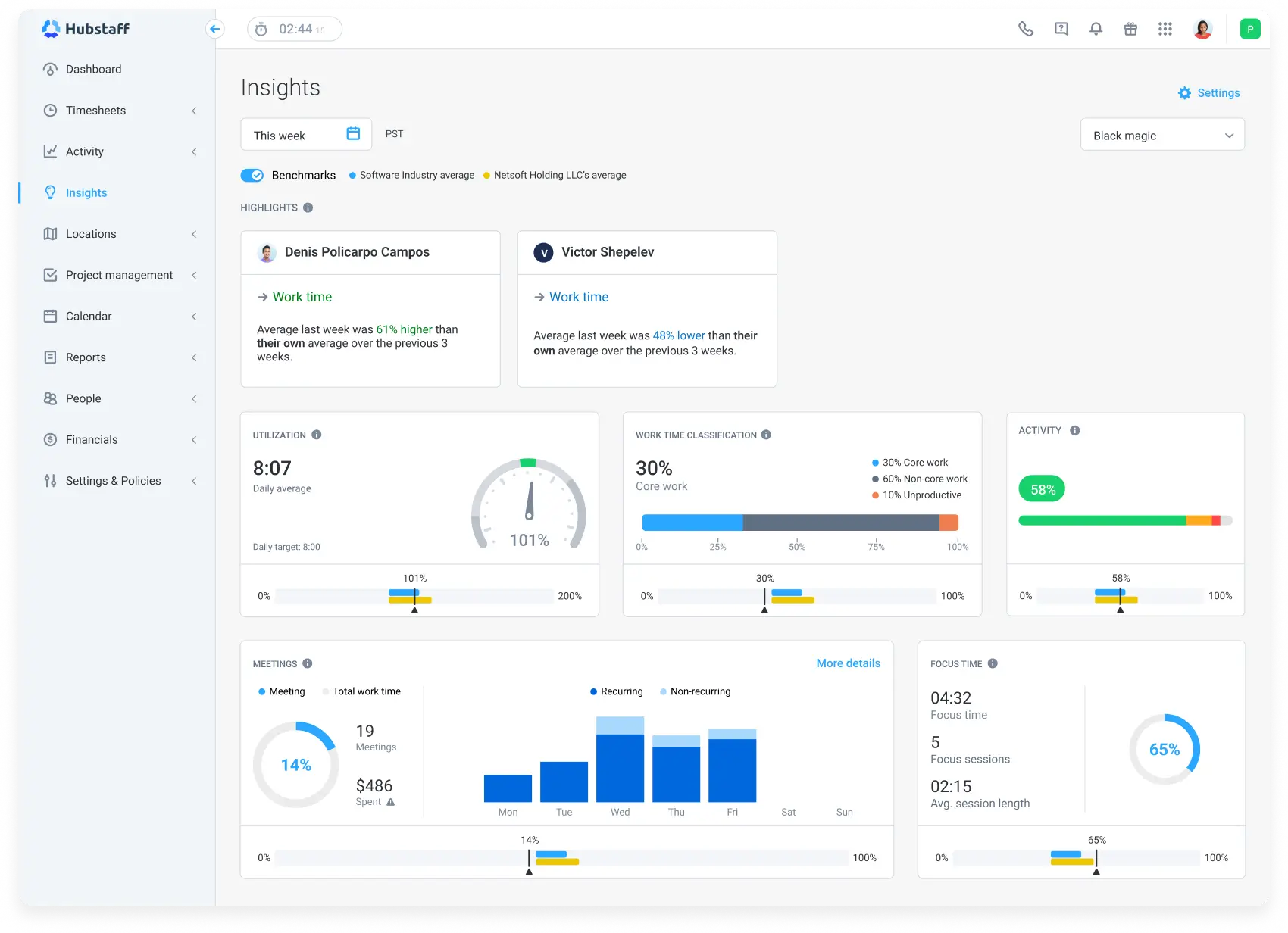
Hubstaff makes it super easy for employees to track time, whether they’re working on-site or remotely. But it’s not just about recording hours; it also allows teams to track billable hours and even GPS locations for field teams, making it great for companies with a mobile workforce.
Key Features
-
Activity Monitoring: You get insights into typing, clicking, and idle time. This helps you spot productivity dips fast.
-
Screenshots & Screen Recording: You can capture your team’s screens at customizable intervals. Handy for remote work oversight.
-
Payroll & Accounting Integration: Hubstaff automatically calculates hours, billable time, and even syncs with QuickBooks. That makes payroll smoother.
Pros
-
You gain clear visibility into computer activity.
-
Screenshots give real proof of work.
-
Payroll integration saves you manual math and errors.
-
Customizable settings mean you only record what you want.
Cons
-
Location tracking can be inaccurate and confusing.
-
If someone works by thinking or reading, idle time might mislead you.
-
Tracking pauses when internet disconnects which isn’t ideal for field teams.
Pricing
Hubstaff pricing starts at $4.99 per seat per month for the Starter plan. Grow costs $7.50 per seat per month, Team costs $10 per seat per month, and Enterprise costs $25 per seat per month.
All paid plans except Enterprise include a 14-day free trial.
Best For
-
Remote or hybrid teams that rely on activity data and screenshots for proof of work.
-
Businesses that need integrated payroll and accounting.
-
Teams that want customizable tracking to balance oversight and privacy.
3. ActivTrak
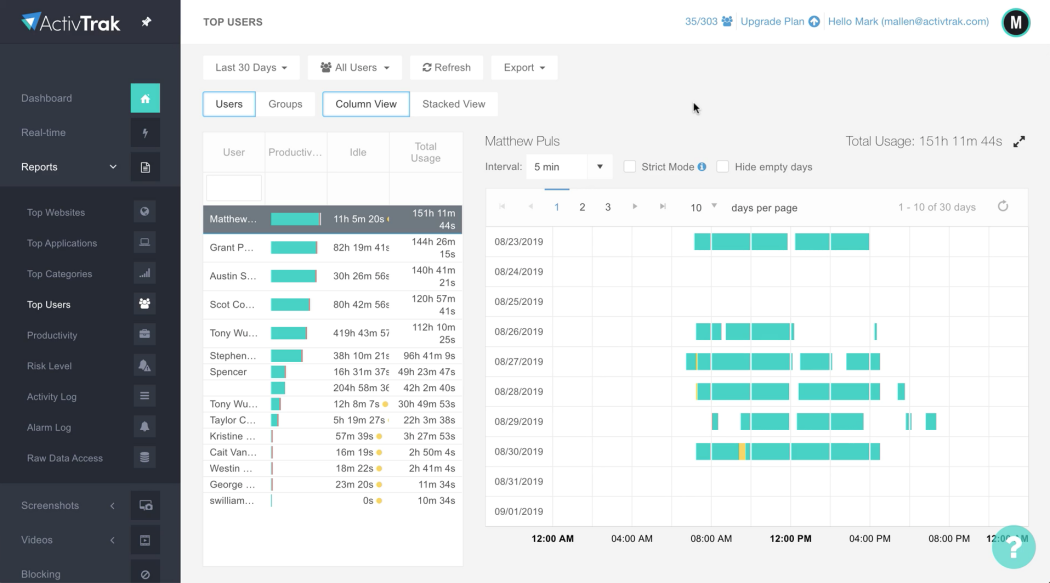
ActivTrak provides deep insights into employee behavior, application usage, and web activity. This helps managers get a better understanding of how time is spent during work hours, identifying patterns, and spotting areas where efficiency can be improved.
Key Features
-
Well-being Alerts
You get notified when productivity changes or burnout signs appear. It’s proactive and supportive—not shaming. -
Engagement-Friendly Tracking
You keep an eye on performance without micromanaging. Your team still gets autonomy and trust. -
Easy-to-Use Dashboards
You see clear charts and metrics that simplify complex data. You can spot top performers and areas that need training. -
Smart Integrations
It works well with tools like Slack and Trello. You don’t need to change your workflow or juggle extra software.
Pros
-
You support your team’s well-being as well as performance.
-
You stay informed without being intrusive.
-
You get clear, visual insights that help you make better decisions.
-
It fits smoothly into your existing toolset.
Cons
-
Some companies roll it out secretly, which raises ethical red flags.
-
There’s a lag in data refresh, so real-time tracking isn’t perfect.
-
It may have weak compatibility with less common tools.
Pricing
ActivTrak offers a free plan for up to 3 users. Paid plans start at $10 per worker per month when billed annually for work activity tracking, $15 per worker per month for workforce management, and $17 per worker per month for productivity optimization.
Best For
-
You if you care about team wellness and performance equally.
-
Managers who want light-touch monitoring, not micromanagement.
-
Teams that rely on tools like Slack or Trello.
4. Time Doctor
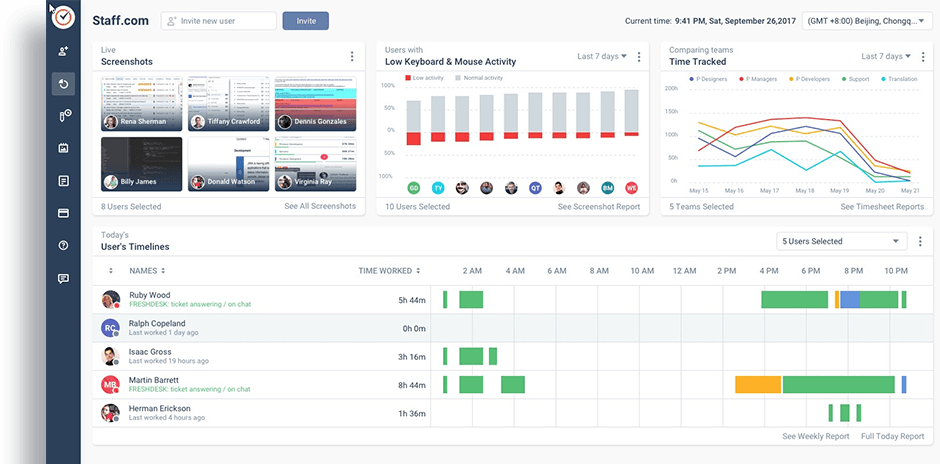
Time Doctor is one of the most robust employee monitoring and time tracking tools out there, with features that cater to a wide range of needs. The app offers automatic time tracking, which means you don’t have to worry about your employees forgetting to start or stop the timer. It tracks time spent on various tasks and apps and even takes screenshots at regular intervals to ensure accountability. But don’t worry, Time Doctor strikes a balance between productivity and trust, allowing you to set up alerts to remind employees to stay focused rather than micromanaging them.
Key Features
-
Distraction Alerts
You get gentle reminders if you’ve been idle or visiting non-work sites. It’s a kind nudge, not a nag. -
Client-Specific Time Tracking
You can assign time to specific clients or projects. It even lets you set budgets and track billable hours precisely. -
Employee Scheduling with Time Zone Support
You create work schedules for everyone—even across time zones. No more guessing who’s on shift. -
Deep Reporting & Insights
You get detailed reports showing hours worked, activities, and time spent on apps or websites. This helps you spot trends and improve efficiency.
Pros
-
You stay focused with distraction nudges.
-
You bill clients accurately with project-level time tracking.
-
You manage global teams easily with scheduling tools.
-
You get rich data to drive smarter decisions.
Cons
-
Users report crashes and lost time logs.
-
Inaccurate logged hours could mess with payroll.
-
Idle reminders can feel like a persistent ping if you pause for a bit.
Pricing
Time Doctor pricing starts at $6.67 per user/month for the Basic plan when billed annually. The Standard plan costs $11.67 per user/month, the Premium plan costs $16.70 per user/month, and the Enterprise plan offers custom pricing.
Best For
-
You if you manage distraction-prone or client-focused work.
-
Teams that bill by project or need detailed client tracking.
-
Managers handling remote staff in various time zones.
-
Anyone who wants deep analytics to boost productivity.
The feature most teams wish they had compared earlier.
Explore All Flowace Features5. Teramind
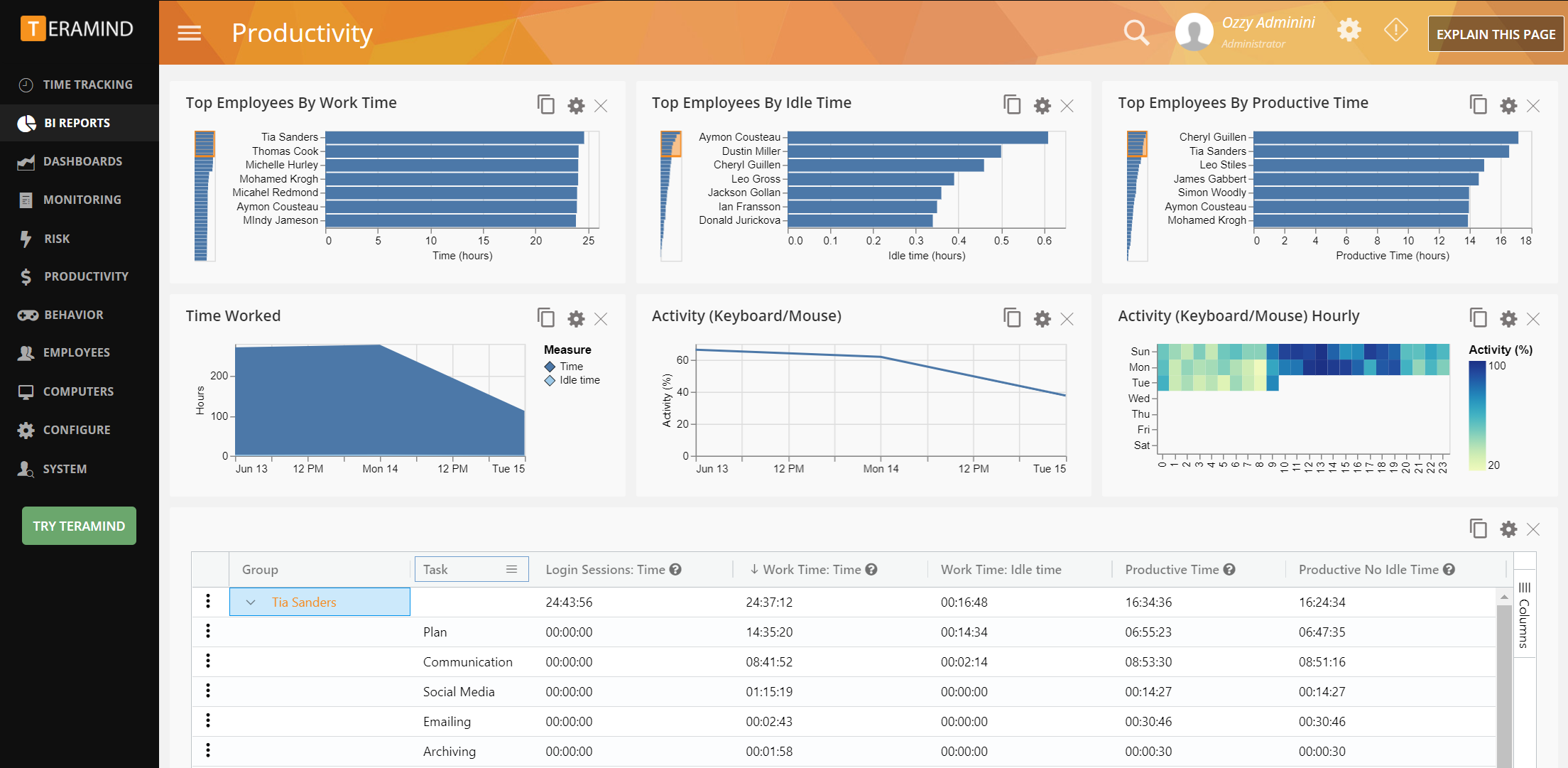
Teramind is a powerful employee monitoring software that offers a suite of unique features designed to give organizations deep insights into employee activity while ensuring compliance and data security. One of its standout features is its behavioral analytics. Teramind tracks how employees interact with applications, websites, and files, allowing you to analyze patterns and behaviors that may signal productivity issues or even security risks.
Key Features
-
Custom Policy Engine
You set smart alerts based on your own rules. If someone accesses sensitive data after hours, you get notified right away. You choose what counts: browsing, emails, file transfers, and more. -
Live Monitoring & Session Recording
You can watch screens live or play back sessions later. This lets you see exactly how tasks get done and catch issues as they happen. -
Keystroke Logging
You capture every keystroke for detailed auditing. It’s powerful for industries that need full tracking. -
Data Loss Prevention (DLP)
You stop unauthorized file transfers and flag risky info sharing. It plugs into your IT setup and secures both local and cloud data.
Pros
-
You get granular control over monitoring rules.
-
You gain full visibility into live and historical work.
-
You capture keystrokes for strong auditing.
-
You protect sensitive data with built-in DLP tools.
Cons
-
If you’re not tech-savvy, setup can feel overwhelming.
-
You’ll likely never use all those advanced features unless you really need them.
Pricing
Pricing starts at ~$14 per seat per month for the Starter plan, ~$28 per seat per month for UAM, and ~$32 per seat per month for DLP. All plans are billed annually. Enterprise pricing is available on request.
Best For
-
You if you need customizable, rule‑based monitoring and instant alerts.
-
Security‑focused industries that require live sessions, keystroke capture, and data protection.
-
Organizations with strong IT support ready to handle a feature-heavy system.
6. DeskTime
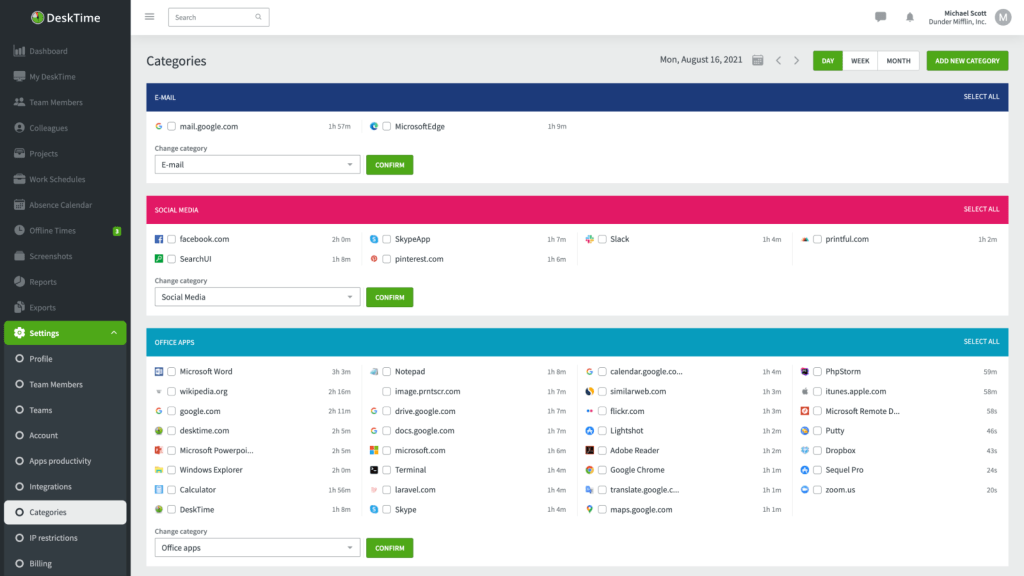
DeskTime is a feature-packed time-tracking tool with a specific focus on boosting productivity through intelligent insights. One of its most unique features is its automatic time tracking, which runs in the background, effortlessly recording time spent on various tasks and apps. This means that your team doesn’t need to worry about starting and stopping timers, DeskTime handles that automatically. This feature is especially useful for busy employees who might forget to log their time manually.
Key Features
-
Productivity Score
You can quickly see how productive your day really was. DeskTime automatically sorts the apps and websites you use into productive, neutral, or unproductive. It even shows which sites eat up most of your time, so you know exactly where distractions come from. -
Pomodoro Timer
Love working in short, focused bursts? DeskTime has a built-in Pomodoro timer. It helps you follow a 25-minute work + 5-minute break cycle, keeping your brain fresh and focused all day. -
Offline Time Tracking
Lost internet connection? No worries. DeskTime keeps tracking your time even when you’re offline and syncs everything once you’re back online. Perfect for remote work or travel days.
Pros
-
You get instant insight into how you’re spending your time.
-
The Pomodoro method helps you stay focused and avoid burnout.
-
You won’t lose time logs during internet drops.
-
It’s simple to use and doesn’t take long to set up.
Cons
-
If your job involves deep thinking or planning, the tool might feel too rigid.
-
It doesn’t offer much flexibility for teams with different work styles.
-
Insights are helpful but not as detailed as some other tools.
Pricing
DeskTime’s Pro plan for small teams and startups starts at $6.42/user/month billed annually. Premium plans for hybrid and growing teams at $9.17/user/month billed annually and adds features like screenshots, shift scheduling, and the absence calendar. A 14-day free trial is available.
Best For
-
You if you want a clear view of your productivity habits.
-
People who enjoy working in structured, focused sprints.
-
Remote workers who deal with offline time or travel.
-
Teams looking for a simple time tracking tool that just works.
7. TimeCamp
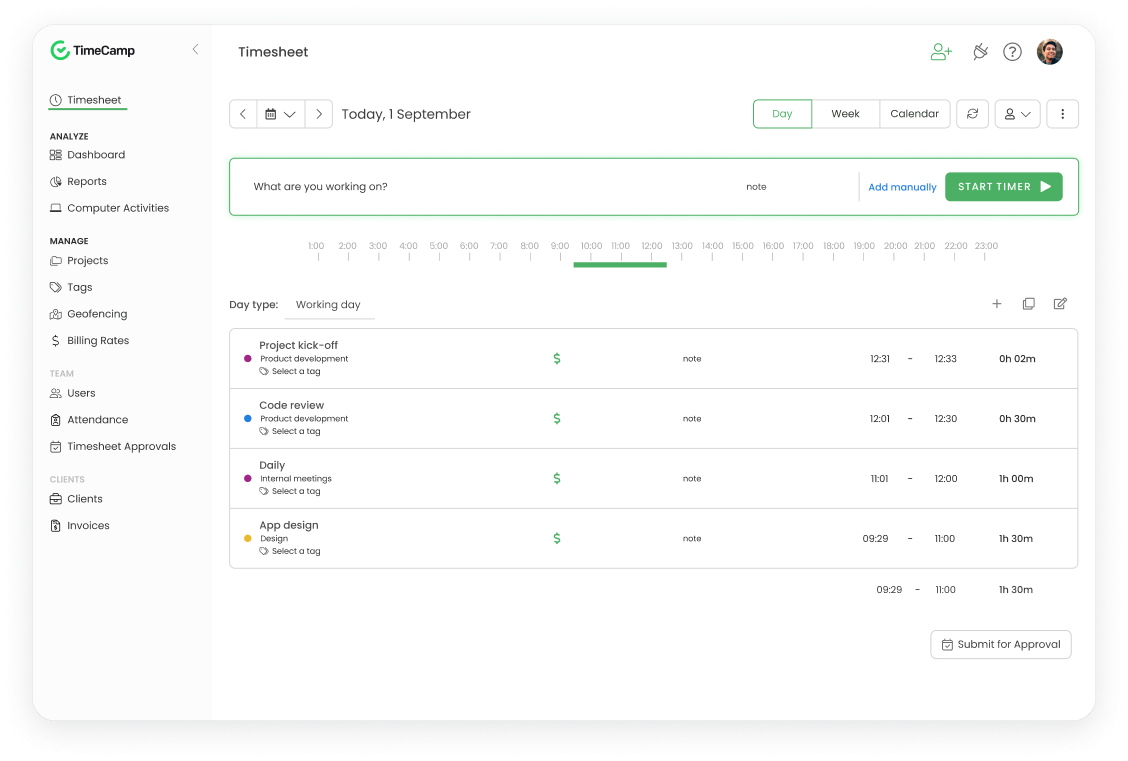
One of its most niche and impressive features is its automatic tracking capability. Unlike many time trackers that require manual input, TimeCamp automatically detects the applications and websites you’re using and logs the time spent on them. This means employees don’t have to worry about tracking every minute; they just get to work, and TimeCamp takes care of the rest.
Key Features
-
Billable Hours Tracking
You can mark time entries as billable hours and generate invoices right from TimeCamp. This makes billing clients accurate and easy. No more manual invoice prep! -
Attendance & Geolocation
Track when your team starts and ends work, and monitor time off. If you’re managing remote or field teams, you can even check where they worked from. -
Project Tracking & Task Categories
You can assign projects and tasks, and track time spent on each. This helps spot which projects need more resources or attention. -
Powerful Integrations
You can sync time data with tools like Trello, Asana, and QuickBooks. This keeps your project management and accounting in harmony.
Pros
-
You get effortless, accurate client billing.
-
You can easily track employee attendance and work location.
-
You gain clarity on project time usage.
-
You save time with seamless integrations.
Cons
-
Many users say time tracking isn’t always accurate.
-
The interface can feel clunky and confusing.
-
You might spend time fixing tracking mistakes, which defeats the point of automation.
Pricing
TimeCamp pricing starts at $2.49 per user/month for the Starter plan when billed annually. The Premium plan costs $3.99 per user/month, the Ultimate plan costs $4.99 per user/month, and the Enterprise plan offers custom pricing on request.
Best For
-
You if you run a service-based business or freelancer gig, and need accurate billing.
-
Managers tracking attendance and hours across teams.
-
Teams using Trello, Asana, or QuickBooks already.
-
Anyone who wants project-level time insights and easy invoicing.
8. KeepActive
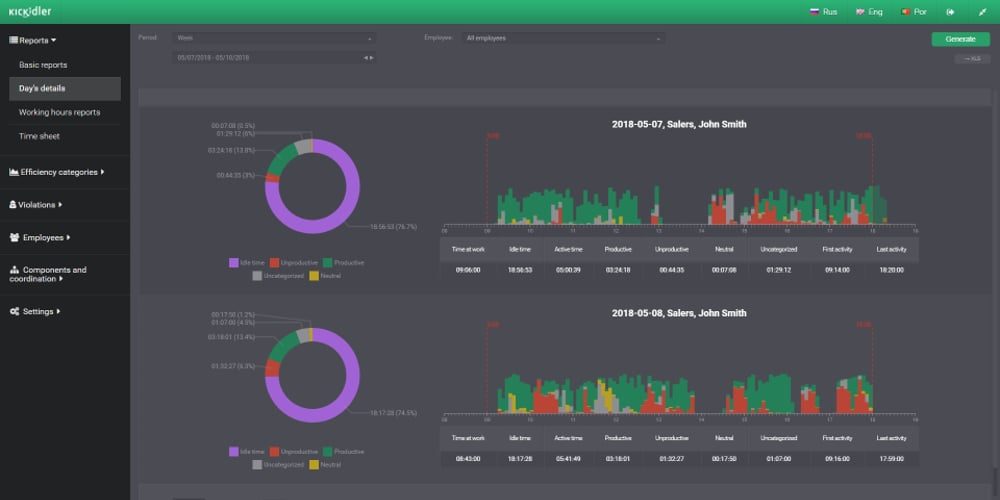
One of KeepActive‘s most notable aspects is its live screen monitoring, which allows managers to observe what employees are doing in real-time. This feature is particularly useful for keeping a close eye on tasks that require immediate attention or for checking the work process during critical projects. It’s like having a live feed to ensure your team is on track without constantly interrupting their workflow.
Key Features
-
Keystroke Tracking
You get a complete log of every key pressed. It’s perfect for roles where every character matters—data entry, customer support, you name it. -
Minute-by-Minute Activity Insights
You can see exactly how much time was spent on each task or app. It helps you understand workflow in detail. -
Activity Heatmaps
You get a visual map of your team’s activity levels throughout the day. It’s great for spotting moments of focus and promoting high productivity.
Pros
-
You get extremely detailed productivity insights.
-
You can improve workflows and training with minute-level data.
-
Heatmaps make it easy to spot activity patterns at a glance.
Cons
-
The interface is cluttered and setup can be confusing.
-
It may slow down older computers.
-
Price-wise, it’s not ideal for small teams.
Pricing
Pricing starts at $2.75 per user per month for Time Tracking, $5.5 per user per month for Employee Monitoring, $11 per user per month for Data Loss Protection. Plans are billed annually. No credit card is required to start the trial.
Best For
-
You if your work demands high precision, like data entry or customer support.
-
Managers who want minute-level insights on task and app usage.
-
Teams that benefit from visual workflow maps.
-
Organizations with older machines and a small team size might want to think twice.
9. EmpMonitor
EmpMonitor tracks apps and websites that are being used during work hours. This feature allows managers to drill down into specific behaviors. For example, if a team member spends hours on a social media platform during working hours, it could flag an issue with time management. What’s particularly powerful about this tool is that it can provide insight into time spent on non-work-related sites but also break down time spent on productive tools.
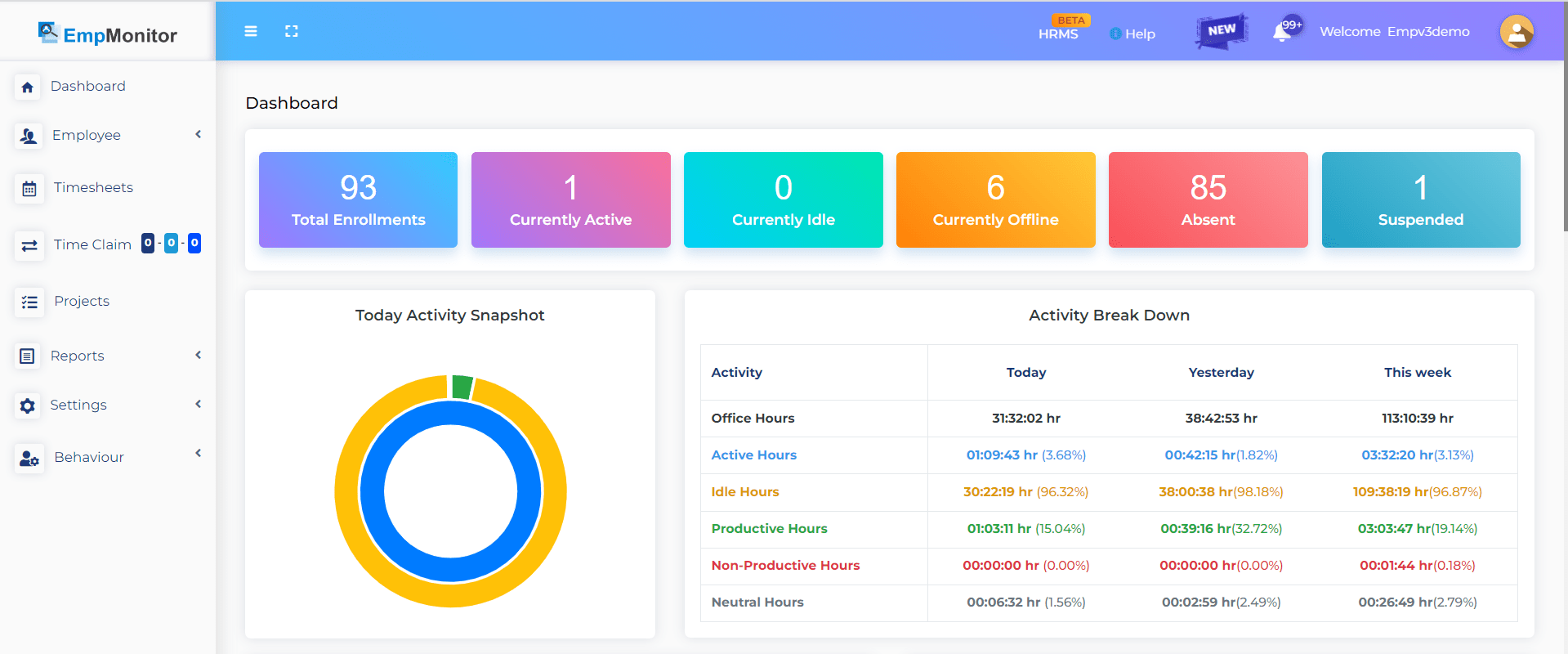
So, if an employee spends time on software relevant to their job, like a CRM or project management platform, EmpMonitor can highlight this, giving a clearer picture of time well spent. In short, it helps ensure that employees are spending their time wisely by distinguishing between work-related activities and potential distractions.
Key Features
-
Customizable Random Screenshots
You decide how often screenshots are taken or set them to trigger at key moments. It’s flexible so you can monitor when it matters without hovering nonstop. -
Full Session Screen Recording
You get real-time recordings of entire work sessions. This is perfect for tracking progress on complex tasks like coding or design. -
Idle Time Detection
You’ll know when the mouse or keyboard is inactive. EmpMonitor helps you dig into the reasons behind inactivity, not just log it.
Pros
-
You have flexible monitoring without feeling invasive.
-
Screen recordings offer deep visibility into work processes.
-
Idle tracking can uncover focus issues and help improve productivity.
Cons
-
You need some IT know-how to set it up properly.
-
Advanced features aren’t available unless you pay extra.
Pricing
EmpMonitor pricing starts at $4.66 per user/month for the Bronze plan when billed yearly (for 1 to 10 users). The Silver plan costs $3.83 per user/month for 11 to 50 users, the Gold plan costs $3 per user/month for 51 to 200 users, and the Diamond plan offers custom pricing for 200+ users.
Best For
-
You if you need flexible, targeted monitoring without micromanaging.
-
Teams doing complex or high-stakes work like software dev or design that benefit from full session recording.
-
You if uncovering why people get idle is important to you.
-
Managers comfortable with a bit of IT setup.
10. RescueTime
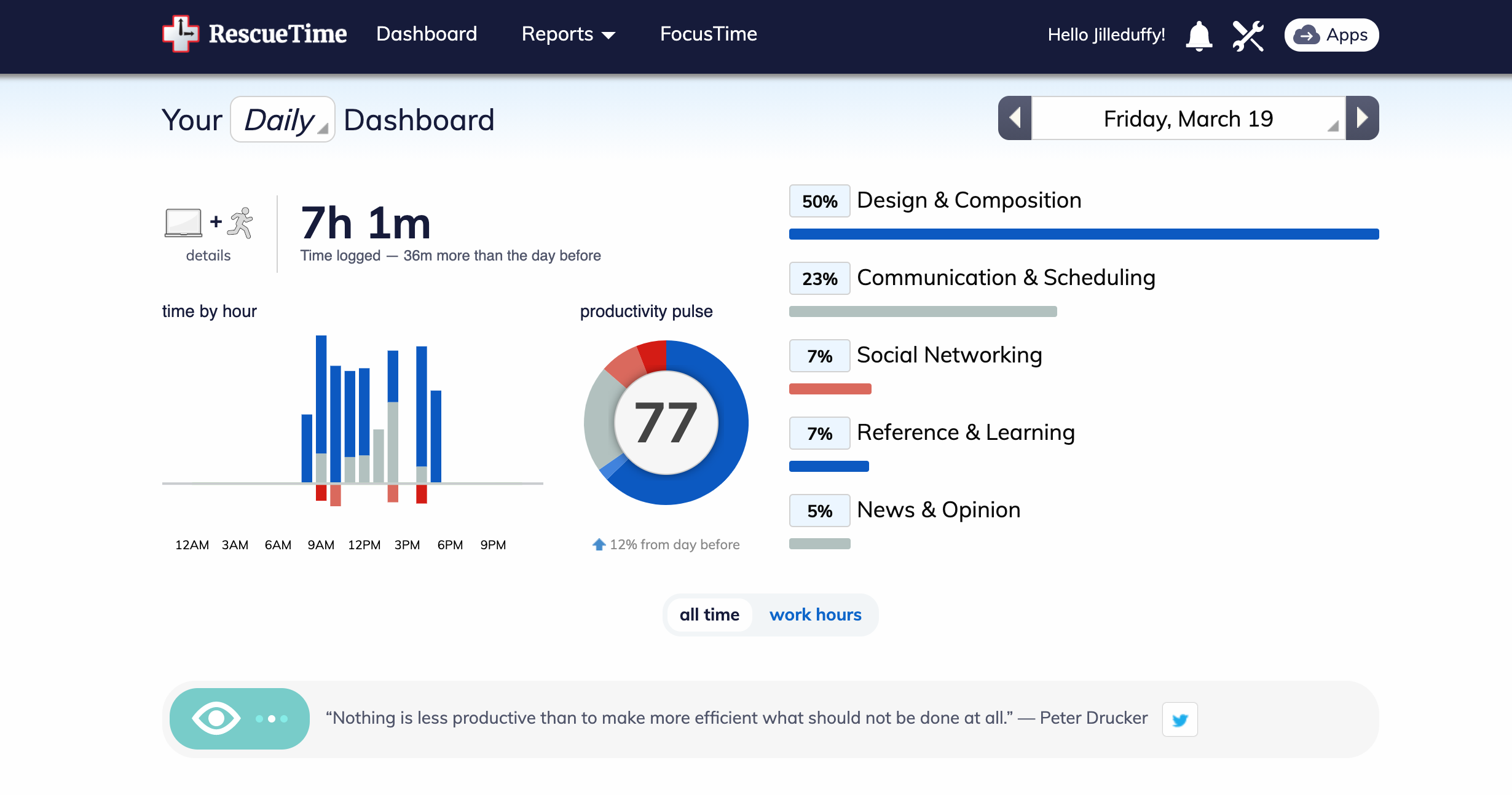
RescueTime is a productivity powerhouse that’s perfect for those who want to dive deep into understanding how time is spent throughout the day. One of its standout niche features is its automatic tracking of time across all your digital activities. It runs quietly in the background, tracking everything you do, whether it’s spending time on emails, social media, or specific work-related apps, without you having to lift a finger. This means you get an accurate picture of how your time is truly being spent, even if you’re not consciously tracking it.
Key Features
-
FocusTime Blocking
You can block distracting websites or apps when you’re in focus mode. It helps you stay in the zone and avoid social media rabbit holes. -
Time Alerts
You’ll get notifications when you spend too much time on certain apps or sites. It’s an easy way to form healthier digital habits. -
Goal-Setting System
You set personal productivity goals—like hitting a certain number of productive hours per day. RescueTime tracks your progress and keeps you accountable.
Pros
-
You stay focused with built-in blocking tools.
-
You get nudged to avoid time-wasting habits.
-
You track progress and hit your personal productivity goals.
-
Insights help you make smarter time-allocation decisions.
Cons
-
It’s designed for individuals, not teams, so lacks group tracking features.
-
If you need screenshots or visual proof of work, RescueTime won’t deliver.
Pricing
RescueTime pricing starts at $7/month for the Solo plan when billed annually. The Solo+ plan costs $12/month, the Team plan costs $10/user/month, and the Team+ plan costs $16/user/month when billed annually.
Best For
-
You if you’re working solo and need help staying focused.
-
Anyone who wants healthy digital habits and goal tracking.
-
Self-managing workers or students looking to optimize personal productivity.
Is Employee Monitoring Software Legal & Ethical?
Legally, the use of employee monitoring software is allowed, but there are guidelines and restrictions depending on where you are and how it’s used. In most countries, employers have the right to monitor their employees’ work devices, particularly when those devices are owned by the company. The idea is that if you’re using company equipment, you’re not just working for your own benefit but for the organization as well, so some level of monitoring is usually acceptable. However, there are limits.
For instance, in many places, you can’t just install software and start tracking everything an employee does without informing them. That’s where transparency comes in. Legally, companies typically need to notify employees about what’s being monitored and, in some cases, get their consent. This could be part of an employment contract or a company policy. If the monitoring is intrusive, like recording private conversations or tracking personal activities outside of work, that’s where the line between legal and illegal becomes blurry.
Sure, employers have a right to know how their resources are being used and want to ensure productivity, but they also need to respect employees’ privacy.
Ethical employee monitoring is about setting clear expectations and boundaries.
Moreover, ethical use also means being upfront with employees. Imagine logging into your computer at work and realizing you’re being watched without having been told it’s uncomfortable, right? Ethically, companies should give employees a heads-up about the kind of monitoring that’s happening, why it’s necessary, and how it benefits everyone.
Clear communication can go a long way in maintaining trust.
Best Employee Monitoring Software by Industry
Choosing the right monitoring software depends not only on features and budget but also on industry-specific requirements. Different sectors have unique priorities, security, compliance, project tracking, or remote collaboration, that dictate which tools perform best.
Healthcare & Finance (High Security Needs)
Organizations in healthcare and finance handle sensitive data daily. Compliance with regulations such as HIPAA, SOX, and GDPR is critical, and any monitoring solution must provide robust data protection.
Flowace
- Fully HIPAA/SOX compliant with enterprise-grade encryption
- Tracks employee activity without compromising data security
- Offers AI-driven productivity insights while maintaining compliance and privacy
Teramind
- Advanced Data Loss Prevention (DLP) features to monitor for unauthorized data access
- Real-time alerts for suspicious activity, insider threats, or potential policy violations
- Detailed audit trails and reporting to satisfy compliance requirements
Veriato
- Focused on insider threat detection and behavioral analytics
- Monitors email, chat, file transfers, and endpoint activity for potential breaches
- Comprehensive compliance reporting and forensics tools
Creative Agencies (Project-Based Work)
For agencies, the focus is on tracking project hours, demonstrating accountability to clients, and optimizing team workflows rather than strict security.
Flowace
- Integrates seamlessly with project management tools like Jira, Trello, and Asana
- Automatically tracks time spent on tasks and projects
- Provides AI insights to identify productivity bottlenecks and optimize workloads
Hubstaff
- Offers visual proof of work with optional screenshots and activity monitoring
- Time tracking for multiple projects and clients simultaneously
- Enables easy invoicing and client billing based on tracked hours
TimeCamp
- Lightweight time tracking and project reporting
- Generates client-friendly reports for transparency
- Budget tracking and alerts for project overruns
Remote-First Companies
Remote teams face challenges like asynchronous communication, time zone differences, and a lack of visibility into daily workflows. Monitoring software here should foster productivity without micromanaging.
Flowace
- Optimizes asynchronous workflows by analyzing peak productivity times
- Offers offline tracking and automatic syncing for flexible remote work
- AI-driven insights help managers identify team bottlenecks without constant supervision
Time Doctor
- Global time zone support for distributed teams
- Tracks work hours, breaks, and active application usage
- Integrates with popular communication and project management tools
Insightful
- Provides detailed analytics on remote team activity
- Helps managers visualize team workload distribution and productivity patterns
- Supports engagement tracking to identify potential burnout or disengagement
Implementation Best Practices
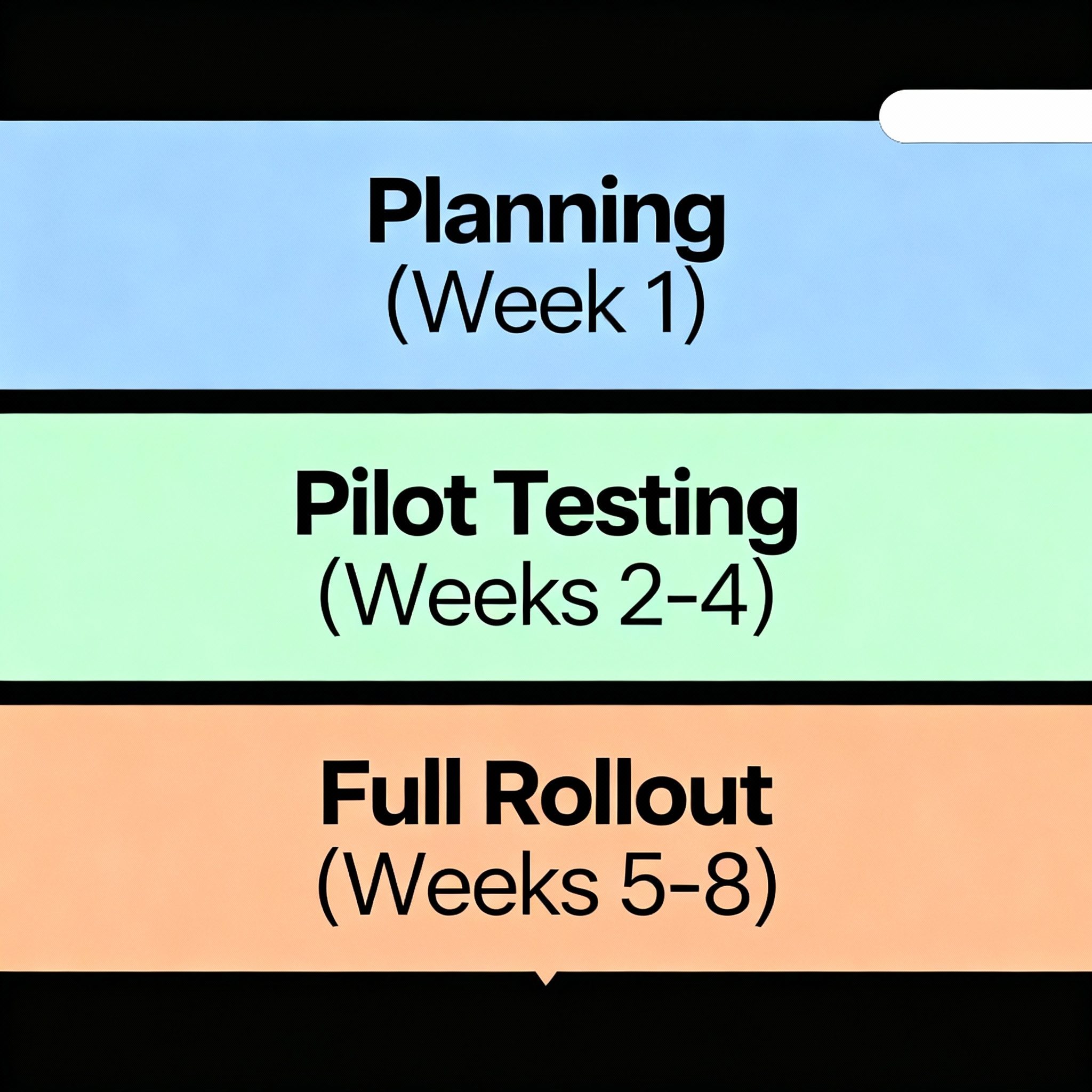
Rolling out employee monitoring software successfully requires careful planning, pilot testing, and continuous evaluation. Here’s a detailed phased approach.
Phase 1: Planning (Week 1)
The first step in any implementation is defining clear monitoring objectives. Organizations need to determine whether the primary goal is productivity optimization, security, compliance, accurate time tracking, or a combination of these. Aligning monitoring objectives with broader team and organizational goals is crucial; if employees perceive monitoring as micromanagement, it can harm trust and morale.
At this stage, it is also important to select a pilot team of 5-10 employees. Ideally, this should be a cross-functional group representing different roles, workflows, and responsibilities. Doing so ensures the monitoring software is evaluated across diverse work patterns and uncovers any potential gaps before full deployment.
Finally, communicating transparently with staff is essential. Explain why monitoring is being introduced, the specific benefits it brings to both the organization and employees, and the limits of data collection. Address privacy concerns openly and reassure employees that data will be handled securely and in compliance with regulations such as GDPR or HIPAA.
Building transparency from the start creates trust and sets the tone for a smooth rollout.
Phase 2: Pilot Testing (Weeks 2-4)
Once planning is complete, the next step is deploying the monitoring solution to the pilot group. Start with baseline, minimally invasive settings to ensure the software does not disrupt normal workflows. During this period, it’s important to monitor both productivity data and employee feedback closely.
Observing actual usage patterns alongside subjective experiences provides a holistic view of how the tool functions in practice. Next, gather feedback and measure key metrics to assess effectiveness. Track quantitative data such as active work hours, project completion times, and idle periods, while also collecting qualitative feedback from employees regarding usability and any workflow disruptions.
This dual approach highlights both strengths and pain points. Based on these insights, adjust settings as needed. Fine-tuning tracking parameters ensures the software captures meaningful data without being intrusive. It’s also the time to address any errors in data collection or gaps in functionality.
By iterating on settings during the pilot phase, organizations can minimize resistance, build employee trust, and ensure the solution is ready for full deployment.
Phase 3: Full Rollout (Weeks 5-8)
After a successful pilot, it’s time for the full rollout across the organization. Begin by training managers on dashboard usage. Leaders must understand not only how to read reports and interpret metrics but also how to translate data into actionable insights. Emphasize that monitoring is not a punitive measure, but a tool for improving workflows, supporting employees, and recognizing high performers. Next, establish a reporting cadence.
Schedule regular meetings, weekly or biweekly, to review data, discuss progress, and share relevant insights with employees. Consistent communication ensures transparency and helps maintain trust. Finally, create productivity improvement action plans based on collected data. Identify bottlenecks, optimize workflows, and recognize achievements to foster a culture of continuous improvement.
Maintain ongoing evaluation of both software effectiveness and employee satisfaction, adjusting monitoring parameters as necessary. By starting with minimally invasive settings and gradually expanding, organizations can achieve a balance between effective monitoring and a positive employee experience.
Why Flowace Stands Out As the Best Employee Monitoring Software
Flowace emerges as a leading solution, offering a comprehensive suite of features tailored to modern workforce needs.
1. Automated Time Tracking
Flowace eliminates the need for manual time entries by automatically capturing work hours, application usage, and idle times. This hands-free approach ensures accuracy and reduces administrative overhead.
2. Real-Time Monitoring
Managers can gain immediate insights into employee activities through live screen streaming, screenshot captures, and application usage reports. This transparency fosters trust and allows for timely interventions when necessary.
3. Comprehensive Activity Logs
Detailed logs provide information on break times, active work durations, project-specific time allocations, and idle periods. Such granularity aids in identifying productivity patterns and areas for improvement.
4. Offline Tracking
Recognizing that not all work environments have consistent internet access, Flowace offers offline tracking capabilities. Once connectivity is restored, data syncs seamlessly, ensuring no loss of information.
5. AI-Driven Insights
Leveraging artificial intelligence, Flowace analyzes work patterns to provide actionable insights. This includes identifying peak productivity hours, potential distractions, and opportunities for workflow optimization.
6. Seamless Integrations
Flowace integrates with over 30 platforms, including HRMS, project management tools, and communication apps. This ensures a unified approach to workforce management and data consistency across systems.
What Are People Saying Online About Employee Monitoring Software?
People discussing employee monitoring software on Reddit often focus on how tracking affects their work experience. Common concerns include privacy, constant activity tracking, screenshots, and the pressure to always appear productive.
A few real discussions show these concerns clearly:
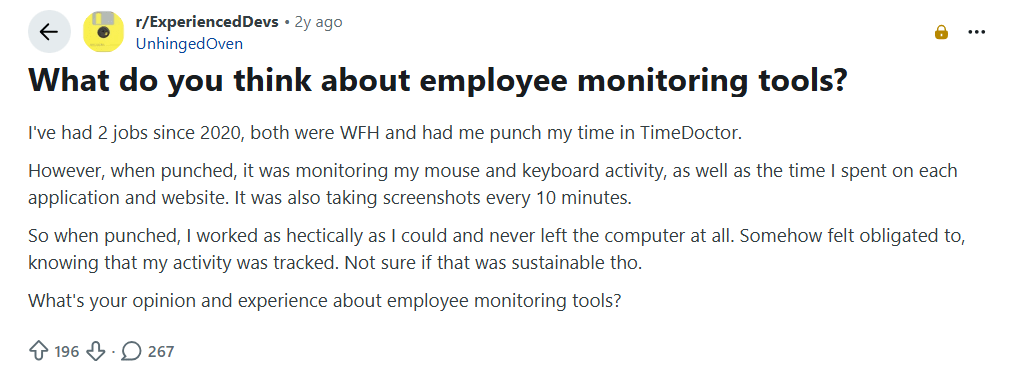
Image alt text: Reddit discussion where an employee shares their experience with TimeDoctor tracking mouse and keyboard activity, apps, websites, and screenshots.
The employee explains that knowing their activity was being tracked made them work constantly and avoid leaving their computer. They also question whether this kind of monitoring is sustainable in the long run.
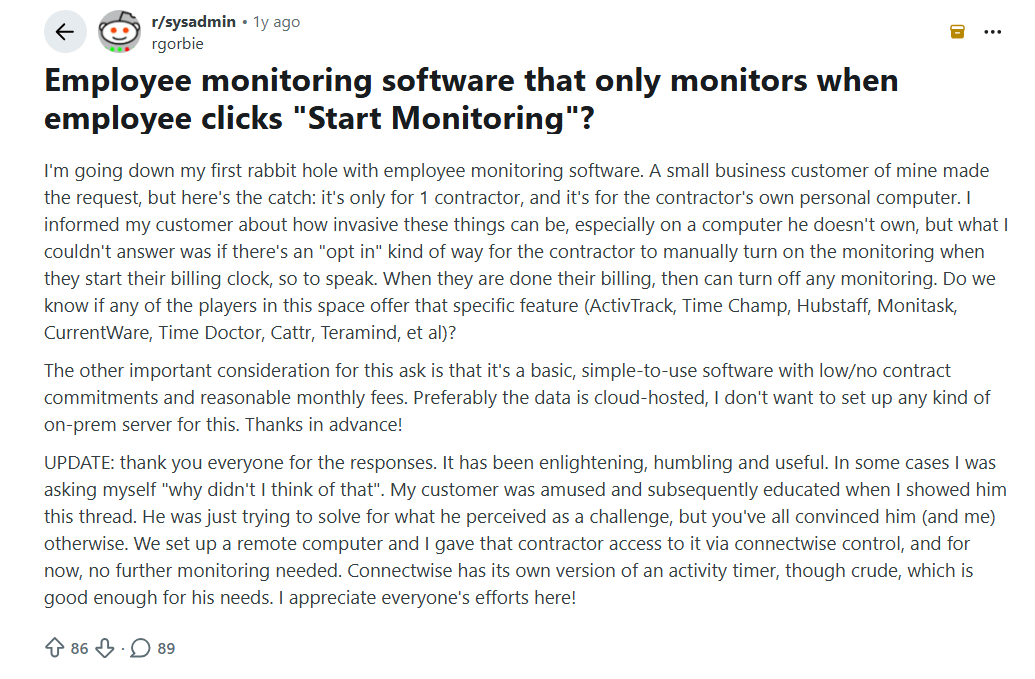
Image alt text: Reddit discussion where a business owner asks about employee monitoring software that employees can manually turn on and off.
The discussion focuses on whether a contractor should be able to start monitoring only when they begin work and stop it when they finish. In the end, the business owner chose a remote computer setup instead of monitoring the contractor’s personal computer.
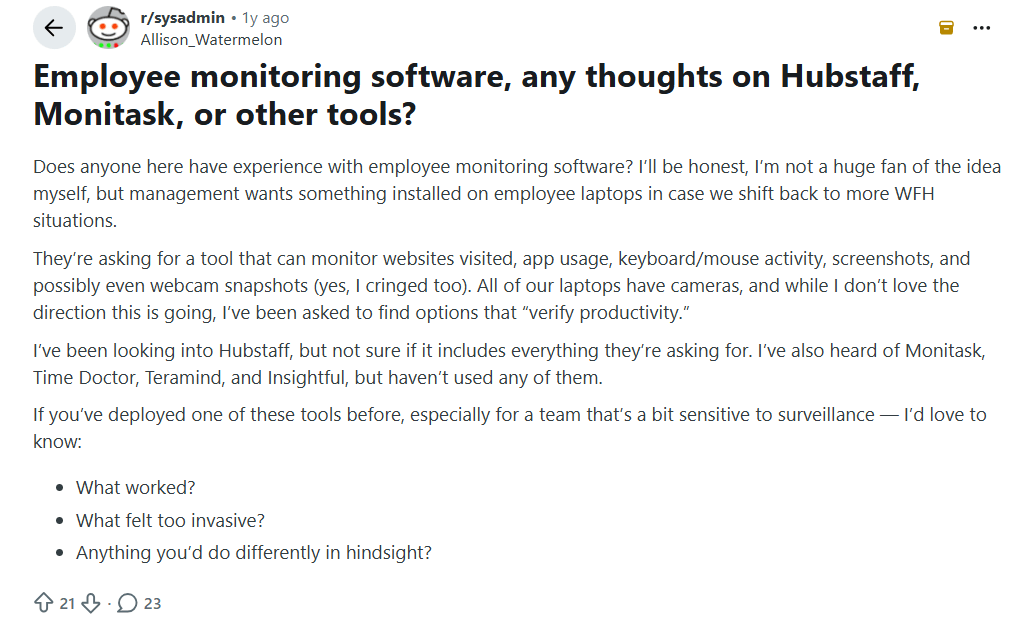
Image alt text: Reddit discussion where a manager asks about employee monitoring software that tracks websites, apps, keyboard and mouse activity, screenshots, and webcam snapshots.
The discussion highlights the tension between productivity tracking and employee privacy. The person looking for a tool is especially concerned about invasive features and wants to know what has worked well and what others would avoid.
Conclusion
Every one of these tools has its pros and cons, but the biggest question is: Do you want productivity tracking or surveillance? Some of these tools lean too far into the “watchdog” category, which can hurt morale. If you’re thinking about using one, it’s always good to balance tracking with trust. If you need a tool that takes care of all your needs (basic and advanced) while building trust with your employees, Flowace is the way to go!
You've compared the tools. Now compare the experience.
Start 7-Day Free TrialFrequently Asked Questions About the Best Employee Monitoring Software
1. What is employee monitoring software?
Employee monitoring software tracks employee work activity across apps, websites, computers, time and attendance. It helps businesses measure productivity, understand work patterns and improve workflow visibility.
2. What’s the best employee screen monitoring software?
The best employee screen monitoring software depends on your needs. KeepActive and Teramind are strong choices for live screen monitoring and session recording, while Flowace is a good option for teams that want screenshot monitoring without keystroke logging.
3. Is there free employee monitoring software?
Yes. ActivTrak and TimeCamp offer free employee monitoring software with basic features. Paid plans provide more users, advanced reporting and additional monitoring capabilities.
4. How much does employee monitoring software cost per employee?
Employee monitoring software typically costs between $1.99 and $33 per user per month, depending on features. Tools with session recording, insider threat detection and advanced security features generally cost $15–35 per user per month.
5. Which employee monitoring software is best for small and mid-size teams in India?
Flowace is the best employee monitoring software for small and mid-size teams in India because it offers local pricing, automated time tracking, productivity insights and workforce management features designed for Indian businesses.
6. What’s the difference between employee monitoring and time tracking software?
The difference between employee monitoring software and time tracking software is that employee monitoring software tracks work activity, app usage, websites and productivity alongside time worked. While Time tracking software primarily records working hours for payroll, billing and attendance.
7. Will employees know if monitoring software is installed on their computer?
Yes. Most reputable employee monitoring software is deployed transparently, and employers should inform employees about what data is being collected and why.
8. Does employee monitoring software track keystrokes?
Some employee monitoring software records keystrokes, while other tools do not. Teramind and KeepActive offer keystroke logging, whereas Flowace measures activity levels without recording what employees type.