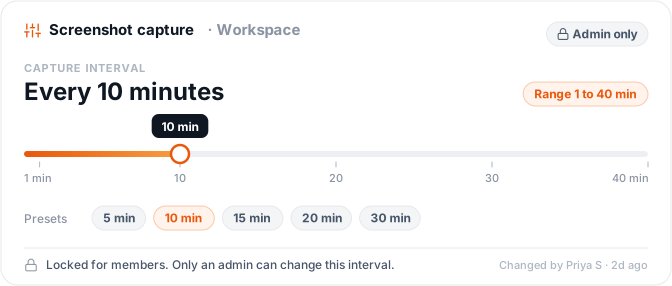
Pick any interval from 1 to 40 minutes. It holds until an admin changes it.
Enterprise-grade security backed by GDPR, HIPAA, ISO 27001 & SOC 2 compliance. Know more

Updated on
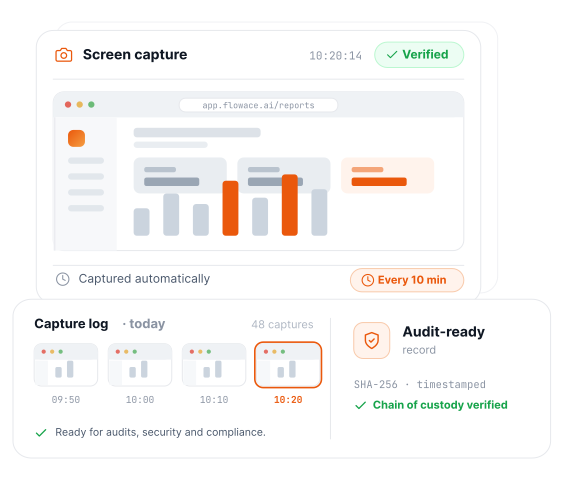
See what was on screen and when, captured on a schedule you set. So your security reviews, client audits and compliance checks have an answer ready before anyone asks.
Free 7-day trial · No credit card required · 5-minute setup · Dedicated onboarding.

80,000 users, 674 customers, 20 countries















Short answer
Flowace is screen monitoring software for desktop teams on Windows, Mac and Linux. It captures screenshots on an interval an admin sets, anywhere from 1 to 40 minutes, alongside second-by-second activity logs. Every capture rolls up into a report your IT, legal and procurement teams can review, so the record of work holds up when someone asks how it was collected.
Flowace captures what's on screen on a schedule you set, and fills the gaps with a second-by-second activity log. You choose how often screenshots land and whether the agent is visible to the employee. Every capture rolls into one report your IT and legal teams can hand straight to procurement.
Pick any interval from 1 to 40 minutes. It holds until an admin changes it.
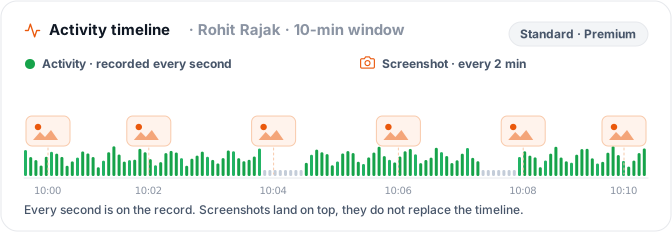
Every second is recorded, not just the moments a screenshot lands. Standard and Premium.
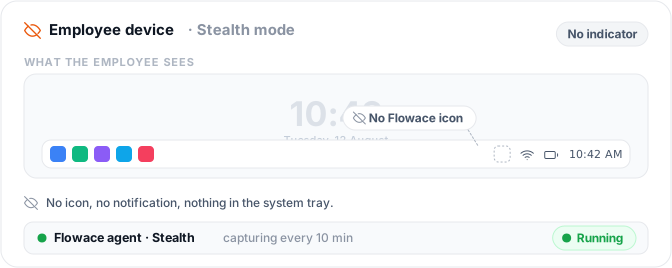
The Stealth mode agent runs without a visible icon or notification on the device.
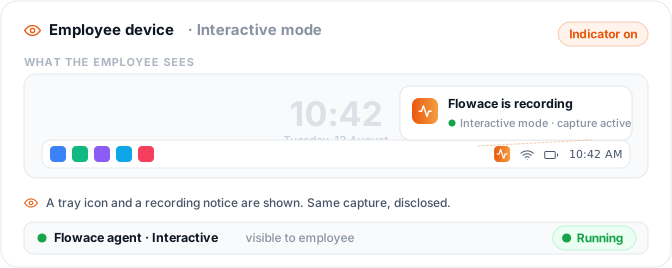
Interactive Mode shows the employee it's running. Same capture, disclosed rather than silent.
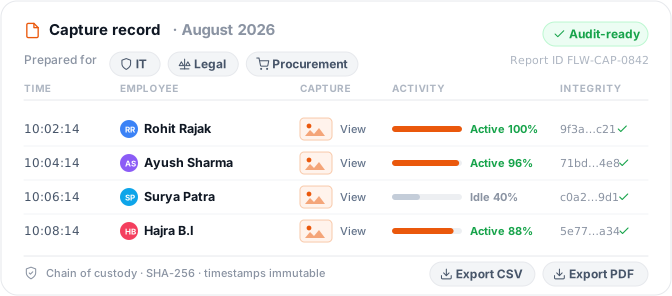
Every capture rolls into a report your IT, legal and procurement teams can use as it stands.
Capabilities
Flowace's screen monitoring captures what was on screen, how active the person was, and when they were idle, then encrypts all of it at rest and in transit. It runs from a single desktop agent on Windows, Mac and Linux. The result is evidence you can put in front of a client, an auditor or your own security team.
Screenshots run on the gap you choose, anywhere from 1 to 40 minutes, and keep running without anyone rechecking the setting.
Activity logs record second by second, so you can tell an idle hour from a busy one. Included on Standard and Premium.
Flowace tracks how often the keyboard and mouse are used, never what was typed. No keystroke setting exists at any tier.
Idle periods get tagged without anyone flagging them by hand. Available on every tier.
AES-256 at rest, TLS 1.2+ in transit, on every tier.
Windows, Mac and Linux, with the same screenshot and activity logging on all three.
Comparison
Checked September 2026, Flowace is the only one of the four to publish its agent's resource use, at roughly 50 MB of RAM and 1 to 2% CPU on Windows. WebWork Tracker, Hubstaff and we360.ai state no footprint figures on the pages checked.
| Feature | Flowace | WebWork Tracker | Hubstaff | we360.ai |
|---|---|---|---|---|
| Capture method | Periodic screenshots, scheduled | Periodic screenshots (~10 min, configurable) + optional video clips | Periodic screenshots, up to 3/10 min, customizable | Periodic screenshots (up to 60/hr, Enterprise) and live view and continuous recording |
| Live screen viewing | Not offered, by design | Real-time activity status (who's tracking, current app), not a live screen feed | Not stated on pages checked | Yes — "Livestream: view live employee screens in real time" |
| Continuous recording | Not offered | Not offered | Not offered | Yes — separate "Screen Recording" mode |
| Keystroke logging | Never, at any tier | Never, frequency only | Never — explicitly excludes keystrokes, messages, webcam, audio | Not mentioned either way — unconfirmed |
| Screenshot blur/redaction | Not available directly today. As a workaround, screenshot resolution can be lowered from the backend, for teams that only need a general sense of activity. | Yes, "Blurred" mode | Yes — irreversible blur, can disable | Yes — adjustable blur level |
| Employee notice/consent | No individual opt-out. Screenshot capture is controlled at the workspace level by the admin, based on company policy. | Informed of monitoring mode; can view/delete own screenshots | Can view/delete own screenshots; org can disable entirely | Consent-first standard mode, or a separate "Stealth mode... where legally permitted" |
| Mobile monitoring | Not offered | Yes, iOS and Android apps | Mobile time-tracking apps exist; screenshot capture on mobile not stated | Not found on pages checked |
| Data retention | One year (Basic/Standard/Premium); custom on Enterprise | Not stated on page checked | Up to 6 months, plan-dependent | Up to 2 years (Enterprise only) |
| Activity data granularity | Logged to the second, on Standard and Premium; not on Basic | Not published. Activity levels described as "based on the frequency of keyboard and mouse use," no interval stated | Per-second active/inactive detection, reported as a percentage per 10-minute segment | "Sub-second precision" for keyboard and mouse counting, dashboards "refreshed in real time"; retained-log granularity not stated |
| Starting price | $1.99/user/mo | From $3.99/user/mo | Not published on pages checked | ₹399/user/mo (different currency basis) |
| Platforms | Windows, Mac, Linux (desktop only) | Windows, Mac, Linux, iOS, Android, Chrome extension | Windows, macOS, Linux, web, iOS, Android | Windows, macOS, Linux (incl. Citrix/RDP/VDI) |
Verdict
"WebWork and Hubstaff suit teams that need mobile coverage or app/website tracking alongside screenshots; we360.ai suits teams that want live viewing as an option. Flowace suits teams that want the smallest possible capture footprint, no live view, no continuous recording, no keystrokes, and don't need a mobile app."

8,239 hours of remote work auto-captured.
The onboarding felt smooth from the very first call. And once we got into AI time tracking, that is the one that really stood out for us.

86.9% Team productivity in 2026
We started on the standard plan, but once we saw how much more Flowace could do for us, upgrading to Premium was an easy decision.

+12.7% billable growth, with zero new hires
Hours that had been untracked or broadly logged became visible and defensible. We didn't work more, we measured what we'd been doing.
By industry
Show that contractor access stayed inside approved systems
Your developers and contractors work inside client repos and environments all day. Flowace captures periodic screenshots and second-by-second activity logs, so when a client asks which systems were open and when, you answer with a timestamped record instead of a reassurance.
Best for IT services firms running remote or contract developers against client environments.
Prove customer data stayed on the screen it belonged on
Your agents handle card numbers and personal details on every call. Flowace gives supervisors a screenshot and activity record they can pull up after an incident, so a client escalation gets a factual answer the same day rather than a week of reconstruction.
Best for BPOs and contact centres that owe clients evidence of PII handling.
Show who had a patient record on screen, and when
Your revenue-cycle and back-office teams work in patient data under HIPAA. Flowace's periodic capture builds a HIPAA-aligned access trail you can produce during a compliance review, with the capture interval set by your own policy rather than ours.
Best for RCM and healthcare back-office teams that have to evidence PHI access.
Document how client financials were actually handled
Ledgers, client books and audit files all cross someone's screen eventually. Flowace records that handling with timestamped screenshots and activity logs, so segregation of duties becomes something you demonstrate from the record instead of asserting in a policy document.
Best for accounting and audit firms that need to evidence segregation of duties.
Build a chain of custody for privileged material
Your fee earners open privileged documents constantly. Flowace's scheduled screenshots create a matter-level access record with a timestamp on every capture, which is what opposing counsel or a client's risk team will ask you to produce.
Best for law firms and in-house legal teams that need matter-level access records.
Outcomes
Simple per-user pricing. Every plan includes attendance, projects & tasks, silent tracking, and support.
billed annually
Included features
billed annually
All features in Basic, plus:
billed annually
All features in Standard, plus:
All features in Premium, plus:
Pricing as of September 2026, billed annually, roughly 30% below monthly · 7-day free trial, no card, no seat minimum · Full plan comparison
Windows — full desktop agent, screenshots and activity logging.
No mobile app exists and no mobile monitoring is offered.
macOS — full desktop agent, same capability set.
No mobile app exists and no mobile monitoring is offered.
Linux — full desktop agent, same capability set.
No mobile app exists and no mobile monitoring is offered.
Flowace is a desktop agent for Windows, Mac and Linux, so it fits teams whose work happens on company computers. Capture behaves the same whether people are remote, hybrid or in the office. What changes is the report each team opens: HR checks policy and access, Ops checks capacity, Finance checks billable time.
One record across every machine, wherever people work.
The same capture in the office and at home, so the two compare directly.
A record supervisors can pull up after an incident, instead of reconstructing it.
A monitoring policy you can defend
Interactive Mode discloses monitoring on the device, activity is measured by input frequency rather than content, and team leads see only their own team's data.
Evidence of how a shift actually ran
Screenshots on an interval you set from 1 to 40 minutes, plus second-by-second activity logs on Standard and Premium, with idle and active time tagged automatically.
Billable hours you can evidence, not estimate
Activity exports as CSV for billing and audit review. Knowcraft Analytics surfaced ₹2.37Cr in recoverable billable capacity and grew billable hours 12.7% with no new headcount.
Trust and compliance
Flowace encrypts every screenshot and activity log with AES-256 at rest and TLS 1.2+ in transit, on every pricing tier including Basic. The platform is GDPR compliant, ISO 27001 certified and HIPAA-aligned, and holds a SOC 2 Type I report. Each certification below carries the date it took effect, so your InfoSec team can check currency before a review.
 GDPR Compliant Effective: May 2026
 ISO 27001 Certified Effective: April 2026
 SOC 2 Type II report Effective: May 2026
 HIPAA Aligned No certifying body exists for HIPAA, so no date applies
Flowace holds captured data for one year on Basic, Standard and Premium, and lets Enterprise plans set their own retention period. Retail accounts are hosted on Flowace's AWS VPC in the Mumbai region; Enterprise customers on a qualifying deal can choose their region. Admins can delete screenshots before the retention period ends, and export activity as CSV or screenshots as PNG at any time.
If you cancel. The workspace stays active for 14 days to clear any outstanding invoice. It is suspended on day 14 if the invoice stays unpaid, has a 7-day window to reactivate, and is permanently deleted on day 21.
Who can see what. Team leads see only their own team's data, on the dashboard and in CSV exports, based on the hierarchy you set up.
Flowace does not watch screens live or record them continuously. It captures periodic screenshots on a schedule an admin sets, with nothing captured between intervals and no live-view mode anywhere in the product. What a screen monitoring tool does
Flowace does not log keystrokes, at any pricing tier. What it tracks instead is input frequency, a Premium-tier feature called Keypad and Cursor Activity that shows how active someone was without ever showing what they typed.
Admins can set the interval anywhere from 1 to 40 minutes.
No individual opt-out exists. Screenshot capture is controlled at the workspace level by the admin, based on company policy, not something an individual employee can turn off.
Flowace logs activity down to the second, included on Standard and Premium; it isn’t part of Basic.
Flowace does not offer a mobile app or mobile monitoring. It’s desktop only, covering Windows, Mac, and Linux, unlike WebWork Tracker and Hubstaff, which both publish mobile apps.
Flowace supports Windows, Mac, and Linux, with the same screenshot and activity-logging capability on all three.
Both modes capture the same data; the difference is whether the software is visible while running.
Flowace is built to document work activity, not to invade privacy: no keystroke logging, no live viewing, no continuous recording, and no access to email, message, or file content.
Notice requirements for workplace monitoring vary by location and apply regardless of which capture mode is used, India’s DPDP Act and several US states require it. Check with your legal team about the specific requirements in your jurisdiction.
Flowace retains data for one year on the Basic, Standard, and Premium tiers, with Enterprise plans able to set a custom retention period.
Yes. Admins can delete screenshots early, and end users can delete their own screenshots too, but only when that permission has been explicitly enabled for them.
The workspace stays active for 14 days after cancellation to clear any outstanding invoice. If it stays unpaid, the account is suspended on day 14, followed by a 7-day grace period to reactivate. With no action, the workspace is permanently deleted on day 21.
For retail customers, no. All data sits on Flowace’s AWS VPC in the Mumbai region, with no multi-region option. Enterprise customers with a qualifying deal size can arrange data residency in a region of their choice.
Yes. Team leads see only their own team’s data, based on the hierarchy set up in the platform, across both the dashboard and CSV report exports.
On Windows, the agent uses about 50 MB of RAM, with temporary spikes to 100 to 200 MB when screenshots are enabled, 1 to 2% CPU, and under 100 MB of install size. On Linux, it uses about 60 MB of RAM with minimal CPU and under 150 MB of install size. On Mac, about 60 MB of RAM with minimal CPU and under 250 MB of install size. Disk usage on all platforms scales with data captured.
Flowace is GDPR compliant, effective May 2026.
Flowace is SOC 2 Type I compliant, with the report effective May 2026 — not an unqualified “SOC 2,” since Type II is still in its observation period.
Flowace is HIPAA-aligned. HIPAA has no certifying body, so “certified” isn’t a claim that holds up.
Flowace is ISO 27001 certified, effective April 2026.
Flowace has four pricing tiers, as of September 2026, billed annually: Basic at $1.99 per user per month, Standard at $3.99, Premium at $6.98, and Enterprise on custom pricing. Annual billing saves roughly 30% against paying monthly.
Flowace offers a seven-day free trial, with no credit card required and no minimum number of seats.
Some competitors, including we360.ai, publish a live screen-viewing mode as a feature (checked September 2026); Flowace does not offer one, by design.
Flowace’s Premium and Enterprise plans include public API access, so data can be integrated with your own reporting or compliance tools. Activity reports also export as CSV and screenshots export as PNG directly from the dashboard, for teams that do not need the API.
Flowace’s agent holds 99.9% uptime. Updates ship at least twice a month, with quarterly major updates for the desktop agents.
See what was on screen and when, captured on a schedule you set.



Experience seamless time tracking and productivity enhancement like never before. Join the Flowace revolution and unlock your full potential. Start your journey to success today!”




