Clockify vs Toggl Pricing, Features And Which One to Pick



Published: August 2026 · Last Updated: August 2026 · Last Verified: August 2026
Clockify and Toggl both track time, but the better choice depends on what your team needs. Clockify leans toward approvals and admin control, while Toggl Track is a better fit for teams that want simple time tracking without screenshots or employee monitoring.
This Clockify vs Toggl comparison article covers 2026 pricing at 10, 50, and 200 seats, key features, and which one to pick.
Clockify vs Toggl At a Glance
Both Clockify and Toggl work on web, desktop, and mobile, with time syncing across devices. The bigger differences are price, admin controls, screenshots, and employee activity tracking and those are the details shown in the table below.
| Feature | Clockify |
Toggl |
| Free plan limit | Up to 5 users | For a limited number of users |
| Cheapest paid plan | $3.99/seat/mo (Basic Plan, annual) | $9/licence/mo (Starter Plan, annual) |
| Invoicing | Yes, from Standard Plan | Yes, from Free Plan |
| Screenshots | Yes, from Pro Plan | No |
| GPS tracking | Yes, from Pro Plan | No |
| Scheduling | Yes, from Pro Plan | No |
| Kiosk mode (shared device clock-in) | Yes | No |
| Integrations | 100+ web apps | 100+ tools via browser extension |
| Activity monitoring | Yes, from Free Plan | Optional |
*Updated August 2026
Note: Prices and plan features can change, so check the current pricing page before you buy.
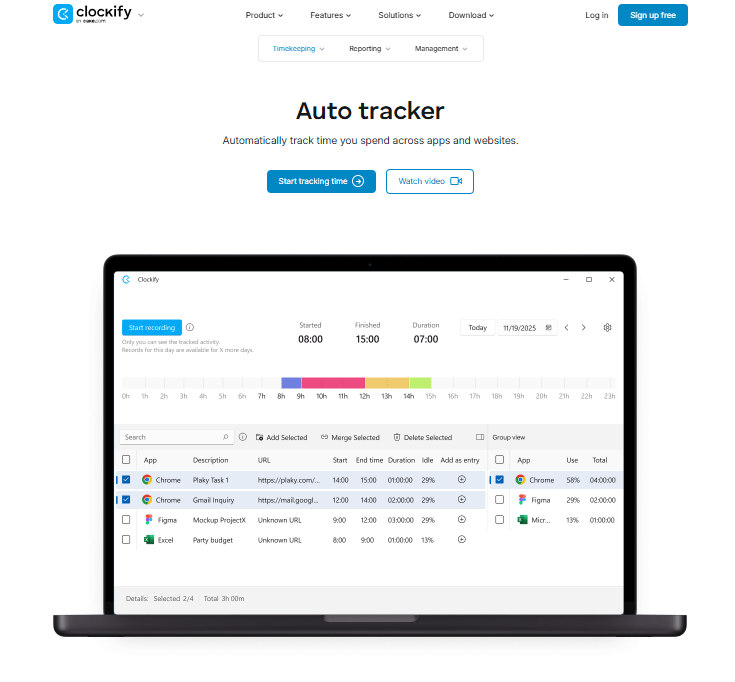
Source: Clockify
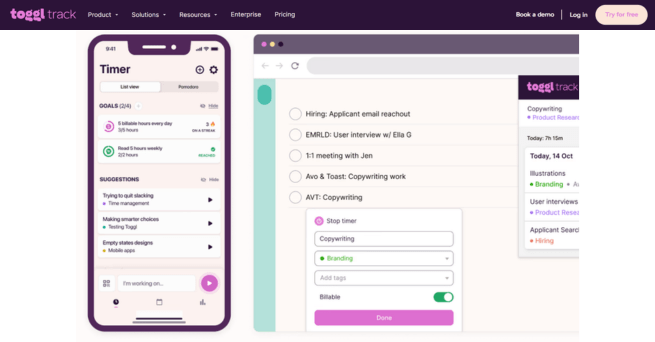
Source: Toggl
Clockify has the edge if you need approvals, invoicing, kiosk clock-ins, GPS, or screenshots. Toggl Track makes more sense for teams that want a simpler time tracker and do not want employee screenshots, while still offering private Timeline feature on desktop apps.
What Clockify and Toggl Actually Costs at 10, 50, and 200 Seats
The table below shows what the paid plans cost for 10, 50, and 200 seats using each vendor’s annual billing rates.
|
Plan |
Price/seat/mo | 10 seats/mo | 50 seats/mo |
200 seats/mo |
| Clockify Free | $0 (Up to 5 users) | – | – | – |
| Clockify Basic | $3.99 | ~$40 | ~$200 | $798 |
| Clockify Standard | $5.49 | ~$55 | ~$275 | $1,098 |
| Clockify Pro | $7.99 | ~$80 | ~$400 | $1,598 |
| Clockify Enterprise | $11.99 | ~$120 | ~$600 | $2,398 |
| Toggl Free | $0 (For a limited number of users) | – | – | – |
| Toggl Starter | $9 | $90 | $450 | $1,800 |
| Toggl Premium | $18 | $180 | $900 | $3,600 |
| Toggl Enterprise | Custom | Custom | Custom | Custom |
*Updated August 2026
Prices and plan features can change, so check the current pricing page before you buy.
Note: $14 per license per month applies to your first year of Toggl Premium annual, then renews at $18 per license per month.
Clockify Costs Less at the Main Paid Tiers
At 10 seats, Clockify Standard costs ~$55 per month, compared with $90 for Toggl Starter. At 50 seats, the difference is ~$275 versus $450. At 200 seats, it’s $1,098 versus $1,800.
The same pattern continues at the next tiers. Clockify Pro costs ~$80 per month for 10 seats, ~$400 for 50, and $1,598 for 200. Toggl Premium costs $140 per month in its first year at 10 seats, $700 at 50, and $2,800 at 200 but after the first year it changes to $180 per month for 10 seats, $900 for 50 seats, and $3,600 for 200 seats.
For the first year, that makes Clockify Pro cheaper than Toggl Premium at every team size shown here. The difference becomes larger after Toggl’s Premium plan renews at $14 per license per month.
Clockify vs. Toggl: Which Plan Is Right for Your Team?
Clockify and Toggl take a different approach to their paid plans, so the best choice depends on the features your team needs most.
- Clockify Standard adds all Basic plan features, plus time off, invoicing, recurring invoices, approval, lock time, attendance & overtime, targets & reminders, manager role, task rates, rounding, quickBooks integration, customize kiosk, and kiosk QR code.
whereas
- Toggl Starter adds everything in Free plan, plus focuses more on billable rates, project time estimates and alerts, revenue and productivity analysis, team collaboration features, and project tasks.
_______
- Clockify Pro adds all Standard plan features, plus scheduling, forecasting, expenses, labor cost & profit, budget & estimates, custom fields, multiple currencies, user fields, email reports, alerts, force timer, GPS tracking, kiosk photo capture, screenshots, and data region.
whereas
- Toggl Premium adds everything in the Starter plan, plus focuses more on profitability analysis, fixed fee projects, scheduled reports, timesheet approvals, data accuracy features, fully customizable reports, Jira, Salesforce integrations, and single sign-on (SSO).
Clockify offers more time tracking, scheduling, invoicing, and workforce management features, while Toggl puts more focus on project management, profitability, reporting, and integrations.
Monthly Billing Changes the Comparison
Clockify’s annual prices are lower than its monthly prices. Basic plan is $3.99 annually versus $4.99 monthly, Standard plan is $5.49 versus $6.99, Pro plan is $7.99 versus $9.99, and Enterprise plan is $11.99 versus $14.99.
Toggl Starter is $9 per license per month on annual billing and $12 on monthly billing. Premium is $14 for the first year on annual billing, then $18 at renewal but its monthly price is $20.
So don’t compare Clockify’s annual rate with Toggl’s monthly rate. Use the same billing cycle on both sides.
Where the Free Plans Stop
Clockify’s current Free plan has a limit of 5 users, including the owner. For unlimited users, upgrade to the Basic plan. Toggl’s Free plan is free for a limited number of users, but is free for life.
For a team of 5 or fewer, either free plan can be enough for basic time tracking.
Once you need a sixth full user, you’ll need a paid plan. That’s where Clockify’s low entry price becomes a major advantage if all you need is basic team administration and time tracking.
Screenshots in Clockify vs. Toggl: What’s the Difference
Toggl Track does not offer employee screenshots, while clockify offers optional screenshots on Pro and Enterprise plan.
Toggl does have desktop activity tracking, but it is private. Its Timeline records window titles and active apps locally, while users choose which activity becomes a time entry. It does not use screenshots, keystroke logging, mouse tracking, or webcam surveillance.
For a small agency that bills on trust, that can be a better fit. Teams can track billable hours without giving managers a stream of screenshots to review.
Clockify takes a different approach. Its screenshot feature captures an image every five minutes while the timer runs. Screenshots are blurred by default, and Clockify notifies team members when an admin enables the feature.
That can matter when a client, insurer, or compliance process requires proof of work beyond a time entry. If screenshots are required, Clockify has the advantage. If employee screenshots are off the table, Toggl Track is the cleaner choice.
In short, Toggl gives teams private activity tracking without screenshots. Clockify adds screenshots and GPS tracking for teams that need more oversight.
Need more visibility? See how Flowace tracks work, activity, and screenshots.
Explore Flowace's Monitoring SoftwareWhat Users on G2 and Reddit Actually Say
As of August 2026, Clockify has a 4.5/5 rating based on 202 G2 reviews. Toggl has a 4.6/5 rating based on 1,589 G2 reviews.
Clockify
Users on G2 commonly praise Clockify for:
- Easy to use: Its simple and easy-to-use interface.
- Strong reporting: Its reporting features make time tracking and project management easier.
- Quick setup: The intuitive interface makes it easy to get started.
- Integrations: It works smoothly with other tools.
- Good for teams and freelancers: Users find it a reliable choice for both.
There are complaints too. Some G2 reviewers mention the mobile app can be buggy at times, which can affect the overall experience. Also its limited customisations, admin limitations, and poor interface designs have frustrated lots of users.
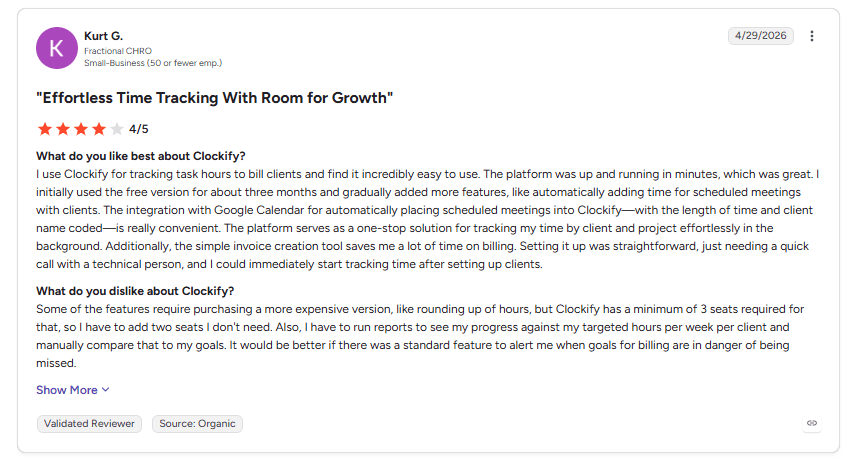
This Reddit discussion adds real users feedback to the Clockify review. It highlights what users like about Clockify, along with common concerns about its interface, reporting, pricing and overall ease of use.
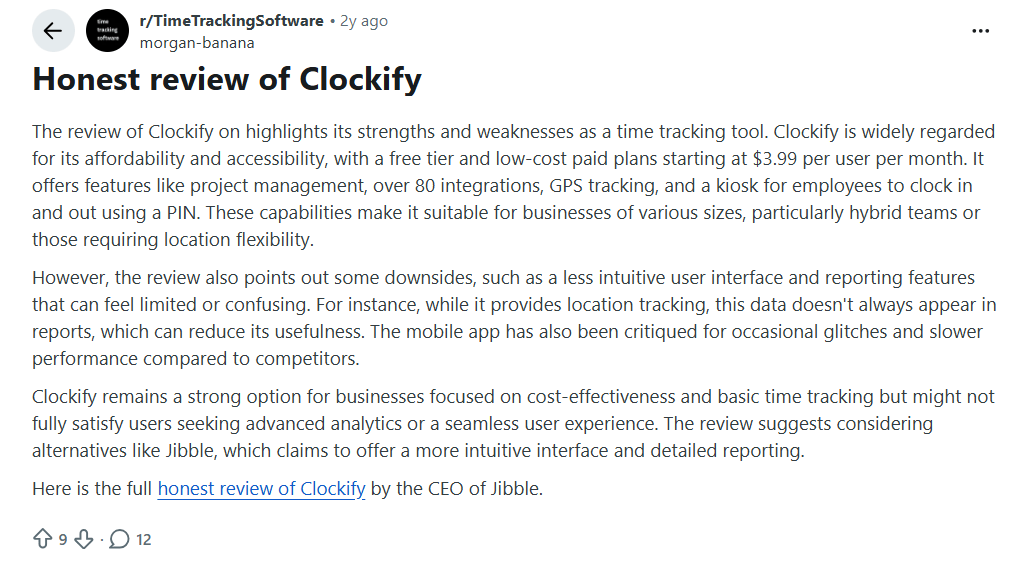
The user says Clockify is affordable and useful for basic time tracking, but points out some issues with the interface and reporting. They also mention problems with location data and occasional mobile app glitches, showing why some teams may look for alternatives.
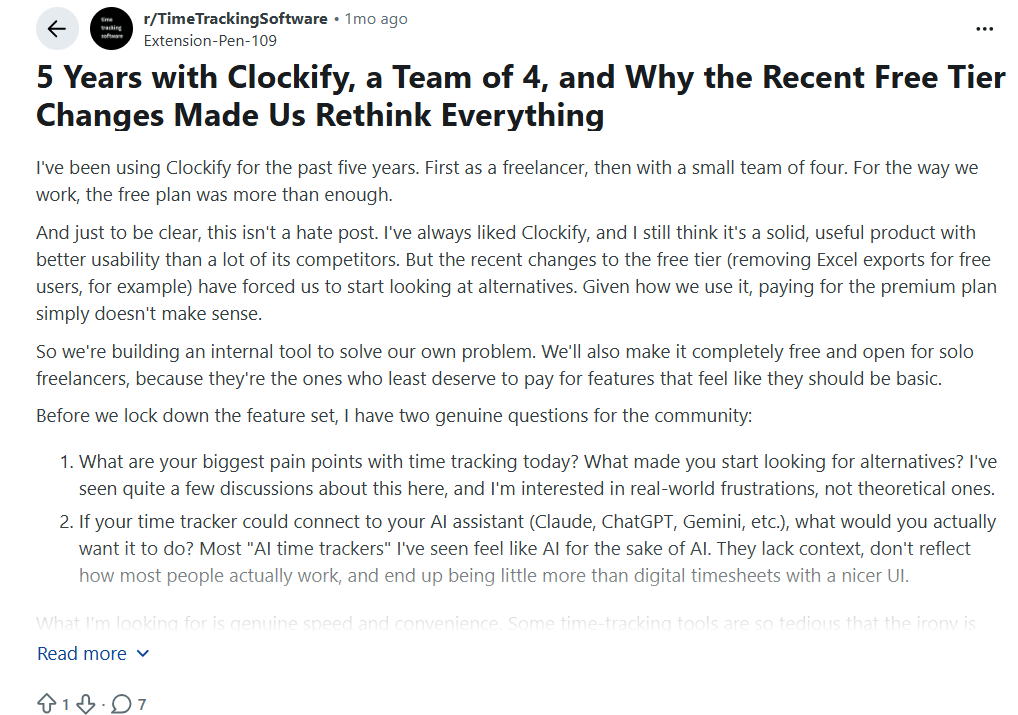
The user says they used Clockify for five years with a small team and were happy with the free plan. Recent changes, including the removal of Excel exports for free users, made them consider alternatives because paying for a premium plan no longer feels worthwhile.
Toggl
Users on G2 most often praise Toggl for:
- Works across devices: It makes time tracking easy across different devices.
- Quick time tracking: Users like how quickly they can start and stop timers.
- Reliable: Many find it a reliable tool for tracking work hours.
The complaints here are different. Some G2 reviewers point to paid features and subscription limits, while others mention missing features or issues with more complex project work.
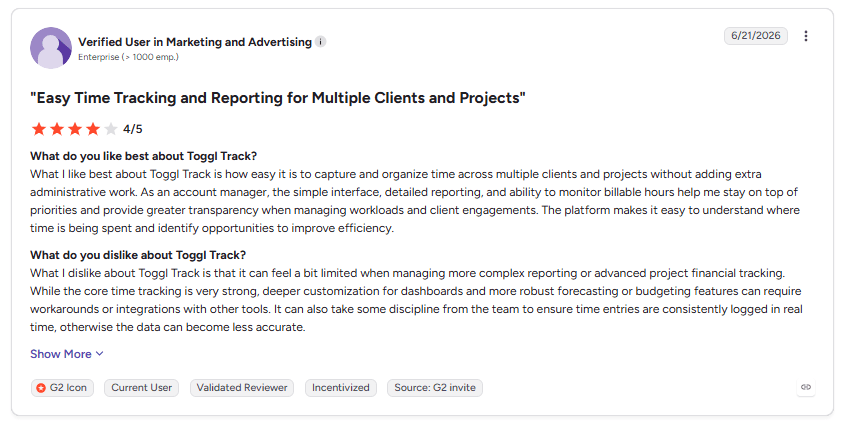
This Reddit discussion adds real users feedback to the Toggl review. It highlights on its clean interface and wide range of integrations, while also pointing out concerns about reliability, mobile syncing, and price.
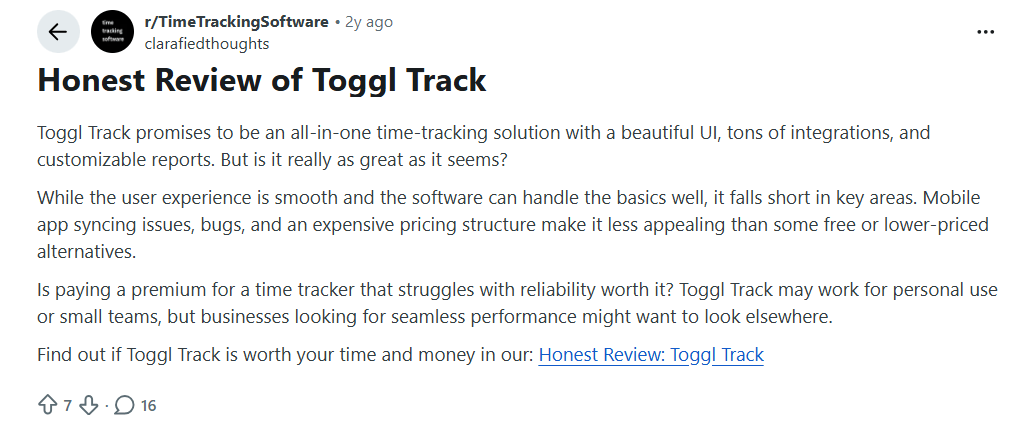
The Reddit review praises Toggl Track for its smooth user experience, integrations, and customizable reports. It also points to mobile syncing issues, bugs, and higher pricing as reasons some users may consider other options.
In short, Clockify gets more praise for value and the amount it offers for the price, while Toggl gets more praise for a simple tracking experience.
Where Clockify and Toggl Both Beat Flowace
There are real cases where Clockify or Toggl is the better choice.
- Pick Toggl if your team does not want employee screenshots or manager-facing monitoring. Toggl desktop app can record apps and websites locally, but that activity stays private to the user until they choose to turn it into a time entry. If your team wants time tracking with less employee oversight, Toggl fits better than Flowace.
- Pick Clockify if you have a small team that only needs basic time tracking. Clockify’s Free plan supports up to five active users. If a five-person team only needs to log hours and run simple reports, Clockify can cover that need without paying for Flowace’s deeper activity and productivity features.
- Pick Clockify if you need shared-device clock-ins. Clockify Kiosk lets employees clock in and out from one shared device using a PIN or QR code. That makes it a better fit than Flowace for places such as a warehouse, shop floor, or front desk where employees share a physical clock-in point.
- Pick Toggl if its integrations fit your workflow better. Toggl supports 100+ tools through browser extensions, while Flowace lists 70+ integrations across HR, payroll, identity, and productivity tools. If a tool your team already uses connects better with Toggl, that can be a real reason to choose it.
Clockify wins on simple, low-cost time tracking and shared clock-ins. Toggl wins when teams want private activity tracking or a specific integration.
Does Clockify or Toggl Show Where Work Time Goes?
Clockify and Toggl Track can show logged hours and some desktop activity, but they give managers different levels of visibility. Toggl keeps desktop activity private to the user, while Clockify can add manager-facing screenshots and GPS tracking on higher plans.
If you need to know where paid work hours go after they are logged, Flowace adds deeper work-activity tracking at the individual and team level. It works alongside the need for time tracking rather than replacing a client-billing timer.
Author’s Take: For simple time tracking, Clockify is the better value for small teams and Toggl is the better fit for teams that want less employee monitoring. If your bigger problem is understanding how work time is actually being used, Flowace is worth considering.
Want to see how Flowace would work for your team?
Book a 30-Minute DemoFrequently Asked Questions On Clockify vs Toggl
1. Is Clockify cheaper than Toggl?
Yes. Clockify is cheaper than Toggl at the comparable plans covered in this article. The exact difference depends on the plan, number of seats, and billing cycle.
2. Which is better, Clockify or Toggl?
Clockify is the better pick if price, admin controls, approvals, invoicing, or Kiosk matter most. Toggl Track is the better pick if you want a simple timer with less activity monitoring.
3. Does Clockify have a free plan?
Yes. Clockify has a free plan for up to five users. It includes unlimited tracking, time tracker, timesheet, auto tracker, calendar, mobile & desktop app, pomodoro timer, idle detection & reminders, tracking integrations, team activity, and reports.
4. What is the difference between Clockify and Toggl?
The difference is that Clockify puts more focus on team administration, billing, approvals, Kiosk, and optional screenshots, while Toggl Track focuses more on simple time tracking and private desktop activity tracking.
5. Does Toggl have a screenshot feature?
No. Toggl Track does not offer employee screenshots. It does have Desktop Activity Tracking, which can record apps and websites locally. That activity stays private to the user until they choose to turn it into a time entry.
6. Does Toggl monitor employees?
Yes. Toggl has Desktop Activity Tracking, but it does not use screenshots, mouse tracking, or similar invasive monitoring. Its activity tracking is designed to stay private to the user unless they turn the activity into a time entry.
7. What are the best Clockify alternatives?
Toggl is one of the main alternatives to Clockify for simple time tracking. Flowace is another option if you need deeper visibility into work activity, screenshots, and productivity.
8. Should I choose Clockify, Toggl, or Flowace?
Choose Clockify if you want low-cost time tracking and strong admin features. Choose Toggl if you want simple time tracking with less employee monitoring. Choose Flowace if you need deeper visibility into work activity and productivity.