Employee Monitoring
Connectivity reports tell offline apart from disconnected. Silent or interactive mode, set per team.
Explore monitoringEnterprise-grade security backed by GDPR, HIPAA, ISO 27001 & SOC 2 compliance. Know more

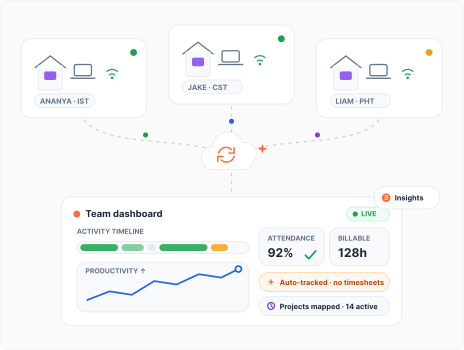
Attendance, activity and billable hours, tracked automatically. Run your remote team on data, not instinct.

80,000 users, 674 customers, 20 countries















How it works
Minutes to set up. Zero change for your team.
Share one link. Installs on Windows, macOS or Linux in 60 seconds.
Takes 60 secondsNo timesheets to fill. No check-ins to remember. No new habits to learn.
Zero behaviour changeYour dashboard is live the same day. Most teams spot their first inefficiency within 72 hours.
First insight in 3 daysSignature features for remote teams
Remote made visibility the hard part of managing. Flowace answers with six capabilities in one agent: employee monitoring, productivity insights, automatic time tracking, workforce management, AI alerts and audit-ready reports.
Connectivity reports tell offline apart from disconnected. Silent or interactive mode, set per team.
Explore monitoringEvery hour classified across apps and websites. Coach on data, not hunches.
Explore insightsTimesheets fill themselves, mapped to projects and tasks. Billable hours with zero manual entry.
Explore time trackingAttendance starts at device login. Live status across every time zone, no check-ins.
Explore workforce managementAI flags burnout, low activity and late starts before they become attrition.
Explore alertsActivity logs at 1-second precision. Proof of work you can export and share.
Explore reportsSound familiar?
If you've asked one of these this quarter, this page is for you.
Yes. Automatic timesheets backed by activity logs and optional screenshots.
How staffing teams use FlowaceOnline isn't working. See active hours, focus time and idle patterns in every time zone.
How IT services use FlowaceActivity patterns tell them apart without interrupting either.
How research teams use FlowaceEvery hour mapped to a client and project as it happens.
How accounting firms use FlowaceDifferent sector, same questions?
Explore Flowace for your industryFrom G2
“It has genuinely helped us get real visibility into where our team's time and effort is going. It gives us clarity to take corrective action.”
“Flowace is fully automated, eliminating the need for manual input. The setup process was incredibly fast, allowing us to onboard approximately 150 members in under fifteen minutes.”
“Employee timesheets help us generate reports from digital or manual entries, and project time tracking gives us clear visibility into time allocation across projects.”
Pricing
Starts at ₹166 per user per month. Every plan includes attendance, projects and tasks, silent tracking, and support.
billed annually
Included features
billed annually
All features in Basic, plus:
billed annually
All features in Standard, plus:
All features in Premium, plus:
No credit card required · Every plan starts with a free 7-day trial · Full plan comparison
Monitoring people trust
Employees see the same data their managers do. That is the difference between accountability and spying.
Enterprise-grade compliance




Employees see their own activity data.
Tracking is scoped to work hours only.
AES-256 at rest, TLS 1.2+ in transit, never shared.
Insights fix workloads, they don't catch people out.
What employees see: their own data, on the same dashboard
FAQ's
Software that gives distributed teams visibility into attendance, work hours, activity and productivity without a shared location. Flowace captures attendance from device login, tracks app and website usage, and turns both into productivity insights across every time zone.
Automatically, from device login. No manual clock-in. Live status shows online, offline and idle in real time, and attendance reflects actual active hours rather than physical presence.
Yes. Privacy controls are visible to employees, personal time is never tracked, and all data is encrypted and never shared with third parties. Flowace is built for accountability, not surveillance.
Yes. Flowace runs on Windows, macOS and Linux, works online and offline, and shows a distributed team in one unified view across time zones.
Yes. Time maps to projects and tasks, timesheets generate automatically, and activity logs with optional screenshots provide proof of work for client billing.
Flowace starts at ₹166 per user per month billed annually (₹250 monthly). Standard is ₹333, Premium is ₹583, and Enterprise is custom. Every plan includes a free 7-day trial with no credit card required.
Flowace differentiates on fully automatic tracking with no manual timers, 1-second precision activity logs, per-worker connectivity reporting, and per-team silent or interactive modes, at a lower per-user price. Detailed comparison pages: Hubstaff, Time Doctor, We360, ProHance, Timechamp.



Experience seamless time tracking and productivity enhancement like never before. Join the Flowace revolution and unlock your full potential. Start your journey to success today!”