Enterprise-grade security backed by GDPR, HIPAA, ISO 27001 & SOC 2 compliance. Know more

Teramind vs Flowace: Team Activity Tracking at Half the Price
Teramind starts at $14 a seat, and you have to buy five. Flowace Premium is $6.98 per user for however many users you have, and it keeps keystrokes and screen video out of your records.
- 7-day free trial, no credit card
- Buy one seat or a hundred

TRUSTED BY GROWING TEAMS WORLDWIDE















The short version
Teramind is a security tool first. If you mainly need to see how your team spends its day, Flowace does that for about half the price.
Pay for the people you have.
Teramind's cheapest plan is $14 a seat, and you have to buy at least five. On Flowace Premium, a three-person team pays $6.98 a head, for three heads.
Screenshots on a schedule you set.
Flowace counts how often the keyboard and mouse are used and captures screenshots at the interval you choose. For most managers, that's enough to see where the day went.
Timesheets and leave in one place.
Project hours, shifts and leave requests sit beside the activity data, so payroll stops needing its own spreadsheet.
Side by side
Teramind vs Flowace: Features and pricing compared
| What you're really buying | Flowace | Teramind |
|---|---|---|
| Price with the same basics | Premium, $6.98 | Starter, $14 |
| Smallest purchase | 1 seat | 5 seats |
| Monthly billing | Yes | Yes |
| Keystroke logging | No, on any plan | From UAM, $28 |
| Screen video recording | No | From Starter |
| Live screen view | No | From Starter |
| Camera and email monitoring | No | From UAM |
| Project and task time | Included | Not on plan list |
| Attendance, shifts, leave | Built in | Not on plan list |
| Data loss prevention | Not offered | DLP plan, $32 |
| Feature | Flowace | Teramind |
|---|---|---|
| TRACKING & MONITORING | ||
| Automatic time capture | Yes | Yes |
| Activity logs | 1-second raw, from Standard | User activity monitoring |
| Screenshots | Scheduled, included | Screen video recording |
| Keystroke logging | No, on any plan | UAM and up |
| Live screen view | No | Starter and up |
| Camera usage monitoring | No | UAM and up |
| Email monitoring | No | UAM and up |
| AI conversation recording | No | DLP plan and up |
| SECURITY | ||
| Insider threat detection | No | Starter and up |
| DLP rules | No | DLP plan, 200 prebuilt rules |
| OCR engine | No | Enterprise |
| Flowace certifications | SOC 2 Type II, ISO 27001, GDPR, HIPAA-aligned | |
| PROJECT & WORK MANAGEMENT | ||
| Project time tracking | Included | Not listed |
| Profit (cost/hr, rate/hr) | Included | Not listed |
| Attendance, shifts, leave | Built in | Not listed |
| AI assistant | Flowace AI, for admins | Timmy copilot |
| PLATFORM & DEPLOYMENT | ||
| Platforms | Windows, Mac, Linux | Windows, macOS, Linux |
| Mobile app | No | Not listed |
| Deployment | Cloud; private cloud on Enterprise | Cloud, self-hosted, hybrid |
| SUPPORT | ||
| Support | Live chat on every plan; success manager from Premium | Premium SLA on Enterprise |
| COMMERCIAL | ||
| Annual price, same basics | Premium $6.98 | Starter $14 |
| Monthly price | Premium $10.00 | Starter $15 |
| Seat minimum | None | 5 seats |
| Free trial | 7 days, no card | Offered; length not listed |
Strengths mapped
Where each platform is stronger
Teramind wins two of these outright, and we've marked them that way.

Price per seat

Fit for small teams

Privacy by default

Time, projects and attendance

Data loss prevention

Forensic investigation
Value per seat
Most of Teramind's monitoring sits on the $28 plan
Starter gets you screen recording and basic alerts for $14 a seat. Keystroke logging, email monitoring and file tracking start on UAM, which costs twice as much.
- Automatic time capture, no manual entries
- 1-second activity logs you can audit
- Scheduled screenshots
- SSO, included in Premium
- Keyboard and mouse activity as a percentage
- Project and task tracking with auto-timesheets
- Attendance, shifts and leave
- Live chat on every plan, a success manager from Premium
- Any number of seats, starting at one
- Starter, $14 a seat per month, 5 seats minimum
- UAM, $28, adds keystrokes, email and file monitoring
- DLP, $32, adds data loss prevention
- Enterprise, custom price, adds OCR and a premium SLA
- Project and task time
- Attendance, shifts and leave
Yes, Flowace has add-ons too. There are five, all for IT teams: single sign-on, user provisioning, API access, extra screenshots and shared-desk tracking. Premium includes every one of them. Tracking, screenshots and reports have never been sold separately.
Why teams move
Why teams start looking past Teramind
Pulled from Teramind's G2 reviews and its own plan list.
The bill grows faster than the team
- Starter is $14 a seat
- Keystroke logging only starts on UAM, at $28
- You pay for five seats even if three people use it
With Flowace:
Premium is $6.98 per user, and you buy exactly the seats you need.
You end up storing data nobody asked for
- Screen video is on from the first plan
- UAM adds keystrokes, email and camera use
- Every extra stream has to be secured and explained to staff
With Flowace:
You get activity levels and scheduled screenshots, and that's the whole record.
Setup turns into a project
- G2 reviewers call the interface complex
- Rules take a while to get right
- One enterprise reviewer saw heavy resource use on virtual desktops
With Flowace:
The agent installs in about a minute, and most teams see their first report within 72 hours.
Timesheets still live somewhere else
- Teramind tracks activity and risk
- Project time and leave aren't on its plan list
- So payroll keeps its own spreadsheet
With Flowace:
Project hours, shifts and leave sit in the same place as activity data.
The platform
Five things a Flowace seat includes that a Teramind seat doesn't
Starts at one seat
- A three-person team buys three seats.
- Add people the week they join, and stop paying the week they leave.
Teramind
Five seats minimum, on every plan.
Flowace
Buy the seats you use.
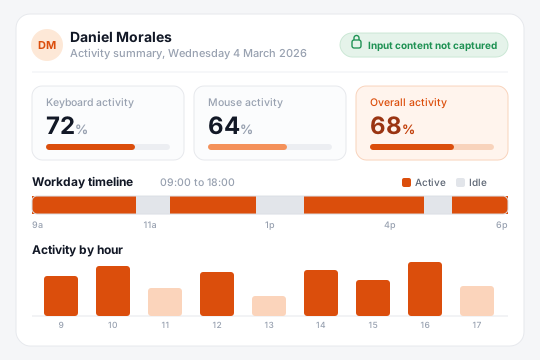
Shows activity without logging what people type
- Keyboard and mouse use appears as a percentage of the day.
- The text itself is never stored, so typed passwords and messages never end up in a log.
Teramind
Keystroke logging from UAM.
Flowace
Input frequency only.
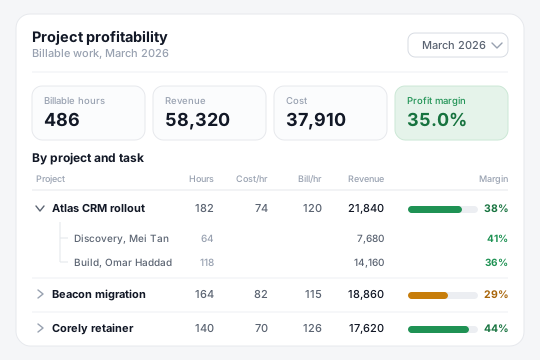
Tracks time by project and task
- Every hour maps to a cost rate and a bill rate.
- You see margin per project and per person, which is what finance asks for.
Teramind
Not on its plan list.
Flowace
Cost and rate per project, per person.
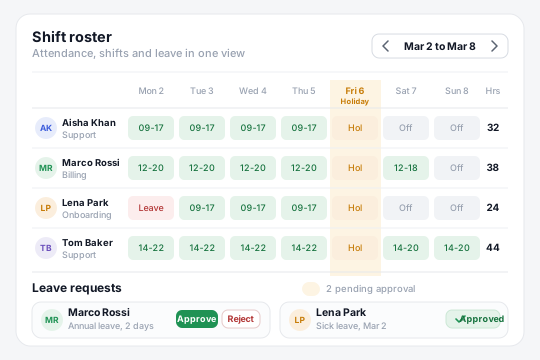
Runs attendance, shifts and leave
- Set schedules and shift rosters once.
- Managers approve leave in the same tool they use to check hours.
Teramind
Not on its plan list.
Flowace
Shifts, leave and holidays built in.
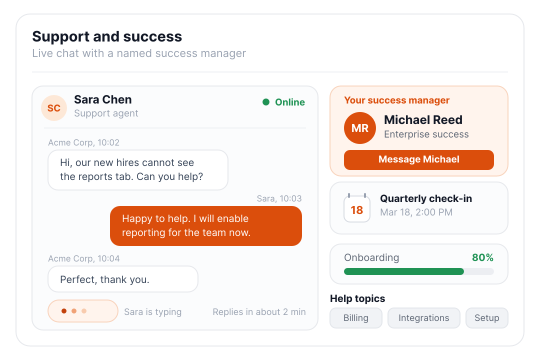
Answers support questions fast
- Live chat is on every plan.
- From Premium, you also get a named success manager.
Teramind
Premium SLA on Enterprise.
Flowace
Live chat on every plan.
Results
What teams learned without logging a keystroke

8,239 hrs of work captured, with no timesheets
- 95.9% Of tracked time spent on productive work
- 2 sessions To onboard all 55 remote users
The onboarding felt smooth from the very first call. And once we got into AI time tracking, that is the one that really stood out for us.55 remote users onboarded in two one-hour sessions
44% less unproductive time, 2024 to 2026
- 48 hrs To move off Time Doctor, start to finish
- 87.7% Activity rate in 2026, up from 85.8%
We started on the standard plan, but once we saw how much more Flowace could do for us, upgrading to Premium was an easy decision.Live on Flowace within 48 hours of leaving Time Doctor

35pp sourcing gap between top and bottom recruiters, made visible
- 30 to 35% Of each recruiter's day found on non-sourcing work
- 15% Error rate on self-reported timesheets
Flowace showed us the real picture of our recruiter utilization. We were able to clearly see delivery consistency and revenue leakage.Invoices built on Flowace timesheets, approved 3× faster
Deployment
Moving from Teramind to Flowace takes a day, not a project.
We import your data.
Teams, settings, and history migrated free.
Deploy in 60 seconds.
One link installs the agent on Windows, macOS, and Linux.
First insight in 72 hours.
Dashboards go live in minutes. Most teams find their first inefficiency within three days.
Our candid take
Which should you pick?
Teramind may fit if:
- Your security team needs data loss prevention or insider-threat alerts.
- Investigations mean replaying a full session, frame by frame.
- You have to self-host, or run in a government cloud.
Flowace is the stronger choice if:
- You want to see how work gets done and pay about half as much per seat.
- You're starting with a handful of people and don't want a seat minimum.
- Keystrokes, screen video and camera data don't belong in your records.
- Timesheets, shifts and leave should live in the same tool as activity data.
Frequently Asked Questions
FAQs About Teramind vs Flowace
Teramind is an insider-risk platform. It records screens, logs keystrokes on its UAM plan, and offers data loss prevention for security teams. Flowace is built for the managers running those teams: it tracks activity, project time and attendance, takes scheduled screenshots, and costs about half as much per seat.
Flowace costs roughly half of what Teramind does. Flowace Premium is $6.98 per user per month on annual billing, and Teramind Starter is $14 per seat with a 5-seat minimum. A 10-person team pays $837.60 a year on Flowace and $1,680 on Teramind.
Teramind requires at least 5 seats on every plan. Flowace has no minimum, so a team of two can buy two seats and add more later.
Flowace does not log keystrokes or record screen video on any plan. It measures how often the keyboard and mouse are used and takes screenshots at the interval you set. Teramind records screen video from its Starter plan and logs keystrokes from UAM.
Flowace doesn’t offer data loss prevention or insider-threat controls. If you need DLP rules, content blocking or full session replay, Teramind’s DLP and Enterprise plans are built for that, and we’d point you there.
Flowace has no live screen view and no continuous recording. Managers see scheduled screenshots instead. Teramind includes live view from its Starter plan.
Flowace includes live chat on every plan, and Premium customers also get a named customer success manager. Teramind lists a premium SLA on its Enterprise plan.
Flowace has five add-ons, all for IT: single sign-on, user provisioning, API access, extra screenshots and shared-desk tracking. Premium includes all five. Tracking, screenshots, reports and project time come with every plan. See Flowace pricing.
Flowace doesn’t have a mobile app and doesn’t monitor phones. It runs on Windows, Mac and Linux, and Teramind supports the same three.
Moving from Teramind to Flowace usually takes a day. We migrate your teams, settings and history for free. The agent installs in about a minute per device, and first reports show up within 72 hours. Book a demo and we’ll plan the switch with you.
Flowace is SOC 2 Type II certified. It is also ISO 27001 certified, GDPR compliant and HIPAA-aligned, and all of it applies on every plan. Sales can send the SOC 2 report the same day under NDA.
Teramind is one of the more detailed monitoring tools on the market. Depending on the plan, it records screen video, offers live view, logs keystrokes, and watches email, file transfers, camera use and AI chats. Flowace tracks activity levels and takes scheduled screenshots, and that’s the full extent of it.
Flowace is a Teramind alternative for teams that want to track activity without logging keystrokes, at about half the price. ActivTrak, Insightful, Controlio and Hubstaff come up often too. We compare them all in our list of Teramind alternatives.
Run both Teramind and Flowace for a week.
Put Flowace on a few machines next to Teramind, then compare the bill, the setup time and what ends up in your records.
- No credit card
- Free migration
- Cancel anytime





Maximize Your Potential with Flowace!
Experience seamless time tracking and productivity enhancement like never before. Join the Flowace revolution and unlock your full potential. Start your journey to success today!”
