Teramind Pricing vs Flowace Pricing and Features in 2026



Published: 22 October 2026 · Last Updated: 22 October 2026 · Last Verified: 22 October 2026
Teramind pricing reflects its focus on data security, insider risks, and employee monitoring, while Flowace focuses on time tracking and productivity insights.
This article compares their 2026 pricing, plans, and features to help you choose the right tool for your team. For more options, explore our Best Teramind Alternatives roundup.
Quick Comparison Table
This table compares starting price, core focus, security and DLP depth, and who each platform suits best, based on the official pricing pages of both companies as of October 2026.
|
What You’re Comparing |
Teramind | Flowace |
| Starting price (billed annually) | ~$14/seat/month |
$1.99/user/month |
|
Highest listed plan before custom pricing (annual) |
~$32/seat/month (DLP) | $6.98/user/month (Premium) |
| Core focus | Insider risk management and data loss prevention, with productivity monitoring included |
Time tracking and productivity insight, with no DLP or insider risk layer |
|
Data loss prevention |
Built in from the UAM plan, expanded in the DLP plan | Not offered |
| Insider risk and anomaly detection | Included from the UAM plan up |
Not offered |
|
Keystroke logging |
UAM plan and above | Not offered. Premium tracks keypad and cursor activity levels only |
| Live screening | Starter plan and above |
Not offered. No live screen viewing or camera/microphone access |
|
Screen recording |
Starter plan and above | Not offered. Scheduled screenshots only, configurable per role |
| Free Trial | 7 days (cloud) and 14 days (on-premise) |
7 days |
|
Compliance posture |
GDPR, HIPAA, and SOC 2 badges shown on Teramind’s site; GDPR, HIPAA, and PCI DSS compliance features included from the UAM plan up | ISO 27001 certified (April 2026), SOC 2 Type II, HIPAA-aligned, and GDPR compliant |
| Best fit | Security, compliance, and insider threat teams |
Teams that want time and productivity data without a security tool |
*Updated on October 22, 2026
What is Teramind?
Teramind is a workforce analytics and user activity monitoring platform with features for insider risk management and data loss prevention. It tracks user activity across devices and apps and helps teams analyze behavior, improve productivity, detect risks, and protect sensitive data.
Teramind includes tools for employee monitoring, productivity analysis, behavior data, real-time alerts, insider risk detection, and data loss prevention. It also supports business process optimization and hybrid workforce management.
Who is Teramind built for?
Teramind is designed for organizations that need employee activity visibility, productivity insights, insider risk management, or data loss prevention. Its official site highlights use cases in financial services, healthcare, call centers and customer service, and government.
Teramind also supports government and enterprise deployments, including AWS GovCloud and Azure Government availability. These options are relevant to organizations with specific security, compliance, or deployment requirements.
How Much Does Teramind Cost in 2026?
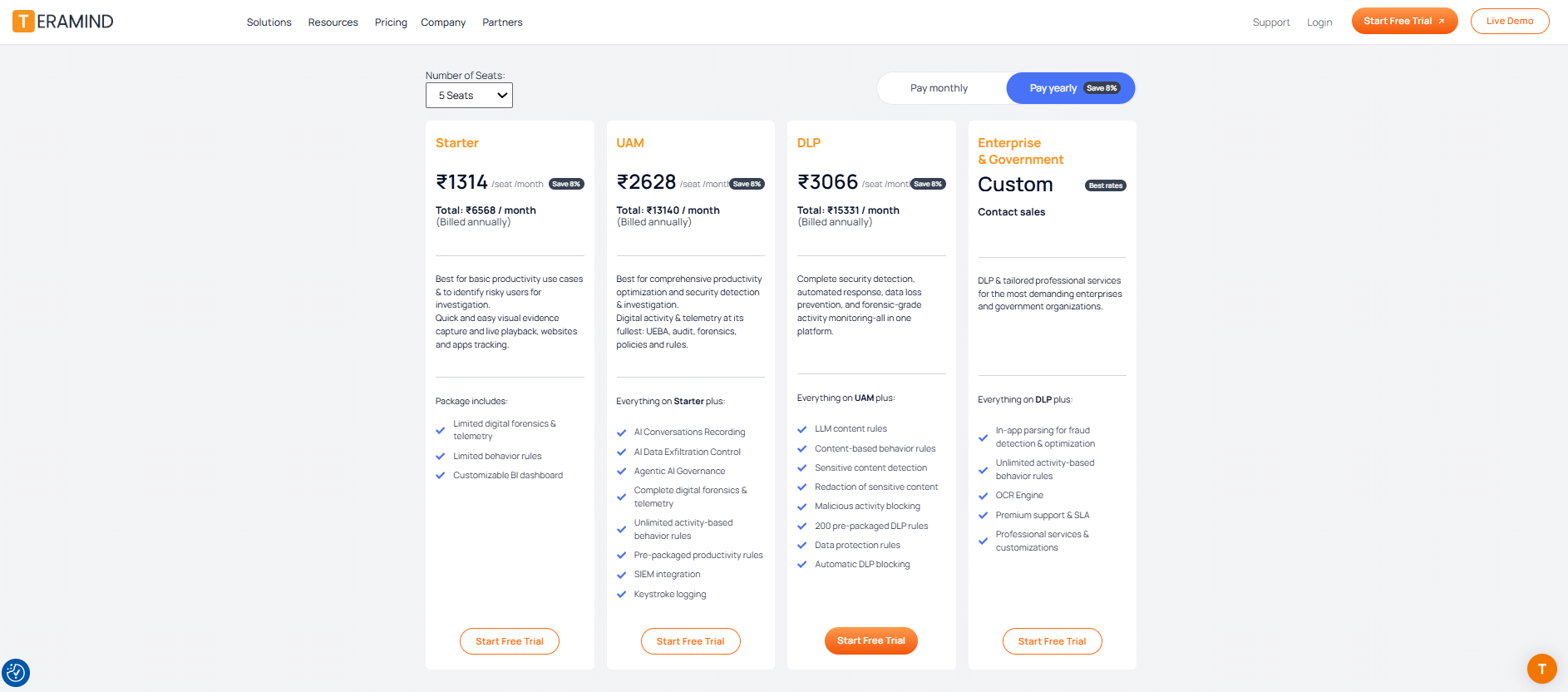
Source: Teramind
Teramind pricing, captured October 22, 2026
Teramind has four pricing plans listed on its official pricing page. The plans are Starter, UAM, DLP, and Enterprise & Government.
- The Starter plan costs approximately $14/seat/month billed annually, or $15/seat/month billed monthly (roughly an 8% premium over the annual rate).
- The UAM plan costs approximately $28/seat/month billed annually, or $30/seat/month billed monthly. UAM stands for User Activity Monitoring and adds deeper employee activity monitoring capabilities.
- The DLP plan costs approximately $32/seat/month billed annually, or $35/seat/month billed monthly. DLP stands for Data Loss Prevention and is designed for teams that need stronger controls around sensitive data and data loss risks.
- Enterprise & Government pricing is custom. You need to contact Teramind’s sales team for a quote.
Teramind’s pricing page shows an 8% saving with annual billing compared with the monthly rate.
What Does Each Teramind Pricing Plan Include?
What does Teramind Starter include?
Best for: Basic productivity tracking, spotting risky users, and quickly reviewing screen activity, websites, and apps.
Starter includes:
- Limited digital forensics & telemetry
- Limited behavior rules
- Customizable BI dashboard
What does Teramind UAM include?
Best for: Deeper productivity insights, security monitoring, and investigations with UEBA, audits, forensics, policies, and activity rules.
Everything on Starter plus:
- AI Conversations Recording
- AI Data Exfiltration Control
- Agentic AI Governance
- Complete digital forensics & telemetry
- Unlimited activity-based behavior rules
- Pre-packaged productivity rules
- SIEM integration
- Keystroke logging
Teramind also lists GDPR, HIPAA, and PCI-related compliance features with UAM.
What does Teramind DLP include?
Best for: Complete security monitoring, automated response, data loss prevention, and detailed activity tracking in one platform.
Everything on UAM plus:
- LLM content rules
- Content-based behavior rules
- Sensitive content detection
- Redaction of sensitive content
- Malicious activity blocking
- 200 pre-packaged DLP rules
- Data protection rules
- Automatic DLP blocking
What does the Teramind Enterprise & Government plan include?
Best for: DLP and tailored professional services for large enterprises and government organizations with advanced security needs.
Everything on DLP plus:
- In-app parsing for fraud detection & optimization
- Unlimited activity-based behavior rules
- OCR Engine
- Premium support & SLA
- Professional services & customizations
G2 Rating
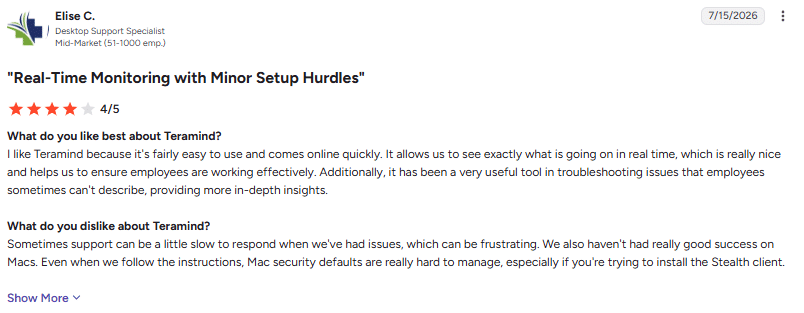
User Rating: 4/5
Image alt text: G2 review highlights Teramind’s real-time monitoring and troubleshooting benefits, while noting slower support and some Mac setup challenges, dated July 15, 2026.
“I like Teramind because it’s fairly easy to use and comes online quickly. Sometimes support can be a little slow to respond when we’ve had issues, which can be frustrating.” (Elise C., Desktop Support Specialist, G2 review, July 15, 2026)
Want to see if Flowace fits your team's time tracking and productivity needs?
Book a DemoHow Much Does Flowace Cost in 2026?
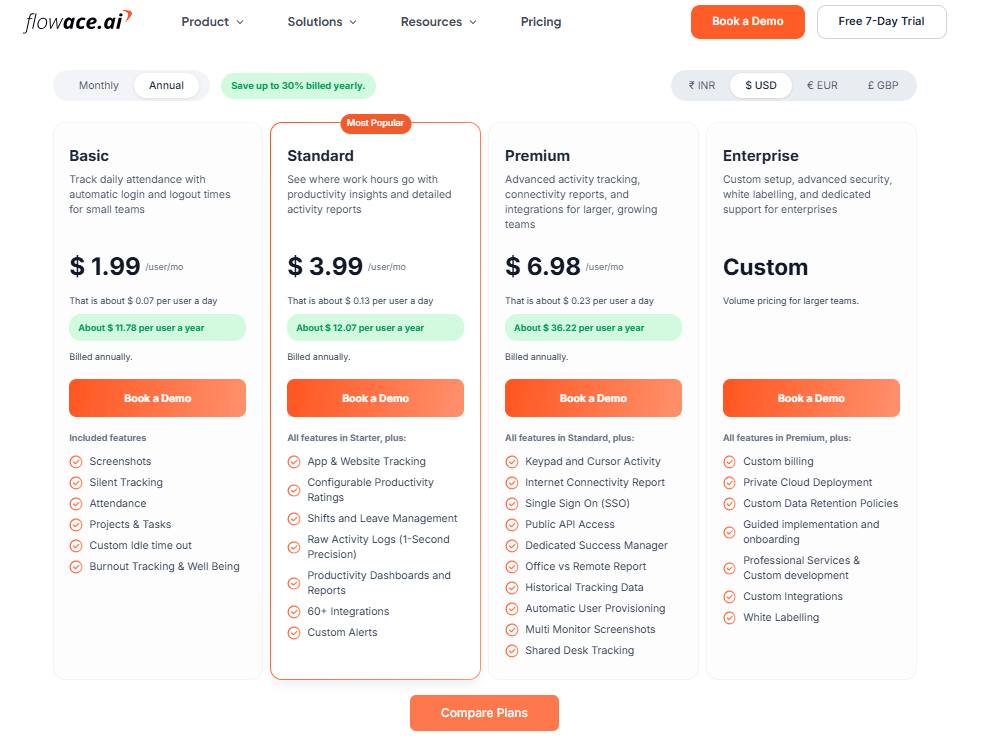
Source: Flowace
Flowace pricing, captured October 22, 2026
Flowace has four pricing plans listed on its official pricing page: Basic, Standard, Premium, and Enterprise. Prices are available in USD, INR, EUR, and GBP through the currency selector.
- The Basic plan costs $1.99/user/month when billed annually or $2.99/user/month when billed monthly.
- The Standard plan costs $3.99/user/month when billed annually or $4.99/user/month when billed monthly.
- The Premium plan costs ₹$6.98/user/month when billed annually or $10/user/month when billed monthly.
- Enterprise pricing is custom and volume-based. Teams need to contact the Flowace sales team for a quote.
Flowace does not have a minimum seat requirement on its plans. A team can start with one user.
What Does Each Flowace Plan Include?
What does Flowace Basic include?
Best for: Small businesses or startups that need fundamental time tracking and attendance automation.
Included features:
- Screenshots
- Silent Tracking
- Attendance
- Projects & Tasks
- Custom Idle time out
- Burnout Tracking & Well Being
What does Flowace Standard include?
Best for: Growing and mid-sized teams that need productivity analysis and usage monitoring.
All features in Basic, plus:
- App & Website Tracking
- Configurable Productivity Ratings
- Shifts and Leave Management
- Raw Activity Logs (1-Second Precision)
- Productivity Dashboards and Reports
- 60+ Integrations
- Custom Alerts
What does Flowace Premium include?
Best for: Larger organizations, agencies serving clients, and teams that need SSO and dedicated support.
All features in Standard, plus:
- Keypad and Cursor Activity
- Single Sign On (SSO)
- Public API Access
- Dedicated Success Manager
- Office vs Remote Report
- Historical Tracking Data
- Automatic User Provisioning
- Multi Monitor Screenshots
- Shared Desk Tracking
What does Flowace Enterprise include?
Best for: Volume pricing for larger teams.
All features in Premium, plus:
- Custom billing
- Private Cloud Deployment
- Custom Data Retention Policies
- Guided implementation and onboarding
- Professional Services & Custom development
- Custom Integrations
- White Labelling
G2 Rating
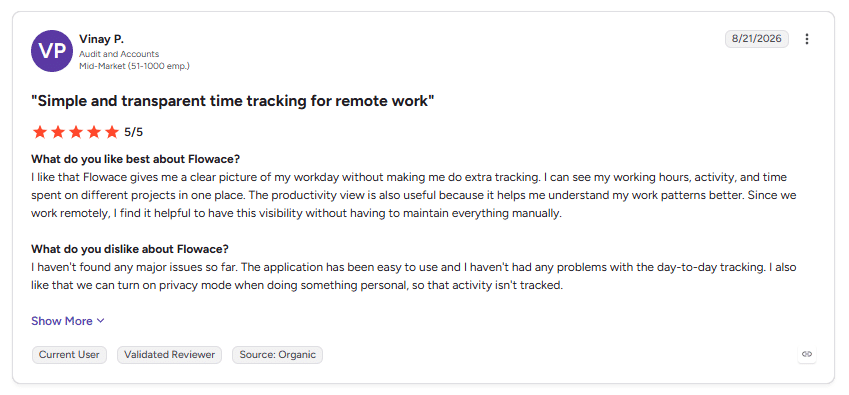
User Rating: 5/5
Image alt text: G2 review praises Flowace for simple time tracking and productivity insights, with privacy mode as a useful feature, dated August 21, 2026.
“I like that Flowace gives me a clear picture of my workday without making me do extra tracking. I can see my working hours, activity, and time spent on different projects in one place.” (Vinay P., Audit and Accounts, G2 review, August 21, 2026)
Is Flowace a Security Tool?
Flowace is an ethical employee monitoring and workforce management platform. Its current published feature list does not include data loss prevention, insider threat detection, anomaly detection, or risk scoring.
How does Flowace’s ethical monitoring approach compare to Teramind’s?
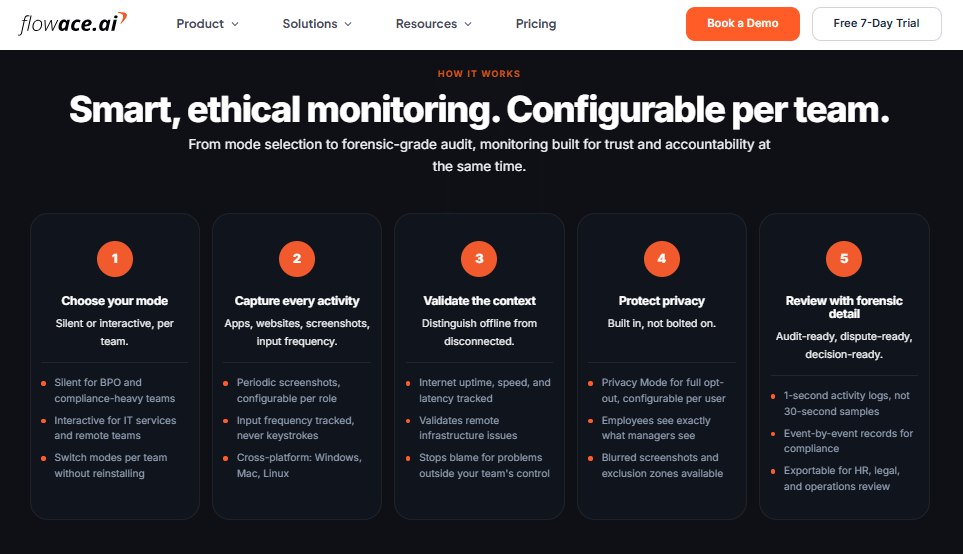
Source: Flowace
Flowace ethical monitoring, captured SOctober 22, 2026
Flowace lets teams choose between Silent and Interactive monitoring on a team-by-team basis. Silent mode is suited to BPO and compliance-heavy teams, while Interactive mode shows employees a visible tracking app and lets them see their own activity data.
Flowace does not offer live screen viewing, camera access, or microphone access. It captures periodic screenshots at employer-set intervals. Its Privacy Mode also lets any user opt out of tracking completely, with tracking disabled as if the desktop app were not installed.
Flowace does not log keystrokes. Instead, it measures keyboard and mouse input frequency as an engagement signal without recording the keys themselves.
Teramind’s UAM and DLP plans include keystroke logging, continuous screen recording, and data loss prevention (DLP) tools. These features support security and compliance investigations, alongside user activity monitoring.
How does Flowace protect customer data?
Flowace protects the data collected by its platform with AES-256 encryption at rest, TLS 1.2 or higher in transit, role-based access controls, and a virtual private cloud. Flowace also lists ISO 27001 certification (April 2026), SOC 2 Type II, GDPR compliance, and HIPAA-aligned practices.
These measures protect data within the Flowace platform. They serve a different purpose from tools that monitor employee activity for data leaks, insider risks, or sensitive data movement.
How Do Teramind and Flowace Compare?
Teramind and Flowace focus on different business needs. Teramind has deeper DLP and insider risk capabilities, while Flowace focuses on time tracking, workforce visibility, and productivity insights.
Flowace focuses on workforce productivity. Its plans provide tools for tracking work hours, projects, activity, and productivity trends. Pricing starts at $1.99 per user per month when billed annually, with no minimum seat requirement, based on its current pricing information.
The right fit depends on the problem your team needs to solve. A team investigating sensitive data movement needs Teramind’s security capabilities. A team focused on understanding time use and productivity gets more value from Flowace’s workforce features.
Which is better for employee productivity tracking?
For teams mainly focused on employee productivity tracking, Flowace is the more cost-effective option. It provides productivity dashboards, configurable productivity ratings, and activity reporting as core features of its workforce productivity offering.
Flowace’s Standard and Premium plans include these productivity features. Standard starts at $3.99 per user per month when billed annually.
Teramind also provides productivity analysis and reporting across its plans, but its platform combines these features with deeper employee activity monitoring, security controls, data loss prevention (DLP), and insider risk capabilities. Its Starter plan starts at approximately $14 per seat per month when billed annually and requires a minimum of five seats.
So, for day-to-day productivity tracking, productivity ratings, dashboards, and activity reporting, Flowace offers a lower-cost option. Teams that also need deeper activity monitoring, DLP, or insider risk controls may find Teramind’s broader feature set more relevant.
Which is better for insider risk and data loss prevention?
Teramind is the more relevant option for insider risk and data loss prevention. Its UAM plan includes features such as anomaly detection and risk scoring, while its DLP plan adds content-based controls and tools for detecting and blocking risky data movement.
When Does Flowace Make Sense as a Lower-Cost Productivity Option?
Flowace may suit teams that mainly need time tracking, productivity insights, and workforce visibility. Its current pricing and feature set also differ from Teramind in several important ways.
- Flowace’s own pricing page cites more than 674 customers and 80,000 users across 20 countries, including customers at AM2PM, Knowcraft Analytics, Leadzen.ai, TRST01 and Spectrum Talent Management.
Knowcraft Analytics, for example, grew billable hours by 12.7% between Q2 and Q3 and identified ₹2.37Cr in recoverable billable capacity with Flowace. Flowace also frames the product as typically paying for itself in the first month through recovered work hours, based on the ROI calculator on its pricing page.
- Flowace Standard includes 60+ integrations, including tools such as Slack, Asana, Jira, Trello, Zoho, and more.
- Flowace focuses on AI time tracking, productivity insights, activity reporting, and workforce management.
This makes the two products relevant to different requirements. Teams that need productivity and time tracking can compare Flowace’s plans based on those needs, while teams that require DLP or insider risk controls should consider Teramind’s security capabilities.
See how Flowace can help your team track time and improve productivity.
Book A DemoFrequently Asked Questions About Teramind Pricing
1. Is Teramind worth the price for small businesses?
Yes, Teramind can be a good fit for small businesses that need user activity monitoring, insider risk detection, or DLP. Starter costs about $14 per seat/month billed annually, with a 5-seat minimum.
For time tracking and productivity visibility, Flowace starts at $1.99 per user/month billed annually with no seat minimum.
2. Why would a Teramind buyer look at Flowace?
A Teramind buyer may choose Flowace when the main need is time tracking and productivity visibility. Flowace focuses on workforce productivity, time tracking, activity reporting, and productivity insights, with a lower starting price.
3. What is the biggest difference between Teramind and Flowace?
The biggest difference between Teramind and Flowace is that Teramind focuses more on security, DLP, insider risk, and user activity monitoring, while Flowace focuses on productivity and time tracking.
4. Does Flowace offer features comparable to Teramind’s DLP?
No, Flowace does not offer comparable DLP features. Flowace protects data within its platform through security measures such as encryption and access controls, while Teramind’s UAM and DLP plans provide tools for monitoring risky activity and preventing sensitive data movement.
5. Is Flowace cheaper than Teramind?
Yes. Flowace has a lower starting price. Flowace Basic starts at $1.99 per user/month billed annually, while Teramind Starter costs about $14 per seat/month with a 5-seat minimum.
6. Which platforms focus on ethical monitoring and avoid invasive features like webcam snapshots?
Flowace focuses on ethical employee monitoring. It does not offer live screen viewing, camera or microphone access, or keystroke logging. Instead, it tracks keyboard and mouse input frequency and offers Privacy Mode, which lets any user opt out of tracking completely.
Teramind provides deeper monitoring through features such as keystroke logging and continuous screen recording from its UAM plan, along with DLP tools.
For day-to-day productivity visibility with limited data capture, Flowace is designed around that use case. For security investigations and data loss prevention, Teramind provides deeper monitoring and security controls.