How Much Does ActivTrak Really Cost in 2026?



Published: September 2026 · Last Updated: September 2026 · Last Verified: September 22, 2026
ActivTrak pricing in 2026 ranges from a free plan for up to 3 users to paid plans starting at $10 per user per month when billed annually. The current plans are Work Activity Tracking, Workforce Management, Productivity Optimization, and Workflow.
This article breaks down what each plan includes, which features cost extra, and how Flowace pricing compares.
Who Can Benefit Most From ActivTrak?
ActivTrak can help organizations understand how work gets done, track productivity trends, manage workloads, and improve workforce efficiency. It is especially useful for:
1. Remote and hybrid teams that need real-time visibility into work activity, productivity, and work patterns across locations. ActivTrak can show work activity and productivity trends without GPS tracking.
2. Organizations managing multiple teams or departments that want to compare productivity trends, work patterns, workload, and app or website usage across groups.
3. Operations and service teams that want to understand how employees spend their work time, identify productivity gaps, and find opportunities to improve workflows.
4. HR, operations, and workforce leaders who need data to understand workload balance, productivity trends, employee work patterns, and workforce capacity.
5. Organizations that need activity and technology usage oversight across company devices, including app and website usage and technology policy compliance. ActivTrak also offers compliance alerts as part of its platform.
6. Managers who need visibility into team activity and productivity to track work patterns, compare progress with goals, and identify opportunities for coaching or workload support.
7. Organizations that need detailed productivity reports to compare employees, teams, applications, categories, and productivity trends over time.
8. Teams looking for workflow and workload improvements that want to identify bottlenecks, reduce low-value work, balance workloads, and make better resource decisions.
ActivTrak helps organizations analyze work activity, productivity, workload, app and website usage, schedule adherence, location-related work patterns, and workforce capacity. Its current platform also includes AI usage and productivity insights.
ActivTrak Pricing Plans Overview
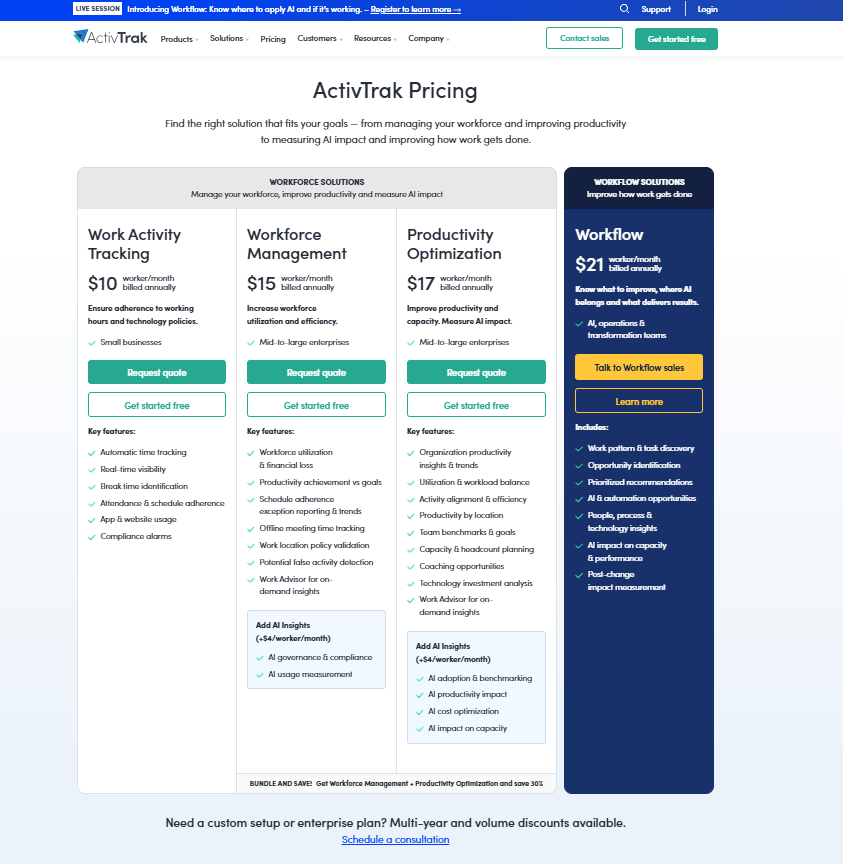
Source: ActivTrak
ActivTrak pricing, captured September 22, 2026
Image alt text: ActivTrak’s official pricing page showing the Free, Work Activity Tracking, Workforce Management, Productivity Optimization, and Workflow plans, captured September 22, 2026.
How much does ActivTrak’s Free plan cost?
Pricing: $0
Best for: Basic activity visibility limited to 3 people
Free plan includes:
- Automatic time tracking
- Activity summary by user & team
- Productivity trends
- Website, application & technology category usage
- User identity management and role-based access controls
- Automatic activity classification and agent updates
- Activity logs for data validation
- Security, privacy & compliance (HIPAA, GDPR, CCPA, SOC 2 Type 2)
After the 14-days trial, the account automatically moves to the Free plan, which supports up to 3 workers with limited functionality.
How much does ActivTrak’s Work Activity Tracking plan cost?
Pricing: $10 per worker per month billed annually
Best for: Small businesses that want to track working hours and ensure tech compliance
Work Activity Tracking includes:
- Automatic time tracking
- Real-time visibility
- Break time identification
- Attendance & schedule adherence
- App & website usage
- Compliance alarms
How much does ActivTrak’s Workforce Management plan cost?
Pricing: $15 per worker per month billed annually
Best for: Mid-to-large enterprises that want to increase workforce utilization and efficiency
Workforce Management includes:
- Workforce utilization & financial loss
- Productivity achievement vs goals
- Schedule adherence exception reporting & trends
- Offline meeting time tracking
- Work location policy validation
- Potential false activity detection
- Work Advisor for on-demand insights
Add AI Insights (+$4/worker/month)
- AI governance & compliance
- AI usage measurement
How much does ActivTrak’s Productivity Optimization plan cost?
Pricing: $17 per worker per month billed annually
Best for: Mid-to-large enterprises that want to improve productivity and capacity
Productivity Optimization includes:
- Organization productivity insights & trends
- Utilization & workload balance
- Activity alignment & efficiency
- Productivity by location
- Team benchmarks & goals
- Capacity & headcount planning
- Coaching opportunities
- Technology investment analysis
- Work Advisor for on-demand insights
Add AI Insights (+$4/worker/month)
- AI adoption & benchmarking
- AI productivity impact
- AI cost optimization
- AI impact on capacity
How much does ActivTrak’s Workflow plan cost?
Pricing: $21 per worker per month billed annually
Best for: AI, operations & transformation teams
Workflow includes:
- Work pattern & task discovery
- Opportunity identification
- Prioritized recommendations
- AI & automation opportunities
- People, process & technology insights
- AI impact on capacity & performance
- Post-change impact measurement
G2 Rating
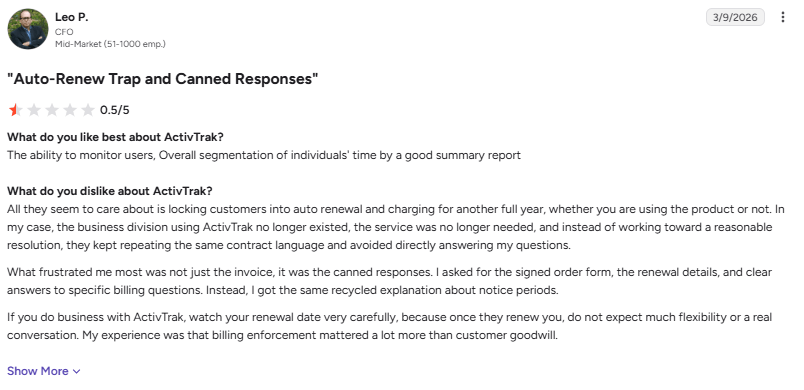
User Rating 0.5/5
Image alt text: G2 review by a CFO criticizing ActivTrak’s auto-renewal policy and billing responses, dated March 9, 2026.
“All they seem to care about is locking customers into auto renewal and charging for another full year, whether you are using the product or not.” (Leo P., CFO, Mid-Market company, G2 review, March 9, 2026)
Curious what the same setup would cost with Flowace?
Book A DemoFlowace Pricing & How We Compare
Flowace is an AI employee productivity platform that helps businesses understand how teams spend their workday. It tracks work activity automatically, so employees do not need to fill out timesheets or enter their work manually.
Flowace does not offer a permanent free plan. You can start with one user on the lowest paid plan. Every plan includes a 7-day free trial with access to all features, and no credit card is required to start the trial.
What results can businesses get with Flowace?
Flowace can help businesses find lost productive time, improve billable hours, and reduce non-billable work.
For example, Knowcraft Analytics is a 350+ employees firm managing more than 30 active client projects. After using Flowace, the company increased billable hours by 12.7% over nine months without adding headcount. It also reduced non-billable time by 24% in one quarter.
This example shows how teams can use Flowace to understand where work time goes and find opportunities to improve productivity and billable work.
Which Flowace plan should you choose?
You can start with the lowest plan for a small team and move to a higher plan as your monitoring, reporting, and productivity needs grow.
The pricing plans below explain what each plan includes, who it is designed for, and how much it costs.
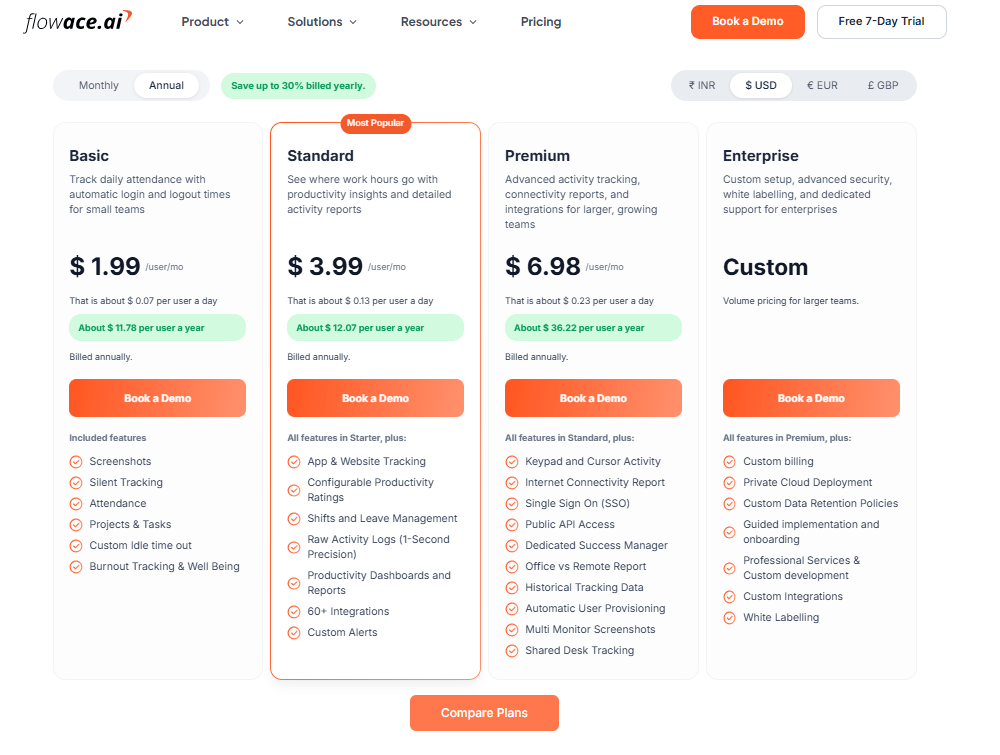
Source: Flowace
Flowace pricing, captured September 22, 2026
Image alt text: Flowace’s official pricing page showing the Basic, Standard, Premium, and Enterprise plans, captured September 22, 2026.
How much does Flowace’s Basic plan cost?
Pricing: $1.99 per user per month billed annually ($2.99 per user per month)
Best for: Small businesses or startups that need fundamental time tracking and attendance automation.
Included features:
- Screenshots
- Silent Tracking
- Attendance
- Projects & Tasks
- Custom Idle time out
- Burnout Tracking & Well Being
How much does Flowace’s Standard plan cost?
Pricing: $3.99 per user per month billed annually ($4.99 per user per month)
Best for: Growing and mid-sized teams that need productivity analysis and usage monitoring.
All features in Basic, plus:
- App & Website Tracking
- Configurable Productivity Ratings
- Shifts and Leave Management
- Raw Activity Logs (1-Second Precision)
- Productivity Dashboards and Reports
- 60+ Integrations
- Custom Alerts
How much does Flowace’s Premium plan cost?
Pricing: $6.98 per user per month billed annually ($10.00 per user per month)
Best for: Larger organizations, agencies serving clients, and teams that need SSO and dedicated support.
All features in Standard, plus:
- Keypad and Cursor Activity
- Single Sign On (SSO)
- Public API Access
- Dedicated Success Manager
- Office vs Remote Report
- Historical Tracking Data
- Automatic User Provisioning
- Multi Monitor Screenshots
- Shared Desk Tracking
How much does Flowace’s Enterprise plan cost?
Pricing: Contact sales for custom pricing.
Best for: Volume pricing for larger teams.
All features in Premium, plus:
- Custom billing
- Private Cloud Deployment
- Custom Data Retention Policies
- Guided implementation and onboarding
- Professional Services & Custom development
- Custom Integrations
- White Labelling
G2 Rating
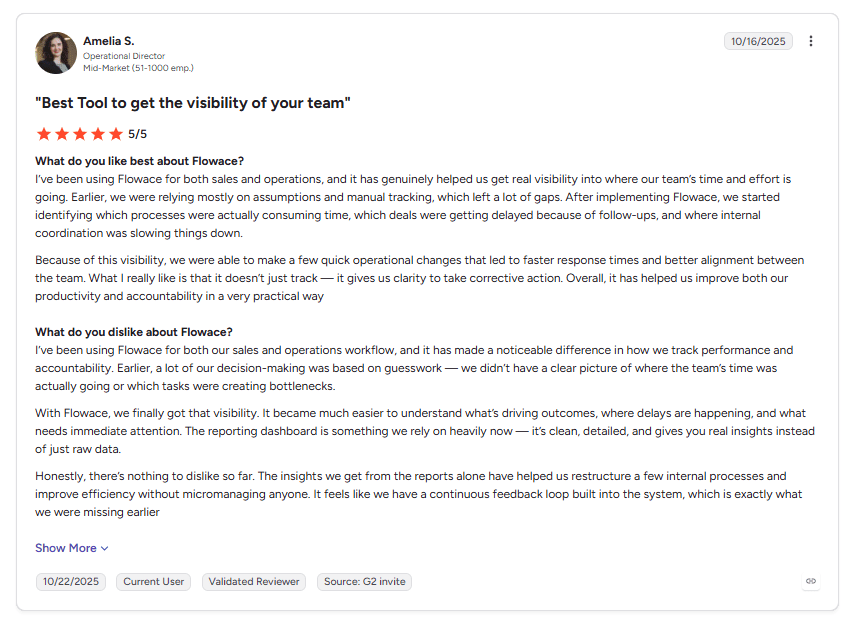
User Rating 5/5
Image alt text: G2 review by an Operational Director praising Flowace’s visibility into team activity and attendance.
“After implementing Flowace, we started identifying which processes were actually consuming time, which deals were getting delayed because of follow-ups, and where internal coordination was slowing things down.” (Amelia S., Operational Director, Mid-Market company, G2 review, October 10, 2025)
Flowace vs ActivTrak Side-by-Side Comparison
| Feature Area | Flowace | ActivTrak |
|---|---|---|
| Time tracking / attendance | Offers automatic / silent time tracking, manual tracking, idle detection, meeting / calendar / call time capture. | Supports time & attendance tracking, shift scheduling, offline time tracking. |
| Productivity & analytics | Includes productivity analytics, reports/dashboards, work mode vs privacy mode, activity logs, idle screens, usage of apps/websites, KPI / resource utilization, AI-driven analytics. | Provides workforce analytics, productivity scoring, trends over time, benchmarking across teams, capacity or labor forecasting, planning. |
| Monitoring & oversight | Can capture screenshots, track apps/websites, track GPS / geofencing / site / transit / meetings. | Offers web usage, screenshots, live monitoring, policy / compliance enforcement, web blocking. |
| Project / task / resource management | Supports project & task tracking, expense / budgeting, timesheets, resource utilization, leave management. | Has schedule adherence tracking, work location policy validation, and configurable work schedules |
| Reporting & dashboards | Provides dashboards, reports, visual analytics, custom fields, real-time dashboards. | Provides custom reports and dashboards, archived logs, analytics over time, exception reports. |
| Integrations & platform | Integrates with various workflow tools; supports desktop, mobile, offline mode. | Offers ActivConnect API access as an add-on, plus compliance alarms and audit tools |
| Strength / positioning | Emphasizes non-intrusive tracking, simplicity, AI insights, hybrid & remote teams, cost-efficient. | Strong emphasis on productivity monitoring, compliance and oversight, benchmarking, managerial controls. |
*Updated on September 22, 2026
Why Choose Flowace Over ActivTrak
1. Automatic Time and Productivity Tracking
Flowace automatically tracks work time across projects, tasks, apps, and websites. It also provides productivity reports, attendance tracking, and activity insights to reduce manual time entry.
2. Flexible Pricing
Flowace offers Basic, Standard, Premium, and Enterprise plans. Annual pricing starts at $1.99 per user/month, with optional add-ons for features such as extra screenshots, SSO, API access, and automated user provisioning.
3. 60+ Integrations
Flowace supports 60+ integrations on its Standard plan, including project management, HR, communication, and business tools.
4. Configurable Monitoring and Privacy Controls
Flowace lets administrators control features such as screenshots, internet usage, and cursor or keypad activity. Privacy Mode can disable screenshots and hide certain app-usage details. Flowace also states that it does not record the actual content of keystrokes.
5. Productivity and Workforce Analytics
Flowace combines productivity scores, activity reports, project tracking, attendance data, and workforce insights in one dashboard.
6. Security and Compliance
Flowace states that its platform is GDPR, HIPAA, ISO 27001, and SOC 2 compliant. It also provides employee data visibility and controls for monitoring features.
How Much Does Flowace Cost Compared With ActivTrak?
Flowace starts at $1.99 per user per month when billed annually. ActivTrak starts with a free plan for up to 3 users, while paid plans start at $10 per worker per month when billed annually.
Flowace includes time tracking, screenshots, attendance tracking, app and website tracking, and productivity reports in its paid plans. It also has no hard user limit.
ActivTrak offers a free plan for up to 3 users. Some features, including screenshots and full URL visibility, require the Screen Details add-on.
Which Pricing Model Fits Your Team?
Flowace may suit teams that want core tracking and workforce features included in one paid plan. ActivTrak may suit smaller teams that can use its free plan or want to choose features through different plans and add-ons.
The right choice depends on your team size, required features, and budget.
Looking for more than pricing? See our ActivTrak alternative article for a detailed comparison of Flowace and ActivTrak.
Want to see how Flowace would work for your team?
Book A DemoFrequently Asked Questions About ActivTrak Pricing
1. Does ActivTrak have a free plan?
Yes. ActivTrak’s Free plan supports up to 3 users and includes basic activity summaries, productivity trends, and 30 days of data history.
2. How much does ActivTrak cost?
ActivTrak has four paid plans. Work Activity Tracking at $10, Workforce Management at $15, Productivity Optimization at $17, and Workflow at $21 per worker per month. All paid plans are billed annually.
3. Does ActivTrak have a minimum number of users?
No. ActivTrak’s pricing page does not list a minimum seat requirement. However, paid support plan (Premier / Signature) required for more than 50 licenses.
4. Does ActivTrak offer monthly billing?
No. ActivTrak offers annual billing only and does not currently offer monthly billing.
5. Does ActivTrak charge extra for add-ons?
Yes. Screen Details, AI Insights, ActivConnect, and extended data history cost extra. AI Insights costs $4 per worker per month, while extended data history costs $1 per worker per month.