What Employees Can Expect From Screen Monitoring Privacy



Screen monitoring privacy explains what employers can see, what data a monitoring tool collects, and when tracking happens. Most screen monitoring software can show app and website activity, active and idle time, and screenshots. This article explains what managers and employees can actually see with Flowace and how its privacy controls work.
What Can Employees and Managers See During Screen Monitoring?
Screen monitoring can show different information depending on the user’s role and the company’s settings. Here is what employees and managers can see in Flowace.
|
Tracked information |
What the employee can see | What the manager can see |
| App and website activity | Their activity history |
Activity history by project and time |
|
Active and idle time |
Their activity by minute | Daily and weekly totals for people or teams |
| Screenshots | Screenshots taken during tracked time |
The same screenshots based on the company’s settings |
|
Keypad and Cursor Activity |
Keyboard and mouse activity frequency | The same activity frequency data |
| Internet connection | Online, offline, or disconnected status |
The same connection status |
|
Camera and microphone |
No camera or microphone data | No camera or microphone data |
| Personal accounts and files | Content they have open during tracked time |
Content that appears in a screenshot or website activity record |
Can Screen Monitoring See Personal Accounts?
Flowace does not directly connect to or read personal email, banking, or social media accounts. However, personal information can appear in monitoring data if it is visible during tracked time.
For example, if you open your personal email while tracking is active, a screenshot taken at that moment can include the email page. A website activity record can also show that the email website was visited.
A screenshot captures what is visible on the screen at that moment, so employees should avoid opening sensitive personal information during tracked work time if their company’s monitoring policy allows screenshots.
What Controls Decide What Managers Can See?
 Source: Flowace Silent Tracking
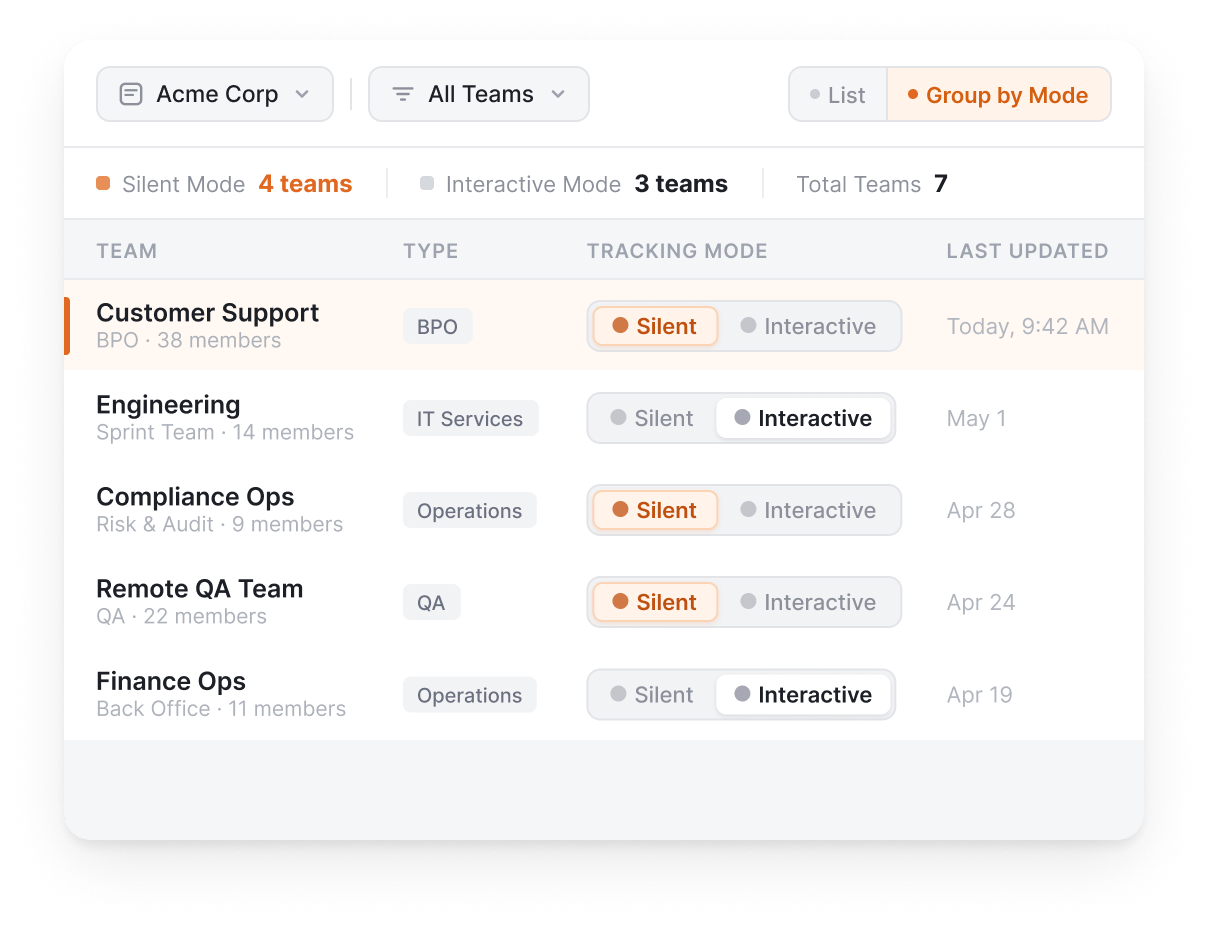
The information a manager can see depends on the monitoring mode and settings chosen by the company. Flowace has three modes i.e. Silent, Interactive, and Privacy.
What Is Silent Mode?
Silent Mode runs in the background without an icon or window for the employee to interact with. It can suit teams that need continuous activity records during configured work periods, such as shift-based or BPO teams.
What Is Interactive Mode?
Interactive Mode gives employees access to their own dashboard and a desktop widget for switching between projects. Employees can review their activity and work data while tracking is active.
What Does Privacy Mode Do?
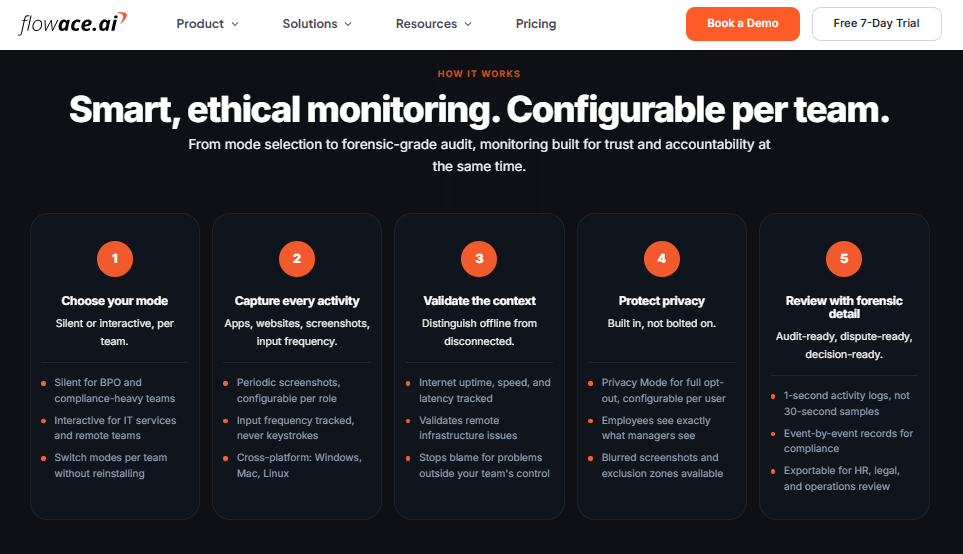
Privacy Mode lets employees pause tracking during personal time, such as a break or personal errand.
When Privacy Mode is active, confirm exactly what data Flowace stops collecting and what managers can see in your company’s settings and policy.
When Does Screen Monitoring Run?
Tracking follows the work session and schedule configured by the company. It can run while an employee is logged in and working within the configured hours or shift.
A closed laptop, time outside the scheduled shift, or a period when Privacy Mode is active may fall outside the tracking period, depending on the company’s settings.
See how Flowace's screen monitoring software configures these modes per team
Explore Screen Monitoring SoftwareWhat Does Flowace Capture During Screen Monitoring?
Employees often want to know whether screen monitoring includes live screen viewing, keystrokes, cameras, or personal files. Here is what Flowace currently captures and what it does not.
Can managers watch your screen live? No. Managers see screenshots taken at configured intervals rather than a continuous live feed.
Can Flowace access your camera or microphone? No. Flowace does not access the camera or microphone.
Does Flowace record keystrokes? No. Flowace does not record keystrokes. Keypad and Cursor Activity measures how often you use the keyboard and mouse. It does not record the keys you press or the text you type.
Can Flowace read personal accounts or files? Flowace does not directly connect to or read personal email, banking, social media, or files. However, personal information can appear in a screenshot or website activity record if it is visible or accessed during tracked work time.
These limits explain what screen monitoring can show in Flowace and where the privacy boundaries sit.
What Should a Fair Employee Monitoring Policy Include?
Source: Flowace
A clear monitoring policy should tell employees what is being tracked, why it is being tracked, and who can access the data. Employees should be able to understand the policy before monitoring begins.
At a minimum, the policy should explain:
- Why monitoring is used is the business purpose behind it.
- What is monitored such as apps, websites, activity, idle time, or screenshots.
- What data is collected including exactly what the monitoring tool records.
- When tracking runs the work hours, shifts, or conditions when monitoring is active.
- Who can access the data which managers, admins, or other roles can view it.
- How long data is kept is the company’s retention period and deletion process.
- How employees can ask questions about who they can contact about monitoring or their data.
What Are the Legal Requirements for Employee Monitoring?
Employee monitoring laws vary by state, the type of monitoring, and the device or account being monitored. Some U.S. states, including New York, Connecticut, and Delaware, have notice requirements for certain forms of employee monitoring.
Companies should check the laws that apply to their employees and monitoring practices and have legal counsel review the policy before rollout. See the full employee monitoring laws by state guide for a state-by-state breakdown.
Use a free downloadable US Employee Monitoring Policy Template built for employer notice requirements.
Employee Monitoring Policy Template Free DownloadDoes Visible Employee Monitoring Build More Trust?
Flowace’s view is that employees are more likely to trust monitoring when they know what is being tracked, when it happens, and who can see the data. This is a product position, not a claim that has been proven by a controlled study.
A 2025 survey of 1,000 U.S. workers by career site Zety found that 62% believed workplace monitoring should be openly communicated. Other surveys on workplace surveillance have also reported concerns about monitoring that employees learn about after the fact. These findings support the value of clear communication, but they do not prove that visible monitoring always creates more trust.
Flowace’s Interactive Mode gives employees access to their own activity data, while Privacy Mode provides a control for pausing tracking. The goal is to give employees more visibility into how monitoring works and what data is being collected.
Leena Lopez, Sr. VP of Strategy and HR at Knowcraft Analytics, described her team’s experience after moving to transparent tracking: “Hours that had been untracked or broadly logged became visible and defensible. We didn’t work more, we measured what we’d been doing.” This is one customer’s experience and should not be treated as proof that visible monitoring produces the same result for every team.
Silent Mode can also have a practical role in settings where a company needs an unattended activity record, such as certain BPO or compliance-driven operations. The right approach depends on the company’s purpose, monitoring policy, and employee communication.
Get a clear look at what employees and managers can see before rolling out monitoring.
Book A DemoFrequently Asked Questions About Screen Monitoring Privacy
1. Can Employees Opt Out of Screen Monitoring at Work?
Flowace has a Privacy Mode that allows tracking to be paused. Confirm with your company how Privacy Mode works, who can use it, and what data is captured while it is enabled.
2. Is Screen Monitoring Legal Everywhere?
Yes, employee monitoring is legal but varies by state, the type of monitoring, and the device or account being monitored. Some U.S. states require employers to give employees notice before certain types of monitoring begin. Check the rules that apply to your state and have your legal team review the monitoring policy before rollout.
3. Can I See My Own Screen Monitoring Data?
In Interactive Mode, employees can access their own activity dashboard. In Silent Mode, access depends on the permissions and settings configured by the company. Ask your administrator if you need access to your monitoring data.
4. Does Flowace Monitor My Phone?
No. Flowace does not have a mobile app that monitors activity on your phone. Its monitoring features run through the supported desktop setup.
5. Can screen monitoring tools access webcams or microphones?
Flowace does not access webcams or microphones. These features are not part of the Flowace monitoring setup, including Silent and Interactive Mode.
6. How does Flowace handle employee data and personal information?
Flowace collects activity data such as app and website usage, screenshots, and keyboard and mouse activity frequency, depending on the company’s settings. Keypad and Cursor Activity measures how often the keyboard and mouse are used. It does not record the keys employees press or the text they type.
Flowace also does not directly connect to personal email, social media, or other personal accounts. Personal information can still appear in a screenshot or website activity record if it is visible during tracked work time.
7. Who can see employee monitoring data?
Access depends on how the company configures its Flowace account. Manager and admin permissions determine who can access monitoring data, so companies should define these permissions clearly in their monitoring policy before tracking begins.