Workforce intelligence platform: What it is, how it works, and what to look for



Most managers already know something is off. The team looks busy but keeps missing deadlines, a project that ran over hours with no clear reason why, a star performer who quietly disengages before anyone notices.
All of this can be explained and the data for it already exists. It’s sitting in your attendance system, your project tracker, your calendar, your timesheets. The issue with this data is that it is spread across tools that never talk to each other.
That’s the problem a workforce intelligence platform solves by connecting what’s already there and turning it into something you can actually act on.
This guide breaks down what workforce intelligence platforms actually do (and what they don’t), how the underlying system works, and what separates a genuine intelligence platform from a relabelled time tracker, so you can evaluate tools against the right criteria, not the wrong ones.
What is a workforce intelligence platform?
Workforce intelligence platform is a tool that connects all the data from your various data and task trackers and makes simple actionable reports for managers on what to do next.
Most organisations already have data about how their teams work. Attendance records, project trackers, timesheets, performance reviews, but all of it is spread across a dozen systems.
A workforce intelligence platform automatically captures how time, focus, and capacity move across an organisation, then surfaces that data as patterns that managers and leadership can act on, without asking employees to change how they work.
The core challenge in workforce intelligence is collecting data without friction. The moment you introduce manual timesheets, check-in rituals, or status updates, you introduce noise. The signal gets contaminated by the behaviour you asked people to perform.
The “intelligence” part is the layer between raw data and a decision: pattern recognition, anomaly detection, trend tracking, capacity modelling. With it, you have a system that shows you where inefficiency lives, which teams are stretched beyond capacity, and where attrition risk is quietly building.
Stop guessing on workload. Start acting on patterns. Try Flowace AI free for 7 days
How does a workforce intelligence platform work?
Progressive Diagram or infographic:
A vertical or horizontal 3-step flow: Data Capture → Pattern Recognition → Role Views.
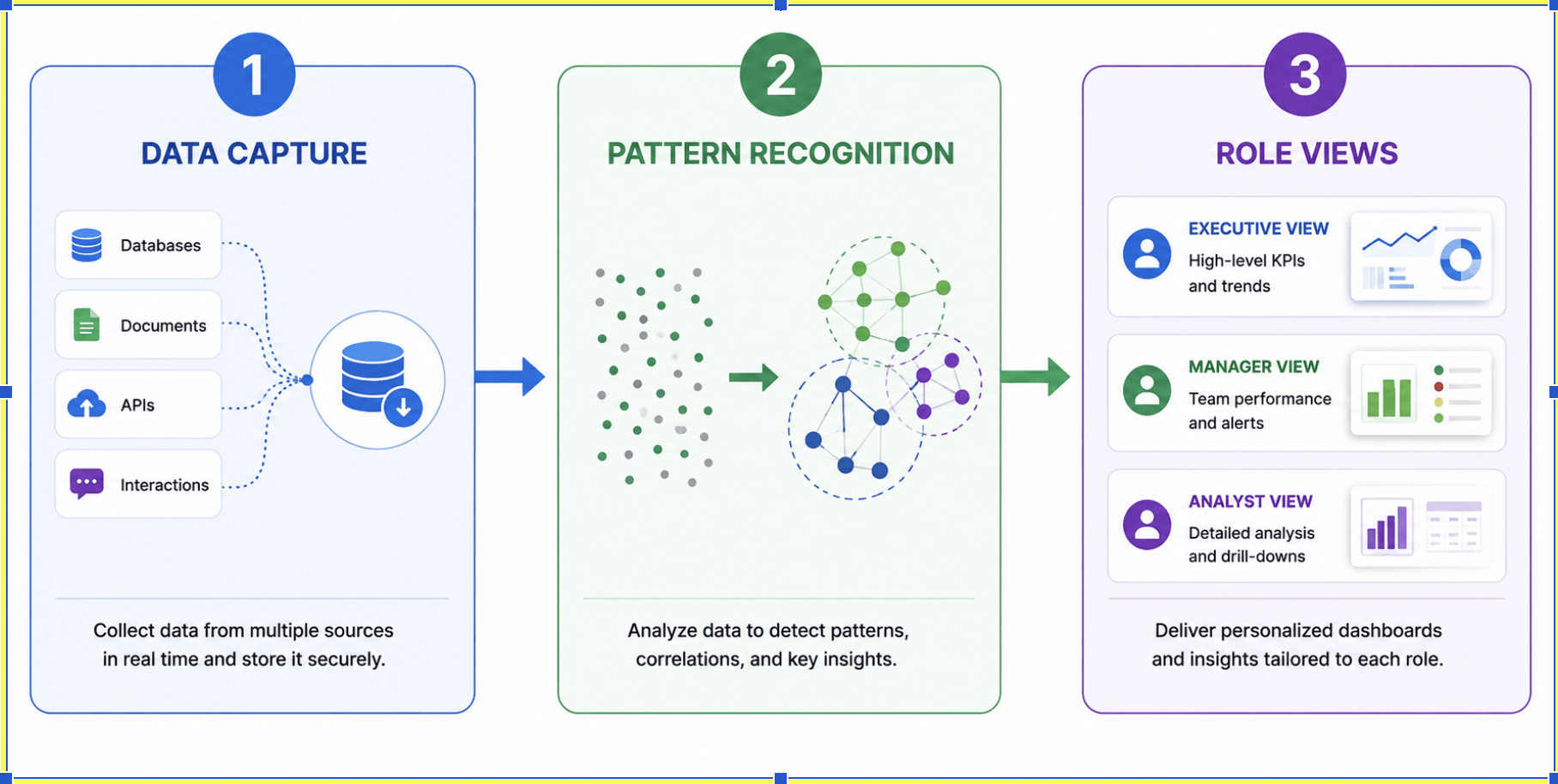
The platform works in three layers. Understanding each one helps you evaluate whether a tool is doing genuine intelligence or just collecting and displaying raw data.
Layer 1: Data collection
The foundation is automatic, continuous data capture across the apps, projects, tasks, and time blocks that make up a workday. This is different from self-reported data.
Modern workforce intelligence platforms capture:
- Application and website usage: which tools employees use, for how long, and at what intensity
- Project and task-level time: how hours break down across work categories, not just in aggregate
- Attendance signals: when work starts and ends, breaks, active vs. idle periods
- Meeting and collaboration activity: time in meetings, chat volume, context-switching frequency
- Offline activity: work that continues when connectivity drops, synced when reconnected
The capture happens in the background. No manual input is required. The data is granular as it is measured in seconds, not minutes. That matters when you are trying to detect patterns rather than produce averages.
One important note: the platform should be configurable. A compliance-sensitive BPO operation has different requirements than a product team. It should have the ability to configure capture settings per role, team, or individual. It should be collected transparently, so employees know what is tracked.
Layer 2: Turning raw data to actionable signals
A log showing that someone spent six hours in their email client on a Tuesday tells you almost nothing without context. Was that normal? Was it a spike? How does it compare to peers in the same role?
The analytical layer turns raw logs into signals through several mechanisms:
Productivity classification: not every app used during work hours counts as productive work. A word processor is productive for a writer, less so for someone in billing. Platforms that let organisations configure productive/unproductive ratings per team or role produce far more accurate data than those with blanket classifications.
Utilisation and capacity modelling: aggregating individual activity into team-level utilisation: who is over-allocated, who has capacity headroom, where workload is unevenly spread.
Anomaly detection: the platform flags deviations from established patterns. A sustained drop in productive hours. A team logging 50% more hours than peers doing equivalent work. Meeting load creeping above the point where focus work collapses. A system that only shows averages makes you find these yourself.
Trend lines over time: point-in-time data is brittle. The intelligence comes from direction: is utilisation improving or getting worse? Is the meeting load trending up? What happened to productivity the week after a policy change? Trend data turns a dashboard from a status snapshot into a diagnostic tool.
Layer 3: Providing role-level visibility
One of the clearest signs of a mature workforce intelligence platform is role-tiered data access. The same data set should produce three different views:
- Leadership and executives: They see organisation-wide totals: utilisation, cost-per-output trends, cross-team capacity, and patterns that affect strategic decisions.
- Managers: They see their team: individual and team utilisation, workload distribution, burnout risk signals, and the data needed for meaningful performance conversations.
- Employees: They see themselves: their own activity data, productivity trends, and how they compare to anonymised benchmarks. When employees can see exactly what their manager sees, the data becomes a shared language instead of a surveillance tool. This is also why transparency is increasingly a procurement requirement. HR and legal teams in regulated industries will ask for it during vendor evaluation.
A platform that shows managers individual-level data without first showing employees their own data has the power dynamic backwards. Platforms that build lasting adoption make the data transparent and bilateral.
Workforce intelligence vs workforce management vs workforce analytics
These three terms appear interchangeably in vendor marketing. They are not the same thing, and the difference affects what you are actually buying.
| Workforce intelligence | Workforce management | Workforce analytics | |
| Primary question | How is work actually happening, and where are the patterns? | Who is scheduled when, and are they compliant? | What does historical workforce data show about performance? |
| Data layer | Real-time, automatic activity capture | Schedule, attendance, leave, compliance | HR systems, performance reviews, historical records |
| Output | Operational signals and capacity models | Schedules, rosters, compliance reports | Reports, dashboards, retrospective analysis |
| Time orientation | Present and near-future | Present and planned future | Past |
| Primary user | Operations, managers, HR, finance | Shift supervisors, HR compliance | HR analytics, FP&A, senior leadership |
| Decision type | Tactical and strategic: workload, capacity, productivity | Operational: scheduling, compliance | Strategic: headcount planning, compensation, talent |
The simplest way to think about it:
- workforce management tells you someone was scheduled and showed up.
- workforce analytics tells you what last quarter looked like.
- workforce intelligence tells you what is happening right now, and flags what you need to act on before it becomes a problem.
Core features to look for in a workforce intelligence platform
This section focuses on the features that separate genuine intelligence platforms from relabelled time trackers.
Automatic time and activity capture
The benchmark is zero manual input.
Look for:
- Automatic attendance triggered by device activity, not a clock-in button
- Background capture of app and website usage at second-level precision
- Offline capture with sync on reconnect for both remote and hybrid teams when they lose connectivity
- Coverage across Windows, Mac, Linux, iOS, and Android
If employees need to do this manually or change their workflow in any way to generate data, quality will degrade over time proportional to how consistently they do it.
Productivity and capacity dashboards
The difference between a useful dashboard and a data dump is specificity.
Good dashboards:
- Show utilisation by individual, team, and department
- Surface capacity gaps: who is over-allocated, who has headroom
- Separate time spent from productive time spent (these are different numbers)
- Allow role-tiered access so each user sees the right level of data
A dashboard that requires manual configuration to surface basic patterns is a reporting tool. The system should do pattern recognition. The manager should just act on it.
Workload and shift tracking
Attendance in a workforce intelligence context goes beyond clock-in and clock-out.
It should capture:
- When productive work actually starts, not just when a machine turns on
- Break patterns and idle detection
- Shift adherence for teams with scheduled hours
- Overtime trends over time
Workload tracking sits at the intersection of attendance and capacity: are certain people or teams consistently carrying more than others? Where are the structural over-allocations hiding?
Billing and project cost visibility
For organisations that bill clients by time like consulting firms, BPOs, legal practices, IT services, the link between tracked time and revenue is direct.
Key capabilities:
- Billable vs. non-billable hour tracking, automatically categorised
- Project and client cost visibility like what does this project actually cost us in hours before we invoice?
- Invoice generation directly from tracked time, removing manual reconciliation
- Margin visibility per client and per project
This feature set is often treated as an add-on by time tracking tools. In a workforce intelligence platform, it should be native.
Alerts and anomaly detection
Monitoring tools generate data. Intelligence platforms generate alerts about data that deviates from expected patterns.
Signals worth surfacing automatically:
- Utilisation spikes: a team consistently working 20% above capacity for three weeks is a retention risk before it becomes an attrition event
- Meeting load creep: when meeting hours rise above the point where focus work collapses, productivity falls; the data shows it before the output does
- Productivity drops: sustained decreases in productive time for an individual or team, against their own baseline, can signal workload mismatch, engagement problems, or management gaps
None of these require the manager to analyse raw data. The platform should surface them automatically, with enough context to act.
Integrations and API access
Workforce intelligence data is most valuable when it connects to the rest of your operational stack.
Core integration categories:
- HRIS platforms (Darwinbox, Keka HR): so workforce data stays in sync with employee records and attendance policies
- Project management tools (Asana, Jira): to connect task data with time data
- Communication platforms (Google Meet, Microsoft Teams): to capture meeting load accurately
- Payroll and billing systems: to close the loop between hours worked and compensation or invoicing
- Public API and SSO: for organisations that need to push data into their own systems or BI tools
For any organisation above a few hundred people, a public API is the difference between the platform being a standalone tool and an actual layer in their operational infrastructure.
Workforce intelligence use cases by team type
The same platform produces different primary values depending on who is using it. Let’s take a look at how workforce intelligence tools work for different types of teams.
BPO and outsourcing operations
Workforce intelligence platform for BPO creates the most immediate, measurable value. BPOs operate under three competing pressures: client SLA commitments, workforce cost control, and reporting transparency. Workforce intelligence platform for BPO addresses all three.
Specific problems it solves:
- Client-level utilisation reporting: which accounts are consuming what share of workforce capacity, and is that aligned with billing rates?
- SLA compliance visibility: are teams consistently hitting the output and quality benchmarks in contracts?
- Agent performance benchmarking: across large operations with hundreds of agents doing similar work, which teams are consistently outperforming peers and what is structurally different about how they work?
- Shift and overtime management: in 24/7 operations, the cost of shift misalignment is significant; workforce intelligence surfaces where scheduled hours and actual productive hours diverge
Clients increasingly expect proof of productivity, not just proof of presence. In a BPO context, screenshot-based activity logs and client-specific reporting are contract requirements.
IT services and remote teams
Remote IT services teams face a version of the capacity problem that is invisible without good tooling. Let’s take a look at what workforce intelligence software can do for these teams.
Key use cases:
- Project cost accuracy: how many hours did this implementation actually take vs. what was estimated?
- Cross-team utilisation: are senior engineers being pulled into work that could be handled at lower seniority?
- Meeting load in distributed teams: async-first teams that gradually drift into meeting-heavy patterns lose the output benefits of being distributed; workforce intelligence makes that drift visible before it becomes the default
HR and people operations
HR teams use workforce intelligence for strategic planning as much as for operational reporting:
- Attrition risk signals: getting to this signal 60–90 days before the resignation is the difference between proactive intervention and an exit interview. In high-attrition industries like BPO and IT services, where replacement cost per employee ranges from 50–200% of annual salary, that window has direct financial value.
- Capacity planning for headcount decisions: when a team is consistently at or above capacity, that is a data-backed case for a hiring request, more credible than a manager’s feeling that the team is stretched
- Hybrid policy effectiveness: are distributed teams achieving the same productive output as in-office equivalents?
- Onboarding ramp benchmarks: how long does it actually take a new hire to reach the productive output of their peers? That data shapes onboarding investment and expectation-setting.
Finance and FP&A
Finance teams interact with workforce intelligence primarily through cost and capacity lenses:
- Labour cost per output: what does it cost in real hours to produce each billable unit of work?
- Billable vs. non-billable hour ratio: for services businesses, this ratio is a direct margin indicator; workforce intelligence makes it visible in real time, not at month-end
- Headcount ROI modelling: when evaluating the financial return of adding headcount, workforce intelligence provides the utilisation and capacity baseline to model the actual output gap being filled
- Project profitability: which projects are running over hours relative to billing? The signal often shows up in workforce data weeks before it surfaces in the P&L.
To tighten budget predictability, finance leaders can connect workforce capacity and utilisation signals with automated methods to forecast cloud costs, improving variance reviews and aligning infrastructure spend with real demand. This automation reduces commitment risk and strengthens your FinOps cadence.
See how Flowace AI can help your team. [Explore how Flowace AI surfaces capacity, utilisation, and workload patterns →]
Benefits of using a workforce intelligence platform
The direct benefits fall into four categories. Each maps to a different stakeholder, which is why buy-in typically needs to come from more than one team.
- Operational visibility that improves decisions: Managers gain a real-time picture of how work flows across the organisation. Capacity gaps, utilisation imbalances, and bottlenecks become visible before they create downstream problems, delayed projects, team burnout, missed SLAs.
- Cost efficiency through better capacity allocation: Organisations consistently find pockets of under-utilised capacity once workforce intelligence surfaces the patterns. Knowledge workers lose an estimated 28% of their workday to interruptions and communication overhead, according to McKinsey Global Institute. Add tool-switching and untracked work, and effective output loss commonly reaches 30–40%. The first step of addressing this is that the platform makes that gap visible and attributable.
- Less administrative overhead: Automatic time capture eliminates manual timesheets, project time logging, and the effort of chasing missing data. Billing teams using workforce intelligence-linked invoicing consistently cut invoice reconciliation time. Time that was administrative work becomes operational capacity.
- Earlier signals on workforce health: Burnout, disengagement, and attrition rarely appear without warning in the data. The warning signs like sustained utilisation spikes, declining productive hours, meeting load growth, show up weeks or months before they appear as turnover or productivity drops. Having those signals early gives managers and HR teams a window to act rather than react.
How AI powers workforce intelligence
AI in workforce management gets applied broadly. It is worth being specific about where AI genuinely changes what a platform can do, and where it is shorthand for pattern-matching that has existed for decades.
Where AI creates real value:
- Automatic classification at scale: Manually labelling thousands of apps as productive or unproductive for different roles is not feasible. AI-powered classification learns from organisational patterns and role definitions to categorise activity accurately at scale.
- Anomaly detection without manual threshold-setting: AI-based anomaly detection builds dynamic baselines per individual, team, and role, then flags deviations automatically, without requiring managers to configure every alert.
- Predictive capacity modelling: By analysing historical utilisation and workload patterns, AI workforce intelligence can project future capacity constraints before they materialise.
- Natural language queries: The latest generation of workforce intelligence platforms lets managers ask questions in plain language, “which team had the lowest productive hours last quarter?” without SQL or analyst support.
Where AI adds less than advertised:
The core of workforce intelligence software is capturing activity, aggregating into patterns, visualising utilisation. This is better understood by software engineers than AI. Platforms that lead with AI positioning for features that are fundamentally rule-based reporting are worth scrutinising.
Ask: what specifically does the AI do that a rules-based system could not? Where does the model learn and update? Can it explain its outputs?
In workforce intelligence for HR and compliance contexts that last question matters a lot. A manager who cannot explain to an employee why the system flagged their performance pattern will quickly lose trust in the system entirely.
How to choose the right workforce intelligence platform
Most organisations evaluate workforce intelligence platforms on the wrong criteria. The differences that matter are in precision, configurability, and how fast you get from deployment to first actionable insight.
Start with a problem statement, not a feature list
- What decision am I currently making badly, or not at all, because I lack good data?
- How many people, teams, and roles will this platform need to cover, and do they work in different ways?
- What does my current HR and operational tech stack look like, and what does this platform need to connect to?
- Who owns this platform internally: HR, operations, or IT? The answer shapes rollout and buy-in requirements.
- What does success look like 90 days after deployment? If you cannot name a specific metric, you are not ready to evaluate.
Must-have vs. nice-to-have features
Must-haves:
- Automatic, zero-friction data capture. If employees need to do anything to generate data, quality will degrade over time. Non-negotiable.
- Granular precision. Second-level activity logging matters for compliance, billing disputes, and genuine pattern analysis.
- Configurable productivity ratings. A blanket definition of “productive” across all roles produces meaningless data. The platform must allow configuration by team, role, or individual.
- Role-tiered visibility. Leadership, managers, and employees should each see the right scope of data.
- Cross-platform coverage. Windows, Mac, Linux, iOS, Android, offline. Gaps in coverage mean gaps in your data.
- Security and compliance certification. ISO 27001 or equivalent is the baseline for any regulated industry. AES-256 encryption at rest, TLS in transit, and role-based access controls are baseline expectations, not differentiators.
Nice-to-haves:
- Native billing and invoicing (critical for BPOs and services firms; less relevant for internal teams)
- Advanced AI-based anomaly detection
- White-labelling (relevant for BPOs presenting data to clients)
- Custom data retention policies (an enterprise procurement requirement; rarely operationally important at mid-market)
What to expect from Flowace AI in the first week
- Zero manual input. Flowace AI captures attendance, app usage, project time, and productivity patterns automatically the moment a device is active.
- 1-second precision activity logs. Audit-ready, tamper-proof logs down to the second. Should be built for billing accuracy and compliance in BPO, legal, and IT services.
- Productivity ratings you define. Set what “productive” means per team or per individual. Your developers’ productive apps are not your finance team’s. Flowace AI reflects your organisation, not a generic benchmark.
- First insight within three days. Customers consistently surface their first significant capacity or productivity signal within 72 hours of deployment. (Based on internal Flowace AI customer survey data)
Your teams generate workforce data every day. Most of it never becomes a decision.
A workforce intelligence platform fixes that:
- Capacity gaps
- Burnout signals
- Billing inefficiencies
- Utilisation imbalances
Start a 7-day free trial with Flowace AI, no credit card required
Frequently Asked Questions on Workforce Intelligence Platform
1. What is the difference between a workforce intelligence platform and a workforce analytics platform?
Workforce analytics platforms focus on retrospective analysis of historical HR and operational data, they report on what happened in past quarters. Workforce intelligence platforms capture real-time activity data and surface it as current operational signals. The key difference is time orientation: analytics answers “what happened?” while intelligence answers “what is happening now, and what should I do about it?”
2. Can a workforce intelligence platform be used transparently with employees?
Yes, and transparency is considered best practice for both ethical and adoption reasons. The most effective deployments configure the platform so employees can see their own data in the same format their manager sees it. This removes the adversarial dynamic associated with monitoring tools and makes workforce data a shared operational language.
3. How long does it take to see value from a workforce intelligence platform?
A well-implemented platform should surface the first meaningful capacity or productivity signal within 72 hours of deployment. Most organisations identify significant operational issues like over-allocated teams, disproportionate non-billable hours, meeting load exceeding productive thresholds all of this within the first two weeks. Longer-term strategic value (attrition prediction, capacity modelling, trend analysis) builds over the first 60–90 days as the platform establishes a sufficient baseline.
4. Is a workforce intelligence platform suitable for BPO operations?
Workforce intelligence platforms are particularly well-suited to BPO operations because they address three core challenges at once: client SLA reporting, workforce cost optimisation, and agent performance benchmarking. Features like billable hour tracking, client-specific reporting, and shift-level utilisation data align closely with BPO operational requirements.
5. What security certifications should a workforce intelligence platform have?
ISO 27001 certification is the baseline standard for enterprise deployments, particularly in industries handling client data. Beyond certification, look for AES-256 encryption at rest, TLS 1.2+ for data in transit, role-based access controls, virtual private cloud hosting, and configurable data retention policies. For regulated industries, verify SSO support and a public API, as both are common enterprise procurement requirements.
Flowace AI holds ISO 27001 certification.
6. How does workforce intelligence differ from employee monitoring?
Employee monitoring focuses on individual behavioural tracking, recording whether specific people are working, capturing proof of presence, and enforcing compliance. Workforce intelligence aggregates activity data at the team and organisation level to surface capacity patterns, utilisation trends, and productivity signals. The lens is different: monitoring answers “is this person working?” while intelligence answers “how is our organisation’s capacity distributed, and where are we losing output?”
7. What are the risks of rolling out a workforce intelligence platform without employee buy-in?
When you deploy the platform as a management tool without telling employees what is being tracked or why, it creates an adversarial dynamic that damages trust and often triggers pushback through HR or legal channels. Best practice is to communicate clearly before rollout: what data is captured, who can see it, and what it will and will not be used for.