Clockify Pricing 2026: Plans, Costs & Features



Clockify has six pricing plans in 2026, including one free plan and five paid plans. Paid plans range from $3.99 to $12.99 per seat per month when billed yearly.
A key pricing update in 2026 is the Clockify Free plan limit, which now supports up to 5 users instead of unlimited users.
This guide explains every Clockify pricing plan, monthly and yearly costs, included features, and which plan fits different team sizes. It also covers Clockify limitations for growing teams and what to consider before choosing a plan.
Clockify Pricing Plans And Costs In 2026
The table below compares every Clockify plan, including yearly and monthly billing prices. All prices are listed per seat, per month. The first price shows yearly billing, and the price in parentheses shows monthly billing.
|
Clockify Plan |
Price Billed Annually (Billed Monthly) | Best For |
Key Features |
|
Free |
$0 | Up to 5 users | Basic time tracking and reports |
| Basic | $3.99 per seat/month ($4.99) | Small teams that need admin tools |
Bulk edit, time audit, billable rates |
|
Standard |
$5.49 per seat/month ($6.99) | Teams that bill clients or track time off | Invoicing, approvals, QuickBooks sync |
| Pro | $7.99 per seat/month ($9.99) | Teams that manage budgets and profit |
Scheduling, budgets, screenshots |
|
Enterprise |
$11.99 per seat/month ($14.99) | Companies that need strict security | SSO, SCIM, audit log |
| Cake.com | Bundle | $12.99 per seat/month ($15.99) | Teams that also want chat and task tools |
Clockify Enterprise plus Pumble and Plaky |
*Last Updated: August 2026
A seat is any active or invited user on your team page. This includes the owner, admins, managers, and members. If you remove someone, you free up that seat.
Flowace Pricing Plans In 2026 Compared To Clockify
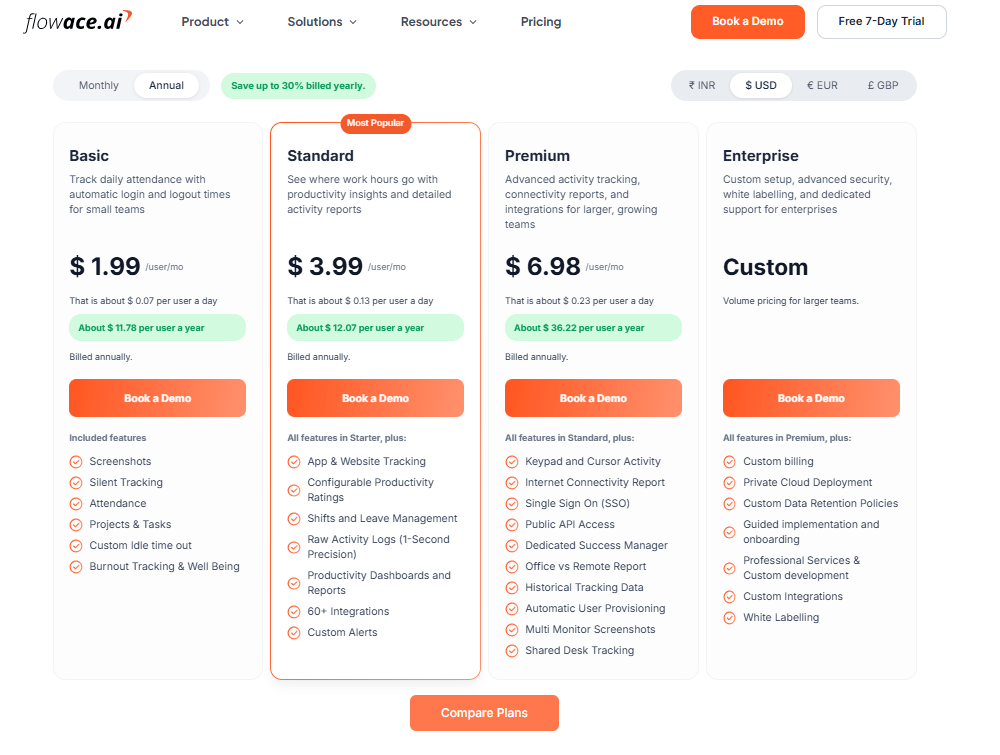
Image Alt Text: Flowace Pricing Plans
Flowace’s tiers start lower per seat than Clockify’s matching tiers in 2026. Flowace pricing includes automated tracking, productivity analytics, and security features across plans. It also offers newer features like an AI chatbot, currently available in BETA with MCP integration planned soon.
|
Flowace Plan |
PlanPrice (Annual, per seat/mo) |
What It Adds |
|
Basic |
$1.99/user/mo |
Screenshots, Silent Tracking, Attendance, Projects & Tasks, Custom Idle time out, Burnout Tracking & Well Being |
|
Standard |
$3.99/user/mo |
(All features in Basic) plus App & Website Tracking, Configurable Productivity Ratings, Shifts and Leave Management, Raw Activity Logs (1-Second Precision), Productivity Dashboards and Reports, 60+ Integrations, Custom Alerts |
|
Premium |
$6.98/user/mo |
(All features in Standard) plus Keypad and Cursor Activity, Internet Connectivity Report, Single Sign On (SSO), Public API Access, Dedicated Success Manager, Office vs Remote Report, Historical Tracking Data, Automatic User Provisioning, Multi Monitor Screenshots, Shared Desk Tracking |
|
Enterprise |
Custom |
(All features in Premium) plus Custom billing, Private Cloud Deployment, Custom Data Retention Policies, Guided implementation and onboarding, Professional Services & Custom development, Custom Integrations, White Labelling |
*Last Updated: August 2026
Figures are public listed ranges from Flowace pricing. Flowace displays regional pricing by default, so confirm the exact seat cost for your country before you buy.
What Does Each Clockify Pricing Plan Include?
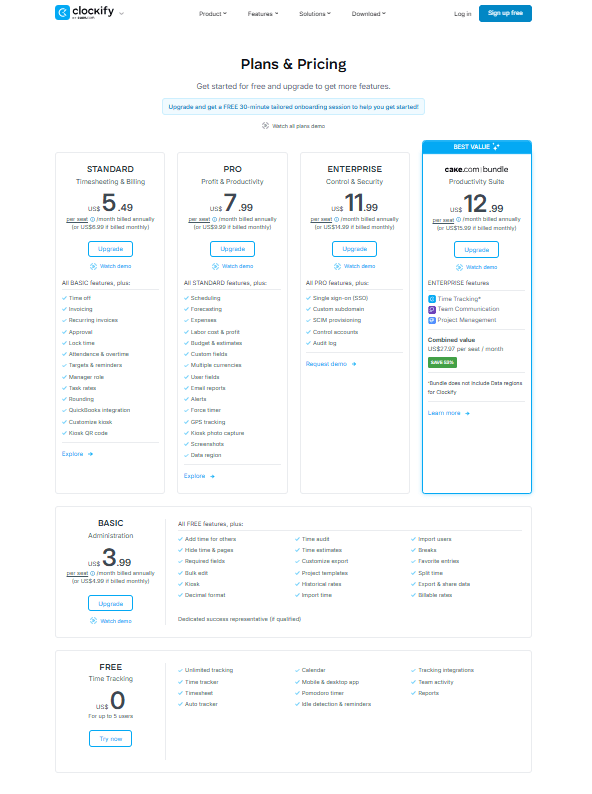
Image Alt Text: Clockify Pricing Plans
Each Clockify pricing plan includes the features from the lower tiers and adds more tools for different team needs. The Free plan covers basic time tracking, while paid plans add advanced features such as reporting, team management, and productivity tools.
Below is a breakdown of what each Clockify pricing plan includes and which teams each plan is best suited for.
What Is Included In Clockify Free Plan?
Clockify’s Free plan supports up to 5 users in 2026, including the account owner and 4 additional members, as mentioned in Clockify’s Help Center. This is a change from previous years when the Free plan allowed unlimited users.
The Free plan includes the core time tracking features most individuals and small teams need:
- Unlimited time tracking
- Timer and manual time entry
- Timesheets and calendar view
- Auto Tracker for app and website activity
- Mobile, desktop, and browser apps
- Pomodoro timer
- Idle detection and reminders
- Basic reports with a 31-day date range limit
- Team activity view
Some features that were previously available on the Free plan now require a paid plan. These include billable rates, bulk edit, time audit, project templates, and CSV or Excel exports. Free users can still export reports as PDF.
If your team tracks billable client work, needs advanced reporting, or manages more than five users, you may need to upgrade to a paid Clockify plan.
How Much Does Clockify Basic Cost?
Clockify Basic costs $3.99 per seat per month when billed annually. The monthly billing price is $4.99.
The Basic plan includes all Free features, plus additional administration and time management tools for small teams.
Clockify Basic features include:
- Add time for others
- Hide time & pages
- Required fields
- Bulk edit
- Kiosk
- Decimal format
- Time audit
- Time estimates
- Customize export
- Project templates
- Historical rates
- Import time
- Import users
- Breaks
- Favorite entries
- Split time
- Export & share data
- Billable rates
Dedicated success representative (if qualified)
How Much Does Clockify Standard Cost?
Clockify Standard costs $5.49 per seat per month when billed annually. The monthly billing price is $6.99.
The Standard plan includes all Basic features, plus additional tools for billing, approvals, and team management.
Key Clockify Standard features include:
- Time off
- Invoicing
- Approval
- Lock time
- Attendance & overtime
- Targets & reminders
- Manager role
- Task rates
- Rounding
- QuickBooks integration
- Customize kiosk
How Much Does Clockify Pro Cost?
Clockify Pro costs $7.99 per seat per month when billed annually. The monthly billing price is $9.99.
The Pro plan includes all Standard features, plus advanced tools for productivity tracking, budgeting, and team management.
Key Clockify Pro features include:
- Scheduling
- Forecasting
- Expenses
- Labor cost & profit
- Budget & estimates
- Custom fields
- Multiple currencies
- User fields
- Email reports
- Alerts
- Force timer
- GPS tracking
- Kiosk photo capture
- Screenshots
- Data region
How Much Does Clockify Enterprise Cost?
Clockify Enterprise costs $11.99 per seat per month when billed annually. The monthly billing price is $14.99.
The Enterprise plan includes all Pro features, plus advanced security and account management tools for larger organizations.
Key Clockify Enterprise features include:
- Single sign-on (SSO)
- Custom subdomain
- SCIM provisioning
- Control accounts
- Audit log
Clockify’s Enterprise plan page confirms SCIM provisioning is included at this tier as of 2026. SCIM lets IT teams sync users from an identity provider like Okta or Azure AD. Users get added and removed automatically.
How Much Does The cake.com | bundle Cost?
The cake.com bundle costs $12.99 per seat per month when billed annually. The monthly billing price is $15.99.
The bundle includes Enterprise-level features from three cake.com products.
The cake.com | bundle includes:
- Clockify Enterprise features for time tracking and productivity management
- Pumble Enterprise features for team communication
- Plaky Enterprise features for project management
The combined price of buying all three products separately is $27.97 per seat per month. The bundle saves teams money when they need time tracking, communication, and project management tools together.
The cake.com | bundle includes features such as:
- Advanced permissions and user roles
- Single sign-on (SSO)
- Custom subdomain
- Increased limits and integrations
- API access
- Mobile and web apps
- 24/7 customer support
Note: The cake.com | bundle does not include Clockify Data Regions.
How Much Do Clockify Kiosk Seats Cost?
Clockify Kiosk seats are designed for employees who clock in and out from a shared device without needing a full user account. Limited seats cost between $0.79 and $2.39 per limited seat/month when billed annually, depending on the plan.
Clockify Kiosk Seat Pricing
|
Plan |
Annual Billing Price |
Monthly Billing Price |
|
Basic |
$0.79 per limited seat/month | $0.99 per limited seat/month |
| Standard | $1.19 per limited seat/month |
$1.49 per limited seat/month |
|
Pro |
$1.59 per limited seat/month | $1.99 per limited seat/month |
| Enterprise | $2.39 per limited seat/month |
$2.99 per limited seat/month |
|
cake.com | bundle |
$2.39 per limited seat/month |
$2.99 per limited seat/month |
Kiosk seats work well for teams that need shared-device time tracking, such as workplaces with on-site employees who clock in from a common location.
Outgrowing basic time tracking? See how Flowace helps teams automate tracking and improve visibility.
Explore All FeaturesIs Clockify’s Free Plan Enough For Your Team?
Clockify’s Free plan supports up to 5 users and includes the core time tracking features small teams need. It works best for teams that only need basic tracking without advanced reporting, billing, or management tools.
As teams grow, they may need features that are available only on paid plans:
No billable rates: You cannot track the value of logged hours by dollar amount without upgrading.
No bulk edit or time audit: Fixing incorrect timesheets can take more manual work.
Limited report history: Free users can view reports for up to 31 days, which can make longer-term reporting harder.
Limited team visibility: Auto Tracker records app and website activity for individual users, but managers do not get a shared view of this activity.
For a small team with simple needs, these limits may not matter. For larger teams, managing timesheets, payroll data, and employee activity can require more manual effort.
What Are Clockify Users Saying About The 2026 Free Plan Changes?
There’s Reddit community discussions where Clockify users reported concerns after the April 2026 Free Plan changes. It is mainly around the removal of features such as billable hours tracking and reports.
Many users on platforms like Reddit and G2 shared that the pricing update affected their existing workflows and expected features. Check below.
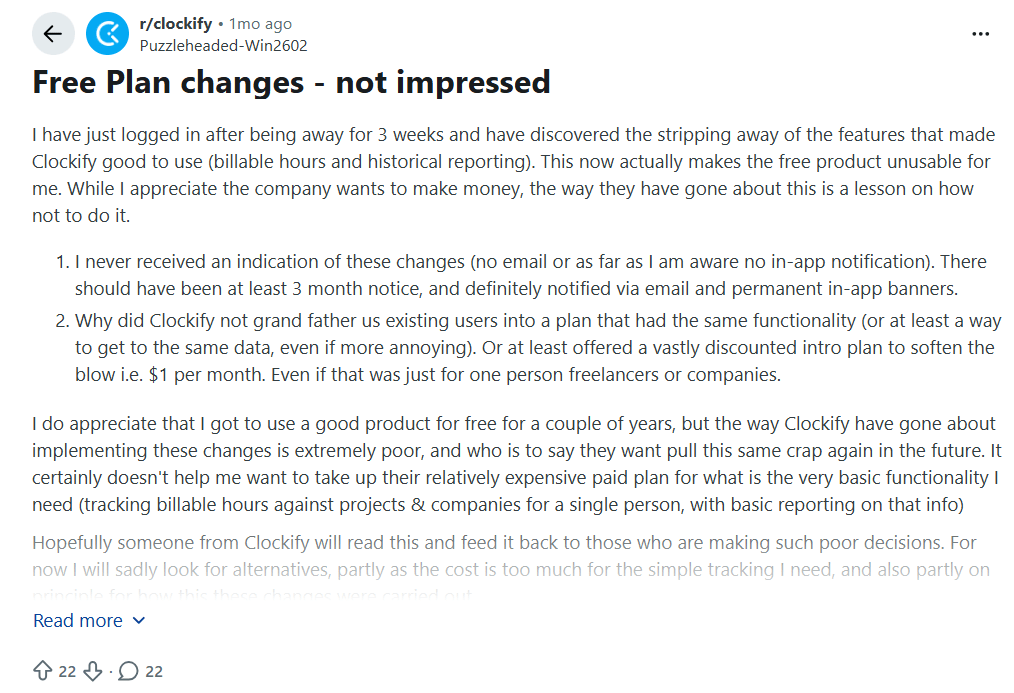
Image alt text: Reddit post by a Clockify user about 2026 Free Plan changes and removed features.
This Clockify user shared their experience with the 2026 Free Plan changes on Reddit. They mentioned that losing access to billable hours and historical reports affected their workflow. The user also raised concerns about not receiving an email or in-app notification before the changes were introduced and suggested offering a discounted plan to help existing users transition.
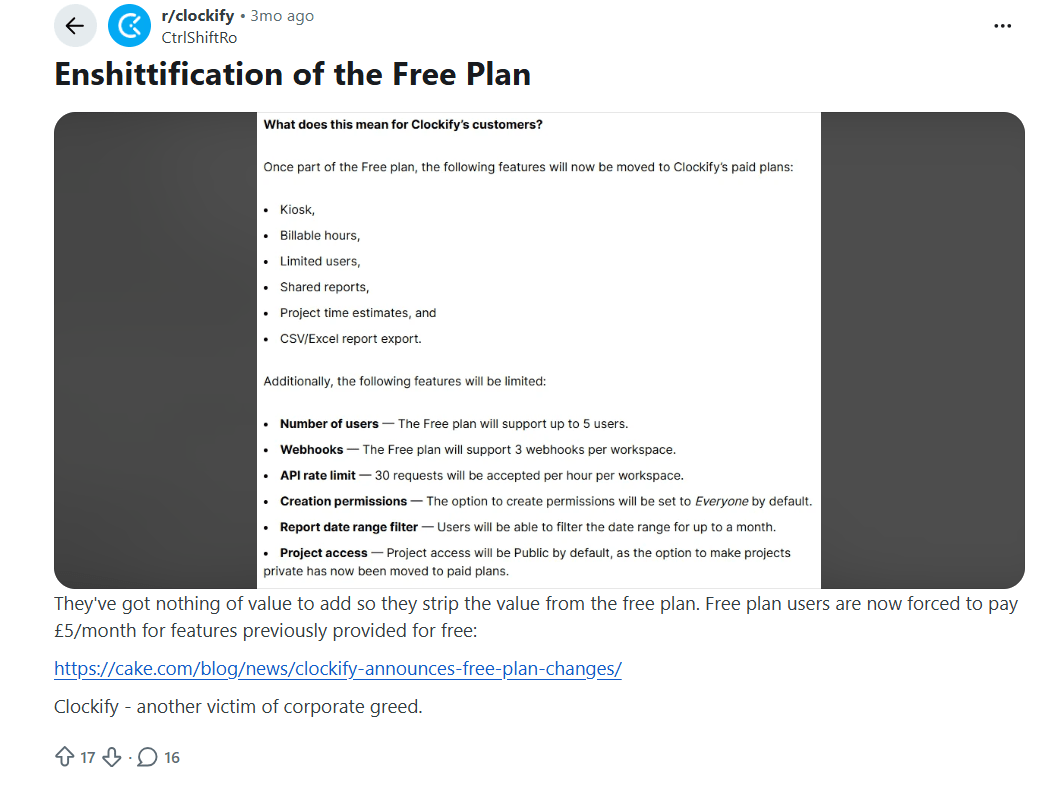
Image alt text: Reddit post by a Clockify user about Free Plan features moved to paid plans.
Similarly, this other user shared concerns about Clockify moving free features like billable hours, kiosk, shared reports, and exports to paid plans, saying these changes affected free plan users.
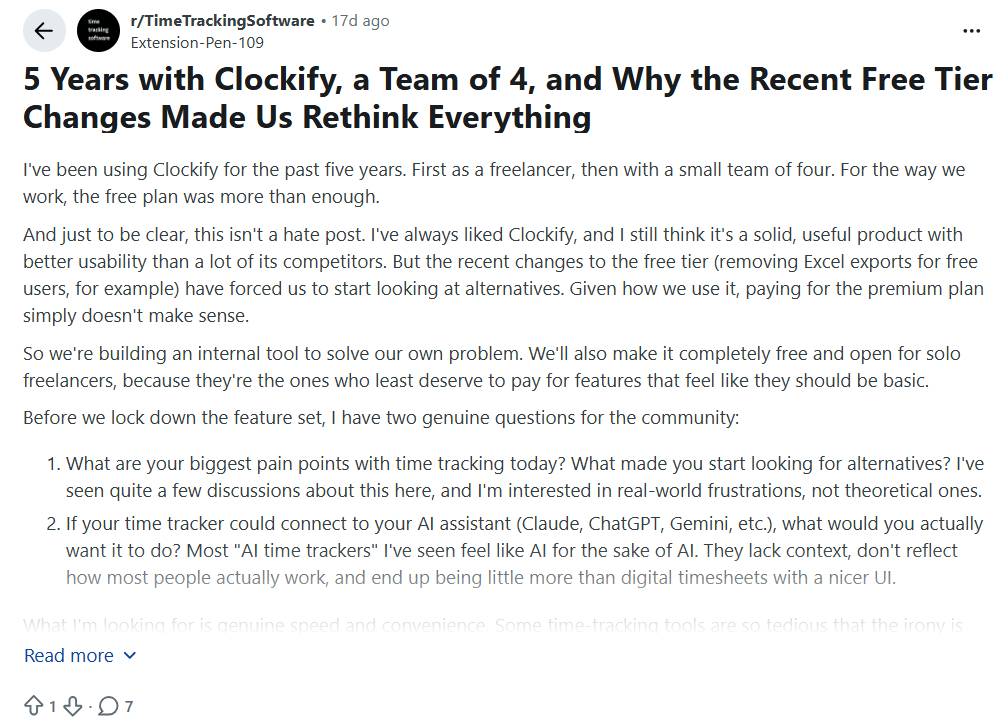
Image alt text: Screenshot of a Reddit post describing how recent free-tier changes prompted the user to look at alternatives.
A Reddit user in r/TimeTrackingSoftware described using Clockify’s free plan for five years with a team of four shared that after five years of using Clockify with a small team, losing free Excel exports made them rethink the tool for the first time.
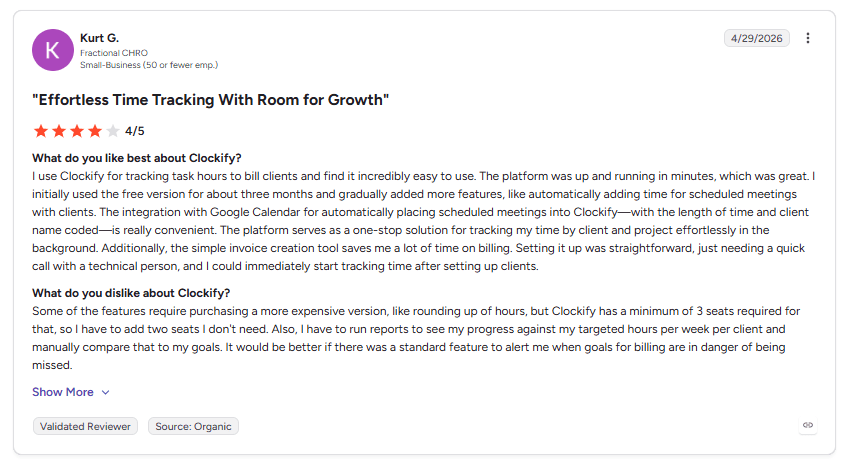
Image alt text: G2 review from a Fractional CHRO about Clockify pricing and features.
This G2 reviewer praised Clockify’s setup and Google Calendar sync but shared concerns about needing a paid plan with extra seats to access hour rounding features.
Across these user reviews, the main concern is the impact of the Free Plan changes. Users continue to value Clockify’s core time tracking features, but many raised concerns about losing previously available features, limited communication around changes, and paying for higher plans to access specific tools.
These reviews show that users look for clear pricing, predictable feature access, and plans that match their team’s needs.
What Are Clockify Enterprise Limitations?
Clockify Enterprise includes advanced security, user management, and reporting features. Even so, there are a few limitations to consider before choosing the plan.
Manual time tracking: Most work hours still depend on employees starting and stopping timers. Auto Tracker records activity, but it does not provide shared productivity insights for managers.
Limited payroll integrations: Clockify connects directly with QuickBooks Online. Other payroll and ERP systems may require CSV exports or third-party integrations.
API limits: Clockify applies API rate limits on paid plans. Teams with large automated workflows may need to account for these limits.
For many businesses, these three limitations are not an issue. Teams with larger operations or higher automation needs may want to compare other time tracking solutions before making a decision.
If you want to dig deeper, our blogs include detailed, side-by-side comparisons of Flowace’s features and pricing against competitors such as TimeCamp vs Clockify, Time Doctor vs Clockify, Clockify vs Hubstaff, Toggl Track vs Clockify, or explore our guide to the best Clockify alternatives.
How Does Clockify Compare To Flowace?
Clockify and Flowace both help teams track work hours, but they take different approaches.
Clockify mainly relies on manual timers and timesheets. Flowace automatically tracks work across apps, websites, and projects, reducing the need for manual time entry.
|
Aspect |
Flowace | Clockify |
| Basic plan (annual billing) | $1.99/user/mo |
$ 3.99/seat/mo |
|
Standard plan (annual billing) |
$3.99/user/mo | $5.49/seat/mo |
| G2 Rating | 4.6/5 (137 reviews) |
4.5/5 (201 reviews) |
|
Time Tracking |
Automatic time tracking across apps, websites, and projects | Manual timers, timesheets, and Auto Tracker |
| Productivity analytics | Included from the Standard plan up |
Limited to Pro and Enterprise reports |
|
Employee monitoring |
Screenshots and silent tracking in Basic plan | Screenshots and GPS tracking on Pro |
| Project management | Built-in task and project management |
Tasks on paid plans |
|
Enterprise options |
Advanced security, custom integrations, and white labelling |
Enterprise plan with SSO, SCIM, and audit logs |
Clockify works well for freelancers and small teams that prefer manual time tracking and a free plan. Flowace is designed for growing teams that want automatic time tracking, employee monitoring, productivity insights, and workforce management software in one platform.
If your team spends time reminding employees to start timers, fixing missing timesheets, or switching between multiple tools, Flowace can help automate tracking and give managers better visibility into work without adding extra manual effort. Plus it also offers newer features like an AI chatbot, currently available in BETA with MCP integration planned soon.
Here’s what one of our users says about the Flowace product and its pricing.
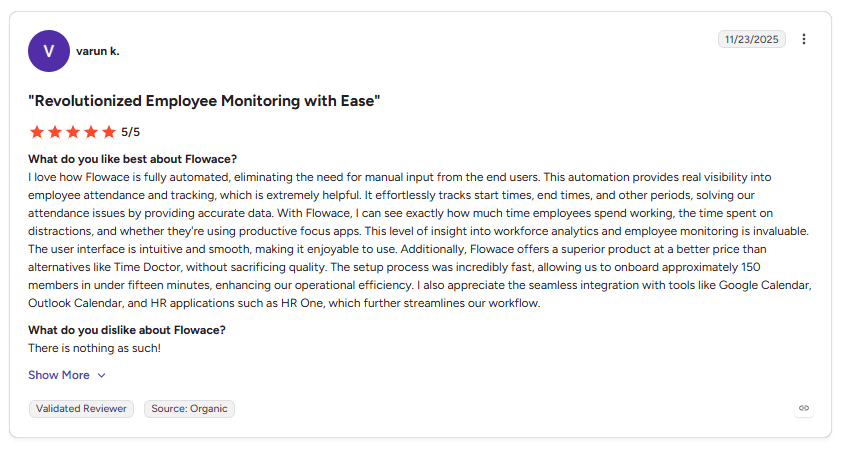 Image alt text: Flowace G2 review
Is Clockify Pricing Worth It In 2026?
Clockify offers good value for freelancers, individuals, and small teams that need manual time tracking at a low cost. The Free plan supports up to 5 users, while the Basic and Standard plans add features like billable rates, invoicing, approvals, and time-off management.
As teams grow, it is worth comparing the total cost with the features you need. Larger teams may want capabilities such as automatic time tracking, productivity insights, employee monitoring, advanced reporting, or workload visibility. Checking which plans include these features can help you choose the right software before committing to annual billing.
If your team only needs simple time tracking and timesheets, Clockify remains a strong option. If you want to reduce manual time entry and gain more visibility into how work gets done, compare Clockify with platforms like Flowace before making a final decision.
Before you choose a plan, ask these questions:
- How many users will you need over the next year?
- Do you need automatic or manual time tracking?
- Which reporting and billing features are essential?
- Will your team benefit from employee monitoring or productivity insights?
- What is your total annual cost as your team grows?
- Answering these questions will help you choose the plan that best fits your team and budget.
Ready to move beyond manual time tracking? Try Flowace free for 7 days.
Start A Free TrialFrequently Asked Questions About Clockify Pricing
1. Is Clockify actually free?
Yes. Clockify has a free plan for up to 5 users. It includes time tracking, timesheets, basic reports, and mobile, desktop, and browser apps.
2. How many users can I add to Clockify’s free plan?
Clockify’s Free plan supports up to 5 users total. This includes the account owner plus up to 4 invited users.
3. Does Clockify charge per user?
Yes. Every paid Clockify plan charges per seat, not a flat team price. A seat is any active or invited user on your team page, including the owner, admins, managers, and members. Add a person and you add a seat. Remove a person and you free up that seat for someone else.
4. What is the cheapest Clockify paid plan?
Clockify Basic is the cheapest paid plan. It costs $3.99 per seat per month when billed annually or $4.99 per seat per month when billed monthly. Basic adds features like billable rates, bulk edit, time audit, project templates, and import and export tools.
5. What is included in Clockify Enterprise?
Clockify Enterprise includes Pro features plus advanced security and admin controls. It adds single sign-on (SSO), a custom subdomain, SCIM user provisioning, account controls, and audit logs. Enterprise costs $11.99 per seat per month when billed annually or $14.99 per seat per month when billed monthly.
6. What is the cake.com | bundle price?
The cake.com | bundle costs $12.99 per seat a month, billed yearly, or $15.99 billed monthly. It includes Clockify Enterprise plus Pumble, a team chat app, and Plaky, a project management tool. Bought separately, the three tools cost $27.97 per seat a month, so the bundle saves about 53%.
7. Does Clockify’s free plan include billable rates?
No. Billable rates are available on paid plans. Clockify Free allows teams to track hours, but it does not show the monetary value of those hours.
8. Is there a better alternative to Clockify for automatic time tracking?
Flowace is one of the best alternatives to Clockify for automatic time tracking. It automatically tracks work activity, records time without manual timers, and provides productivity insights for teams that want better visibility into daily work.